
HelloSilverlight
一:输入姓名并选中一个日期,将在下面显示
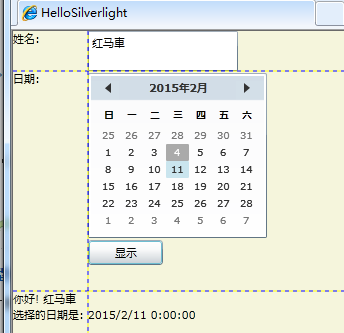
二:XAML代码
<UserControl x:Class="HelloSilverlight.MainPage"

    xmlns="http://schemas.microsoft.com/winfx/2006/xaml/presentation"

    xmlns:x="http://schemas.microsoft.com/winfx/2006/xaml"

    xmlns:d="http://schemas.microsoft.com/expression/blend/2008"

    xmlns:mc="http://schemas.openxmlformats.org/markup-compatibility/2006"

    mc:Ignorable="d"

    d:DesignHeight="" d:DesignWidth="" xmlns:sdk="http://schemas.microsoft.com/winfx/2006/xaml/presentation/sdk">

    <Grid x:Name="LayoutRoot" Background="Beige" ShowGridLines="True">

        <Grid.RowDefinitions>

            <RowDefinition Height=""/>

            <RowDefinition Height=""/>

            <RowDefinition Height=""/>

        </Grid.RowDefinitions>

        <Grid.ColumnDefinitions>

            <ColumnDefinition Width="" />

            <ColumnDefinition Width=""/>

        </Grid.ColumnDefinitions>

        <TextBlock  Text="姓名:" Grid.Row="" Grid.Column=""></TextBlock>

        <TextBlock  Text="日期:" Grid.Row="" Grid.Column=""></TextBlock>

        <TextBlock x:Name="message1" Text="消息:" Grid.Row="" Grid.Column=""

            Grid.ColumnSpan=""></TextBlock>

        <TextBox x:Name="name1" Text="你的名字" Grid.Row="" Grid.Column=""

            Width="" HorizontalAlignment="Left"></TextBox>

        <StackPanel Grid.Column="" Grid.Row="" Orientation="Vertical">

            <sdk:Calendar x:Name="cal1" SelectionMode="SingleDate" HorizontalAlignment="Left"></sdk:Calendar>

            <Button Click="Button_Click" x:Name="OKbutton" Width="" Height=""

                HorizontalAlignment="Left" Content="显示"></Button>

        </StackPanel>

    </Grid>

</UserControl>
后台代码:
using System;

using System.Collections.Generic;

using System.Linq;

using System.Net;

using System.Windows;

using System.Windows.Controls;

using System.Windows.Documents;

using System.Windows.Input;

using System.Windows.Media;

using System.Windows.Media.Animation;

using System.Windows.Shapes;

namespace HelloSilverlight

{

    public partial class MainPage : UserControl

    {

        public MainPage()

        {

            InitializeComponent();

        }

        #region 显示事件

        private void Button_Click(object sender, RoutedEventArgs e)

        {

            string dateString;

            if (cal1.SelectedDate == null)

            {

                dateString = "请选择一个日期!";

            }

            else

            {

                dateString = cal1.SelectedDate.ToString();

            }

            message1.Text = "你好! " + name1.Text + "\n" +

                "选择的日期是: " + dateString;

        }

        #endregion

    }

}
HelloSilverlight的更多相关文章
随机推荐
- Android进阶笔记01:Android 网络请求库的比较及实战(一)
在实际开发中,有的时候需要频繁的网络请求,而网络请求的方式很多,最常见的也就那么几个.本篇文章对常见的网络请求库进行一个总结. 一.使用HttpUrlConnection: 1. HttpUrlCon ...
- android核心服务初探
终于进入android学习的进阶阶段,第一个课题是android的核心服务.首先,让我们来认识一下核心服务. android核心服务与app服务有所区别.app服务继承自Service基类,在app运 ...
- codevs 1515 跳
/* 画矩阵找规律发现是杨辉三角 Cg (i,j)= C (i+j,i); 贪心走的话 沿着0行(列)一直走然后拐直角 拐弯后每个格子都累加 Cg (n,0) + Cg (n,1) + Cg (n,2 ...
- JavaScript自动关闭窗口
<!DOCTYPE html PUBLIC "-//W3C//DTD XHTML 1.0 Transitional//EN" "http://www.w3.org/ ...
- 加载MSCOMCTL.OCX错误处理的几个关键
一.工程文件说明,两个版本Object={831FDD16-0C5C-11D2-A9FC-0000F8754DA1}#2.0#0; MSCOMCTL.OCXObject={831FDD16-0C5C- ...
- 图片标签的alt与title区别
一.img标签alt属性 1.alt属性是考虑到不支持图像显示或者图像显示被关闭的浏览器的用户,以及视觉障碍的用户和使用屏幕阅读器的用户.当图片不显示的时候,图片的替换文字. 2.alt属性值得长度必 ...
- phonegap 2.8.1 toast
目录结构如下: 以上三个用红色框勾出的地方是需要修改的文件夹. 首先:添加java代码. 在src目录下新建一个包裹:org.apache.cordova 在该包裹下新建类:ToastPlugin.j ...
- 【USACO 2.1.1】城堡
[题目描述] 我们憨厚的USACO主人公农夫约翰(Farmer John)以无法想象的运气,在他生日那天收到了一份特别的礼物:一张“幸运爱尔兰”(一种彩票).结果这张彩票让他获得了这次比赛唯一的奖品— ...
- 对于HttpContext.Current的一点理解
string[] userInfomationSplits = HttpContext.Current.User.Identity.Name.Split(new string[] { "\\ ...
- 百度分享share.js插件
//百度分享window._bd_share_config = { common : { bdText : '分享标题', bdDesc : '分享描述', bdUrl : '分享链接', bdPic ...