
文件上传利器SWFUpload使用指南
这里就不再介绍什么是SWFUpload啦,简单为大家写一个简单关于SWFUpload的Demo。
1.把SWFUpload 相关的文件引用进来
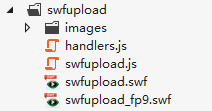
2.创建upload.aspx页面(页面名称可自定义),
-前台页面代码如下:
<!DOCTYPE html>

<html>

<head id="Head1" runat="server">

    <title>SWFUpload Application Demo (ASP.Net 2.0)</title>

    <link href="../assets/lib/ckeditor/plugins/codesnippet/lib/highlight/styles/default.css" rel="stylesheet" />

    <script src="../assets/lib/swfupload/swfupload.js"></script>

    <script src="../assets/lib/swfupload/handlers.js"></script>

    <script type="text/javascript">

        var swfu;

        window.onload = function () {

            swfu = new SWFUpload({

                // Backend Settings

                //上传请求处理地址

                upload_url: "upload.aspx",

                //POST提交同时伴随上传的键值对

                post_params: {

                    <%--"ASPSESSID": "<%=Session.SessionID %>"--%>

                },

                // File Upload Settings

                //最大文件限制

                file_size_limit: "2 MB",

                //上传的文件类型

                file_types: "*.jpg",

                //点击弹出浏览窗口的文件默认类型

                file_types_description: "JPG Images",

                file_upload_limit: ,    // Zero means unlimited

                // Event Handler Settings - these functions as defined in Handlers.js

                //  The handlers are not part of SWFUpload but are part of my website and control how

                //  my website reacts to the SWFUpload events.

                swfupload_preload_handler: preLoad,

                swfupload_load_failed_handler: loadFailed,

                file_queue_error_handler: fileQueueError,

                file_dialog_complete_handler: fileDialogComplete,

                upload_progress_handler: uploadProgress,

                upload_error_handler: uploadError,

                upload_success_handler: function (file, serverData) {document.getElementById("img").src=serverData},

                upload_complete_handler: uploadComplete,

                // Button settings

                button_image_url: "../assets/lib/swfupload/images/XPButtonNoText_160x22.png",

                button_placeholder_id: "spanButtonPlaceholder",

                button_width: ,

                button_height: ,

                button_text: '<span class="button">选择图片 <span class="buttonSmall">(2 MB Max)</span></span>',

                button_text_style: '.button { font-family: Helvetica, Arial, sans-serif; font-size: 14pt; } .buttonSmall { font-size: 10pt; }',

                button_text_top_padding: ,

                button_text_left_padding: ,

                // Flash Settings

                flash_url: "../assets/lib/swfupload/swfupload.swf",    // Relative to this file

                flash9_url: "../assets/lib/swfupload/swfupload_FP9.swf",    // Relative to this file

                custom_settings: {

                    upload_target: "divFileProgressContainer"

                },

                // Debug Settings

                debug: false

            });

        }

    </script>

</head>

<body>

    <form id="form1" runat="server">

    <div id="content">

        <div id="swfu_container" style="margin: 0px 10px;">

            <div>

                <span id="spanButtonPlaceholder"></span>

            </div>

            <div id="divFileProgressContainer" style="height: 75px;"></div>

            <div id="thumbnails">

                <img id="img" src="#" alt="" />

            </div>

        </div>

        </div>

    </form>

</body>

</html>
-后台页面代码如下:
 public partial class upload : System.Web.UI.Page

     {

         protected void Page_Load(object sender, EventArgs e)

         {

             if (Request.IsPostBack())

             {

                 //

                 foreach (string key in Request.Files)

                 {

                     Request.Files[key].SaveAs(Server.MapPath("~/uploads/" + Request.Files[key].FileName));

                     Response.Write("/uploads/" + Request.Files[key].FileName);

                 }

                 Response.End();

             }

         }

     }
注:里面的一些使用方式已经为大家附上注释,自己可以简单看下。
文件上传利器SWFUpload使用指南的更多相关文章
- 文件上传利器SWFUpload使用指南(转)
http://www.cnblogs.com/2050/archive/2012/08/29/2662932.html 文件上传利器SWFUpload使用指南 SWFUpload是一个flash和js ...
- [Plugin] 文件上传利器SWFUpload使用指南
SWFUpload是 一个flash和js相结合而成的文件上传插件,其功能非常强大.以前在项目中用过几次,但它的配置参数太多了,用过后就忘记怎么用了,到以后要用时又得 到官网上看它的文档,真是太烦了. ...
- 文件上传利器SWFUpload入门简易教程
凡做过网站开发的都应该知道表单file的确鸡肋. Ajax解决了不刷新页面提交表单,但是却没有解决文件上传不刷新页面,当然也有其它技术让不刷新页面而提交文件,该技术主要是利用隐藏的iFrame, 较A ...
- 文件上传工具swfupload[转]
转至:http://zhangqgc.iteye.com/blog/906419 文件上传工具swfupload 示例: 1.JavaScript设置SWFUpload部分(与官方例子类似): var ...
- 文件上传:swfupload.js、blueimp-file-upload
一.swfupload 1.下载swfupload http://code.google.com/p/swfupload/ 2. 3.API http://www.cnblogs.com/henw/ ...
- 文件上传利器JQuery上传插件Uploadify
在做日常项目中,经常在后台需要上传图片等资源文件,之前使用过几次这个组件,感觉非常好用 ,但是每次使用的时候都是需要经过一番查阅,所以还不如记住在这里,以后使用的时候就翻翻. 他的官方网站如下:htt ...
- [转]腾讯云Linux云服务器文件上传利器——WinSCP
本文转自:http://bbs.qcloud.com/thread-4379-1-1.html WinSCP简介 WinSCP是一个Windows环境下使用SSH的开源图形化SFTP客户端.同时支持S ...
- 多图片/文件上传 - SwfUpload/PlUpload
<文件上传利器SWFUpload使用指南> <前端上传组件Plupload使用指南>
- 前端上传组件Plupload使用指南
我之前写过一篇文章<文件上传利器SWFUpload使用指南>,里面介绍了上传组件SWFUpload的使用方法,但现在随着html5技术的逐渐推广和普及,再去使用以flash为上传手段的SW ...
随机推荐
- 牛刀小试、用SharePoint 实现请假管理功能
转:http://www.cr173.com/html/15518_1.html "请假管理"应用,应该算是 SharePoint 的"Hello World!" ...
- ASP.NET中验证控件的使用
转自:http://www.cnblogs.com/yangmingming/archive/2010/03/09/1682006.html 前言: 前几日,无奈用JS判断控件的有效性,发现的确是一件 ...
- Windows 8/8.1系统下硬盘占用率100%的问题解决思路汇总
家庭组 2.关闭虚拟内存 3.关闭Windows 8快速开机功能 4.服务进程superfetch 5.系统下软件排除 操作步骤: 1.Windows 8系统的家庭组方便多人不用存储设备就能在局域网中 ...
- Red and Black
Red and Black Time Limit: 2000/1000 MS (Java/Others) Memory Limit: 65536/32768 K (Java/Others)Tot ...
- 多用pip,少用easy_install。
在此之前装python包,用过easy_install,也用过pip,但都是照猫画虎,在网上找命令完了装上就完事.现在稍微整理一下. easy_install: python开发有一个工具,setup ...
- UART(串口)
(1)串行通信线路三种工作方式:单工通信.半双工通信.全双工通信 单工:单工就是指A只能发信号,而B只能接收信号,通信是单向的. 半双工:半双工就是指A能发信号给B,B也能发信号给A,但这两个过程不能 ...
- Mac下快捷键列表
主界面 command + tab 切换程序 command + ` 在程序内切换界面 command + w 关闭界面 command + q 关闭程序 command + option + esc ...
- iPhone 6出现后,如何将一份设计稿支持多个尺寸?
http://mp.weixin.qq.com/s?__biz=MzA4NTQzNTMwOA==&mid=201174413&idx=3&sn=c3fe5b3459bac288 ...
- 浙大PTA - - 堆中的路径
题目链接:https://pta.patest.cn/pta/test/1342/exam/4/question/21731 本题即考察最小堆的基本操作: #include "iostrea ...
- OGG问题 ORA-01403的处理办法
认识logdump分析工具及常用命令:http://book.51cto.com/art/201202/319253.htm http://www.killdb.com/2012/09/01/gold ...