
mysql5.7二进制包进行多实例安装
一、需求
在一台服务器上安装mysql5.7,并且部署两个实例:3306用于本机主库,3307用于其他MYSQL服务器的从库
二、下载mysql二进制包
[root@push-- src]# mkdir /usr/local/src/mysql-5.7.-linux-glibc2.

[root@push-- src]# cd /usr/local/src/mysql-5.7.-linux-glibc2.

[root@push-- mysql-5.7.-linux-glibc2.]# wget https://dev.mysql.com/get/Downloads/MySQL-5.7/mysql-5.7.26-linux-glibc2.12-x86_64.tar.gz
三、解压、添加环境变量
[root@push-- mysql-5.7.-linux-glibc2.]# tar -zxvf mysql-5.7.-linux-glibc2.-x86_64.tar.gz

mv mysql-5.7.-linux-glibc2.-x86_64 /usr/local/mysql-5.7.26
[root@push-5-222 /]# vim /etc/profile
PATH=$PATH:/usr/local/mysql-5.7.26/bin
root@push-5-222 /]# source /etc/profile
四、配置3306和3307各自对应的目录
数据目录: /home/mysql-5.7.26/data/3306 /home/mysql-5.7.26/data/330X
日志目录:/home/mysql-5.7.26/log/3306 /home/mysql-5.7.26/log/330X
socket:/var/lib/mysql/330X/mysql.sock
pid-file:/var/run/mysqld/330X/mysqld.pid
log-error:/home/mysql-5.7.26/log/330X/mysqld.log
[root@push-- home]# mkdir -p /home/mysql-5.7./data/

[root@push-- mysql-5.7.]# mkdir -p /home/mysql-5.7./data/

[root@push-- mysql-5.7.]# mkdir -p /var/lib/mysql/

[root@push-- mysql-5.7.]# mkdir -p /var/lib/mysql/

[root@push-- mysql-5.7.]# mkdir -p /var/run/mysqld/

[root@push-- mysql-5.7.]# mkdir -p /var/run/mysqld/

[root@push-- mysql-5.7.]# mkdir -p /home/mysql-5.7./log/

[root@push-- mysql-5.7.]# mkdir -p /home/mysql-5.7./log/
五、将对应的目录授权给mysql用户
[root@push-- mysql-5.7.]# chown -R mysql:mysql /home/mysql-5.7./

[root@push-- /]# chown -R mysql:mysql /var/lib/mysql

[root@push-- /]# chown -R mysql:mysql /var/run/mysqld
六、编辑my-330x配置文件
[root@push-- /]# mkdir /etc/mysql

[root@push-- /]# chown -R mysql:mysql /etc/mysql/

[root@push-- /]# vim /etc/mysql/my-.cnf

[mysqld]

#innodb_buffer_pool_size = 128M

# join_buffer_size = 128M

# sort_buffer_size = 2M

# read_rnd_buffer_size = 2M

user=mysql

port=

datadir=/home/mysql-5.7./data/

socket=/var/lib/mysql//mysql.sock

server_id=

#log-bin=master-

#binlog_format=row

#skip-grant-tables

symbolic-links=

pid-file=/var/run/mysqld//mysqld.pid

log-error=/home/mysql-5.7./log//mysqld.log

[mysqld_safe]

log-error=/home/mysql-5.7./log//mysqld.log
[root@push-- /]# vim /etc/mysql/my-.cnf

[mysqld]

# innodb_buffer_pool_size = 128M

# join_buffer_size = 128M

# sort_buffer_size = 2M

# read_rnd_buffer_size = 2M

user=mysql

port=

datadir=/home/mysql-5.7./data/

socket=/var/lib/mysql//mysql.sock

server_id=

symbolic-links=

pid-file=/var/run/mysqld//mysqld.pid

log-error=/home/mysql-5.7./log//mysqld.log

[mysqld_safe]

log-error=/home/mysql-5.7./log//mysqld.log
七、初始化3306和3307数据库
[root@push-- /]# mysqld --defaults-file=/etc/mysql/my-.cnf --initialize --basedir=/usr/local/mysql-5.7./ --datadir=/home/mysql-5.7./data/

[root@push-- /]#
没有报错,查看数据目录是否有系统数据文件
[root@push-- /]# ll /home/mysql-5.7./data/

总用量

-rw-r-----  mysql mysql        5月   : auto.cnf

-rw-r-----  mysql mysql       5月   : ib_buffer_pool

-rw-r-----  mysql mysql  5月   : ibdata1

-rw-r-----  mysql mysql  5月   : ib_logfile0

-rw-r-----  mysql mysql  5月   : ib_logfile1

drwxr-x---  mysql mysql      5月   : mysql

drwxr-x---  mysql mysql      5月   : performance_schema

drwxr-x---  mysql mysql      5月   : sys
再查看日志文件查找生成的随机root密码,用于第一次登陆数据库使用
[root@push-- /]# cat /home/mysql-5.7./log//mysqld.log |grep password

--27T00::.406309Z  [Note] A temporary password is generated for root@localhost: -QOhO4-KccHl
此时,数据库初始化完成了,3307也是同样的操作
[root@push-- /]# mysqld --defaults-file=/etc/mysql/my-.cnf --initialize --basedir=/usr/local/mysql-5.7./ --datadir=/home/mysql-5.7./data/

[root@push-- /]# ll /home/mysql-5.7./data/

总用量

-rw-r-----  mysql mysql        5月   : auto.cnf

-rw-r-----  mysql mysql       5月   : ib_buffer_pool

-rw-r-----  mysql mysql  5月   : ibdata1

-rw-r-----  mysql mysql  5月   : ib_logfile0

-rw-r-----  mysql mysql  5月   : ib_logfile1

drwxr-x---  mysql mysql      5月   : mysql

drwxr-x---  mysql mysql      5月   : performance_schema

drwxr-x---  mysql mysql      5月   : sys

[root@push-- /]# cat /home/mysql-5.7./log//mysqld.log |grep password

--27T00::.147398Z  [Note] A temporary password is generated for root@localhost: <,XBJ?ksp4ZQ
八、分别启动3306和3307数据库
[root@push-- /]# mysqld_safe --defaults-file=/etc/mysql/my-.cnf&

[]

[root@push-- /]# --27T00::.964704Z mysqld_safe Logging to '/home/mysql-5.7.26/log/3306/mysqld.log'.

--27T00::.031905Z mysqld_safe Starting mysqld daemon with databases from /home/mysql-5.7./data/
查看是否有mysqld进程
[root@push-- /]# ps -ef|grep mysqld

root         : pts/    :: /bin/sh /usr/local/mysql-5.7./bin/mysqld_safe --defaults-file=/etc/mysql/my-.cnf

mysql        : pts/    :: /usr/local/mysql-5.7./bin/mysqld --defaults-file=/etc/mysql/my-.cnf --basedir=/usr/local/mysql-5.7. --datadir=/home/mysql-5.7./data/ --plugin-dir=/usr/local/mysql-5.7./lib/plugin --user=mysql --log-error=/home/mysql-5.7./log//mysqld.log --pid-file=/var/run/mysqld//mysqld.pid --socket=/var/lib/mysql//mysql.sock --port=

root         : pts/    :: grep --color=auto mysqld
[root@push-- /]# mysqld_safe --defaults-file=/etc/mysql/my-.cnf&

[]

[root@push-- /]# --27T00::.035649Z mysqld_safe Logging to '/home/mysql-5.7.26/log/3307/mysqld.log'.

--27T00::.095446Z mysqld_safe Starting mysqld daemon with databases from /home/mysql-5.7./data/

^C

[root@push-- /]# ps -ef|grep mysqld

root         : pts/    :: /bin/sh /usr/local/mysql-5.7./bin/mysqld_safe --defaults-file=/etc/mysql/my-.cnf

mysql        : pts/    :: /usr/local/mysql-5.7./bin/mysqld --defaults-file=/etc/mysql/my-.cnf --basedir=/usr/local/mysql-5.7. --datadir=/home/mysql-5.7./data/ --plugin-dir=/usr/local/mysql-5.7./lib/plugin --user=mysql --log-error=/home/mysql-5.7./log//mysqld.log --pid-file=/var/run/mysqld//mysqld.pid --socket=/var/lib/mysql//mysql.sock --port=

root         : pts/    :: /bin/sh /usr/local/mysql-5.7./bin/mysqld_safe --defaults-file=/etc/mysql/my-.cnf

mysql        : pts/    :: /usr/local/mysql-5.7./bin/mysqld --defaults-file=/etc/mysql/my-.cnf --basedir=/usr/local/mysql-5.7. --datadir=/home/mysql-5.7./data/ --plugin-dir=/usr/local/mysql-5.7./lib/plugin --user=mysql --log-error=/home/mysql-5.7./log//mysqld.log --pid-file=/var/run/mysqld//mysqld.pid --socket=/var/lib/mysql//mysql.sock --port=

root         : pts/    :: grep --color=auto mysqld
此时可以看到3306和3307两个mysqld_safe进程都启动了
八、分别登录3306和3307数据库修改密码
[root@push-- /]# mysql -uroot -p -S /var/lib/mysql//mysql.sock

Enter password:

Welcome to the MySQL monitor.  Commands end with ; or \g.

Your MySQL connection id is

Server version: 5.7.

Copyright (c) , , Oracle and/or its affiliates. All rights reserved.

Oracle is a registered trademark of Oracle Corporation and/or its

affiliates. Other names may be trademarks of their respective

owners.

Type 'help;' or '\h' for help. Type '\c' to clear the current input statement.

mysql>
mysql> alter user 'root'@'localhost' identified by 'xxxxxxxxxxxx';

Query OK,  rows affected (0.00 sec)

mysql> flush privileges;

Query OK,  rows affected (0.00 sec)

mysql>
注意,这里一定要使用 -S 方式来连接mysql,修改3307数据库密码
[root@push-- /]# mysql -uroot -p -S /var/lib/mysql//mysql.sock

Enter password:

Welcome to the MySQL monitor.  Commands end with ; or \g.

Your MySQL connection id is

Server version: 5.7.

Copyright (c) , , Oracle and/or its affiliates. All rights reserved.

Oracle is a registered trademark of Oracle Corporation and/or its

affiliates. Other names may be trademarks of their respective

owners.

Type 'help;' or '\h' for help. Type '\c' to clear the current input statement.

mysql> alter user 'root'@'localhost' identified by 'xxxxxxxxx';

Query OK,  rows affected (0.00 sec)

mysql> flush privileges;

Query OK,  rows affected (0.00 sec)

mysql>
退出,并重新用新密码登录。
九、设置远程访问权限
[root@push-- /]# mysql -uroot -p -S /var/lib/mysql//mysql.sock

Enter password:

Welcome to the MySQL monitor.  Commands end with ; or \g.

Your MySQL connection id is

Server version: 5.7. MySQL Community Server (GPL)

Copyright (c) , , Oracle and/or its affiliates. All rights reserved.

Oracle is a registered trademark of Oracle Corporation and/or its

affiliates. Other names may be trademarks of their respective

owners.

Type 'help;' or '\h' for help. Type '\c' to clear the current input statement.

mysql> use mysql;

Reading table information for completion of table and column names

You can turn off this feature to get a quicker startup with -A

Database changed

mysql> update user set host='%' where user='root';

Query OK,  row affected (0.00 sec)

Rows matched:   Changed:   Warnings:

mysql> flush privileges;

Query OK,  rows affected (0.00 sec)

mysql>
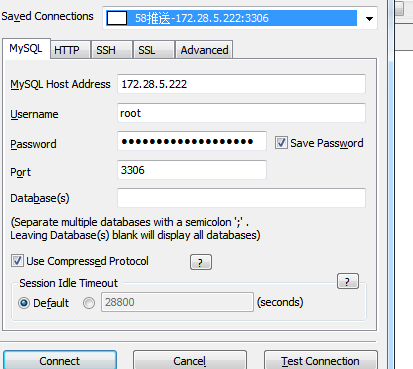
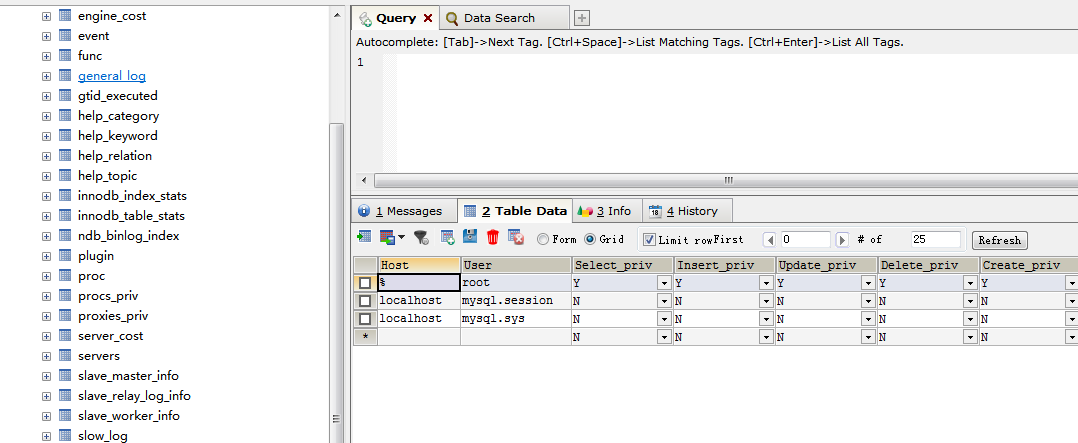
,然后通过其他机器客户端连接3306成功。
3307也是同样操作
[root@push-- /]# mysql -uroot -p -S /var/lib/mysql//mysql.sock

Enter password:

Welcome to the MySQL monitor.  Commands end with ; or \g.

Your MySQL connection id is

Server version: 5.7. MySQL Community Server (GPL)

Copyright (c) , , Oracle and/or its affiliates. All rights reserved.

Oracle is a registered trademark of Oracle Corporation and/or its

affiliates. Other names may be trademarks of their respective

owners.

Type 'help;' or '\h' for help. Type '\c' to clear the current input statement.

mysql> use mysql;

Reading table information for completion of table and column names

You can turn off this feature to get a quicker startup with -A

Database changed

mysql> update user set host='%' where user='root';

Query OK,  row affected (0.00 sec)

Rows matched:   Changed:   Warnings:

mysql> flush privileges;

Query OK,  rows affected (0.00 sec)

mysql>
此时,双实例安装成功。
十、多实例的启动和停止
停止3306实例: mysqladmin -uroot -p -S /var/lib/mysql/3307/mysql.sock shutdown
启动3306实例: mysqld_safe --defaults-file=/etc/mysql/my-3306.cnf &
连接3306实例:mysql -uroot -p -S /var/lib/mysql/3306/mysql.sock
mysql5.7二进制包进行多实例安装的更多相关文章
- MYSQL5.7二进制包的安装
mysql5.7 二进制包安装1. 下载包 wget http://mirrors.sohu.com/mysql/MySQL-5.7/mysql-5.7.12-linux-glibc2.5-x86_6 ...
- MYSQL5.5二进制包的安装
二进制1. 下载包 wget http://mirrors.sohu.com/mysql/MySQL-5.6/mysql-5.5.55-linux2.6-i686.tar.gz2. 解压 tar xx ...
- MYSQL5.6二进制包的安装
二进制1. 下载包 wget http://mirrors.sohu.com/mysql/MySQL-5.6/mysql-5.6.26-linux-glibc2.5-x86_64.tar.gz2. 解 ...
- MYSQL-5.5二进制包安装
groupadd mysql 添加用户组 useradd mysql -s /sbin/nologin -g mysql -M 添加用户 mv mysql-5.5.54-linux2.6-x86_6 ...
- mysql5.7 二进制包安装
1. 下载包 wget http://mirrors.sohu.com/mysql/MySQL-5.7/mysql-5.7.12-linux-glibc2.5-x86_64.tar.gz 2. 解 ...
- centos mysql5.7 二进制包安装
此种方式安装非常简单 cd /usr/local 下载安装包wget https://dev.mysql.com/get/Downloads/MySQL-5.7/mysql-5.7.17-linux- ...
- Linux环境下安装mysql5.6(二进制包不是rpm格式)
一.准备: 1.CentOS release 6.8 2.mysql-5.6.31-linux-glibc2.5-x86_64.tar.gz 3.Linux下MySQL5.6与MySQL5.7安装方法 ...
- Mysql5.6二进制包安装方法
1.Download MySQL Community Server 访问mysql官方网站转到下载页https://dev.mysql.com/downloads/mysql/5.6.html#dow ...
- mysql5.6的二进制包安装
author: headsen chen data :2018-06-08 16:21:43 1. 创建存放软件文件夹 # cd / #mkdir a 2.下载MySQL5.6二进制包 cd a w ...
随机推荐
- 代码实现:求s=a+aa+aaa+aaaa+aa...a的值,其中a是一个数字
import java.util.Scanner; /*题目:求s=a+aa+aaa+aaaa+aa...a的值,其中a是一个数字. 例如2+22+222+2222+22222(此时共有5个数相加), ...
- Checkbox 多选框
Checkbox 多选框 一组备选项中进行多选 ¶基础用法 单独使用可以表示两种状态之间的切换,写在标签中的内容为 checkbox 按钮后的介绍. 在el-checkbox元素中定义v-model绑 ...
- KNN距离函数的简单拓展
KNN--k-NearestNeighbor可以是是分类法中最简单的算法了. 大致的idea为:找出k各跟新数据点最像的点,看这些点主要属于哪类,那么新数据点也就属于哪类的了. 其伪代码如下: 1. ...
- ArcGISDynamicMapServiceLayer 和 ArcGISTiledMapServiceLayer 区别
ArcGISDynamicMapServiceLayer(动态地图服务)通常用于实时显示经常变化的数据,支持控制单个图层可见性,可动态投影.但缺点是显示效果较差,整个服务出图较慢:ArcGISTile ...
- Oracle中生成随机数的函数
在Oracle中的DBMS_RANDOM程序包中封装了一些生成随机数和随机字符串的函数,其中常用的有以下两个: DBMS_RANDOM.VALUE函数 该函数用来产生一个随机数,有两种用法: 1. 产 ...
- rocketMQ retry 消息的实现
consumer 消费失败,会把消息重新发往 %RETRY% + consumerGroup,这个 retry 消息会在一定时间后,真实送到 retry topic. broker 处理发送到 ret ...
- LVS 四层 TCP/UDP 负载均衡器
目录 文章目录 目录 LVS LVS 应用结构 LVS 提供的三种模式 LVS-NAT LVS-TUN LVS_DR LVS 负载均衡算法 静态负载均衡 动态负载均衡 LVS-ipvsadm 指令集 ...
- 阶段3 3.SpringMVC·_01.SpringMVC概述及入门案例_01.SpringMVC概述及入门案例
第二章 第三章 第四章 三层框架 springMvc是表现层
- #Java学习之路——基础阶段二(第十二篇)
我的学习阶段是跟着CZBK黑马的双源课程,学习目标以及博客是为了审查自己的学习情况,毕竟看一遍,敲一遍,和自己归纳总结一遍有着很大的区别,在此期间我会参杂Java疯狂讲义(第四版)里面的内容. 前言: ...
- 贪心+dp
贪心+dp 好多题都是这个思想, 可以说是非常重要了 思想一: 在不确定序列无法dp的情况下, 我们不妨先假设序列已经选定, 而利用贪心使序列达到最优解, 从而先进行贪心排序, 在进行dp选出序列 思 ...