
.net core 学习小结之 自定义JWT授权
- 自定义token的验证类
using System;

using System.Collections.Generic;

using System.IO;

using System.Linq;

using System.Threading.Tasks;

using Microsoft.AspNetCore;

using Microsoft.AspNetCore.Hosting;

using Microsoft.Extensions.Configuration;

using Microsoft.Extensions.Logging;

namespace JwtAuth

{

    using System.Security.Claims;

    using Microsoft.IdentityModel.Tokens;

    using Microsoft.AspNetCore.Authentication.JwtBearer;

    public class MyTokenValidata : ISecurityTokenValidator

    {

        //判断当前token是否有值

        public bool CanValidateToken => true;

        public int MaximumTokenSizeInBytes { get; set; }//顾名思义是验证token的最大bytes

        public bool CanReadToken(string securityToken)

        {

            return true;

        }

        ///验证securityToken

        public ClaimsPrincipal ValidateToken(string securityToken, TokenValidationParameters validationParameters, out SecurityToken validatedToken)

        {

            validatedToken = null;

            if (securityToken != "yourtoken")

            {

                return null;

            }

            var identity = new ClaimsIdentity(JwtBearerDefaults.AuthenticationScheme);

            identity.AddClaim(new Claim("name", "cyao"));

            identity.AddClaim(new Claim(ClaimsIdentity.DefaultRoleClaimType, "admin"));

            identity.AddClaim(new Claim("SuperAdmin", "true"));//添加用户访问权限

            var principal = new ClaimsPrincipal(identity);

            return principal;

        }

    }

} - 在strtup注册自定义验证的管道代码
using System;

using System.Collections.Generic;

using System.Linq;

using System.Threading.Tasks;

using Microsoft.AspNetCore.Builder;

using Microsoft.AspNetCore.Hosting;

using Microsoft.Extensions.Configuration;

using Microsoft.Extensions.DependencyInjection;

using Microsoft.Extensions.Logging;

using Microsoft.Extensions.Options;

namespace JwtAuth

{

    using Microsoft.AspNetCore.Authentication.JwtBearer;

    using Microsoft.AspNetCore.Authorization;

    using Microsoft.IdentityModel.Tokens;

    public class Startup

    {

        public Startup(IConfiguration configuration)

        {

            Configuration = configuration;

        }

        public IConfiguration Configuration { get; }

        // This method gets called by the runtime. Use this method to add services to the container.

        public void ConfigureServices(IServiceCollection services)

        {

            //将配置文件读取到settings

            services.Configure<JwtSettings>(Configuration.GetSection("JwtSettings"));

            JwtSettings settings = new JwtSettings();

            Configuration.Bind("JwtSettings", settings);

            //添加授权信息

            services.AddAuthentication(options =>

            {

                options.DefaultAuthenticateScheme = JwtBearerDefaults.AuthenticationScheme;

                options.DefaultChallengeScheme = JwtBearerDefaults.AuthenticationScheme;

            })

            .AddJwtBearer(c =>

            // c.TokenValidationParameters = new Microsoft.IdentityModel.Tokens.TokenValidationParameters//添加jwt 授权信息

            // {

            //     ValidIssuer = settings.Issuer,

            //     ValidAudience = settings.Audience,

            //     IssuerSigningKey = new SymmetricSecurityKey(System.Text.Encoding.UTF8.GetBytes(settings.SecretKey))

            // }

            // ------------------------自定义分割线-------------------------

            {

               c.SecurityTokenValidators.Clear();//清除默认的设置

               c.SecurityTokenValidators.Add(new MyTokenValidata());//添加自己设定规则的验证方法

               c.Events = new JwtBearerEvents()

               {

                   OnMessageReceived = context =>

                   {

                       var token = context.Request.Headers["mytokens"];//修改默认的http headers

                       context.Token = token.FirstOrDefault();

                       return Task.CompletedTask;

                   }

               };

             }

           );

            //只允许superadmin进行访问claims

            services.AddAuthorization(options => options.AddPolicy("SuperAdmin", policy => policy.RequireClaim("SuperAdmin")));

            services.AddMvc();

        }

        // This method gets called by the runtime. Use this method to configure the HTTP request pipeline.

        public void Configure(IApplicationBuilder app, IHostingEnvironment env)

        {

            if (env.IsDevelopment())

            {

                app.UseDeveloperExceptionPage();

            }

            //向builder中添加授权的管道

            app.UseAuthentication();

            app.UseMvc();

        }

    }

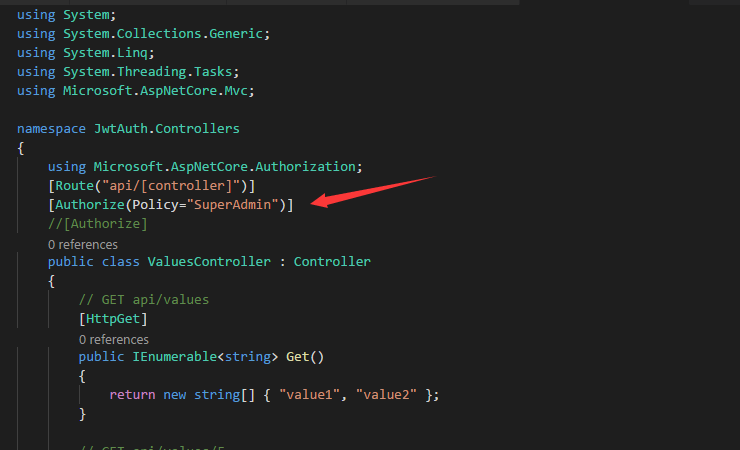
} - 最终在api的最上方贴上对应的特性标签(这种是基于claims的访问)
.net core 学习小结之 自定义JWT授权的更多相关文章
- .net core 学习小结之 JWT 认证授权
新增配置文件 { "Logging": { "IncludeScopes": false, "Debug": { "LogLeve ...
- 如何使用Swagger为.NET Core 3.0应用添加JWT授权说明文档
简介 本教程采用WHY-WHAT-HOW黄金圈思维模式编写,黄金圈法则强调的是从WHY为什么学,到WHAT学到什么,再到HOW如何学.从模糊到清晰的学习模式.大家的时间都很宝贵,我们做事前先想清楚为什 ...
- 学习ASP.NET Core(05)-使用Swagger与Jwt授权
上一篇我们使用IOC容器解决了依赖问题,同时简单配置了WebApi环境,本章我们使用一下Swagger,并通过Jwt完成授权 一.Swagger的使用 1.什么是Swagger 前后端分离项目中,后端 ...
- .net core 学习小结之 PostMan报415
首先415的官方解释是:对于当前请求的方法和所请求的资源,请求中提交的实体并不是服务器中所支持的格式,因此请求被拒绝. 也就是说我所准备的数据格式并不是后台代码使用的数据格式 后台代码如下 using ...
- 【.Net Core 学习系列】-- 自定义错误页面在IE浏览器中不能正常显示
测试场景: 1. 新建.Net Core Web项目 2. 选择模板: 3. 修改Error页面代码:(去掉母版页并修改页面显示信息) 4. 修改[ASPNETCORE_ENVIRONMENT],并抛 ...
- .net core 学习小结之 Cookie-based认证
在startup中添加授权相关的管道 using System; using System.Collections.Generic; using System.Linq; using System.T ...
- .net core 学习小结之环境配置篇
安装IIs对 netcore 的支持 https://docs.microsoft.com/en-us/aspnet/core/fundamentals/servers/aspnet-core-mod ...
- .Net Core 学习依赖注入自定义Service
1. 定义一个服务,包含一个方法 public class TextService { public string Print(string m) { return m; } } 2. 写一个扩展方法 ...
- .net core 学习小结之 配置介绍(config)以及热更新
命令行的配置 var settings = new Dictionary<string, string>{ { "name","cyao"}, {& ...
随机推荐
- linux高性能服务器编程pdf免费下载
百度云盘:链接: https://pan.baidu.com/s/1pLp4hHx 密码: wn4k
- 微信支付-无法识别qrcode生成的二维码图片
1.开始使用 table方式,但是还是无法识别二维码 http://www.cnblogs.com/staticed/p/8549316.html var code_url = data.code_ ...
- selenium操作下拉选和网页提示框
import time from selenium import webdriver from selenium.webdriver.support.select import Select#处理下拉 ...
- linux系统下导出MySQL文件
1.配置:从centOS6.5系统,MySQL数据库 2.导出.sql文件的命令: mysqldump -uroot -h116.228.90.147 -P18006 -p aimo > /ho ...
- Linux shell 下简单的进度条实现
Linux shell 下简单的进度条实现 [root@db145 ~]# cat print_process.sh function Proceess(){ spa='' i= ] do print ...
- [洛谷P3320] SDOI2015 寻宝游戏
问题描述 小B最近正在玩一个寻宝游戏,这个游戏的地图中有N个村庄和N-1条道路,并且任何两个村庄之间有且仅有一条路径可达.游戏开始时,玩家可以任意选择一个村庄,瞬间转移到这个村庄,然后可以任意在地图的 ...
- 25.复杂链表的复制(python)
题目描述 输入一个复杂链表(每个节点中有节点值,以及两个指针,一个指向下一个节点,另一个特殊指针指向任意一个节点),返回结果为复制后复杂链表的head.(注意,输出结果中请不要返回参数中的节点引用,否 ...
- Linux入门培训教程 linux下拷贝cp删除rm移动mv命令参数以及说明
拷贝移动删除在windows中看起来这么简单,但linux经常使用的文字界面,所以对于linux系统 下拷贝cp删除 rm 移动mv命令参数就不得不需要了解和学习了 cp 该命令的功能是将给出的文件或 ...
- Qt新建工程
1.基本步骤 (1)Qt Quick Project是开发QML语言的: (2)Qt Widget Project是基于部件的开发,一种是PC的Qt Gui Application,一种是手机的Mob ...
- 苹果CMSv10宝塔全自动定时采集教程
伙伴们在建立好自己的网站添加自定义资源库后,由于手动采集方式比较耗时间和精力更新也不够及时,是不是特别希望能有一个全自动定时采集方法来帮助网站增加视频资源解放自己的双手,那么现在就教大家如何用宝塔一步 ...