
SpringMVC学习笔记之---RESTful风格
RESTful风格
(一)什么是RESTful
(1)RESTful不是一套标准,只是一套开发方式,构架思想
(2)url更加简洁
(3)有利于不同系统之间的资源共享
(二)概述
RESTful具体来讲就是HTTP协议的四种形式,四种基本操作
GET:获取资源
POST:新建资源
PUT:修改资源
DELETE:删除资源
(三)实例
(1)功能
1.数据的增删改查
2.controller层的应用
3.HTTP四种基本操作的应用
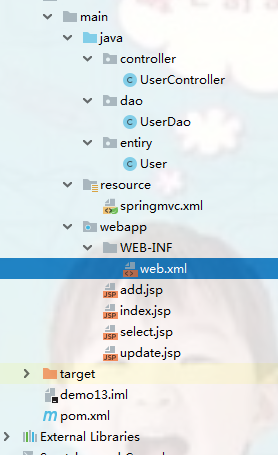
(2)代码实现
1.pom.xml
<dependencies>

  <dependency>

    <groupId>junit</groupId>

    <artifactId>junit</artifactId>

    <version>4.11</version>

  </dependency>

  <dependency>

    <groupId>org.springframework</groupId>

    <artifactId>spring-webmvc</artifactId>

    <version>5.1.3.RELEASE</version>

  </dependency>

  <dependency>

    <groupId>javax.servlet</groupId>

    <artifactId>jstl</artifactId>

    <version>1.2</version>

  </dependency>

</dependencies>
2.web.xml
<web-app>

  <display-name>Archetype Created Web Application</display-name>

  <servlet>

    <servlet-name>SpringMVC</servlet-name>

    <servlet-class>org.springframework.web.servlet.DispatcherServlet</servlet-class>

    <init-param>

      <param-name>contextConfigLocation</param-name>

      <param-value>classpath:springmvc.xml</param-value>

    </init-param>

  </servlet>

  <servlet-mapping>

    <servlet-name>SpringMVC</servlet-name>

    <url-pattern>/</url-pattern>

  </servlet-mapping>

  <!--过滤器,将请求转换为标准的http方法,使得支持GET,POST,PUT,DELETE请求-->

  <filter>

    <filter-name>hiddenHttpMethodFilter</filter-name>

    <filter-class>org.springframework.web.filter.HiddenHttpMethodFilter</filter-class>

  </filter>

  <filter-mapping>

    <filter-name>hiddenHttpMethodFilter</filter-name>

    <url-pattern>/*</url-pattern>

  </filter-mapping>

</web-app>
3.springmvc.xml
<?xml version="1.0" encoding="UTF-8"?>

<beans xmlns="http://www.springframework.org/schema/beans"

       xmlns:xsi="http://www.w3.org/2001/XMLSchema-instance"

       xmlns:context="http://www.springframework.org/schema/context"

       xsi:schemaLocation="http://www.springframework.org/schema/beans http://www.springframework.org/schema/beans/spring-beans.xsd http://www.springframework.org/schema/context http://www.springframework.org/schema/context/spring-context.xsd">

<!--包扫描-->

    <context:component-scan base-package="controller,dao"></context:component-scan>

    <!--视图解析器-->

    <bean class="org.springframework.web.servlet.view.InternalResourceViewResolver">

        <!--前缀-->

        <property name="prefix" value="/"></property>

        <!--后缀-->

        <property name="suffix" value=".jsp"></property>

    </bean>

</beans>
4.User.java
package entiry;

public class User {

    private int id;

    private String name;

    private String password;

    public int getId() {

        return id;

    }

    public void setId(int id) {

        this.id = id;

    }

    public String getName() {

        return name;

    }

    public void setName(String name) {

        this.name = name;

    }

    public String getPassword() {

        return password;

    }

    public void setPassword(String password) {

        this.password = password;

    }

    @Override

    public String toString() {

        return "User{" +

                "id=" + id +

                ", name='" + name + '\'' +

                ", password='" + password + '\'' +

                '}';

    }

}
5.UserDao.java
package dao;

import entiry.User;

import org.springframework.stereotype.Repository;

import java.util.Collection;

import java.util.HashMap;

import java.util.Map;

@Repository

public class UserDao {

    private Map<Integer, User> map=new HashMap<Integer, User>();

    /**

     * 增加

     * @param user

     */

    public void add(User user){

        map.put(user.getId(),user);

    }

    /**

     * 查询所有

     * @return

     */

    public Collection<User> selectAll(){

        return map.values();

    }

    /**

     * 通过id查询

     * @param id

     * @return

     */

    public User select(int id){

        return map.get(id);

    }

    /**

     * 修改

     * @param user

     */

    public void update(User user){

        map.put(user.getId(),user);

    }

    /**

     * 删除

     * @param id

     */

    public void delete(int id){

        map.remove(id);

    }

}
6.UserController.java
package controller;

import dao.UserDao;

import entiry.User;

import org.springframework.beans.factory.annotation.Autowired;

import org.springframework.stereotype.Controller;

import org.springframework.web.bind.annotation.*;

import org.springframework.web.servlet.ModelAndView;

@Controller

public class UserController {

    @Autowired

    private UserDao userDao;

    @PostMapping("/add")

    public String add(User user){

       userDao.add(user);

       //重定向到selectAll

       return "redirect:/selectAll";

    }

    @GetMapping("/selectAll")

    public ModelAndView selectAll(){

        ModelAndView modelAndView=new ModelAndView();

        modelAndView.addObject("users",userDao.selectAll());

        modelAndView.setViewName("select");

        for(User user:userDao.selectAll()){

            System.out.println(user);

        }

        return modelAndView;

    }

    @GetMapping("/select/{id}")

    public ModelAndView select(@PathVariable(value="id") int id){

        ModelAndView modelAndView=new ModelAndView();

        modelAndView.setViewName("update");

        modelAndView.addObject("user",userDao.select(id));

        return modelAndView;

    }

    @PutMapping("/update")

    public String update(User user){

        userDao.update(user);

        return "redirect:/selectAll";

    }

    @DeleteMapping("/delete/{id}")

    public String delete(@PathVariable(value="id")int id){

        userDao.delete(id);

        return "redirect:/selectAll";

    }

}
7.add.jsp
<%@ page contentType="text/html;charset=UTF-8" language="java" %>

<html>

<head>

    <title>Title</title>

</head>

<body>

<form action="${pageContext.request.contextPath}/add" method="post">

    id:<input type="text" name="id"><br>

    用户名:<input type="text" name="name"><br>

    密码:<input type="text" name="password"><br>

    <input type="submit">

</form>

</body>

</html>
8.select.jsp
<%@ page contentType="text/html;charset=UTF-8" language="java" %>

<%@page isELIgnored="false" %>

<%@ taglib uri="http://java.sun.com/jsp/jstl/core" prefix="c"%>

<html>

<head>

    <title>Title</title>

</head>

<body>

<table>

    <tr>

        <td>id</td>

        <td>用户名</td>

        <td>密码</td>

        <td></td>

        <td></td>

    </tr>

    <c:forEach items="${users}" var="user">

        <tr>

            <td>${user.id}</td>

            <td>${user.name}</td>

            <td>${user.password}</td>

            <td>

                <form action="${pageContext.request.contextPath}/select/${user.id}"method="get">

                    <button type="submit">修改</button>

                </form>

            </td>

            <td>

                <form action="${pageContext.request.contextPath}/delete/${user.id}" method="post">

                    <!--将请求的方式设为DELETE-->

                    <input type="hidden" name="_method" value="DELETE">

                <button type="submit" >删除</button>

                </form>

            </td>

        </tr>

    </c:forEach>

</table>

</body>

</html>
9.update.jsp
<%@ page contentType="text/html;charset=UTF-8" language="java" %>

<html>

<head>

    <title>Title</title>

</head>

<body>

<form action="${pageContext.request.contextPath}/update" method="post">

<table>

    <tr>

        <td>id</td>

        <td><input type="text" name="id" value="${user.id}" readonly="readonly"></td>

    </tr>

    <tr>

        <td>用户名</td>

        <td><input type="text" name="name" value="${user.name}"></td>

    </tr>

    <tr>

        <td>密码</td>

        <td><input type="text" name="password" value="${user.password}"></td>

    </tr>

</table>

    <!--将请求的方式设为PUT-->

    <input type="hidden" name="_method" value="PUT">

    <input type="submit">

</form>

</body>

</html>
SpringMVC学习笔记之---RESTful风格的更多相关文章
- springmvc学习笔记(19)-RESTful支持
springmvc学习笔记(19)-RESTful支持 标签: springmvc springmvc学习笔记19-RESTful支持 概念 REST的样例 controller REST方法的前端控 ...
- SpringMVC 学习笔记(五) 基于RESTful的CRUD
1.1. 概述 当提交的表单带有_method字段时,通过HiddenHttpMethodFilter 将 POST 请求转换成 DELETE.PUT请求,加上@PathVariable注解从而实现 ...
- 史上最全的SpringMVC学习笔记
SpringMVC学习笔记---- 一.SpringMVC基础入门,创建一个HelloWorld程序 1.首先,导入SpringMVC需要的jar包. 2.添加Web.xml配置文件中关于Spring ...
- SpringMVC学习笔记之二(SpringMVC高级参数绑定)
一.高级参数绑定 1.1 绑定数组 需求:在商品列表页面选中多个商品,然后删除. 需求分析:功能要求商品列表页面中的每个商品前有一个checkbok,选中多个商品后点击删除按钮把商品id传递给Cont ...
- springmvc学习笔记--REST API的异常处理
前言: 最近使用springmvc写了不少rest api, 觉得真是一个好框架. 之前描述的几篇关于rest api的文章, 其实还是不够完善. 比如当遇到参数缺失, 类型不匹配的情况时, 直接抛出 ...
- springmvc学习笔记---面向移动端支持REST API
前言: springmvc对注解的支持非常灵活和飘逸, 也得web编程少了以往很大一坨配置项. 另一方面移动互联网的到来, 使得REST API变得流行, 甚至成为主流. 因此我们来关注下spring ...
- springmvc学习笔记(简介及使用)
springmvc学习笔记(简介及使用) 工作之余, 回顾了一下springmvc的相关内容, 这次也为后面复习什么的做个标记, 也希望能与大家交流学习, 通过回帖留言等方式表达自己的观点或学习心得. ...
- SpringMVC:学习笔记(3)——REST
SpringMVC:学习笔记(3)——REST 了解REST风格 按照传统的开发方式,我们在实现CURD操作时,会写多个映射路径,比如对一本书的操作,我们会写多个URL,可能如下 web/delete ...
- SpringMVC:学习笔记(8)——文件上传
SpringMVC--文件上传 说明: 文件上传的途径 文件上传主要有两种方式: 1.使用Apache Commons FileUpload元件. 2.利用Servlet3.0及其更高版本的内置支持. ...
随机推荐
- (5.2.2)配置服务器参数——dbcc跟踪标记(trace)
关键字:跟踪标记,跟踪 [1]常规dbcc命令 dbcc help('?') --查看dbcc 所有命令,常规下只有32个常用的dbcc TRACEON(2588) --指定了2588标记的话,你就可 ...
- Python 的开始
现在的 Linux 上一般都自带有 Python 如果没有,那就下载一个 打开 python 在终端中输入 python ,如果出现了和这差不多的 Python 2.7.15+ (default, O ...
- MySql 面试开发技术点汇总
表结构设计 1.为什么一定要设一个主键? 答:因为你不设主键的情况下,innodb也会帮你生成一个隐藏列,作为自增主键.所以啦,反正都要生成一个主键,那你还不如自己指定一个主键,在有些情况下,就能显 ...
- java 字符串锁
package com.example.demo.controller; public class StringLock { public void method(String p) { // new ...
- git使用以及对应sourceTree
git上面的几条指令 (1)要想把A合并到B分支上,就需要先切换到B分支上,然后在合并A分支,执行指令: git checkout B // 这是切换到B分支上 git merge A // 这是将A ...
- vue项目--vuex状态管理器
本文取之官网和其他文章结合自己的理解用简单化的语言表达.用于自己的笔记记录,也希望能帮到其他小伙伴理解,学习更多的前端知识. Vuex 是什么? Vuex 是一个专为 Vue.js 应用程序开发的状态 ...
- 使用svn未响应卡死的几个原因,commit时checkout时
1.commit 时 很可能是:检索文件内容过多导致,解决:不要在最外层文件夹目录下commit 2.checkout时 很可能是:地址错误
- 如何计算java程序运行花了多长时间。加时间戳。
long start = System.currentTimeMillis(); // 记录起始时间 try { Thread.sleep(5000); // 线程睡眠5秒,让运行时间不那么小 } c ...
- rsyslog+loganalyzer日志服务器,无法添加报表模板解决
loganalyzer搭建成功后,各方面功能都算正常但是发现不能创建报表模板,提示报错 mysql错误:'字段列表'中的未知列'Source1' mysql错误号:1054 解决方案:
- - Power Strings (字符串哈希) (KMP)
https://www.cnblogs.com/widsom/p/8058358.htm (详细解释) //#include<bits/stdc++.h> #include<vect ...