
linux运维、架构之路-Nginx提高
一、虚拟主机搭建
1、基于域名的虚拟主机
[root@web01 html]# cat nginx.conf

worker_processes  ;

events {

    worker_connections  ;

}

http {

    include       mime.types;

    default_type  application/octet-stream;

    sendfile        on;

    keepalive_timeout  ;

    server {

        listen       ;

        server_name  www.etiantian.org;

        location / {

            root   html/www;

            index  index.html index.htm;

        }

    }

    server {

        listen       ;

        server_name  bbs.etiantian.org;

        location / {

            root   html/bbs;

            index  index.html index.htm;

        }

    }

    server {

        listen       ;

        server_name  blog.etiantian.org;

        location / {

            root   html/blog;

            index  index.html index.htm;

        }

    }

}

说明:基于域名的虚拟主机,当输入IP地址访问的时候,默认寻找nginx.conf里配置的第一个虚拟主机,如果使用了include功能,则ll extra目录下显示的第一个文件为寻找的目标

[root@web01 conf]# ll extra/

-rw-r--r--  root root  Sep  : bbs.conf

-rw-r--r--  root root  Sep  : blog.conf

-rw-r--r--  root root  Sep  : www.conf
2、基于端口的虚拟主机
[root@web01 html]# cat nginx.conf

worker_processes  ;

events {

    worker_connections  ;

}

http {

    include       mime.types;

    default_type  application/octet-stream;

    sendfile        on;

    keepalive_timeout  ;

    server {

        listen       ;

        server_name  www.etiantian.org;

        location / {

            root   html/www;

            index  index.html index.htm;

        }

    }

    server {

        listen       ;    ###由基于域名bbs.etiantian.org的80改为基于端口的81

        server_name  bbs.etiantian.org;

        location / {

            root   html/bbs;

            index  index.html index.htm;

        }

    }

    server {

        listen       ;

        server_name  blog.etiantian.org;

        location / {

            root   html/blog;

            index  index.html index.htm;

        }

    }

}

测试:基于端口配置的虚拟主机成功:

访问过程:网络层(IP地址)====>传输层(端口)====>应用层(域名)
3、基于IP的虚拟主机
http {

              include       mime.types;

              default_type  application/octet-stream;

              sendfile        on;

              keepalive_timeout  ;

              server {

                      listen       10.0.0.8:;#此处只改了域名bbs.etiantian.org

                      server_name  bbs.etiantian.org;##此处也可以改成对应IP 10.0.0.8

                      location / {

                          root   html/www;

                          index  index.html index.htm;

              }

        }

测试:基于IP配置的虚拟主机,修改完nginx配置文件,都要重新启动nginx服务
4、规范虚拟主机配置文件
cd /application/nginx/conf && mkdir extra

sed -n '10,17p' nginx.conf >./extra/www.conf

sed -n '18,25p' nginx.conf >./extra/blog.conf

sed -n '26,33p' nginx.conf >./extra/bbs.conf
5、精简Nginx主配置文件
cat nginx.conf

worker_processes  ;

events {

    worker_connections  ;

}

http {

    include       mime.types;

    default_type  application/octet-stream;

    sendfile        on;

    keepalive_timeout  ;

    include extra/www.conf;

    include extra/bbs.conf;

    include extra/blog.conf;

}
二、Nginx日志
1、 错误日志
[root@web01 conf]# cat nginx.conf

worker_processes  ;

error_log logs/error.log error;#增加nginx错误日志模块即可

events {

    worker_connections  ;

}

http {

    include       mime.types;

    default_type  application/octet-stream;

    sendfile        on;

    keepalive_timeout  ;

    include extra/www.conf;

    include extra/bbs.conf;

    include extra/blog.conf;

    include extra/status.conf;

}
2、访问日志
log_format  main  '$remote_addr - $remote_user [$time_local] "$request" '

                      '$status $body_bytes_sent "$http_referer" '

                      '"$http_user_agent" "$http_x_forwarded_for"';

access_log  logs/access.log  main;
日志格式详细说明:
10.0.0.253 - - [16/Sep/2017:14:15:29 +0800] "GET / HTTP/1.1" 200 13 "-" "Mozilla/5.0 (Windows NT 6.1;
Win64; x64) AppleWebKit/537.36 (KHTML, like Gecko) Chrome/61.0.3163.79 Safari/537.36" "-"
$remote_addr    10.0.0.253                             #客户端IP地址信息

-                 -

$remote_user    -                                      #user name supplied with the Basic authentication

[/Sep/::: +] [$time_local]             #用户访问时间

"$request"      "GET / HTTP/1.1"                       #http请求报文中的请求行信息

$status                                             #服务端返回的状态码信息

$body_bytes_sent                                     #服务端返回给客户端的资源大小信息

"$http_referer"    -                                   #记录推荐链接过来的服务器地址信息(暂时忽略)

"$http_user_agent"  Chrome/61.0.3163.79 Safari/537.36  #客户端访问网站方式,利用的软件

"$http_x_forwarded_for"     "-"                        #忽略掉
3、日志切割(定时任务+脚本实现 )
[root@web01 scripts]# cat nginx_log_cut.sh

#!/bin/sh

cd /application/nginx/logs/

/bin/mv access.log access_$(date +%F).log

/application/nginx/sbin/nginx -s reload
三、Nginx状态模块http_stub_status_module
cat >>/application/nginx/conf/extra/status.conf<<EOF

server{

    listen  ;

    server_name  status.etiantian.org;

    location / {

      stub_status on;

      access_log   off;

    }

  }

EOF
做好本地hosts解析浏览器访问测试
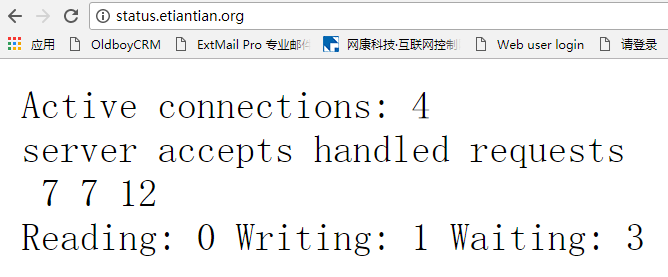
|
参数信息 |
参数说明 |
|
Active connections |
当前活动客户端连接数量包含Waiting连接数量 |
|
accepts |
接收客户端连接的总数量 |
|
handled |
处理连接的总数量 |
|
requests |
客户端请求的总数 |
|
Reading |
当前nginx正在读取请求头的连接数 |
|
Writing |
当前nginx将响应写回客户机的连接数量 |
|
Waiting |
当前空闲客户端连接等待请求的数量 |
四、Nginx location模块
1、语法location [=|~|~*|^~] /uri/ { … }
|
location |
[=|~|~*|^~] / |
uri |
{…} |
|
指令 |
匹配标识 |
匹配的网站网址 |
匹配URI后要执行的配置段 |
2、location匹配优先级
|
不用URI及特殊字符组合匹配顺序 |
匹配说明 |
|
1、“location = / {” |
精确匹配 |
|
2、“location ^~/images/ {” |
匹配常规字符串,不做正则匹配检查,优先匹配路径 |
|
3、“location ~*\.(gif|jpg|jpeg)$ {” |
正则匹配 |
|
4、“location /documents/ {” |
匹配常规字符串,如果有正则优先匹配正则 |
|
5、“location / {” |
所有location都不能匹配后的默认匹配 |
测试location匹配优先级:
server {

        listen       ;

        server_name  www.etiantian.org;

        root   html/www;

        location / {

           return ;

        }

        location = / {

            return ;

        }

        location /documents/ {

            return ;

        }

        location ^~ /images/ {

            return ;

        }

        location ~* \.(gif|jpg|jpeg)$ {

            return ;

        }

        access_log logs/access_www.log main

    }

[root@web01 log]# curl -I -s -w "%{http_code}\n" -o /dev/null  www.etiantian.org

[root@web01 log]# curl -I -s -w "%{http_code}\n" -o /dev/null  www.etiantian.org/index.html

[root@web01 log]# curl -I -s -w "%{http_code}\n" -o /dev/null  www.etiantian.org/documents/

[root@web01 log]# curl -I -s -w "%{http_code}\n" -o /dev/null  www.etiantian.org/images/.jpg

[root@web01 log]# curl -I -s -w "%{http_code}\n" -o /dev/null  www.etiantian.org/.jpg
五、Nginx http_rewrite_module模块
1、功能
rewrite的主要功能是实现网站URL地址重写,rewrite规则需要PCRE软件支持,通过Perl兼容表达式语法进行规则匹配,另一个功能就是实现伪静态。
2、实现301跳转
①种写法:通过if和rewrite结合来实现301跳转,避免无限跳转
server {

        listen       ;

        server_name  www.etiantian.org;

        location / {

            root   html/www;

            index  index.html index.htm;

            if ($host ~* "^etiantian.org$") {

            rewrite ^/(.*) http://www.etiantian.org/$1 permanent;

            }

        }

    }
②种写法增加一个server标签
server {

           listen       ;

           server_name etiantian.org;

           rewrite ^/(.*) http://www.etiantian.org/$1 permanent;

    } #在www.etiantian.org标签之上,增加一个server标签

    server {

        listen       ;

        server_name  www.etiantian.org;

        location / {

            root   html/www;

            index  index.html index.htm;

            }

    }
③自己域名跳转博客园实战
server {

        listen       ;

        server_name  www.yanxingjiang.com;

        location / {

            root   html/blog;

            index index.php index.html index.htm;

            if ($host = "www.yanxingjiang.com"){

            rewrite ^/(.*)$ http://www.cnblogs.com/yanxinjiang/$1 permanent;

    }
④Nginx404、500、502等页面优雅显示
#nginx.conf配置文件中server区域加入#

fastcgi_intercept_errors on;#测试不需要此步也可以

error_page  = /.html; 或者error_page  = http://www.xxx.com/404.html;

/usr/local/nginx/sbin/nginx –t

/usr/local/nginx/sbin/nginx –s reload

同样error_page     = /50x.html;
3、企业应用场景
①可以调整用户浏览URL,看起来更规范,合乎开发及产品人员的需求
②为了让搜索引擎收录网站内容及用户体验更好,企业会将动态URL地址伪装静态地址提供服务
③网站换新域名后,让旧域名的访问跳转到新的域名上,例如京东商城的www.360buy,改成jd.com
④根据特殊变更、目录、客户端的信息进行URL跳转等
六、 Nginx访问认证
1、修改配置文件
[root@web01 extra]# cat status.conf #以nginx状态虚拟主机为例配置

server{

    listen  ;

    server_name  status.etiantian.org;

    location / {

      stub_status on;

      access_log   off;

      auth_basic           "oldboy training";

      auth_basic_user_file   /application/nginx/conf/htpasswd;

    }

  }
2、创建密码认证文件并进行授权
yum install httpd-tools -y

htpasswd -bc /application/nginx/conf/htpasswd oldboy

chmod  /application/nginx/conf/htpasswd

chown -R www.www /application/nginx/conf/htpasswd

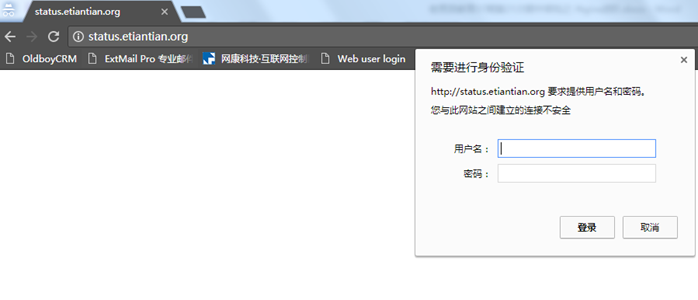
浏览器输入地址测试status.etiantian.org
3、htpasswd命令总结
|
-c |
创建一个新文件 |
|
-n |
不更新文件,显示输出结果 |
|
-m |
强制采用MD5加密密码 |
|
-d |
强制采用CRYPT加密密码(默认) |
|
-p |
不加密密码(明文) |
|
-s |
强制采用SHA加密密码 |
|
-b |
使用密码来自命令行,相当于交互方式 |
|
-D |
删除指定用户 |
4、 企业需求案例
1、搭建好一台nginx的web服务器。配置好内网卡地址与外网卡地址
2、web服务的网站域名为www.etiantian.org,站点目录为html/www
3、要求内网用户可以访问网站http://www.etiantian.org/AV资源信息
4、要求外网用户禁止访问网站http://www.etiantian.org/AV资源信息
解决方案
①定位资源信息
uri== /AV
②进行策略控制
allow
deny
③修改配置文件
[root@web01 www]# cat /application/nginx/conf/extra/www.conf

    server {

        listen       ;

        server_name  www.etiantian.org;

        location / {

            root   html/www;

            index  index.html index.htm;

        }

        location /AV/ {

            root   html/www;

            index  index.html index.htm;

            allow  172.16.1.0/;

            deny   all;

        }

   }
④创建测试资源信息
cd /application/nginx/html/www/

mkdir AV

echo oldboy_AV >AV/oldboy.html
⑤客户端进行测试
[root@nfs01 ~]# curl 10.0.0.8/AV/oldboy.html #模拟外网地址测试

<html>

<head><title> Forbidden</title></head>

<body bgcolor="white">

<center><h1> Forbidden</h1></center>

<hr><center>nginx/1.10.</center>

</body>

</html>

[root@nfs01 ~]# curl 172.16.1.8/AV/oldboy.html #模拟内网地址测试

oldboy_AV
linux运维、架构之路-Nginx提高的更多相关文章
- linux运维架构师职业规划
1.假如你从来未接触过Linux的话,首先要做的就找一本指导书来学习.现在公认的Linux的入门书籍是“鸟哥的私房菜”,讲的很全面,鸟哥的私房菜一共分为两部,一部是基础篇,一部是服务器篇.“鸟哥的私房 ...
- Linux 运维请务必收藏~ Nginx 五大常见应用场景
关注「开源Linux」,选择"设为星标" 回复「学习」,有我为您特别筛选的学习资料~ Nginx 是一个很强大的高性能 Web 和反向代理服务,它具有很多非常优越的特性,在连接高并 ...
- Linux运维之--LVS、Nginx、HAproxy有什么区别?
LVS: 是基于四层的转发 HAproxy: 是基于四层和七层的转发,是专业的代理服务器 Nginx: 是WEB服务器,缓存服务器,又是反向代理服务器,可以做七层的转发 区别: LVS由于是基于四层的 ...
- Nginx+Lua+Redis整合实现高性能API接口 - 网站服务器 - LinuxTone | 运维专家网论坛 - 最棒的Linux运维与开源架构技术交流社区! - Powered by Discuz!
Nginx+Lua+Redis整合实现高性能API接口 - 网站服务器 - LinuxTone | 运维专家网论坛 - 最棒的Linux运维与开源架构技术交流社区! - Powered by Disc ...
- 从苦逼到牛逼,详解Linux运维工程师的打怪升级之路
做运维也快四年多了,就像游戏打怪升级,升级后知识体系和运维体系也相对变化挺大,学习了很多新的知识点. 运维工程师是从一个呆逼进化为苦逼再成长为牛逼的过程,前提在于你要能忍能干能拼,还要具有敏锐的嗅觉感 ...
- 如何掌握并提高linux运维技能
初中级Linux运维人员们系统学习并迅速掌握Linux的运维实战技能.学习路线大纲如下: 入门基础篇 系统运维篇 Web运维篇 数据库运维篇 集群实战篇 运维监控篇 第一篇:Linux入门(安装.配置 ...
- 如何迅速掌握并提高linux运维技能(收藏文)
如何迅速掌握并提高linux运维技能 文章来源于南非蚂蚁 之前曾经写过一篇如何学习Linux的文章,得到了很多反馈,大家都在分享自己的学习经验和体会,并且也提出了不少意见和建议.学习这个事情其 ...
- Linux 运维入门到跑路书单推荐
一.基础入门 <鸟哥的Linux私房菜基础学习篇>:最具知名度的Linux入门书<鸟哥的Linux私房菜基础学习篇>,全面而详细地介绍了Linux操作系统. https://b ...
- Linux运维企业架构实战系列
Linux运维企业架构项目实战系列 项目实战1-LNMP的搭建.nginx的ssl加密.权限控制的实现 项目实战2-LVS.nginx实现负载均衡系列 2.1 项目实战2.1-实现基于LVS负载均衡集 ...
随机推荐
- fpython-笔记(五)装饰器、匿名函数
一.装饰器 装饰器,这个器就是函数的意思,连起来,就是装饰函数,装饰器本身也是一个函数,它的作用是用来给其他函数添加新功能,比如说,我以前写了很多代码,系统已经上线了,但是性能比较不好,现在想把程序里 ...
- 转战 rocketmq
接触 kafka 有一段时间了,一个人的力量实在有限,国内 rocketmq 的生态确实更好,决定换方向. rocketmq 文档地址:http://rocketmq.cloud/zh-cn/docs ...
- write()与writelines()
f = open('user','a+') f.write('abcde') #write只能写字符串 f.writelines(['444','rrrr','uuu']) #writeline ...
- stack() unstack()函数
总结: 1.stack: 将数据的列索引转换为行索引 2.unstack:将数据的行索引转换为列索引 3.stack和unstack默认操作为最内层,可以用level参数指定操作层. 4.stack ...
- Java ——正则表达式
本节重点思维导图 详细见 ————> 正则表达式 [各种语法和方法]
- gradle使用方法
创建一个项目 你可以通过创建一个build.gradle的文件来开始一个项目,然后可以向文件中加入构建逻辑. $ mkdir basic-demo $ cd basic-demo $ touch bu ...
- Java数据结构之稀疏数组(Sparse Array)
1.需求 编写的五子棋程序中,有存盘退出和续上盘的功能.因为该二维数组的很多值是默认值0,因此记录了很多没有意义的数据,为了压缩存储所以采用稀疏数组. 2.基本介绍 当一个数组中大部分元素为0,或者为 ...
- <每日一题>Day 9:POJ-3281.Dining(拆点 + 多源多汇+ 网络流 )
Dining Time Limit: 2000MS Memory Limit: 65536K Total Submissions: 24945 Accepted: 10985 Descript ...
- Java static关键字的重新思考
上完Java课,虽然也写了不少的Java代码,但是一直有不少的疑惑,而static关键字一直困惑着我很久,今天无意探究竟,上知乎再仔细查了一下,发现了这个话题的优秀答案https://www.zhih ...
- hdu6351 Beautiful Now (全排列+循环节)
题目传送门 题意: 给你n和k,你每次能交换n的两个位,问最多k次后的最小和最大值 思路: 考虑到n到1e9,所以可以用全排列来暴力,但是我们不能全排列之前的数位, 因为n中的位数可能相等,那样很难计 ...