
centos7.2下快速安装zabbix4.0
本笔记是基于CentOS 7.2下最小化安装的操作系统搭建的Zabbix4.0环境,主要用于做一些企业路由器和交换机等设备的运行状态监控。
1、安装epel源

- yum -y install epel-release
2、安装php-fpm和mariadb
- yum -y install php-fpm mariadb mariadb-server wget
3、配置zabbix4.0源(我这里主要使用的是清华大学的zabbix镜像源)
- wget -P /etc/yum.repos.d/ http://down.whsir.com/downloads/zabbix.repo
4、安装zabbix4.0
- yum -y install zabbix-server-mysql zabbix-web-mysql zabbix-agent
5、启动mariadb
- systemctl enable mariadb
systemctl start mariadb
6、配置mariadb(创建zabbix数据库,默认密码为空,直接enter)
- mysql -u root -p
- MariaDB [(none)]> create database zabbix character set utf8 collate utf8_bin;
MariaDB [(none)]> grant all privileges on zabbix.* to zabbix@localhost identified by 'www.pengqi.club';
MariaDB [(none)]> quit
7、导入zabbix数据库
- zcat /usr/share/doc/zabbix-server-mysql*/create.sql.gz | mysql -uzabbix -pwww.pengqi.club zabbix
8、修改zabbix-server配置文件
- vi /etc/zabbix/zabbix_server.conf
- DBHost=localhost
DBName=zabbix
DBUser=zabbix
DBPassword=www.pengqi.club
9、修改http配置文件,修改时区为亚洲上海
- vi /etc/httpd/conf.d/zabbix.conf
- php_value date.timezone Asia/Shanghai
10、启动相关应用服务并设置开机启动
- systemctl enable php-fpm
systemctl start php-fpm
systemctl enable httpd
systemctl start httpd
systemctl enable zabbix-server
systemctl start zabbix-server
systemctl enable zabbix-agent
systemctl start zabbix-agent
11、访问web页面初始化安装zabbix4.0(http://你的IP地址/zabbix/)


温馨提示:
1、需要关闭 selinux,一定要关闭这个,开启selinux会引起一连串问题。
- sed -i "s/SELINUX=enforcing/SELINUX=disabled/g" /etc/selinux/config
2、关闭防火墙
- systemctl start firewalld.service#启动firewall
systemctl stop firewalld.service#停止firewall
systemctl disable firewalld.service#禁止firewall开机启动
添加被监控服务器(添加zabbix-agent)
- 安装zabbix-agent客户端
wget -P /etc/yum.repos.d/ http://down.whsir.com/downloads/zabbix.repo
yum install -y zabbix-agent
- 编辑修改配置文件
grep -n '^'[a-Z] /etc/zabbix/zabbix_agentd.conf
vim /etc/zabbix/zabbix_agentd.conf
13:PidFile=/var/run/zabbix/zabbix_agentd.pid

32:LogFile=/var/log/zabbix/zabbix_agentd.log

43:LogFileSize=0

98:Server=192.168.144.113         //zabbix服务器地址

139:ServerActive=192.168.144.113   //活跃服务器地址

150:Hostname=test

268:Include=/etc/zabbix/zabbix_agentd.d/*.conf- 关闭防火墙,启动服务
systemctl stop firewalld.service
setenforce 0
systemctl enable zabbix-agent.service
systemctl restart zabbix-agent.servicenetstat -anpt | grep zabbix //监听在10050端口
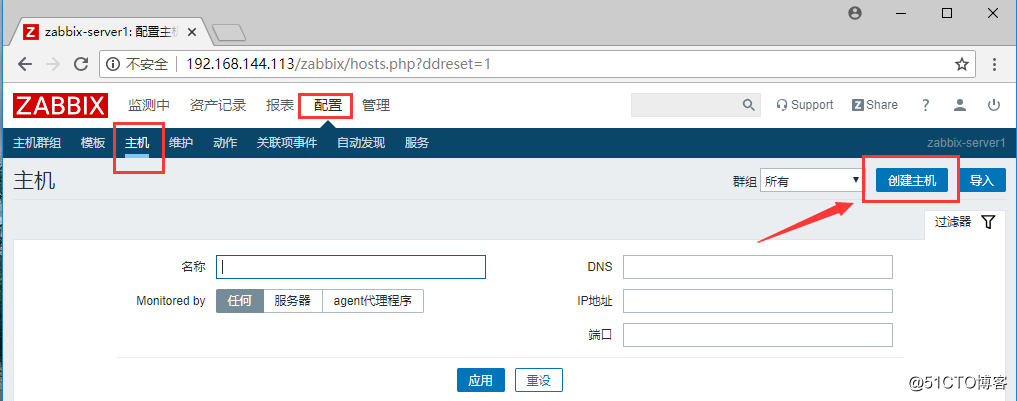
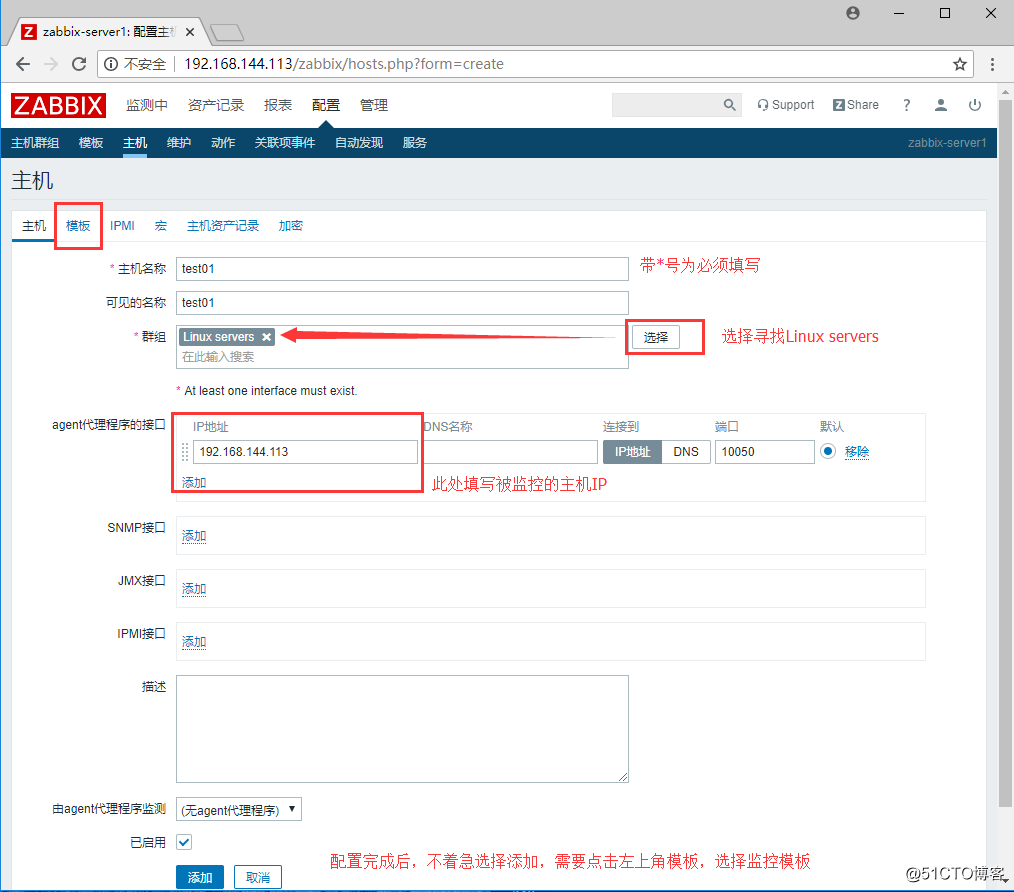
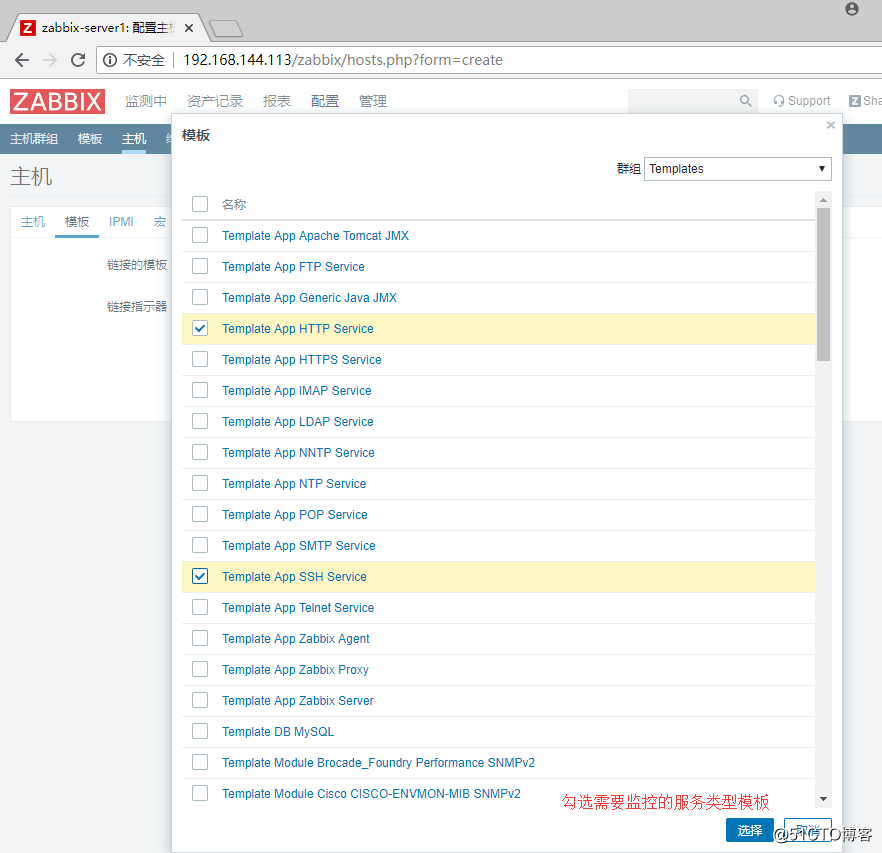
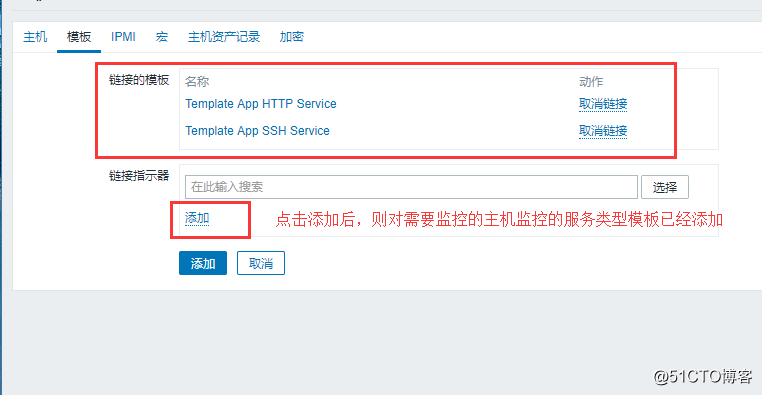
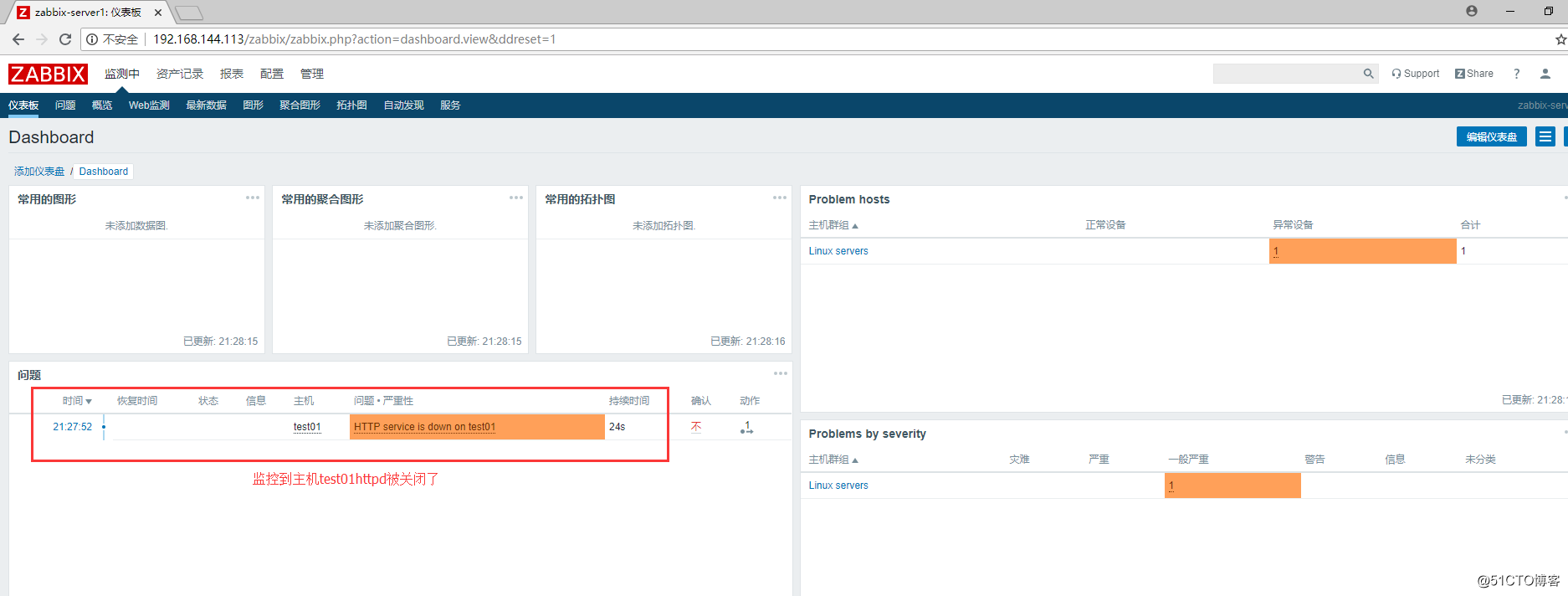
WEB管理界面添加被管理主机
centos7.2下快速安装zabbix4.0的更多相关文章
- centos7.6下编译安装zabbix4.0.10长期支持版
一.安装数据库,这里使用的是percona-server5..24版本 配置如下 [root@zabbix4_clone:~]# cat /etc/my.cnf # Example MySQL con ...
- centos7上安装zabbix4.0
zabbix4.0已经推出有一段时间了,针对之前版本做了很多优化配置,易用性得到提高,特别lts(long team support)长技术支持版本,官方说提供5年的稳定技术支持,在商业化运用上,是比 ...
- Hyperledger fablic 1.0 在centos7环境下的安装与部署和动态增加节点
Hyperledger fablic 1.0 在centos7环境下的安装与部署和动态增加节点 一.安装docker 执行代码如下: curl -sSL https://get.daocloud.io ...
- Centos7下快速安装Mongo3.2
Centos7下快速安装Mongo3.2 一般安装Mongo推荐源码安装,有时候为了快部署测试环境,或者仅仅是想装个mongo shell,这时候yum安装是最合适的方式, 下面介绍一下如何在Cent ...
- Centos7安装Zabbix4.0步骤
点击返回:自学Zabbix之路 点击返回:自学Zabbix4.0之路 点击返回:自学zabbix集锦 Centos7安装Zabbix4.0步骤 官方搭建zabbix4.0的环境要求: 1. 环境搭建L ...
- centos7下编译安装php-7.0.15(PHP-FPM)
centos7下编译安装php-7.0.15(PHP-FPM) 一.下载php7源码包 http://php.net/downloads.php 如:php-7.0.15.tar.gz 二.安装所需依 ...
- Centos7一键编译安装zabbix-4.0.2
##只针对centos7的系统有效,centos6无效,mysql zabbix用户:zabbix,密码:zabbix;建议用全新的centos7服务器 软件版本: (nginx-1.14.2.php ...
- Linux(CentOS7)下rpm安装MySQL8.0.16
记录一下自己在 CentOS7 下 rpm 安装 MySQL8.0.16 的过程. 一.准备工作 1. 下载MySQL所需要的安装包 从 MySQL官网 下载,上传至 CentOS 系统 /usr/l ...
- CentOS7下编译安装redis-5.0.9
CentOS7下编译安装redis-5.0.9 本文地址http://yangjianyong.cn/?p=171转载无需经过作者本人授权 下载redis #code start wget https ...
随机推荐
- Java学习之面向对象特性-----封装
面向对象特性一.封装(Encapsulation)封装:是指隐藏对象的属性和实现细节,仅对外提供公共访问方式.好处: 将变化隔离 便于使用 提高复用性 提高安全性封装原则: 将不需要对外提供的内容都隐 ...
- webstorm 去点右边白线
file>settings>editor>general>appearance>show right margin(configured in code style oo ...
- python学习笔记:接口开发——PythonWEB框架之Flask
Flask是一个使用 Python 编写的轻量级 Web 应用框架,安装命令如下 pip install flask 一.服务端接口是怎么开发的? 1.启动一个服务 2.接收到客户端传过来的数据3.登 ...
- JavaScript之 ------ 函数(一般函数、动态函数、匿名函数)
JavaScript之 ------ 函数(一般函数.动态函数.匿名函数) 函数 一.一般函数 1.格式: function 函数名(形式参数...) { 执行语句: return 返回值: } 函数 ...
- docker--image的获取
image有几种获取方式: 1.Docker官方提供了一种文件格式:Dockerfile,通过这种格式的文件,我们可以定义一个image,然后通过Dockerfile我们可以构建(build)一个im ...
- enovia plm export to sap
UPC creation UPC 结构 PLM 使用的UPC 是 14个数字组成的,兼容. 前两位为 0,后12位为有效数字,在SAP中0会被忽略,符合国际UPC通用 规则, 前一位为0,后13 位为 ...
- 《构建之法》IT行业的创新 读书笔记 WEEK 5
本周选读邹欣老师的<构建之法>第16章——IT行业的创新. 邹欣老师将本章话题分成五个部分来阐述:创新的迷思.创新的时机.创新的招数.魔方的创新.创新和作坊,博主认为时机和招数这两个部分在 ...
- CSS2 从入门到精通
1. 常用的选择器 1. 元素选择器 作用:通过元素选择器可以选择指定的元素 语法:tag{} p{ color: red; } h1{ color: red; } 2. id 选择器 作用:通过元素 ...
- 8、Python MySQL - mysql-connector 驱动
一. 在线安装 mysql-connector : pip install mysql-connector-python 二.操作流程 1.连接数据库信息: conn = mysql.connec ...
- CSIC_716_20191209【并发编程---GIL和协程】
GIL Global Interpreter Lock 全局解释锁 GIL对含IO的任务来说,会出现不能保证数据安全的情况.如下: from threading import Thread fro ...