
学习selenium grid记录
1、找两台Windows系统,一个是A,作为Hub;一个是B,作为Node;
2、在A、B两台电脑分别下载selenium-server-standalone-2.48.0.jar,并放到指定目录
3、先设置Hub,打开A电脑的cmd,cd进入该目录

4、并执行命令:java -jar selenium-server-standalone-.jar -2.48.0role hub ,执行-role hub 意思是将server之行为hub主服务器,可以集中控制Node,命令行窗口出现以下i,192.168.1.2是本机IP,4444是grid默认端口
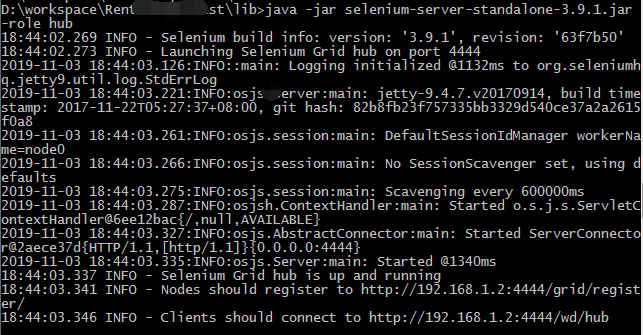
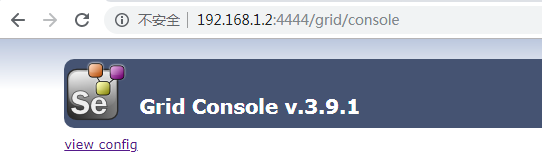
5、在浏览器输入 本机的IP 端口,打开grid,如:http://192.168.1.2:4444/grid/console,出现下图,代表启动成功,在B电脑的浏览器,输入A的IP端口访问grid成功
6、在B电脑也打开cmd窗口,进入selenium-server-standalone-2.48.0.jar 的目录,执行命令:java -jar selenium-server-standalone-2.48.0.jar -role webdriver -hub http://192.168.1.2:4444/grid/register -port 6655 ,设置B为node节点,端口号随便写一个,比如6666,讲该节点注册到主服务器A,执行命令后如下显示:
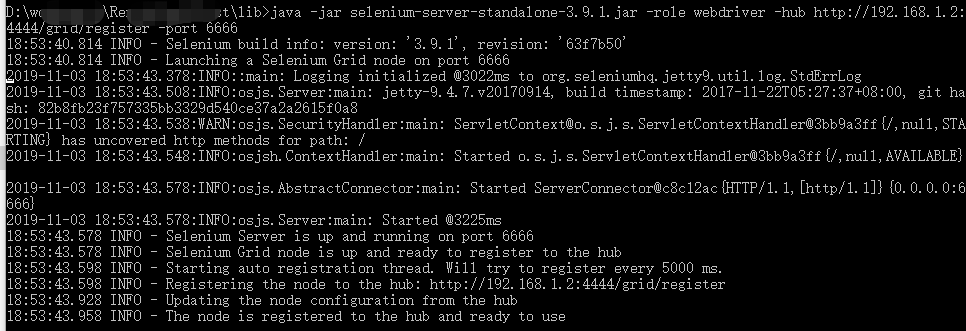
在A电脑的浏览器刷新grid地址,会出现Node的IP及配置信息

7、相关代码如下:
public static String nodeUrl = "http://192.168.1.5:6655/wd/hub";
@BeforeMethod
public void beforeMethod() throws MalformedURLException{
DesiredCapabilities capability = DesiredCapabilities.firefox();//设定远程方法使用Firefox浏览器
capability.setBrowserName("firefox");//设置node的浏览器为Firefox
//设置node使用的操作系统为WINDOWS,设置成Win10报:org.openqa.selenium.WebDriverException: No enum constant org.openqa.selenium.Platform.WIN10,没去找具体原因,有空再分析
capability.setPlatform(Platform.WINDOWS);
//设置node的Firefox的路径,如果用System.setProperty("webdriver.firefox.bin", "D:\\Program Files\\Mozilla Firefox\\firefox.exe");不起作用,设置不了远程服务器的firefox路径
capability.setCapability("firefox_binary", "D:\\Program Files\\Mozilla Firefox\\firefox.exe");//不设置时,报错selenium grid: Cannot find firefox binary in PATH.
driver = new RemoteWebDriver(new URL(nodeUrl), capability);//启动node的driver
driver.get("http://www.baidu.com/");
}
8、大概是这样,还有2个问题待解决
1)用selenium-server-standalone-3.9.1.jar,执行脚本会报Driver info: driver.version: unknown,可能用高版本的grid需要再配置其他配置
2)打开的火狐浏览器,总是默认打开火狐起始页,待解决
参考文档:https://www.cnblogs.com/zhangyachaun/p/4409480.html ,写的很全,对我帮助很大,分享给大家
----------------------------------------------------------------------------------------------------------------------------------------------------------------------------
远程IE浏览器设置:
1、在B服务器进行Hub节点注册使用如下命令
java -jar selenium-server-standalone-2.48.0.jar -role webdriver -hub http://192.168.1.2:4444/grid/register -Dwebdriver.ie.dirver="C:\IEDriverServer.exe" -port 6655 -maxSession 5 -browser browserName="internet explorer",maxInstances=5
2、设置远程方法:
DesiredCapabilities capability = DesiredCapabilities.internetExplorer();//设定远程方法使用internetExplorer浏览器
capability.setBrowserName("internetExplorer");//设置node的浏览器为internetExplorer
远程Chrome设置
1、在B服务器进行Hub节点注册使用如下命令
java -jar selenium-server-standalone-2.48.0.jar -role webdriver -hub http://192.168.1.2:4444/grid/register -Dwebdriver.chrome.dirver="C:\chromedriver.exe" -port 6655 -maxSession 5 -browser browserName="chrome",maxInstances=5
2、设置远程方法:
DesiredCapabilities capability = DesiredCapabilities.chrome();//设定远程方法使用chrome浏览器
capability.setBrowserName("chrome");//设置node的浏览器为chrome
学习selenium grid记录的更多相关文章
- Selenium Grid 学习笔记
Selenium Grid 学习笔记http://www.docin.com/p-765680298.html
- 转:Selenium Grid深入学习
应网友要求写一个用Selenium Grid控制多系统多浏览器并行执行test case的例子. 因为我这里有两台机子,我打算这样演示: 一台机子启动一个作为主点节的hub 和 一个作为次节点的hub ...
- 新人学习selenium哪些资源比较有帮助?
为什么学习selenium? selenium现在基本上成了页面自动化测试的标配,具体理由我在selenium 3.0发布这篇文章里已经说明过了.当一个东西成为标准以后,那么它的能量和潜力都是巨大的. ...
- Selenium-IDE,Selenium-RC ,Selenium grid以及 Selenium-Core
Selenium-IDE,Selenium-RC ,Selenium grid 以及 Selenium-Core Selenium 是一种 Web 应用的自动测试工具,通过模拟用户对 Web 页面的各 ...
- selenium grid 环境搭建
一.selenium grid简介 selenium grid可以同时在不同机器上测试不同浏览器,包含一个hub和多个node.node会发送配置信息到hub,hub记录并跟踪每一个node的配置信息 ...
- 搭建selenium grid简单配置
1.使用selenium提供的服务端独立jar包 :服务端.客户端都是运行于java7环境. 2.启动hub: hub配置文件如下: Java -jar selenium-server-standal ...
- Robot Framework + Selenium2Library环境下,结合Selenium Grid实施分布式自动化测试
最近一段时间,公司在推行自动化测试流程,本人有幸参与了自定义通用控件的关键字封装和脚本辅助编写.数据驱动管理.测试用例执行管理等一系列工具软件的研发工作,积累了一些经验,在此与大家做一下分享,也算是做 ...
- Java学习-007-Log4J 日志记录配置文件详解及实例源代码
此文主要讲述在初学 Java 时,常用的 Log4J 日志记录配置文件详解及实例源代码整理.希望能对初学 Java 编程的亲们有所帮助.若有不足之处,敬请大神指正,不胜感激!源代码测试通过日期为:20 ...
- Selenium Grid 运行报错 Exception thrown in Navigator.Start first time ->Error forwarding the new session Empty pool of VM for setup Capabilities
Selenium Grid 运行报错 : Exception thrown in Navigator.Start first time ->Error forwarding the new se ...
随机推荐
- UVA10779 Collectors Problem 【迁移自洛谷博客】
这是一道不错的练最大流建模的基础题. 这种题目审题是关键. Bob's friends will only exchange stickers with Bob, and they will give ...
- java ajax返回 Json 的 几种方式
原文:https://blog.csdn.net/qq_26289533/article/details/78749057 方式 1. : 自写代码转 Json 需要 HttpHttpServlet ...
- restful接口风格
一.定义 REST全称是Representational State Transfer, 中文意思是表述性状态转移. REST指的是一组架构约束条件和原则,如果一个架构符合REST的约束条件和原则,我 ...
- GET和POST是HTTP请求的两种基本方法,区别是什么!?
GET和POST是HTTP请求的两种基本方法,要说它们的区别,接触过WEB开发的人都能说出一二. 最直观的区别就是GET把参数包含在URL中,POST通过request body传递参数. 你可能自己 ...
- Activity(工作流-1)
1.activity自带数据表的含义(23张表) (1)资源库流程规则表 1)act_re_deployment 部署信息表 2)act_re_model 流程设计模型部署表 3)act_re_pr ...
- Vue学习笔记-作用域插槽
有时候我们希望子组件的内容由父组件决定如何展示,这个时候子组件的数据父组件并不能访问到,而作用域插槽的关键之处就在于,父组件能接收来自子组件的slot传递过来的参数. <div id=" ...
- Linux任务计划at
Linux任务计划at 一Linux任务计划介绍 Linux任务计划.周期性任务执行at:未来的某时间点执行一次任务batch:系统自行选择空闲时间去执行此处指定的任务cron:周期性运行某任务 二a ...
- PHP的Session机制解析 2
在鸟哥的博客看到对php session的过期时间的一篇文章,在此记录. 原文地址:http://www.laruence.com/2012/01/10/2469.html 以下是鸟哥博客原文: 今天 ...
- T1387:搭配购买(buy)
[题目描述] Joe觉得云朵很美,决定去山上的商店买一些云朵.商店里有n朵云,云朵被编号为1,2,…...,n,并且每朵云都有一个价值.但是商店老板跟他说,一些云朵要搭配来买才好,所以买一朵云则与这朵 ...
- LoadRunner内部结构(转)
LoadRunner内部结构 1, 被测系统是由驱动进程mdrv.exe(多线程驱动的进程)和r3vuser.exe来产生压力的,其中r3vuser.exe仿真应用程序的客户端, ...