
SpringBoot框架(1)--入门篇
什么是SpringBoot?
Spring Boot是由Pivotal团队提供的全新框架,其设计目的是用来简化新Spring应用的初始搭建以及开发过程。
特征
创建独立的Spring应用程序
直接嵌入Tomcat,Jetty或Undertow(无需部署WAR文件)
提供固定的“入门”依赖项以简化构建配置
尽可能自动配置Spring和第三方库
提供生产就绪功能,例如指标,运行状况检查和外部化配置
绝对没有代码生成,也不需要XML配置
快速入门
(1)新建空项目New Project
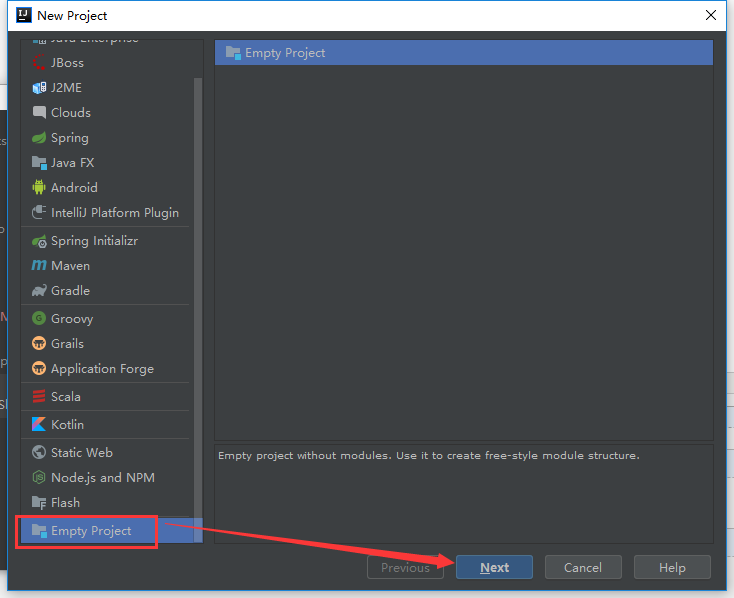
==》命名项目名称,并选择要保存的目录
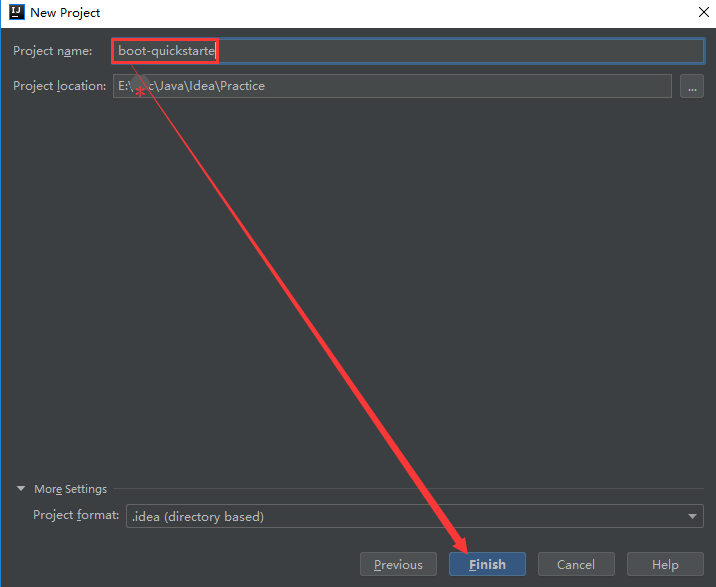
剩余步骤默认不用更改,直接ok即可。到此空白项目创建完成。
接下来在空白项目上建立模块(module)
(2)创建模块
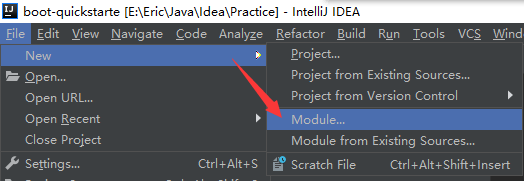
==》创建modules --> Maven --> 选择SDK --> Create from archetype --> org.apache.maven.archetypes

==>命名GroupId,ArtifactId

==》配置仓库
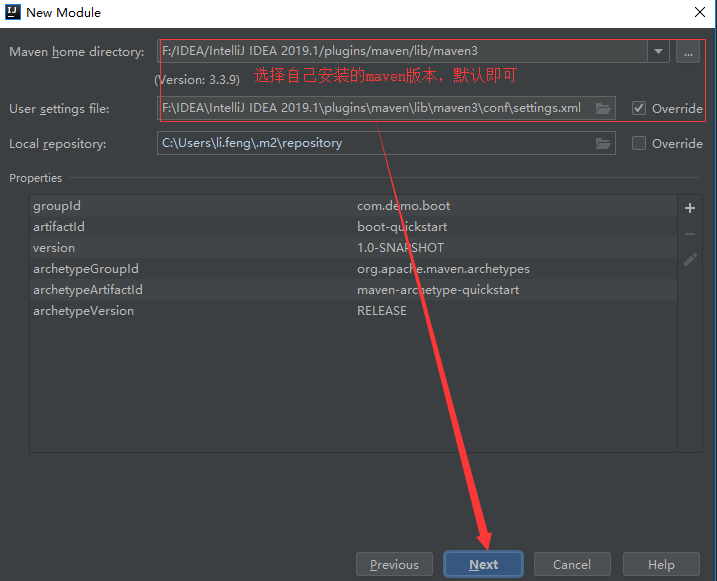
==》命名模块名字,最终完成模块的创建
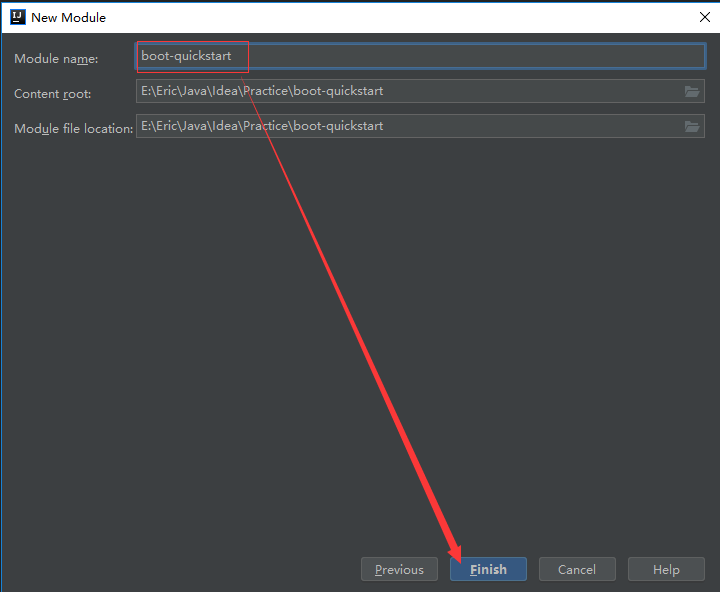
注:创建时,屏幕右下角提示如下,选择Enable Auto-Import即可

到此。模块创建完成
(3)配置项目配置文件(pom.xml)
 <parent>

     <groupId>org.springframework.boot</groupId>

     <artifactId>spring-boot-starter-parent</artifactId>

     <version>2.1.5.RELEASE</version>

 </parent>
 <dependency>

     <groupId>org.springframework.boot</groupId>

     <artifactId>spring-boot-starter-web</artifactId>

 </dependency>

(4)提供应用程序入口
 package com.demo.boot;

 import org.springframework.boot.SpringApplication;

 import org.springframework.boot.autoconfigure.SpringBootApplication;

 import org.springframework.context.ConfigurableApplicationContext;

 /**

  * Hello world!

  */

 @SpringBootApplication

 public class App {

     public static void main(String[] args) {

         ConfigurableApplicationContext context = SpringApplication.run(App.class, args);

     }

 }
(5)类的管理调用
==》pom.xml文件 添加类的依赖 spring-context和pring-boot-starter-web
    <dependencies>

         <dependency>

             <groupId>org.springframework</groupId>

             <artifactId>spring-context</artifactId>

             <version>5.1.7.RELEASE</version>

         </dependency>

         <dependency>

             <groupId>org.springframework.boot</groupId>

             <artifactId>spring-boot-starter-web</artifactId>

         </dependency>

     </dependencies>
==》创建类User.java
 package com.demo.boot;

 import org.springframework.stereotype.Component;

 /**

  * 使用@Component管理类

  */

 @Component//别名 -->默认为类名首字母小写

 public class User {

     @Override

     public String toString() {

         return "com.demo.boot.User:" + super.toString();

     }

 }
==>创建UserConfig类
 package com.demo.boot;

 import org.springframework.boot.SpringBootConfiguration;

 import org.springframework.context.annotation.Bean;

 /**

  * 通过@Configuration注解把User类交给Spring容器管理

  */

 @SpringBootConfiguration

 public class UserConfig {

     @Bean("createUser")默认别名,是方法名称

     public User createUser() {

         return new User();

     }

 }
==》应用程序入口
 package com.demo.boot;

 import org.springframework.boot.autoconfigure.SpringBootApplication;

 import org.springframework.context.annotation.AnnotationConfigApplicationContext;

 /**

  * Hello world!

  */

 @SpringBootApplication//@SpringBootApplication=@Configuration+@ComponentScan+@EnableAutoConfiguration

 public class App {

     public static void main(String[] args) {

         //ConfigurableApplicationContext context = SpringApplication.run(App.class, args);

         AnnotationConfigApplicationContext context = new AnnotationConfigApplicationContext("com.demo.boot");

         User user = context.getBean("user", User.class);//别名为类名首字母小写

         User user1 = context.getBean("createUser", User.class);//类别名为方法名

         UserConfig userConfig = context.getBean(UserConfig.class);//类别名为方法名

         System.out.print(user + "," + user1 + "," + userConfig);//实际通过springCGLIB代理类动态调用自定义方法(createUser)创建类实例

         //输出:com.demo.boot.User:com.demo.boot.User@4c15e7fd,com.demo.boot.User:com.demo.boot.User@23986957,com.demo.boot.UserConfig$$EnhancerBySpringCGLIB$$72899f9e@23f7d05d

         //context.close();

     }

 }
SpringBoot框架(1)--入门篇的更多相关文章
- Google C++测试框架系列入门篇:第三章 基本概念
上一篇:Google C++测试框架系列入门篇:第二章 开始一个新项目 原始链接:Basic Concepts 词汇表 版本号:v_0.1 基本概念 使用GTest你肯定会接触到断言这个概念.断言是用 ...
- Google C++测试框架系列入门篇:第二章 开始一个新项目
上一篇:Google C++测试框架系列入门篇:第一章 介绍:为什么使用GTest? 原始链接:Setting up a New Test Project 词汇表 版本号:v_0.1 开始一个新项目 ...
- 如何在Visual Studio 2017中使用C# 7+语法 构建NetCore应用框架之实战篇(二):BitAdminCore框架定位及架构 构建NetCore应用框架之实战篇系列 构建NetCore应用框架之实战篇(一):什么是框架,如何设计一个框架 NetCore入门篇:(十二)在IIS中部署Net Core程序
如何在Visual Studio 2017中使用C# 7+语法 前言 之前不知看过哪位前辈的博文有点印象C# 7控制台开始支持执行异步方法,然后闲来无事,搞着,搞着没搞出来,然后就写了这篇博文,不 ...
- Springboot(一):入门篇
什么是spring boot spring Boot是由Pivotal团队提供的全新框架,其设计目的是用来简化新Spring应用的初始搭建以及开发过程.该框架使用了特定的方式来进行配置,从而使开发人员 ...
- 高性能NIO框架Netty入门篇
http://cxytiandi.com/blog/detail/17345 Netty介绍 Netty是由JBOSS提供的一个java开源框架.Netty提供异步的.事件驱动的网络应用程序框架和工具 ...
- Google C++测试框架系列入门篇:第一章 介绍:为什么使用GTest?
原始链接:Introduction: Why Google C++ Testing Framework? 词汇表 版本号:v_0.1 介绍:为什么使用GTest? GTest帮助你写更好的C++测试代 ...
- spring boot入门篇
Spring Boot[快速入门] Spring Boot 概述 Build Anything with Spring Boot:Spring Boot is the starting point ...
- SpringBoot 第一篇:入门篇
作者:追梦1819 原文:https://www.cnblogs.com/yanfei1819/p/10819728.html 版权声明:本文为博主原创文章,转载请附上博文链接! 前言 博主从去年 ...
- Springboot快速入门篇,图文并茂
Springboot快速入门篇,图文并茂 文章已托管到GitHub,大家可以去GitHub查看阅读,欢迎老板们前来Star!搜索关注微信公众号 [码出Offer] 领取各种学习资料! image-20 ...
随机推荐
- 阶段3 1.Mybatis_11.Mybatis的缓存_5 缓存的概念
2.Mybatis中的缓存 什么是缓存 存在于内存中的临时数据. 为什么使用缓存 减少和数据库的交互次数,提高执行效率. 什么样的数据能使用缓存 ...
- 阶段3 1.Mybatis_03.自定义Mybatis框架_5.自定义Mybatis的编码-创建两个默认实现类并分析类之间的关系
把XMLConfigBuilder的包名补全 这样我们就可以调用里面的loadConfiguration方法了 创建工厂实现类 实现SqlSessionFactory的接口 实现接口里面的方法 把cf ...
- pyinstaller-python->exe
pip install pyinstaller. pyinstaller -F /home/base64_decode.py https://www.imooc.com/article/26772 h ...
- mount挂载相关指令
最近需要重新挂载一块数据盘,增加挂载设置,遇到一些问题做下记录. step1:df -h 或 lsblk 查看分区挂载和对应挂载的目录 /dev/xxx /data step2:umount /dev ...
- C#得到10000以内素数
偶数除了二都不是素数 一个数 n 如果是合数,那么它的所有的因子不超过sqrt(n)--n的开方 int i, j, n = 10000; for (i = 3; i <= n; i += 2) ...
- Python-自定义函数-参数
一.自定义函数参数 1.种类 (1)位置参数 "x"就是位置参数 #!/usr/bin/env python # -*- coding: utf-8 -*- #author: di ...
- Spark Netty 通信框架解析
1.RpcEndpoint: RPC端点 Spark针对每个节点(Client.Master.Worker)都称之为一个RpcEndpoint,且都实现RpcEndpoint接口,内部根据不同端点的需 ...
- 我的第一个Delphi DLL
library dd; { 使用字符串参数或嵌套字符串参数需要在uses子句中包括sharemm单元,并将BorlandMM.dll与您的应用程序一起发布. 否则需要对参数值使用PChar或Short ...
- 剑指offer-用两个栈来实现一个队列-队列与栈-python
用两个栈来实现一个队列,完成队列的Push和Pop操作. 队列中的元素为int类型. 思路:使用两个栈,stackA 用来接收node stackB 用来接收 stackA 的出栈 # -*- cod ...
- “百度杯”CTF比赛 十一月场--CrackMe01
测试文件:https://static2.ichunqiu.com/icq/resources/fileupload/CTF/BSRC/BSRC-11-3/CrackMe01_97D2BF0DBD2E ...