
Delphi7 客户端调用WebService(天气预报)
客户程序:
第一步:新建一个Application。
第二步:File----->New----->Other------>WebServices----->WSDL Importer
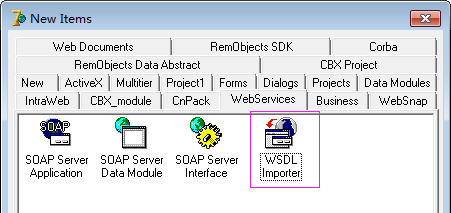
然后在Location of WSDL File or URL中填入:
http://10.22.30.61:36601/MonitorService.asmx?wsdl
或 http://www.webxml.com.cn/WebServices/WeatherWebService.asmx?wsdl,然后确定即生成了一个新的接口定义单元。
第二步:在主form上放上一个按钮和一个Httprio组件(在WebServices页上),并引用第二个单元(即通过WSDL Importer自动生成的单元)
在Httprio的属性页上的WsdlLocation里面填上http://www.webxml.com.cn/WebServices/WeatherWebService.asmx?wsdl;然后在Httprio属性页上的Port和Service上选择上相应的数据即可。
第三步:书写客户调用程序,原代码如下:
procedure TForm1.Button1Click(Sender: TObject);
var
i: Integer;
TMP_Weather: ArrayOfString;
begin
//http://developer.51cto.com/art/200908/147125.htm
//http://www.webxml.com.cn/WebServices/WeatherWebService.asmx?wsdl
TMP_Weather := (HTTPRIO1 as WeatherWebServiceSoap).getWeatherbyCityName('53698'); //石家庄
Memo1.Lines.Clear;
for i := 0 to 22 do
begin
Memo1.Lines.Add(TMP_Weather[i]);
end;
end;
---- 错误信息为:
Project Project1.exe raised exception class ERemotableException with message '服务器无法处理请求。 ---> 未将对象引用设置到对象的实例。'. Process stopped. Use Step or Run to continue.
------解决方案--------------------------------------------------------
修改一下WeatherWebService.pas这个单元,如下所示,一切就OK啦。
Delphi(Pascal) code
if HTTPRIO = nil then RIO := THTTPRIO.Create(nil) else RIO := HTTPRIO; RIO.HTTPWebNode.UseUTF8InHeader:= True; //这里加上这一句 try Result := (RIO as TestStationSoap); if UseWSDL then begin RIO.WSDLLocation := Addr; RIO.Service := defSvc; RIO.Port := defPrt; end else RIO.URL := Addr; finally if (Result = nil) and (HTTPRIO = nil) then RIO.Free; end; InvRegistry.RegisterInterface(TypeInfo(WeatherWebServiceSoap), 'http://WebXml.com.cn/', 'utf-8'); InvRegistry.RegisterDefaultSOAPAction(TypeInfo(WeatherWebServiceSoap), 'http://WebXml.com.cn/%operationName%'); RemClassRegistry.RegisterXSInfo(TypeInfo(ArrayOfString), 'http://WebXml.com.cn/', 'ArrayOfString'); RemClassRegistry.RegisterXSClass(getSupportDataSetResult, 'http://WebXml.com.cn/', 'getSupportDataSetResult'); InvRegistry.RegisterInvokeOptions(TypeInfo(WeatherWebServiceSoap), ioDocument);//这里加上这一句------解决方案--------------------------------------------------------补充一下,如果你用到HTTPRIO1去调webservice接口那就记得在前面加上这句HTTPRIO1.HTTPWebNode.UseUTF8InHeader:= True;//解决汉字乱码问题
本文出自:http://blog.csdn.net/gjtao1130/article/details/12193235 只是做部分修正。
//-------------以下是本人模仿的例子,窗体没有用到Httprio组件,通过GetWeatherWebServiceSoap函数处理即可。
 // ************************************************************************ //

 // The types declared in this file were generated from data read from the

 // WSDL File described below:

 // WSDL     : http://www.webxml.com.cn/WebServices/WeatherWebService.asmx?wsdl

 // Encoding : utf-8

 // Version  : 1.0

 // (2014/12/10 11:28:28 - 1.33.2.5)

 // ************************************************************************ //

 unit WeatherWebService;

 interface

 uses InvokeRegistry, SOAPHTTPClient, Types, XSBuiltIns;

 type

   // ************************************************************************ //

   // The following types, referred to in the WSDL document are not being represented

   // in this file. They are either aliases[@] of other types represented or were referred

   // to but never[!] declared in the document. The types from the latter category

   // typically map to predefined/known XML or Borland types; however, they could also

   // indicate incorrect WSDL documents that failed to declare or import a schema type.

   // ************************************************************************ //

   // !:string          - "http://www.w3.org/2001/XMLSchema"

   getSupportDataSetResult = class;              { "http://WebXml.com.cn/" }

   ArrayOfString = array of WideString;          { "http://WebXml.com.cn/" }

   // ************************************************************************ //

   // Namespace : http://WebXml.com.cn/

   // ************************************************************************ //

   getSupportDataSetResult = class(TRemotable)

   private

     Fschema: WideString;

   published

     property schema: WideString read Fschema write Fschema;

   end;

   // ************************************************************************ //

   // Namespace : http://WebXml.com.cn/

   // soapAction: http://WebXml.com.cn/%operationName%

   // transport : http://schemas.xmlsoap.org/soap/http

   // binding   : WeatherWebServiceSoap

   // service   : WeatherWebService

   // port      : WeatherWebServiceSoap

   // URL       : http://www.webxml.com.cn/WebServices/WeatherWebService.asmx

   // ************************************************************************ //

   WeatherWebServiceSoap = interface(IInvokable)

   ['{0AF62441-3FA0-F5D8-B6B8-B486F32F9DDE}']

     function  getSupportCity(const byProvinceName: WideString): ArrayOfString; stdcall;

     function  getSupportProvince: ArrayOfString; stdcall;

     function  getSupportDataSet: getSupportDataSetResult; stdcall;

     function  getWeatherbyCityName(const theCityName: WideString): ArrayOfString; stdcall;

     function  getWeatherbyCityNamePro(const theCityName: WideString; const theUserID: WideString): ArrayOfString; stdcall;

   end;

 function GetWeatherWebServiceSoap(UseWSDL: Boolean=System.False; Addr: string=''; HTTPRIO: THTTPRIO = nil): WeatherWebServiceSoap;

 implementation

 function GetWeatherWebServiceSoap(UseWSDL: Boolean; Addr: string; HTTPRIO: THTTPRIO): WeatherWebServiceSoap;

 const

   defWSDL = 'http://www.webxml.com.cn/WebServices/WeatherWebService.asmx?wsdl';

   defURL  = 'http://www.webxml.com.cn/WebServices/WeatherWebService.asmx';

   defSvc  = 'WeatherWebService';

   defPrt  = 'WeatherWebServiceSoap';

 var

   RIO: THTTPRIO;

 begin

   Result := nil;

   if (Addr = '') then

   begin

     if UseWSDL then

       Addr := defWSDL

     else

       Addr := defURL;

   end;

   if HTTPRIO = nil then

     RIO := THTTPRIO.Create(nil)

   else

     RIO := HTTPRIO;

   RIO.HTTPWebNode.UseUTF8InHeader:= True;  //这里加上这一句

   try

     Result := (RIO as WeatherWebServiceSoap);

     if UseWSDL then

     begin

       RIO.WSDLLocation := Addr;

       RIO.Service := defSvc;

       RIO.Port := defPrt;

     end else

       RIO.URL := Addr;

   finally

     if (Result = nil) and (HTTPRIO = nil) then

       RIO.Free;

   end;

 end;

 initialization

   InvRegistry.RegisterInterface(TypeInfo(WeatherWebServiceSoap), 'http://WebXml.com.cn/', 'utf-8');

   InvRegistry.RegisterDefaultSOAPAction(TypeInfo(WeatherWebServiceSoap), 'http://WebXml.com.cn/%operationName%');

   RemClassRegistry.RegisterXSInfo(TypeInfo(ArrayOfString), 'http://WebXml.com.cn/', 'ArrayOfString');

   RemClassRegistry.RegisterXSClass(getSupportDataSetResult, 'http://WebXml.com.cn/', 'getSupportDataSetResult');

   InvRegistry.RegisterInvokeOptions(TypeInfo(WeatherWebServiceSoap), ioDocument);//这里加上这一句

 end.
自动生成的WebService文件
 unit Unit1;

 interface

 uses

   Windows, Messages, SysUtils, Variants, Classes, Graphics, Controls, Forms,

   Dialogs, StdCtrls, ExtCtrls;//, InvokeRegistry, Rio, SOAPHTTPClient;

 type

   TForm1 = class(TForm)

     mmo1: TMemo;

     pnl1: TPanel;

     btn1: TButton;

     procedure btn1Click(Sender: TObject);

   private

     { Private declarations }

   public

     { Public declarations }

   end;

 var

   Form1: TForm1;

 implementation

 {$R *.dfm}

  //网页例子 http://blog.csdn.net/gjtao1130/article/details/12193235

 uses WeatherWebService;

 procedure TForm1.btn1Click(Sender: TObject);

 var

   i: Integer;

   TMP_Weather: ArrayOfString;

 begin

   //http://developer.51cto.com/art/200908/147125.htm

   //http://www.webxml.com.cn/WebServices/WeatherWebService.asmx?wsdl

   {TMP_Weather := (htpr1 as WeatherWebServiceSoap).getSupportCity('广西');//玉林 (59453)

   mmo1.Lines.Clear;

   for i := 0 to 10 do

   begin

     mmo1.Lines.Add(TMP_Weather[i]);

   end;  }

   //TMP_Weather := (htpr1 as WeatherWebServiceSoap).getWeatherbyCityName('59453'); //深圳

   TMP_Weather := GetWeatherWebServiceSoap(False,'',nil).getWeatherbyCityName('');

   //GetWeatherWebServiceSoap(Self).getWeatherbyCityName('59453');                                                                       //玉林 (59453)

   mmo1.Lines.Clear;

   for i :=  to  do

   begin

     mmo1.Lines.Add(TMP_Weather[i]);

   end;

 end;

 end.
窗体单元文件
 object Form1: TForm1

   Left =

   Top =

   Width =

   Height =

   Caption = '天气预报WebService'

   Color = clBtnFace

   Font.Charset = DEFAULT_CHARSET

   Font.Color = clWindowText

   Font.Height = -

   Font.Name = 'MS Sans Serif'

   Font.Style = []

   OldCreateOrder = False

   PixelsPerInch =

   TextHeight =

   object mmo1: TMemo

     Left =

     Top =

     Width =

     Height =

     Align = alClient

     Color = clMoneyGreen

     ImeName = '中文 (简体) - 搜狗拼音输入法'

     ScrollBars = ssVertical

     TabOrder =

   end

   object pnl1: TPanel

     Left =

     Top =

     Width =

     Height =

     Align = alTop

     Color = clGradientActiveCaption

     TabOrder =

     object btn1: TButton

       Left =

       Top =

       Width =

       Height =

       Caption = '测试天气信息'

       TabOrder =

       OnClick = btn1Click

     end

   end

 end
窗体文件
Delphi7 客户端调用WebService(天气预报)的更多相关文章
- 用JDK自带的工具生成客户端调用Webservice的代码
JAVA下客户端调用Webservice代码简直是让人心生畏惧,今日尝试,做记录如下,参考网上的众多解决方案,下面这种方式是比较简单的. 在jdk的bin目录下有一个wsimport.exe的工具,使 ...
- axis1客户端调用webservice的通用代码
1.axis1 作为web service 客户端时,调用web service 服务端的通用代码 String url = "http://www.webxml.com.cn/webser ...
- WinForm客户端调用 WebService时 如何启用Session
WinForm客户端调用 WebService时 如何启用Session 摘自: http://www.cnblogs.com/swtseaman/archive/2011/04/18/2020176 ...
- C#开发WEBService服务 C++开发客户端调用WEBService服务
编写WEBService服务端应用程序并部署 http://blog.csdn.net/u011835515/article/details/47615425 编写调用WEBService的C++客户 ...
- cxf 和 httpclient 客户端调用 webservice 接口
一.cxf 生成 webservice 客户端 1.接口路径 http://ws.webxml.com.cn/WebServices/WeatherWS.asmx 2.进入你需要放置 webservi ...
- 使用AXIS2客户端调用 WEBSERVICE
问题 在调用WEBSERVICE时,可以使用wsdl2java生成java代码,调用接口,这种方法在接口固定的情况下是一种不错的选择,如果需要动态调用接口,那么这样就行不通了. 解决办法 1.直接构建 ...
- Delphi 客户端调用Webservice 的TClientdataset 报出“http://www.borland.com/namespaces/Types-IAppServerSOAP”
http://www.borland.com/namespaces/Types-IAppServerSOAP 服务器未能识别 HTTP 头 SOAPAction 的值 (2011-04-25 16:4 ...
- java客户端调用webService
啥也不想说,以前使用的方法突然不行了.各种网搜(记得别忘记到jar包哦:axis.jar) 看代码,第一种方式,也就是以前的方式: 改方式不用表名参数名称 public static String i ...
- CXF发布webService服务以及客户端调用
这篇随笔内容是CXF发布webService服务以及客户端调用的方法 CXF是什么? 开发工作之前需要下载CXF和安装 下载地址:http://cxf.apache.org 安装过程: <1&g ...
随机推荐
- [页面滚动到底部]jquery $(window).height()取值等于$(document).height()的问题
问题现象:JSP中头部引用了某个head.jsp,在videoList.jsp中生成片段时如下 实际最终生成的HTML如下: <!DOCTYPE html>没有解析到,原因找到了,先想办法 ...
- maven编译时如何忽略单元测试
共有两种解决办法 1.通过在命令行设置:-Dmaven.test.skip=true 如:mvn clean install tomcat:run -Dmaven.test.skip=true 2.通 ...
- 25个增强iOS应用程序性能的提示和技巧(中级篇)(2)
25个增强iOS应用程序性能的提示和技巧(中级篇)(2) 2013-04-16 14:42 破船之家 beyondvincent 字号:T | T 本文收集了25个关于可以提升程序性能的提示和技巧,分 ...
- 消息队列MQ - Apache ActiveMQ
Apache ActiveMQ是Apache软件基金会所研发的开放源码消息中间件:由于ActiveMQ是一个纯Jave程式,因此只需要操作系统支持Java虚拟机,ActiveMQ便可执行. 1.que ...
- Genymotion
@Genymotion相关文件下载地址 http://pan.baidu.com/s/1nu9nReh @虚拟机网络代理设置 Normal 0 7.8 磅 0 2 false false false ...
- grep -i 不区分大小写
# rpm -qa|grep -i "mysql" MySQL-server--.rhel5.x86_64 MySQL-test--.rhel5.x86_64 MySQL-embe ...
- C#学习笔记----.net操作进程
进程(Process)是Windows系统中的一个基本概念,它包含着一个运行程序所需要的资源.进程之间是相对独立的,一个进程无法直接访问另一个进程的数据(除非分布式),一个进程运行的失败也不会影响其他 ...
- Redis笔记(八)Redis的持久化
Redis相比Memcached的很大一个优势是支持数据的持久化, 通常持久化的场景一个是做数据库使用,另一个是Redis在做缓存服务器时,防止缓存失效. Redis的持久化主要有快照Snapshot ...
- 虚拟机Class文件结构笔记
>>Java语言的平台无关性 Java是与平台无关的语言,“一次编写,到处运行”,这一方面依赖于Java源代码编译后生成的存储字节码的文件,即Class文件是语言和平台无关的: 另一方面依 ...
- .NET生成带Logo的二维码
使用ThoughtWorks.QRCode生成,利用这个库来生成带Logo的二维码(就是中间嵌了一个图片的二维码),直接见代码: HttpContext context = HttpContext.C ...