
Android课程---布局管理器中的线性布局


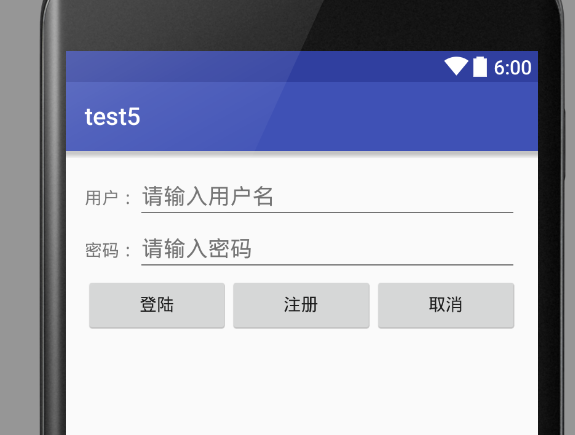
线性布局实例:
<?xml version="1.0" encoding="utf-8"?>
<LinearLayout xmlns:android="http://schemas.android.com/apk/res/android"
    xmlns:tools="http://schemas.android.com/tools"
    android:layout_width="match_parent"
    android:layout_height="match_parent"

    tools:context="com.hanqi.test5.MainActivity"
    android:orientation="vertical"
    android:gravity="center_horizontal"

    android:padding="16dp">

    <!--orientation改方向   vertical垂直-->

    <LinearLayout
        android:layout_width="match_parent"
        android:layout_height="wrap_content">
        <TextView
            android:layout_width="wrap_content"
            android:layout_height="wrap_content"
            android:text="用户:" />

        <EditText
            android:layout_width="match_parent"
            android:layout_height="wrap_content"
            android:hint="请输入用户名"/>
    </LinearLayout>
    <LinearLayout
        android:layout_width="match_parent"
        android:layout_height="wrap_content">
        <TextView
            android:layout_width="wrap_content"
            android:layout_height="wrap_content"
            android:text="密码:"/>

        <EditText
            android:layout_width="match_parent"
            android:layout_height="wrap_content"
            android:hint="请输入密码"
            android:password="true"/>
    </LinearLayout>
    <LinearLayout
        android:layout_width="match_parent"
        android:layout_height="wrap_content"
        android:gravity="center_horizontal">
    <Button
        android:layout_width="wrap_content"
        android:layout_height="wrap_content"
        android:text="登陆"
        android:layout_weight="1"/>
        <!--权重:可以让按钮按屏幕长度的比例分配-->

    <Button
        android:layout_width="wrap_content"
        android:layout_height="wrap_content"
        android:text="注册"
        android:id="@+id/button2"
        android:layout_weight="1"/>
     <Button
            android:layout_width="wrap_content"
            android:layout_height="wrap_content"
            android:text="取消"
            android:layout_weight="1"/>
    </LinearLayout>

</LinearLayout>
效果:
Android课程---布局管理器中的线性布局的更多相关文章
- Android布局管理器-使用TableLayout表格布局管理器实现简单的用户登录页面
场景 Android布局管理器-使用FrameLayout帧布局管理器显示层叠的正方形以及前景照片: https://blog.csdn.net/BADAO_LIUMANG_QIZHI/article ...
- java 图形化小工具Abstract Window Toolit ;布局管理器FlowLayout流式布局;BorderLayout边界布局;GridLayout网格布局;CardLayou重叠卡片布局;BoxLayout方框布局;绝对定位
1.FlowLayout流式布局管理器: FlowLayout布局管理器中,组件像水流一样向某方向流动(排列),遇到障碍(边界)就折回,重头开始排列 .在默认情况下,FlowLayout局管理器从左向 ...
- Android布局管理器-使用FrameLayout帧布局管理器显示层叠的正方形以及前景照片
场景 Android布局管理器-使用LinearLayout实现简单的登录窗口布局: https://blog.csdn.net/BADAO_LIUMANG_QIZHI/article/details ...
- android中的常用布局管理器(三)
接上篇博客 (5)TableLayout 表格布局管理器 在android中,线性布局和表格布局用的是最多的. 在很多的输出操作中,往往会使用表格的形式对显示的数据进行排版,tablelayo ...
- Android 布局管理器
为了更好地管理Android应用程序的用户界面组件,Android它提供了一个布局管理.通过使用布局管理,Android具有良好的平台无关的图形用户界面应用程序. 平时,推荐布局管理器来管理分布式组件 ...
- 二、Android应用的界面编程(二)布局管理器
一.线性布局所有布局都可以作为容器类使用,因此可以调用多个重载的addView()向布局管理器中添加组件.实际上,我们完全可以用一个布局管理器嵌套到其他布局管理器中---因为布局管理器也继承了View ...
- Android UI组件:布局管理器
为了更好的管理Android应用的用户界面中的组件,Android提供了布局管理器.通过使用布局管理器,Android应用的图形用户界面具有良好的平台无关性.通常,推荐使用布局管理器来管理组件的分布. ...
- Android布局管理器(表格布局)
表格布局有TableLayout所代表,TableLayout继承了LinearLayout,因此他的本质依然是LinearLayout. 表格布局采用行.列的形式来进行管理,在使用的时候不需要声明多 ...
- JAVA中GridBagLayout布局管理器应用详解
很多情况下,我们已经不需要通过编写代码来实现一个应用程序的图形界面,而是通过强大的IDE工具通过拖拽辅以简单的事件处理代码即可很轻松的完成.但是我们不得不面对这样操作存在的一些问题,有时候我们希望能够 ...
随机推荐
- Android打包的那些事
使用gradle打包apk已经成为当前主流趋势,我也在这个过程中经历了各种需求,并不断结合gradle新的支持,一一改进.在此,把这些相关的东西记录,做一总结. 1. 替换AndroidManifes ...
- FastMM 定位内存泄露的代码位置
FastMM 定位内存泄露的代码位置 开源的FastMM,使用很简单,在工程的第一行引用FastMM4即可(注意,一定要在第一个Uses的位置),可以在调试程序时提示内存泄露情况,还可以生成报告. 在 ...
- 【CLR in c#】事件
1.事件模型建立在委托的基础上. 2,定义事件编译器会做三个动作,第一个构造具有委托类型的字段,事件发生时会通知这个列表中的委托. 第二个构造的是一个添加关注的方法+=. 第三个构造是一个注销事件关 ...
- server返回arraylist时,juqery在客户端的处理
首先,要添加命名控件如下: using System.Web.Services; server端的方法 [WebMethod()] public static ArrayList GetAuthB ...
- Storm分布式实时流计算框架相关技术总结
Storm分布式实时流计算框架相关技术总结 Storm作为一个开源的分布式实时流计算框架,其内部实现使用了一些常用的技术,这里是对这些技术及其在Storm中作用的概括介绍.以此为基础,后续再深入了解S ...
- [转]Maven实现直接部署Web项目到Tomcat7
From:http://my.oschina.net/angel243/blog/178554 http://yuandingjiema.iteye.com/blog/1752544 以前在项目中很少 ...
- 【转】敏捷开发 Scrum 总结
转:http://www.open-open.com/lib/view/open1330413325514.html 最近把之前学习 Scrum 的资料整理为一篇文档,在接下来的团队和项目开发中,根据 ...
- SCOI 2013 密码 & 乱搞
题意: Fish 是一条生活在海里的鱼.有一天他很无聊,就到处去寻宝.他找到了位于海底深处的宫殿,但是一扇带有密码锁的大门却阻止了他的前进.通过翻阅古籍,Fish 得知了这个密码的相关信息:1. 该密 ...
- ACM Longest Repeated Sequence
Description You are given a sequence of integers, A = a1, a2, ... an. A consecutive subsequence of A ...
- jquery validate学习心得
据说,javascript最初的由来就是为了解决表单的验证问题,当然现在的js已经能够用来做各种各样炫酷的效果,不过表单验证一直以来都是js很重要的一个用途(在博客园第一篇博客,不知道说些什么开头~~ ...