
Android课程---布局管理器中的线性布局


线性布局实例:
<?xml version="1.0" encoding="utf-8"?>
<LinearLayout xmlns:android="http://schemas.android.com/apk/res/android"
    xmlns:tools="http://schemas.android.com/tools"
    android:layout_width="match_parent"
    android:layout_height="match_parent"

    tools:context="com.hanqi.test5.MainActivity"
    android:orientation="vertical"
    android:gravity="center_horizontal"

    android:padding="16dp">

    <!--orientation改方向   vertical垂直-->

    <LinearLayout
        android:layout_width="match_parent"
        android:layout_height="wrap_content">
        <TextView
            android:layout_width="wrap_content"
            android:layout_height="wrap_content"
            android:text="用户:" />

        <EditText
            android:layout_width="match_parent"
            android:layout_height="wrap_content"
            android:hint="请输入用户名"/>
    </LinearLayout>
    <LinearLayout
        android:layout_width="match_parent"
        android:layout_height="wrap_content">
        <TextView
            android:layout_width="wrap_content"
            android:layout_height="wrap_content"
            android:text="密码:"/>

        <EditText
            android:layout_width="match_parent"
            android:layout_height="wrap_content"
            android:hint="请输入密码"
            android:password="true"/>
    </LinearLayout>
    <LinearLayout
        android:layout_width="match_parent"
        android:layout_height="wrap_content"
        android:gravity="center_horizontal">
    <Button
        android:layout_width="wrap_content"
        android:layout_height="wrap_content"
        android:text="登陆"
        android:layout_weight="1"/>
        <!--权重:可以让按钮按屏幕长度的比例分配-->

    <Button
        android:layout_width="wrap_content"
        android:layout_height="wrap_content"
        android:text="注册"
        android:id="@+id/button2"
        android:layout_weight="1"/>
     <Button
            android:layout_width="wrap_content"
            android:layout_height="wrap_content"
            android:text="取消"
            android:layout_weight="1"/>
    </LinearLayout>

</LinearLayout>
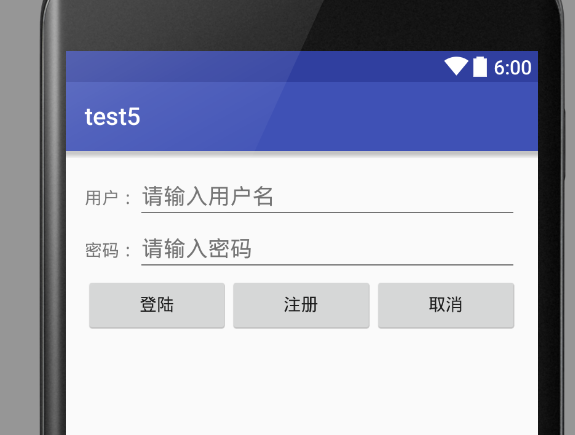
效果:
Android课程---布局管理器中的线性布局的更多相关文章
- Android布局管理器-使用TableLayout表格布局管理器实现简单的用户登录页面
场景 Android布局管理器-使用FrameLayout帧布局管理器显示层叠的正方形以及前景照片: https://blog.csdn.net/BADAO_LIUMANG_QIZHI/article ...
- java 图形化小工具Abstract Window Toolit ;布局管理器FlowLayout流式布局;BorderLayout边界布局;GridLayout网格布局;CardLayou重叠卡片布局;BoxLayout方框布局;绝对定位
1.FlowLayout流式布局管理器: FlowLayout布局管理器中,组件像水流一样向某方向流动(排列),遇到障碍(边界)就折回,重头开始排列 .在默认情况下,FlowLayout局管理器从左向 ...
- Android布局管理器-使用FrameLayout帧布局管理器显示层叠的正方形以及前景照片
场景 Android布局管理器-使用LinearLayout实现简单的登录窗口布局: https://blog.csdn.net/BADAO_LIUMANG_QIZHI/article/details ...
- android中的常用布局管理器(三)
接上篇博客 (5)TableLayout 表格布局管理器 在android中,线性布局和表格布局用的是最多的. 在很多的输出操作中,往往会使用表格的形式对显示的数据进行排版,tablelayo ...
- Android 布局管理器
为了更好地管理Android应用程序的用户界面组件,Android它提供了一个布局管理.通过使用布局管理,Android具有良好的平台无关的图形用户界面应用程序. 平时,推荐布局管理器来管理分布式组件 ...
- 二、Android应用的界面编程(二)布局管理器
一.线性布局所有布局都可以作为容器类使用,因此可以调用多个重载的addView()向布局管理器中添加组件.实际上,我们完全可以用一个布局管理器嵌套到其他布局管理器中---因为布局管理器也继承了View ...
- Android UI组件:布局管理器
为了更好的管理Android应用的用户界面中的组件,Android提供了布局管理器.通过使用布局管理器,Android应用的图形用户界面具有良好的平台无关性.通常,推荐使用布局管理器来管理组件的分布. ...
- Android布局管理器(表格布局)
表格布局有TableLayout所代表,TableLayout继承了LinearLayout,因此他的本质依然是LinearLayout. 表格布局采用行.列的形式来进行管理,在使用的时候不需要声明多 ...
- JAVA中GridBagLayout布局管理器应用详解
很多情况下,我们已经不需要通过编写代码来实现一个应用程序的图形界面,而是通过强大的IDE工具通过拖拽辅以简单的事件处理代码即可很轻松的完成.但是我们不得不面对这样操作存在的一些问题,有时候我们希望能够 ...
随机推荐
- Git 使用命令
$ git add . $ git commit -m "html files created 20160308 16:08" $ git push origin master 设 ...
- Bestcoder round #65 && hdu 5592 ZYB's Premutation 线段树
Time Limit: 2000/1000 MS (Java/Others) Memory Limit: 131072/131072 K (Java/Others)Total Submissio ...
- sql日期格式化
0 或 100 (*) 默认值 mon dd yyyy hh:miAM(或 PM) 1 101 美国 mm/dd/yyyy ...
- iOS Xcode个人常用插件
1.AdjustFontSize 按command +/-进行字体大小调整 2.ATProperty @property专用,strong.assign.copy.weak IBOutlet 3.Ba ...
- IDE-Sublime【1】-JsFormat插件格式化缩进问题
JsFormat插件格式化Javascript代码的快捷键是ctrl+alt+f,发现默认缩进2个空格,但习惯上是4个空格,这里需要手动设置一下. 操作步骤: 1.打开Preferences-> ...
- 图解Storm
问题导读:1.你认为什么图形可以显示hadoop与storm的区别?(电梯)2.本文是如何形象讲解hadoop与storm的?(离线批量处理.实时流式处理)3.hadoop map/reduce对应s ...
- Grunt vs Gulp
grunt vs gulp 虽然gulp已经出来很久了,但是一直没有去使用过.得益于最近项目需要,就尝试了一下,以下从几个要点讲一下grunt和gulp使用的区别,侧重讲一下在使用gulp过程中发现的 ...
- hdu1272 小希的迷宫
Problem Description 上次Gardon的迷宫城堡小希玩了很久(见Problem B),现在她也想设计一个迷宫让Gardon来走.但是她设计迷宫的思路不一样,首先她认为所有的通道都应该 ...
- Leetcode Combination Sum II
Given a collection of candidate numbers (C) and a target number (T), find all unique combinations in ...
- [知识点]SPFA算法
// 此博文为迁移而来,写于2015年4月9日,不代表本人现在的观点与看法.原始地址:http://blog.sina.com.cn/s/blog_6022c4720102vx93.html 1.前言 ...