
gravity、layout_gravity及orientation
gravity、layout_gravity及orientation
最近在弄一个简单的界面:横向,添加一张准备好的背景图,在界面右边居中放置一个按钮。实现过程中发现对布局的主要属性没有想象中地那么熟悉,又重新找资料树梳理了一遍,这里总结一下。
1、gravity、layout_gravity及orientation基本概念
gravity,中文意思为重心(理科生不会陌生吧),表示组件(View)横向和纵向的停靠位置。如果不进行任何设置,默认是靠左。
android:gravity,对组件本身来说的,作用是设置表示组件包含的内容显示在表示组件的什么位置,默认值为左侧。最常见的例子就是组件上的文本,如android:gravity=”center”,那么文本显示位置为垂直和水平方向均居中。
android:layout_gravity,相对于包含该组件(元素)的父组件来说的,设置该组件在父组件的显示位置。若android:layout_gravity="center_vertical",那么该组件在父组件中的位置为垂直方向居中,但水平方向可能是靠左的。orientation,线性布局时以列或行来显示内部子元素,注意在其他布局一般用不到该属性,如AbsoluteLayout等。该属性默认是水平排列(horizontal),即以行的形式来布置包含的子组件,在实际应用程序的开发中用得较多是垂直排布,即不一定要进行如下设定:android:orientation=”vertical”。
2、gravity与layout_gravity属性介绍
top,Put the object at the top of its container, not changing its size。将对象放在其容器的顶部,不改变其大小。
bottom,Put the object at the bottom of its container, not changing its size。将对象放在其容器的底部,不改变其大小。
left,Put the object at the left edge of its container, not changing its size。将对象放在其容器的左侧,不改变其大小。
right ,Put the object at the right edge of its container, not changing its size。将对象放在其容器的右侧,不改变其大小。
center_vertical,Place object in the vertical center of its container, not changing its size。将对象纵向居中,不改变其大小。垂直对齐方式:垂直方向上居中对齐。
fill_vertical,Grow the vertical size of the object if needed so it completely fills its container。必要的时候增加对象的纵向大小,以完全充满其容器。垂直方向填充。
center_horizontal,Place object in the horizontal center of its container, not changing its size。将对象横向居中,不改变其大小。水平对齐方式:水平方向上居中对齐
fill_horizontal, Grow the horizontal size of the object if needed so it completely fills its container。必要的时候增加对象的横向大小,以完全充满其容器。
center,Place the object in the center of its container in both the vertical and horizontal axis, not changing its size。将对象横纵居中,不改变其大小。
fill,Grow the horizontal and vertical size of the object if needed so it completely fills its container。This is the default。必要的时候增加对象的横纵向大小,以完全充满其容器。水平方向填充。
clip_vertical,Additional option that can be set to have the top and/or bottom edges of the child clipped to its container's bounds。 The clip is based on the vertical gravity: a top gravity clips the bottom edge, a bottom gravity clips the top edge, and neither clips both edges。附加选项,用于按照容器的边来剪切对象的顶部和/或底部的内容。 剪切基于其纵向对齐设置:顶部对齐时,剪切底部;底部对齐时剪切顶部;除此之外剪切顶部和底部。垂直方向裁剪。
clip_horizontal,Additional option that can be set to have the left and/or right edges of the child clipped to its container's bounds。 The clip is based on the horizontal gravity: a left gravity clips the right edge, a right gravity clips the left edge, and neither clips both edges。附加选项,用于按照容器的边来剪切对象的左侧和/或右侧的内容。 剪切基于其横向对齐设置:左侧对齐时,剪切右侧;右侧对齐时剪切左侧;除此之外剪切左侧和右侧。水平方向裁剪。
3、xml代码实现
界面的横向设置与背景图的添加很容易实现,针对按钮靠右居中,刚开始没有想到利用orientation这个属性,想当然地以为layout_gravity能够搞定,所以过程有点波折。
整体设计思路为:最外层放置一个LinearLayout,设置子组件的布局为垂直方向居中并靠右,代码如下:
 android:layout_width="match_parent"

 android:layout_height="match_parent"

 android:gravity="center_vertical|right"

 android:background="@drawable/login_bg"
里层再放置一个LinearLayout,用来放置具体的按钮。通过上一步的设置,该LinearLayout显示在了界面的右边,并且是垂直方向居中(其实一般应用中是让该LinearLayout的layout_height属性为match_parent,故父组件中gravity属性的center_vertical值可以不添加)。
到这里,完成了大半,接下来就是添加按钮。注意,目标是让按钮在界面上靠右并居中。刚开始将内层LinearLayout的gravity属性设置为垂直居中,纵向铺满屏幕,为了美观,让其距界面右边界40个像素无关点。代码如下:
 android:layout_width="wrap_content"

 android:layout_height="match_parent"

 android:gravity="center_vertical"

 android:layout_marginRight="@dimen/margin_Right"
但是问题来了,添加三个按钮,以为能够达到预想的效果:水平与垂直方向上均居中地排布在内层的LinearLayout中,并且第二个在第一个下面,第三个在第二个下面。然而,现实是这样的:

后面看了一些例子,恍然大悟,子组件的纵向或横向上的排布,需要借助orientation属性。马上加入代码:
android:orientation="vertical"
满意的结果出现了:
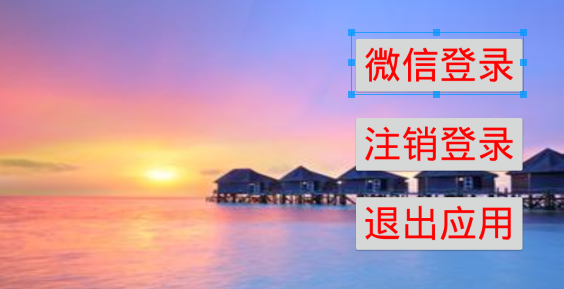
三个按钮的实现代码如下:
 <Button android:id="@+id/button1"

     android:layout_height="wrap_content"

     android:layout_width="wrap_content"

     android:text="@string/login_by_weixin"

     android:textColor="@string/color_weixin"

     android:textSize="@dimen/margin_Right" />

 <Button android:id="@+id/button2"

     android:layout_height="wrap_content"

     android:layout_width="wrap_content"

     android:layout_marginTop="@dimen/activity_vertical_margin"

     android:text="@string/logout_by_weixin"

     android:textColor="@string/color_weixin"

     android:textSize="@dimen/margin_Right" />

 <Button android:id="@+id/button3"

     android:layout_height="wrap_content"

     android:layout_width="wrap_content"

     android:layout_marginTop="@dimen/activity_vertical_margin"

     android:text="@string/close"

     android:textColor="@string/color_weixin"

     android:textSize="@dimen/margin_Right" />
代码中对按钮的大小、具体位置、文本(颜色、大小)进行了设置。
可以发现,若仅将LinearLayout的gravity属性设置为垂直居中,那么当子组件个数大于1时,会全部排列在居中位置,放不下只会在水平方向上错位显示,并不会从上到下依次排布,此时就需要借助orientation属性了。
gravity、layout_gravity及orientation的更多相关文章
- gravity layout_gravity
gravity:控制当前视图的内容/子view layout_gravity:控制视图本身
- Android中的layout_gravity和gravity的区别
在Android的布局中,除了padding和margin容易弄混之外,还有layout_gravity和gravity.按照字面意思来说,layout_gravity就是相对于layout来设置的. ...
- 带你实现开发者头条APP(三) 首页实现
title: 带你实现开发者头条APP(三) 首页实现 tags: 轮播广告,ViewPager切换,圆形图片 grammar_cjkRuby: true --- 一.前言 今天实现开发者头条APP的 ...
- FragmentTabHost的基本用法
开通博客以来已经约莫1个月了.几次想提笔写写东西,但总是由于各种各样的原因并没有开始.现在,年假刚结束,项目也还没有开始,但最终促使我写这篇博客的是,看了一篇博友写的新年计划,说是要在新的一年中写50 ...
- Android—关于自定义对话框的工具类
开发中有很多地方会用到自定义对话框,为了避免不必要的城府代码,在此总结出一个工具类. 弹出对话框的地方很多,但是都大同小异,不同无非就是提示内容或者图片不同,下面这个类是将提示内容和图片放到了自定义函 ...
- 给ListView设置emptyView
给ListView设置emptyView 版权声明:本文为博主原创文章,未经博主允许不得转载. 使用ListView和GridView时,当列表为空时,默认是不显示任何内容的,这样对用户非常不友好,这 ...
- Android开发案例 - 自定义虚拟键盘
所有包含IM功能的App(如微信, 微博, QQ, 支付宝等)都提供了Emoji表情之类的虚拟键盘, 如下图: 本文只着重介绍如何实现输入法键盘和自定义虚拟键盘的流畅切换, 而不介绍如何实现虚 ...
- Android音视频之MediaPlayer音视频播放
前言: 昨天总结了视频录制,今天来学习一下视频的播放,Android的视频播放主要采用MediaPlayer类. MediaPlayer介绍 MediaPlayer类可用于控制音频/视频文件或流的播放 ...
- 仿优酷Android客户端图片左右滑动(自动滑动)
最终效果: 页面布局main.xml: <?xml version="1.0" encoding="utf-8"?> <LinearLayou ...
随机推荐
- C++/CLI——读书笔记《Visual C++/CLI从入门到精通》 第Ⅱ部分
=================================版权声明================================= 版权声明:本文为博主原创文章 未经许可不得转载 请通过右 ...
- linux清理内存命令
1.清理前内存使用情况 free -m 2.开始清理 echo 1 > /proc/sys/vm/drop_caches3.清理后内存使用情况 free -m4.完成! 查看内存条数命令: # ...
- linux基础-第八单元 正文处理命令及tar命令
第八单元 正文处理命令及tar命令 使用cat命令进行文件的纵向合并 两种文件的纵向合并方法 归档文件和归档技术 归档的目的 什么是归档 tar命令的功能 tar命令的常用选项 使用tar命令创建.查 ...
- glibc-2.15编译error: linker with -z relro support required
./configure --prefix=/usr/local/glibc-2.15 configure: error: you must configure in a separate build ...
- Javascript进度条
一个简单的进度条演示. <!doctype html> <html> <head> <meta charset="utf8"> &l ...
- hdu 4966 GGS-DDU (最小树形图)
比较好的讲解:http://blog.csdn.net/wsniyufang/article/details/6747392 view code//首先为除根之外的每个点选定一条入边,这条入边一定要是 ...
- go语言之并发
简介 多核处理器越来越普及,那有没有一种简单的办法,能够让我们写的软件释放多核的威力?答案是:Yes.随着Golang, Erlang, Scale等为并发设计的程序语言的兴起,新 ...
- 记一次ganglia的故障分析 mem_report不显示
ganglia集群中mem_report不能正确显示,有的显示有些不显示. 我通过web开发工具F12,获取生成图片的路径,然后加上&debug=3 显示发现: No matching met ...
- [转]Backbone.js简单入门范例
本文转自:http://dmyz.org/archives/598 11年刚开始用前端MVC框架时写过一篇文章,当时Knockout和Backbone都在用,但之后的项目全是在用Backbone,主要 ...
- SVN报Previous operation has not finished; run 'cleanup' if it was interrupted错误的解决方法
做着项目突然SVN报Previous operation has not finished; run 'cleanup' if it was interrupted,进度又要继续,烦.百度一下发现很多 ...