
bootstrap按钮
按钮
基类
-btn
样式
btn-default(默认)
btn-link(链接)
大小
btn-*[lg,sm,xs]
状态
active
disabled
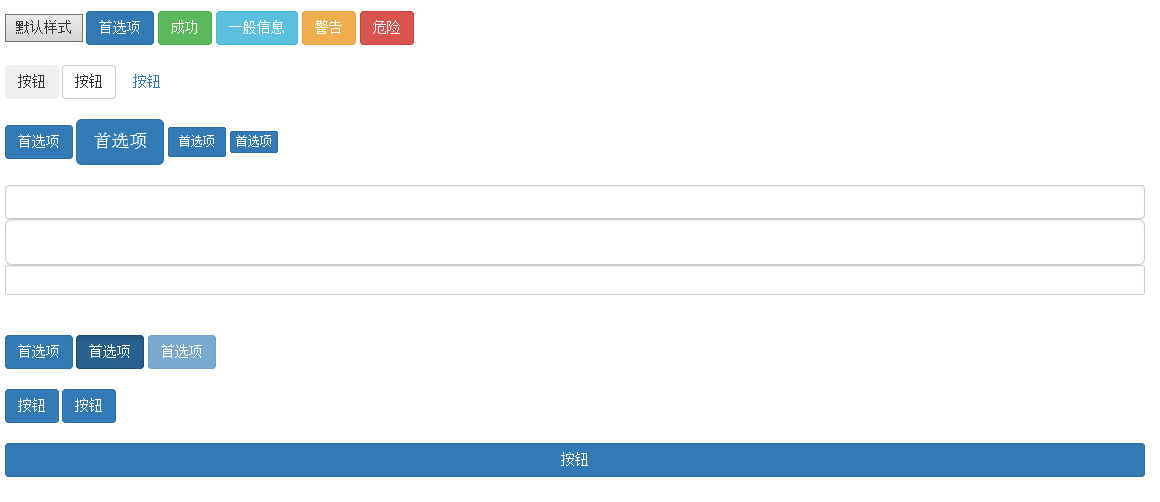
<!DOCTYPE HTML>

<html>

<head>

<meta http-equiv="Content-Type" content="text/html; charset=utf-8">

<title>无标题文档</title>

<meta http-equiv="X-UA-Compatible" content="IE=edge">

<meta name="viewport" content="width=device-width, initial-scale=1">

<link rel="stylesheet" href="css/bootstrap.css">

<style>

.tips1{ width:30px; height:300px; background:black; right:0;}

.tips2{ width:30px; height:100px; background:blue; right:0;}

</style>

</head>

<body style="height:2000px;">

<div class="container">

    <br>

    <input type="button" value="默认样式">

    <input type="button" value="首选项" class="btn btn-primary">

    <input type="button" value="成功" class="btn btn-success">

    <input type="button" value="一般信息" class="btn btn-info">

    <input type="button" value="警告" class="btn btn-warning">

    <input type="button" value="危险" class="btn btn-danger">

    <br><br>

    <input type="button" value="按钮" class="btn">

    <input type="button" value="按钮" class="btn btn-default">

    <input type="button" value="按钮" class="btn btn-link">

    <br><br>

    <input type="button" value="首选项" class="btn btn-primary">

    <input type="button" value="首选项" class="btn btn-primary btn-lg">

    <input type="button" value="首选项" class="btn btn-primary btn-sm">

    <input type="button" value="首选项" class="btn btn-primary btn-xs">

    <br><br>

    <input type="text" class="form-control">

    <input type="text" class="form-control input-lg">

    <input type="text" class="form-control input-sm">

    <br><br>

    <input type="button" value="首选项" class="btn btn-primary">

    <input type="button" value="首选项" class="btn btn-primary active">

    <input type="button" value="首选项" class="btn btn-primary disabled">

    <br><br>

    <a href="#" class="btn btn-primary">按钮</a>

    <button class="btn btn-primary">按钮</button>

    <br><br>

    <button class="btn btn-primary btn-block">按钮</button>

</div>

</body>

<script src="js/jquery-1.11.1.js"></script>

<script src="js/bootstrap.js"></script>

</html>
bootstrap按钮的更多相关文章
- Bootstrap 按钮
本章将通过实例讲解如何使用 Bootstrap 按钮.任何带有 class .btn 的元素都会继承圆角灰色按钮的默认外观.但是 Bootstrap 提供了一些选项来定义按钮的样式,具体如下表所示: ...
- BootStrap 按钮组简单介绍
学会按钮组需要掌握以下几个类. btn btn-group btn-toolbar btn-group-vertical 和 下拉菜单的基本类 dropdown-toggle dropdow ...
- Bootstrap 按钮分组
Bootstrap 按钮分组: <!DOCTYPE html> <html lang="en"> <head> <meta charset ...
- bootstrap 按钮 文本 浮动 隐藏
bootstrap 按钮 文本 浮动 隐藏 <!DOCTYPE html> <html lang="en"> <head> <meta c ...
- Bootstrap按钮插件
前面的话 按钮插件提供了一组可以控制按钮多种状态的功能,比如按钮的禁用状态.正在加载状态.正常状态等.本文将详细介绍Bootstrap按钮插件 加载状态 通过按钮可以设计状态提示,当单击按钮时,会显示 ...
- Bootstrap -- 按钮样式与使用
Bootstrap -- 按钮样式与使用 1. 可用于<a>, <button>, 或 <input> 元素的按钮样式 按钮样式使用: <!DOCTYPE h ...
- 简单叨叨bootstrap按钮无限层级下拉菜单的实现
0.写在前面的话 最近看书都懈怠了,又正值新项目,虽说并不是忙得不可开交,好吧我老实交待,我就是偷懒了其实,博客也没更.言归正传,对于前端的不熟悉现在确实是个让我头疼的事情,以至于一些功能要在网络上漫 ...
- 第二百四十七节,Bootstrap按钮和折叠插件
Bootstrap按钮和折叠插件 学习要点: 1.按钮 2.折叠 本节课我们主要学习一下 Bootstrap 中的按钮和折叠插件. 一.按钮 可以通过按钮插件创建不同状态的按钮,也就是点击后为选中状态 ...
- Bootstrap 按钮,图片,辅助类
Bootstrap 按钮 任何带有 class .btn 的元素都会继承圆角灰色按钮的默认外观.但是 Bootstrap 提供了一些选项来定义按钮的样式,具体如下表所示: 以下样式可用于<a&g ...
- 测开之路一百一十二:bootstrap按钮
bootstrap按钮 引入bootstrap和jquery 普通按钮和bootstrap风格按钮 调整大小 块级按钮 禁用按钮 disabled 按钮分组 分页按钮
随机推荐
- B1/B2签证拒签
http://www.mcdvisa.com/html/News/USA_visa_news/201529/152917GE.html
- Mac OS下配置Eclipse C++的方法
http://nonlz.blog.163.com/blog/static/128872032201262622921622/
- ecshop 订单-》订单状态
/** * 取得状态列表 * @param string $type 类型:all | order | shipping | payment */ function get_status_list($ ...
- CSS3新增基础属性总结——20160409(易达客)
1.box-shadow :h-shadow v-shadow blur spread color inset(outset) h-shadow:必须:水平阴影位置,允许负值. v-shadow:必须 ...
- xenserver安装使用
1.下载参考:http://blog.sina.com.cn/s/blog_61c07ac50102vf55.html 2.安装(个人笔记本配置了12G的内存,所以在VM Workstation 11 ...
- phpize 扩展GD库 安装 ! 环境--centos 7 +nginx 1.7.11+php 5.6.7
使用phpize编译GD库安装,先安装前置库libjpeg libpng zlib freetype等 都是下面php编译的几个选项 先看php编译的选项: --with-gd=DIR ...
- jQuery 互相调用iframe页面中js的方法
1,子iframe内调用父类函数方法: window.parent.func(); 2,子Iframe中获取父界面的元素: $("#xx", window.parent.docum ...
- 判断QQ是否在线
<html> <body> ggygygygy<br> <td><a href="http://wpa.qq.com/msgrd?V=1 ...
- [git]添加项目到git
写在前面 一直在想把代码托管到git上面,一直没有去研究,最近发现自己写的demo,好多都找不到了,实在是没办法了,耐下心研究了下git.这里通过添加了自己做的demo,算是也是学习下git的操作吧. ...
- 源码编译安装 screen
本文转自:http://blog.163.com/oracle_wwf/blog/static/213030127201211191481101/ [root@web1 soft]# wget ftp ...