
关于homebrew使用时遇到的问题: Error: Could not symlink bin/gdb/usr/local/bin is not writable.
关于homebrew使用时遇到的问题: Error: Could not symlink bin/gdb/usr/local/bin is not writable.
这是我在给我的Mac电脑安装GDB的时候遇到的问题:
我的Mac使用homebrew管理,于是我使用brew install gdb命令直接安装gdb,结果如下:

我在stackoverflow找到了发生的类似情况,经过阅读判断,找到了一下两种解决办法:
- 如图,直接输入命令:
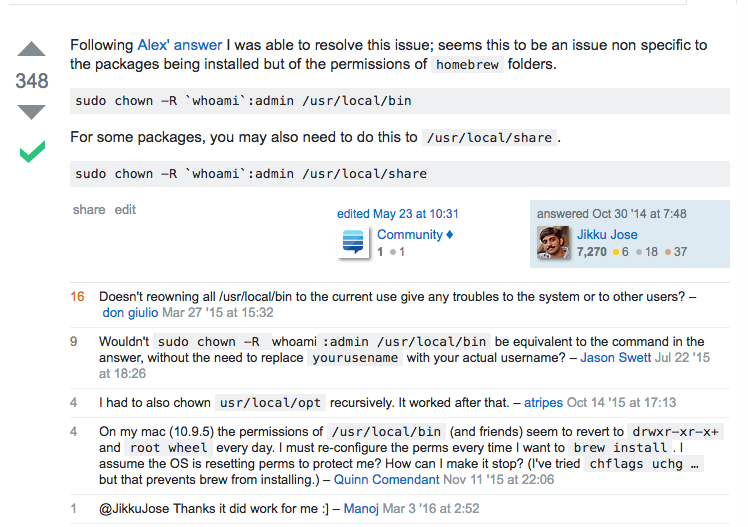
命令内容:
sudo chown -R `whoami`:admin /usr/local/bin
- 如图,为了谨慎起见,使用
homebrew doctor进行检测,根据其反馈来进行操作:
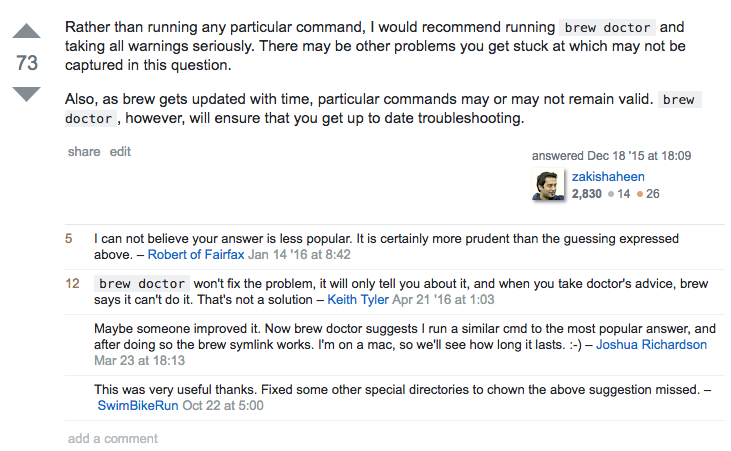
我认为应该使用第二中方法比较好,于是我在终端输入homebrew doctor,稍作等待得到检测结果:
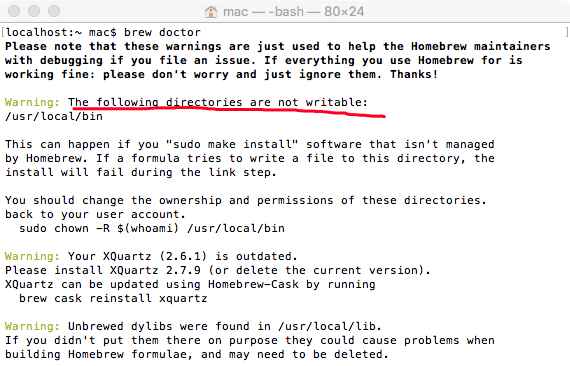
如划红线部分所示,与我遇到的问题相符合,运行其解决方案:
sudo chown -R $(whoami) /usr/local/bin
在此时再link一下我的GDB:
brew link gdb
结果如下:
Already linked: /usr/local/Cellar/gdb/8.0.1
再测试一下GDB:
gdb
结果如下:

成功.
那么问题的原因是什么呢?
- 问题出现在我之前安装OpenSSL时使用了
sudo make install命令,导致了一些软件非homebrew管理,所以homebrew在Link的时候会出现问题。 - 参考
homebrew doctor如下提示:
This can happen if you "sudo make install" software that isn't managed

by Homebrew. If a formula tries to write a file to this directory, the

install will fail during the link step.

You should change the ownership and permissions of these directories.

back to your user account.
参考资料
用brew安装node遇到的问题
Error: The 'brew link' step did not complete successfully
homebrew could not symlink usr/local/bin is not writable
关于homebrew使用时遇到的问题: Error: Could not symlink bin/gdb/usr/local/bin is not writable.的更多相关文章
- Starting MySQL ERROR! Couldn't find MySQL server (/usr/local/mysql/bin/mysqld_safe)
centos7.5 安装mysql数据库报错 问题: [root@db04-54 scripts]# /etc/init.d/mysqld start /etc/init.d/mysqld: line ...
- error: <class 'xml.parsers.expat.ExpatError'>, syntax error: line 1, column 0: file: /usr/local/lib/python2.7/xmlrpclib.py line: 557
当linux设备上开启sonar6.2时, supervisorctl status报如下错误: error: <class 'xml.parsers.expat.ExpatError'> ...
- python pip 使用时错误: Patal error in launcher:Unable to create process using '"'
当前我的电脑配置是64位, 装有python2.7 和python 3.6 两个版本 在使用pip install mysqlclient 的时候,出现了 Patal error in launch ...
- inotify+rsync文件实时同步报错:usr/local/bin/inotifywait: error while loading shared libraries: libinotifytools.so.0:
解决办法: ln -sv /usr/local/lib/libinotify* /usr/lib/ /usr/lib64/libinotifytools.so.
- Mac上Homebrew的使用 (Homebrew 使 OS X 更完整)
0 Homebrew是啥? “Homebrew installs the stuff you need that Apple didn’t.——Homebrew 使 OS X 更完整”. Homebr ...
- Mac上Homebrew的使用——Homebrew 使 OS X 更完整
0 Homebrew是啥? “Homebrew installs the stuff you need that Apple didn’t.——Homebrew 使 OS X 更完整”. Homebr ...
- 安装HomeBrew 失败的解决方案(Error: Fetching /usr/local/Homebrew/Library/Taps/homebrew/homebrew-core failed!)
在安装HomeBrew(或者安装成功 执行相关指令)时遇到错误提示: Error: Failure while executing: git clone https://github.com/Home ...
- jenkins使用时出现的问题!
从安装到日常使用中遇到过的问题和解决方法: 背景/问题:安装时是跳过安装插件过程的,安装好后,我发现里面啥也做不了,连个git的插件都无法下载. 方法:在jenkins的主界面,打开系统管理= ...
- Mac下Mysql启动异常["ERROR 2002 (HY000): Can't connect to local MySQL server through socket '/tmp/mysql.sock' (2)"]
在mac下使用brew安装mysql,之前没有使用过,今天启动的时候发现启动不了 huijundeMacBook-Pro:bin huijunzhang$ mysql ERROR (HY000): C ...
随机推荐
- 让CI框架支持service层
大家知道CodeIgniter框架式MVC分层的,通常大家把业务逻辑写到Controller中,而Model只负责和数据库打交道. 但是随着业务越来越复杂,controller越来越臃肿,举一个简单的 ...
- POJ3347 Kadj Squares
嘟嘟嘟 题意:给出一堆正方形的边长,且这些正方形都是\(45 ^ {\circ}\)斜放着并且紧挨着的,求从上往下看能看到几个正方形. 真是一道好题--跟计算几何关系不大. 想一下,如果我们能求出正方 ...
- 【JavaScript】颜色选择器
颜色空间RGB与HSV(HSL)的转换 好文推荐:http://blog.csdn.net/jiangxinyu/article/details/8000999 从 HSV 到 RGB 的转换 类似的 ...
- Java之关于JSTL引入问题
错误信息:Can not find the tag library descriptor for “http://java.sun.com/jstl/core”JSTL taglib需要jstl.ja ...
- log4j 日志配置和jar包下载
1.日志log4j文件配置 ${webapp.root}才是项目根目录log4j.appender.logfile.File= ${catalina.home}/log/filter.log 指生成日 ...
- 生产者-消费者模型-线程安全队列Queue
#python3 #product new data into the queue #comsume data from the queue from queue import Queue impor ...
- Unity-iPhone has Conflicting Provisioning Settings
Select the top level node called Unity-iPhone in the left tree view (the one with the blue item). Se ...
- Java-链表(单向链表、双向链表)
Java-链表 1.什么是链表? 2.链表的特点是什么? 3.链表的实现原理? 4.如何自己写出一个链表? 1.什么是链表? 链表是一种物理存储单元上非连续.非顺序的存储结构,数据元素的逻辑顺序是通过 ...
- vlookup函数使用---execl公式
目录 vlookup函数使用---execl公式 1.用途: 2.函数语法: 3.使用方式: 4.实际案例+步骤解析 5.常见错误 vlookup函数使用---execl公式 1.用途: 我们有一张工 ...
- 在UIWindow上加类似于“回到顶部”的按钮
在公司上个版本的开发中遇到了一个UI布局的小问题: 某个页面需要增加一个分享按钮,但是该页面是二级页面,导航栏右边也已经放置了2个button. 起初和老大谈论这个问题的时候想到的方法是导航栏右边加三 ...