
【SSH网上商城项目实战10】商品类基本模块的搭建
转自:https://blog.csdn.net/eson_15/article/details/51354932
前面我们完成了与商品类别相关的业务逻辑,接下来我们开始做具体商品部分。
1. 数据库建表并映射Model
首先我们在数据库中新建一张表,然后使用逆向工程将表映射成Model类,表如下:

 1 /*=============================*/

 2 /* Table: 商品表结构                */

 3 /*=============================*/

 4 create table product

 5 (

 6    /* 商品编号,自动增长 */

 7    id                  int primary key not null auto_increment,

 8    /* 商品名称 */

 9    name                varchar(20),

10    /* 商品价格 */

11    price               decimal(8,2),

12    /* 商品图片 */

13    pic                 varchar(200),

14    /* 商品简单介绍 */

15    remark              longtext,

16    /* 商品详细介绍 */

17    xremark             longtext,

18    /* 商品生产日期 */

19    date                timestamp default CURRENT_TIMESTAMP,

20    /* 是否为推荐商品,推荐商品才有可能显示在商城首页 */

21    commend             bool,

22    /* 是否为有效商品,有效商品才有可能显示在商城首页 */

23    open                bool,

24    /* 商品所在的类别编号*/

25    cid                  int,

26    constraint cid_FK foreign key(cid) references category(id)

27 );
使用逆向工程映射为Model类就不赘述了,前面有提到如何使用逆向工程生成Model。
2. 完成商品类的Service层和Action的架构
2.1 商品类的Service层架构
与前面category一样,product也得有个service来操作与商品相关的业务逻辑,所以我们得写一个ProductService和ProductServiceImpl的架构出来,具体如下:
 1 //ProductService接口继承BaseService<Product>

 2 public interface ProductService extends BaseService<Product> {

 3

 4 }

 5

 6 //ProductServiceImpl实现类继承BaseServiceImpl<Product>,并实现上面的ProductService接口

 7 @Service("productService")

 8 public class ProductServiceImpl extends BaseServiceImpl<Product> implements ProductService {

 9

10 }
2.2 商品类的Action架构
首先得完善一下BaseAction中关于Service层的注解
1 @Controller("baseAction")

2 @Scope("prototype")

3 public class BaseAction<T> extends ActionSupport implements RequestAware,SessionAware,ApplicationAware,ModelDriven<T> {

4

5     @Resource

6     protected ProductService productService;

7

8         //其他代码省略,还是原来的代码……

9 }
然后我们写一个ProductAction继承该方法:
1 public class ProductAction extends BaseAction<Product> { 2 3 }
至此,关于商品的后台架构就基本搭建好了,接下来就是完善里面的具体功能和业务逻辑了。
3. 完成前台的基本结构
前台的基本结构和商品类的一样,我们看一下已经完成的商品类的前台都有哪些文件:

我们先根据其商品类的前台文件,拷贝一份到product文件夹中,然后我们再做相应的修改。先来分析一下流程:首先index.jsp到aindex.jsp显示左侧菜单栏,当点击类别管理时,进入category/query.jsp页面右侧显示所有商品类别信息,搜索和删除功能均在此页面,不需要弹出新的窗口,添加弹出save.jsp窗口,更新弹出update.jsp窗口。当点击商品管理的时候,进入product/query.jsp页面右侧显示所有商品信息,搜索和删除功能均在此页面完成,添加和更新分别弹出save.jsp和update.jsp。接下来我们把各个页面的框架搭建好,然后往相应的部分填东西即可。
首先在aindex.jsp中添加如下代码: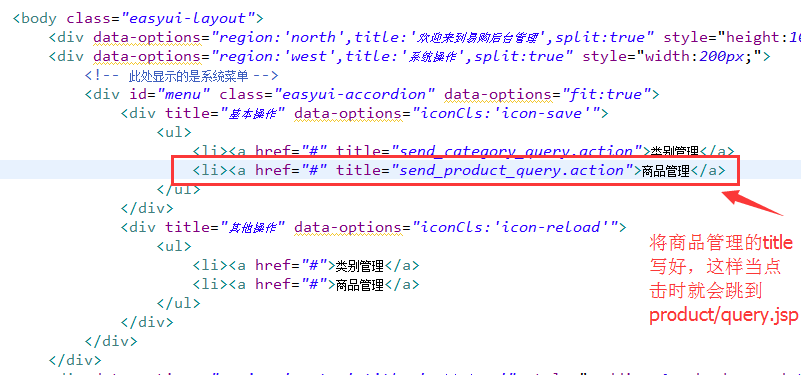
接下来,我们完成query.jsp的框架:
  1 <%@ page language="java" import="java.util.*" pageEncoding="UTF-8"%>

  2 <!DOCTYPE HTML PUBLIC "-//W3C//DTD HTML 4.01 Transitional//EN">

  3 <html>

  4   <head>

  5     <%@ include file="/public/head.jspf" %>

  6     <style type="text/css">

  7         body {

  8             margin: 1px;

  9         }

 10         .searchbox {

 11           margin: -3;

 12         }

 13     </style>

 14     <script type="text/javascript">

 15         $(function(){

 16             $('#dg').datagrid({

 17                 //url地址改为请求productAction中的queryJoinCategory方法

 18                 url:'product_queryJoinCategory.action',

 19                  loadMsg:'Loading......',

 20                 queryParams:{name:''},//这里参数改成name,参数值为空,表示我们要显示所有商品,后台是根据商品name属性查询的

 21                 //width:300,

 22                 fitColumns:true,

 23                 striped:true,

 24                 nowrap:true,

 25                 singleSelect:false,

 26                 pagination:true,

 27                 pageSize:5,

 28                 pageList:[5,10,15,20],

 29                 idField:'id',//指定id为标识字段,在删除,更新的时候有用,如果配置此字段,在翻页时,换页不会影响选中的项

 30

 31                 //toolbar定义添加、删除、更新按钮以及搜索框

 32                 toolbar: [{

 33                     iconCls: 'icon-add',

 34                      text:'添加商品',

 35                     handler: function(){

 36                         //添加触发代码

 37                     }

 38                  },'-',{

 39                      iconCls: 'icon-edit',

 40                     text:'更新商品',

 41                     handler: function(){

 42                                             //添加触发代码

 43                     }

 44                  },'-',{

 45                     iconCls: 'icon-remove',

 46                      text:'删除商品',

 47                     handler: function(){

 48                         //添加触发代码

 49                     }

 50                  },'-',{ //查询按钮不是LinkButton,它有语法,但是也支持解析HTML标签

 51                     text:"<input id='ss' name='serach' />"

 52                  }],

 53                 rowStyler: function(index,row){

 54                      console.info("index" + index + "," + row)

 55                     if(index % 2 == 0) {

 56                          return '';

 57                     } else {

 58                          return '';

 59                     }

 60

 61                  },

 62                 frozenColumns:[[

 63                      {field:'checkbox',checkbox:true},

 64                     {field:'id',title:'商品编号',width:100}

 65                  ]],

 66                 columns:[[

 67                      {field:'name',title:'商品名称',width:100},

 68                     {field:'price',title:'商品价格',width:100},

 69                      {field:'remark',title:'简单描述',width:100},

 70                     {field:'xremark',title:'详细描述',width:100},

 71                      {field:'date',title:'上架时间',width:100},

 72                     {field:'commend',title:'推荐商品',width:100,

 73                          formatter: function(value,row,index){

 74                             if(value) {

 75                                  return "<input type='checkbox' checked='checked' disabled='true'";

 76                             } else {

 77                                  return "<input type='checkbox' disabled='true'";

 78                             }

 79                          }

 80                      },

 81                      {field:'open',title:'有效商品',width:100,

 82                         formatter: function(value,row,index){

 83                              if(value) {

 84                                  return "<input type='checkbox' checked='checked' disabled='true'";

 85                             } else {

 86                                  return "<input type='checkbox' disabled='true'";

 87                             }

 88                          }

 89                      },

 90                      {field:'category.type',title:'所属商品类别',width:200, //category.type是商品类别

 91                          formatter: function(value,row,index){

 92                              if(row.category != null && row.category.type != null) {

 93                                  return row.category.type; //如果商品类别不为空,返回商品类别

 94                              } else {

 95                                  return "此商品暂时未分类";

 96                             }

 97                          }

 98                     }

 99                 ]]

100              });

101             //把普通的文本框转化为查询搜索文本框

102             $('#ss').searchbox({

103                  //触发查询事件

104                  searcher:function(value,name){ //value表示输入的值

105                     //添加触发代码

106                 },

107                 prompt:'请输入搜索关键字'

108              });

109         });

110     </script>

111   </head>

112

113   <body>

114       <table id="dg"></table>

115

116   </body>

117 </html>
接下来我们完成productAction中的queryJoinCategory方法,在这之前,先要完成service部分,我们都是先从底层慢慢往上开发的:
 1 //ProductService接口

 2 public interface ProductService extends BaseService<Product> {

 3

 4     //查询商品信息,级联类别

 5     public List<Product> queryJoinCategory(String type, int page, int size); //使用商品的名称查询

 6     //根据关键字查询总记录数

 7     public Long getCount(String type);

 8 }

 9

10 @SuppressWarnings("unchecked")

11 @Service("productService")

12 public class ProductServiceImpl extends BaseServiceImpl<Product> implements ProductService {

13

14     @Override

15     public List<Product> queryJoinCategory(String name, int page, int size) {

16         String hql = "from Product p left join fetch p.category where p.name like :name";

17         return getSession().createQuery(hql)

18                 .setString("name", "%" + name + "%")

19                 .setFirstResult((page-1) * size) //从第几个开始显示

20                 .setMaxResults(size) //显示几个

21                 .list();

22     }

23

24     @Override

25     public Long getCount(String name) {

26         String hql = "select count(p) from Product p where p.name like :name";

27         return (Long) getSession().createQuery(hql)

28             .setString("name", "%" + name + "%")

29             .uniqueResult(); //返回一条记录:总记录数

30     }

31

32 }
下面可以完成productAction中的queryJoinCategory方法了:
 1 @Controller("productAction")

 2 @Scope("prototype")

 3 public class ProductAction extends BaseAction<Product> {

 4

 5     public String queryJoinCategory() {

 6         System.out.println("name:" + model.getName());

 7         System.out.println("page:" + page);

 8         System.out.println("rows:" + rows);

 9

10         //用来存储分页的数据

11         pageMap = new HashMap<String, Object>();

12

13         //根据关键字和分页的参数查询相应的数据

14         List<Product> productList = productService.queryJoinCategory(model.getName(), page, rows);

15         pageMap.put("rows", productList); //存储为JSON格式

16         //根据关键字查询总记录数

17         Long total = productService.getCount(model.getName());

18 //        System.out.println(total);

19         pageMap.put("total", total); //存储为JSON格式

20         return "jsonMap";

21     }

22

23 }
接下来在struts.xml中进行配置,跟之前的商品类一样的流程,到这里可以看出,开发好了一个,下面一个就快了:
1 <action name="product_*" class="productAction" method="{1}">

2     <result name="jsonMap" type="json">

3         <param name="root">pageMap</param>

4         <param name="excludeProperties">

5             <!-- rows[0].category.account -->

6             <!-- 把所有account过滤掉,否则会出现懒加载问题,该部分下面截图 -->

7         </param>

8     </result>

9 </action>

这样后台程序写好了,然后开启tomcat,测试一下,当我们点击左侧菜单栏的商品管理时,会弹出右边如下窗口:
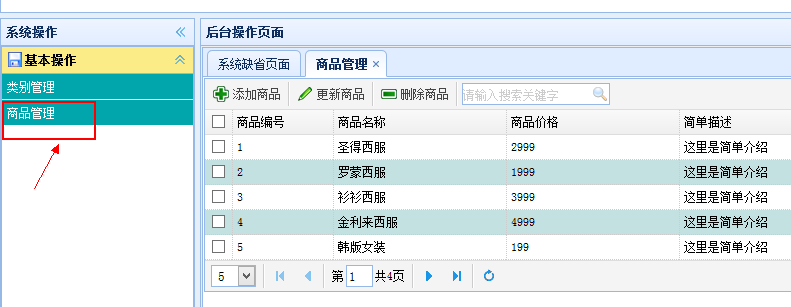
这样我们就完成了商品管理窗口的框架了。
【SSH网上商城项目实战10】商品类基本模块的搭建的更多相关文章
- 【SSH网上商城项目实战30】项目总结
转自:https://blog.csdn.net/eson_15/article/details/51479994 0. 写在前面 项目基本完成了,加上这个总结,与这个项目相关的博客也写了30篇了 ...
- 【SSH网上商城项目实战30】项目总结(附源码下载地址)
项目基本完成了,加上这个总结,与这个项目相关的博客也写了30篇了,积少成多,写博客的过程是固化思路的一个过程,对自己很有用,同时也能帮助别人.顺便说个题外话,在学习的过程中肯定会遇到很多异常出现,我们 ...
- 【SSH网上商城项目实战16】Hibernate的二级缓存处理首页的热门显示
转自:https://blog.csdn.net/eson_15/article/details/51405911 网上商城首页都有热门商品,那么这些商品的点击率是很高的,当用户点击某个热门商品后需要 ...
- 【SSH网上商城项目实战27】域名空间的申请和项目的部署及发布
转自:https://blog.csdn.net/wwww_com/article/details/54405355 前面陆陆续续的完成了网上商城的一些基本功能,虽然还有很多地方有待完善,但是不影响 ...
- 【SSH网上商城项目实战21】从Demo中看易宝支付的流程
转自: https://blog.csdn.net/eson_15/article/details/51447492 这一节我们先写一个简单点的Demo来测试易宝支付的流程,熟悉这个流程后, ...
- 【SSH网上商城项目实战28】使用Ajax技术局部更新商品数量和总价
转自: https://blog.csdn.net/eson_15/article/details/51487323 昨天把项目部署了一下,玩了玩,今天完善了一下购物车中修改商品数量就能局部 ...
- 【SSH网上商城项目实战12】添加和更新商品功能的实现
转自: https://blog.csdn.net/eson_15/article/details/51366370 添加商品部分原理和添加商品类别是一样的,不过要比商品类别复杂,因为商品的属性有很多 ...
- 【SSH网上商城项目实战11】查询和删除商品功能的实现
转自:https://blog.csdn.net/eson_15/article/details/51360804 在第8节我们完成了查询和删除商品类别的功能,那么现在实现查询和删除商品的功能就很好做 ...
- 【SSH网上商城项目实战15】线程、定时器同步首页数据(类似于博客定期更新排名)
转自:https://blog.csdn.net/eson_15/article/details/51387378 上一节我们做完了首页UI界面,但是有个问题:如果我在后台添加了一个商品,那么我必须重 ...
随机推荐
- Git 教程 -- 基于自己学习记录
Git 教程 -- 基于自己学习记录 1. 引言 由于学校布置了一项熟悉 git 和 svn 操作的实验,所以自己重新温习了下 git,记录过程在这. 2. 注册登录 GitHub. 3. 选择一个仓 ...
- verify验证插件的详解
使用此验证插件,我们只需要新建一个实例对象,同时传入一个json对象就行了,这里我们只传入了两个属性:checkItem和callback.下面的代码解析,我们就按照这个例子来. var verify ...
- mxonline实战12, 课程评论,相关课程推荐,课程视频页
对应github地址:第12天 一. 课程评论 1. 创建URL, VIEW courses/views.py -> Course
- multiprocess(上)
仔细说来,multiprocess不是一个模块而是python中一个操作.管理进程的包. 之所以叫multi是取自multiple的多功能的意思,在这个包中几乎包含了和进程有关的所有子模块.由于提供的 ...
- google Agent
一句话:改HOSTS文件 有时候要查看appengine.google.com的后台,但死活上不去,怎么办?还是那个老办法: 1.在cmd下Ping www.google.com.hk,获得IP地址, ...
- 在Eclipse平台中,搭建SpringBoot开发环境
1.查看eclipse版本号,Help->About Eclipse IDE 2.下载对应版本的STS插件 下载地址:https://spring.io/tools3/sts/all(注意版本对 ...
- [Alpha]Scrum Meeting#7
github 本次会议项目由PM召开,时间为4月9日晚上10点30分 时长15分钟 任务表格 人员 昨日工作 下一步工作 木鬼 整理并发布之前因为清明耽误的博客 撰写每日例会报告 SiMrua 添加暂 ...
- [BZOJ5248][2018九省联考]一双木棋
题目描述 https://www.lydsy.com/JudgeOnline/problem.php?id=5248 Solution 我们首先考虑放棋子的操作 发现它一定放棋子的部分是一个联通块 ...
- 题解51nod1515——明辨是非
前提 在这道题老师讲过之后,再考时,我还是WA了ヽ(*.>Д<)o゜果然,我还是好菜啊~%?…,# *'☆&℃$︿★? 谢谢Jack_Pei dalao的帮忙.~~O(∩_∩)O~ ...
- Linux下C++开发常用命令
本页面记录本人在Linux下进行C++开发时使用的常用命令,注意这里不包括比如ls,mv等linux命令,这里会持续更新.首先假设你只有一个源程序文件,叫vec.cpp,编译后的可执行程序叫vec(本 ...