
组件--Fragment(碎片)第二篇详解
感觉之前看的还是不清楚,重新再研究了一次
Fragment常用的三个类:
android.app.Fragment 主要用于定义Fragment
android.app.FragmentManager 主要用于在Activity中操作Fragment
android.app.FragmentTransaction 保证一些列Fragment操作的原子性,熟悉事务这个词,一定能明白~
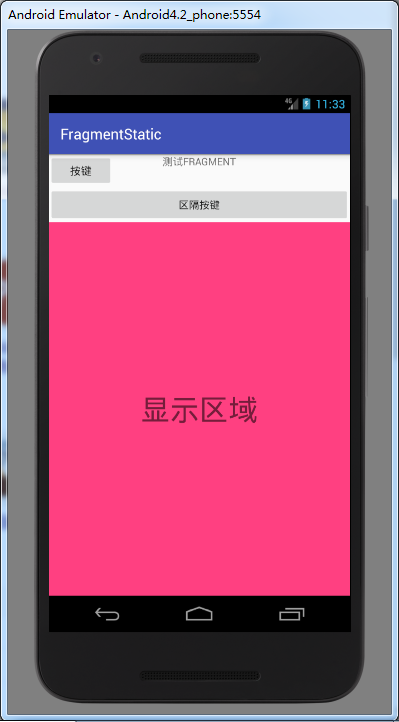
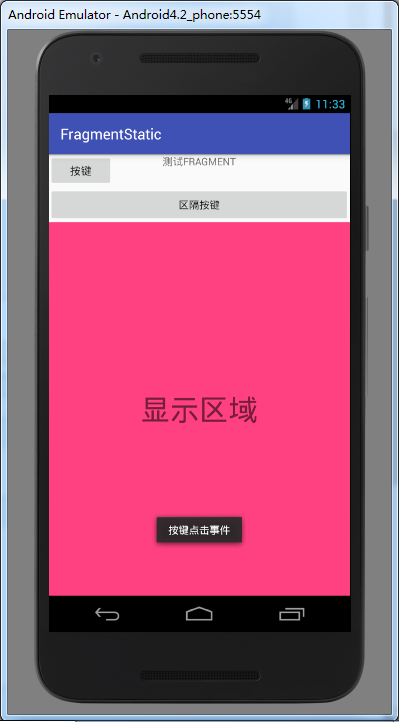
1. 静态调用(就充当普通的控件)
AndroidManifest.xml
<?xml version="1.0" encoding="utf-8"?>

<manifest xmlns:android="http://schemas.android.com/apk/res/android"

    package="viewpagerindicator.com.fragmentstatic">

    <application

        android:allowBackup="true"

        android:icon="@mipmap/ic_launcher"

        android:label="@string/app_name"

        android:roundIcon="@mipmap/ic_launcher_round"

        android:supportsRtl="true"

        android:theme="@style/AppTheme">

        <activity android:name=".MainActivity">

            <intent-filter>

                <action android:name="android.intent.action.MAIN" />

                <category android:name="android.intent.category.LAUNCHER" />

            </intent-filter>

        </activity>

    </application>

</manifest>
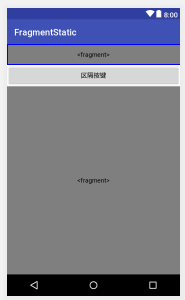
activity_main.xml
<?xml version="1.0" encoding="utf-8"?>

<LinearLayout xmlns:android="http://schemas.android.com/apk/res/android"

    xmlns:app="http://schemas.android.com/apk/res-auto"

    xmlns:tools="http://schemas.android.com/tools"

    android:layout_width="match_parent"

    android:layout_height="match_parent"

    android:orientation="vertical"

    >

    <!--静态调用fragment的方法:

    就是相当于把fragment当做一个Button或者EditText之类的空间

    其中name就相当于普通空间的ID-->

    <fragment

        android:layout_width="match_parent"

        android:layout_height="45dp"

        android:id="@+id/fragment1"

        android:name="viewpagerindicator.com.fragmentstatic.FragmentTittle"/>

    <Button

        android:layout_width="match_parent"

        android:layout_height="wrap_content"

        android:text="区隔按键"/>

    <fragment

        android:layout_width="match_parent"

        android:layout_height="match_parent"

        android:id="@+id/fragment_context_id"

        android:name="viewpagerindicator.com.fragmentstatic.FragmentContext"/>

</LinearLayout>
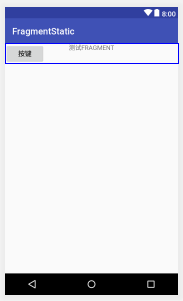
fragment_tittle.xml
<?xml version="1.0" encoding="utf-8"?>

<RelativeLayout xmlns:android="http://schemas.android.com/apk/res/android"

    android:layout_width="match_parent"

    android:layout_height="45dp"

    android:orientation="horizontal">

    <Button

        android:text="按键"

        android:layout_width="wrap_content"

        android:layout_height="wrap_content"

        android:id="@+id/bt1"

        android:textSize="15sp"

        />

    <TextView

        android:layout_width="match_parent"

        android:layout_height="wrap_content"

        android:text="测试FRAGMENT"

        android:gravity="center"

        />

</RelativeLayout>
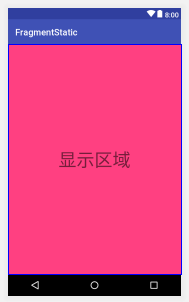
fragment_content.xml
<?xml version="1.0" encoding="utf-8"?>

<LinearLayout xmlns:android="http://schemas.android.com/apk/res/android"

    android:layout_width="match_parent"

    android:layout_height="match_parent"

    android:orientation="horizontal">

    <TextView

        android:layout_width="match_parent"

        android:layout_height="match_parent"

        android:background="@color/colorAccent"

        android:text="显示区域"

        android:textSize="40dp"

        android:gravity="center"/>

</LinearLayout>
MainActivity.java
package viewpagerindicator.com.fragmentstatic;

import android.support.v7.app.AppCompatActivity;

import android.os.Bundle;

import android.util.Log;

public class MainActivity extends AppCompatActivity {

    final  String TAG = "MainActivity";

    @Override

    protected void onCreate(Bundle savedInstanceState) {

        super.onCreate(savedInstanceState);

        setContentView(R.layout.activity_main);

    }

}
FragmentTittle.java
package viewpagerindicator.com.fragmentstatic;

import android.app.Fragment;

import android.content.Context;

import android.support.v7.app.AppCompatActivity;

import android.os.Bundle;

import android.util.AttributeSet;

import android.util.Log;

import android.view.LayoutInflater;

import android.view.View;

import android.view.ViewGroup;

import android.widget.Button;

import android.widget.Toast;

public class FragmentTittle extends Fragment {

    Button mLeftMenu;

    final String TAG = "FragmentTittle";

    public View onCreateView(LayoutInflater inflater, ViewGroup container,

                             Bundle savedInstanceState)

    {

        View view = inflater.inflate(R.layout.fragment_tittle, container, false);

        mLeftMenu = (Button) view.findViewById(R.id.bt1);

        mLeftMenu.setOnClickListener(new View.OnClickListener() {

            @Override

            public void onClick(View view) {

                Toast.makeText(getActivity(), "按键点击事件", Toast.LENGTH_SHORT).show();

            }

        });

        return view;

    }

}
FragmentContext.java
package viewpagerindicator.com.fragmentstatic;

import android.app.Fragment;

import android.os.Bundle;

import android.support.v7.app.AppCompatActivity;

import android.util.Log;

import android.view.LayoutInflater;

import android.view.View;

import android.view.ViewGroup;

public class FragmentContext extends Fragment {

    final String TAG = "FragmentContext";

    //Button mLeftMenu;

    public View onCreateView(LayoutInflater inflater, ViewGroup container,

                             Bundle savedInstanceState)

    {

        View view = inflater.inflate(R.layout.fragment_content, container, false);

        //mLeftMenu = (Button) view.findViewById(R.id.bt1);

        return view;

    }

}
2. 动态调用
组件--Fragment(碎片)第二篇详解的更多相关文章
- Scala进阶之路-Scala函数篇详解
Scala进阶之路-Scala函数篇详解 作者:尹正杰 版权声明:原创作品,谢绝转载!否则将追究法律责任. 一.传值调用和传名调用 /* @author :yinzhengjie Blog:http: ...
- 转载 JS组件Bootstrap Select2使用方法详解
JS组件Bootstrap Select2使用方法详解 作者:懒得安分 字体:[增加 减小] 类型:转载 时间:2016-01-26我要评论 这篇文章主要为大家介绍了JS组件Bootstrap Sel ...
- PHP函数篇详解十进制、二进制、八进制和十六进制转换函数说明
PHP函数篇详解十进制.二进制.八进制和十六进制转换函数说明 作者: 字体:[增加 减小] 类型:转载 中文字符编码研究系列第一期,PHP函数篇详解十进制.二进制.八进制和十六进制互相转换函数说明 ...
- 走向DBA[MSSQL篇] 详解游标
原文:走向DBA[MSSQL篇] 详解游标 前篇回顾:上一篇虫子介绍了一些不常用的数据过滤方式,本篇详细介绍下游标. 概念 简单点说游标的作用就是存储一个结果集,并根据语法将这个结果集的数据逐条处理. ...
- Android UI组件----AppWidget控件入门详解
Widget引入 我们可以把Widget理解成放置在桌面上的小组件(挂件),有了Widget,我们可以很方便地直接在桌面上进行各种操作,例如播放音乐. 当我们长按桌面时,可以看到Widget选项,如下 ...
- Android组件---四大布局的属性详解
[声明] 欢迎转载,但请保留文章原始出处→_→ 文章来源:http://www.cnblogs.com/smyhvae/p/4372222.html Android常见布局有下面几种: LinearL ...
- QuantLib 金融计算——基本组件之天数计算规则详解
目录 天数计算规则详解 定义 30 / 360 法 30/360 US 30/360 Bond Basis 30E/360 30E/360 ISDA Actual 法 Actual/Actual IC ...
- Spring--开篇 (spring优缺点、模块组件、各个jar包详解)
Spring--开篇 分类: SSH&EJB2012-11-23 15:25 4369人阅读 评论(13) 收藏 举报 javaJavaJAVAspringSpringwebWebWEB框架 ...
- Android UI组件----ListView列表控件详解
[声明] 欢迎转载,但请保留文章原始出处→_→ 生命壹号:http://www.cnblogs.com/smyhvae/ 文章来源:http://www.cnblogs.com/smyhvae/p/3 ...
随机推荐
- 【javascript】点击复制内容的实现
各种站点有很多类似的代码,不过都是拿来即用,连个解释也没有.大概看了一下,现在主要使用的有两种办法: 1.documen.execCommand("Copy")或者window.c ...
- ActiveX 控件重绘无效问题,用CClientDC 而不是CPaintDC
ActiveX 控件重绘子控件时,用Invalid()会出现无效的情况即不会更新界面. OnPaint 方法里,是用的 CPaintDC,经测试无效,后换CClientDC,发现可以,百度查他们的区别 ...
- sql--CONVERT、FOR XML PATH解决实际问题
需求:每个平台分类下的门店,每个门店的名称.图片路径.评分,每个门店下的四个产品的名称.图片路径.评分 思路: 一开始门店动态化好写,用Ajax就行了.但是每个门店下面的产品,每个去请求一次查询有点不 ...
- VS2015 IIS Express 无法启动 解决办法(转)
因为安装各种乱七八糟的软件,然后不小心把IIS Express卸载掉了,网上下载了一个IIS Express 7,安装之后本地使用VS 2015无法启动调试,F5 无法启动IIS, 再次F5调试,没有 ...
- sharepoint 2007 log track
1. 以管理员权限运行CMD 2. 运行命令: NOTEPAD c:\windows\system32\drivers\etc\hosts 3. 在打开的记事本中最后一行添加一条记录后保存. ...
- mysql 行转列 (结果集以坐标显示)
create table capacity( type int , numbers int , monthst INT ); select type, sum(case monthst when 1 ...
- Java50道经典习题-程序16 在控制台上打印九九乘法表
题目:输出9*9口诀.分析:利用双重for循环进行输出,分行与列考虑,共9行9列,i控制行,j控制列. public class Prog16 { public static void main(St ...
- Java50道经典习题-程序18 乒乓球赛
题目:两个乒乓球队进行比赛,各出三人.甲队为a,b,c三人,乙队为x,y,z三人.已抽签决定比赛名单.有人向队员打听比赛的名单. a说他不和x比,c说他不和x,z比,请编程序找出三队赛手的名单.分析: ...
- “全栈2019”Java第八十九章:接口中能定义内部类吗?
难度 初级 学习时间 10分钟 适合人群 零基础 开发语言 Java 开发环境 JDK v11 IntelliJ IDEA v2018.3 文章原文链接 "全栈2019"Java第 ...
- 关于IPv4设置一些常见问题的解答
问:为什么要填IP地址.网关.DNS? 如果是单部机拨号上网,是不需要填这些的.不填,或乱填,对上网都没有任何影响.但是在局域网上网(用路由器就属此环境),就一定要正确设置(手工填写或接受自动分配 ...