
BackgroundWorker的简单用法
BackgroudWorker就是一个封装好的异步处理类(就是多线程,广泛用于winform开发中)
例子:
1.界面效果:
一个label,两个button
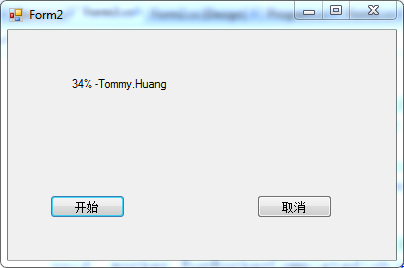
2.Form2.cs的代码
 using System;

 using System.Collections.Generic;

 using System.ComponentModel;

 using System.Data;

 using System.Drawing;

 using System.Linq;

 using System.Text;

 using System.Windows.Forms;

 namespace BackgroundWorkerTest

 {

     public partial class Form2 : Form

     {

         /*

          * 使用BackgroundWorker的用法很多

          * 1.可以直接从左边控件列表中拖一个到界面中

          * 2.动态写代码生成,这里我是把它作为成员变量了

          * **/

         private BackgroundWorker _worker = new BackgroundWorker();

         public Form2()

         {

             InitializeComponent();

             //设置是否允许报告进度

             _worker.WorkerReportsProgress = true;

             //设置是否允许取消

             _worker.WorkerSupportsCancellation = true;

             //BackgroundWorker的三个事件之一,异步处理是所要执行的动作

             _worker.DoWork += new DoWorkEventHandler(_worker_DoWork);

             //BackgroundWorker的三个事件之二,当进度改变时所要执行的动作

             _worker.ProgressChanged += new ProgressChangedEventHandler(_worker_ProgressChanged);

             //BackgroundWorker的三个事件之三,当任务正常完成或手动取消时,所要执行的动作

             _worker.RunWorkerCompleted += new RunWorkerCompletedEventHandler(_worker_RunWorkerCompleted);

         }

         //运行RunWorkerAsync()时就出发此方法,而且此方法不能与UI有交互,会抛异常

         void _worker_DoWork(object sender, DoWorkEventArgs e)

         {

             //这个类是用来测试报告进度时,除了可以报告进度外,还可以返回一个object的变量

             Person tommy = new Person("Tommy.Huang","","CXY");

             for (int i = ; i <= ; i++)

             {

                 //如果想要实现能够中途取消的功能,就必须在DoWork里面判断是否点击了取消

                 //CancellationPending用于判断是运行了CancelAsync()方法

                 if (_worker.CancellationPending)

                 {

                     e.Cancel = true;

                     break;

                 }

                 else

                 {

                     _worker.ReportProgress(i,tommy);//ReportProgress可以带1个或2个参数,第一个为进度int,第二个为object

                     //因为太快,看不到效果,所以让线程每一次暂停半秒

                     System.Threading.Thread.Sleep();

                 }

             }

         }

         //当进度有所改变时,就会触发该方法,此方法可以与UI交互,所以通常在此方法中处理

         void _worker_ProgressChanged(object sender, ProgressChangedEventArgs e)

         {

             Person p = e.UserState as Person;

             this.label1.Text = e.ProgressPercentage.ToString()+"% -"+p.Name;

         }

         //当异步线程正常运行结束,或者点击取消时都会执行此方法

         void _worker_RunWorkerCompleted(object sender, RunWorkerCompletedEventArgs e)

         {

             if (e.Cancelled)

                 System.Windows.Forms.MessageBox.Show("取消了");

             else

                 System.Windows.Forms.MessageBox.Show("完成了!");

         }

         private void btnStart_Click(object sender, EventArgs e)

         {

             //需要先判断backgroundWorker是否正在运行

             if (!_worker.IsBusy)

             {

                 //RunWorkerAsync()启动线程

                 _worker.RunWorkerAsync();

             }

         }

         private void btnCancel_Click(object sender, EventArgs e)

         {

             //先判断backgroundWorker是否支持取消

             if (_worker.WorkerSupportsCancellation)

             {

                 //CancelAsync()取消线程

                 _worker.CancelAsync();

             }

         }

     }

 }
3.控件代码:Form2.Designer.cs
 namespace BackgroundWorkerTest

 {

     partial class Form2

     {

         /// <summary>

         /// Required designer variable.

         /// </summary>

         private System.ComponentModel.IContainer components = null;

         /// <summary>

         /// Clean up any resources being used.

         /// </summary>

         /// <param name="disposing">true if managed resources should be disposed; otherwise, false.</param>

         protected override void Dispose(bool disposing)

         {

             if (disposing && (components != null))

             {

                 components.Dispose();

             }

             base.Dispose(disposing);

         }

         #region Windows Form Designer generated code

         /// <summary>

         /// Required method for Designer support - do not modify

         /// the contents of this method with the code editor.

         /// </summary>

         private void InitializeComponent()

         {

             this.btnStart = new System.Windows.Forms.Button();

             this.btnCancel = new System.Windows.Forms.Button();

             this.label1 = new System.Windows.Forms.Label();

             this.SuspendLayout();

             //

             // btnStart

             //

             this.btnStart.Location = new System.Drawing.Point(, );

             this.btnStart.Name = "btnStart";

             this.btnStart.Size = new System.Drawing.Size(, );

             this.btnStart.TabIndex = ;

             this.btnStart.Text = "开始";

             this.btnStart.UseVisualStyleBackColor = true;

             this.btnStart.Click += new System.EventHandler(this.btnStart_Click);

             //

             // btnCancel

             //

             this.btnCancel.Location = new System.Drawing.Point(, );

             this.btnCancel.Name = "btnCancel";

             this.btnCancel.Size = new System.Drawing.Size(, );

             this.btnCancel.TabIndex = ;

             this.btnCancel.Text = "取消";

             this.btnCancel.UseVisualStyleBackColor = true;

             this.btnCancel.Click += new System.EventHandler(this.btnCancel_Click);

             //

             // label1

             //

             this.label1.AutoSize = true;

             this.label1.Location = new System.Drawing.Point(, );

             this.label1.Name = "label1";

             this.label1.Size = new System.Drawing.Size(, );

             this.label1.TabIndex = ;

             this.label1.Text = "label1";

             //

             // Form2

             //

             this.AutoScaleDimensions = new System.Drawing.SizeF(6F, 13F);

             this.AutoScaleMode = System.Windows.Forms.AutoScaleMode.Font;

             this.ClientSize = new System.Drawing.Size(, );

             this.Controls.Add(this.label1);

             this.Controls.Add(this.btnCancel);

             this.Controls.Add(this.btnStart);

             this.Name = "Form2";

             this.Text = "Form2";

             this.ResumeLayout(false);

             this.PerformLayout();

         }

         #endregion

         private System.Windows.Forms.Button btnStart;

         private System.Windows.Forms.Button btnCancel;

         private System.Windows.Forms.Label label1;

     }

 }
BackgroundWorker的简单用法的更多相关文章
- CATransition(os开发之画面切换) 的简单用法
CATransition 的简单用法 //引进CATransition 时要添加包“QuartzCore.framework”,然后引进“#import <QuartzCore/QuartzCo ...
- jquery.validate.js 表单验证简单用法
引入jquery.validate.js插件以及Jquery,在最后加上这个插件的方法名来引用.$('form').validate(); <!DOCTYPE html PUBLIC " ...
- NSCharacterSet 简单用法
NSCharacterSet 简单用法 NSCharacterSet其实是许多字符或者数字或者符号的组合,在网络处理的时候会用到 NSMutableCharacterSet *base = [NSMu ...
- [转]Valgrind简单用法
[转]Valgrind简单用法 http://www.cnblogs.com/sunyubo/archive/2010/05/05/2282170.html Valgrind的主要作者Julian S ...
- Oracle的substr函数简单用法
substr(字符串,截取开始位置,截取长度) //返回截取的字 substr('Hello World',0,1) //返回结果为 'H' *从字符串第一个字符开始截取长度为1的字符串 subst ...
- Ext.Net学习笔记19:Ext.Net FormPanel 简单用法
Ext.Net学习笔记19:Ext.Net FormPanel 简单用法 FormPanel是一个常用的控件,Ext.Net中的FormPanel控件同样具有非常丰富的功能,在接下来的笔记中我们将一起 ...
- TransactionScope简单用法
记录TransactionScope简单用法,示例如下: void Test() { using (TransactionScope scope = new TransactionScope()) { ...
- WPF之Treeview控件简单用法
TreeView:表示显示在树结构中分层数据具有项目可展开和折叠的控件 TreeView 的内容是可以包含丰富内容的 TreeViewItem 控件,如 Button 和 Image 控件.TreeV ...
- listActivity和ExpandableListActivity的简单用法
http://www.cnblogs.com/limingblogs/archive/2011/10/09/2204866.html 今天自己简单的总结了listActivity和Expandable ...
随机推荐
- Oracle电子商务套件版本12.1.3自述文件 (Doc ID 1534411.1)
文档内容 用途 适用范围 详细信息 应用版本更新包 更新后的步骤 包含的修补程序列表 变更记录 文档可访问性 参考 适用于: Oracle Applications DBA - 版 ...
- [Erlang27]如何监控指定目录下的*.beam文件,如果有改动就更新到指定的节点?
在Erlang In Anger第二章中讲到使用rebar来创建一个Erlang项目(Application或Project) 但美中不足的只是给出了指引,但没有给出详细的步骤. 下面我们就使用reb ...
- leetcode 回文数
判断一个整数是否是回文数.回文数是指正序(从左向右)和倒序(从右向左)读都是一样的整数. 示例 1: 输入: 121 输出: true 示例 2: 输入: -121 输出: false 解释: 从左向 ...
- C#基础笔记(第十五天)
1.Directory//File 文件 Path 路径 FileStream StreamReader StreamWriter 流 Directory 文件夹 目录 //创建文件夹 Directo ...
- VS2015 IIS Express 无法启动 解决办法(转)
因为安装各种乱七八糟的软件,然后不小心把IIS Express卸载掉了,网上下载了一个IIS Express 7,安装之后本地使用VS 2015无法启动调试,F5 无法启动IIS, 再次F5调试,没有 ...
- 在 Cef 中实现 C++ 与 JavaScript 交互场景分析
此文已由作者邓佳佳授权网易云社区发布. 欢迎访问网易云社区,了解更多网易技术产品运营经验 本文主要介绍 CEF 场景中 C++ 和 JavaScript 交互(以下简称 JS Bridge)中的一些重 ...
- JS 获取各个偶数之和!!
<html> <head> <meta charset="utf-8" /> <title>js& ...
- 【文文殿下】Manache算法-学习笔记
Manache算法 定义:是一个判断回文子串的算法,我们结合例题解释: 题目:给定一个长度为 n 的字符串 S,求其最长回文子串 一个字符串是回文的,当且仅当反转后的串与原串完全相等 分析:对于这个题 ...
- php 递归数据,三维数组转换二维
public function sortarea($area, $parent_id = 0, $lev = 1){ static $list; foreach($area as $v){ if($v ...
- [XHR]——重新认识 XMLHttpRequest
细说XMLHttpRequest如何使用 先来看一段使用XMLHttpRequest发送Ajax请求的简单示例代码. function sendAjax() { //构造表单数据 var formDa ...