
Android fill_parent和wrap_content分析
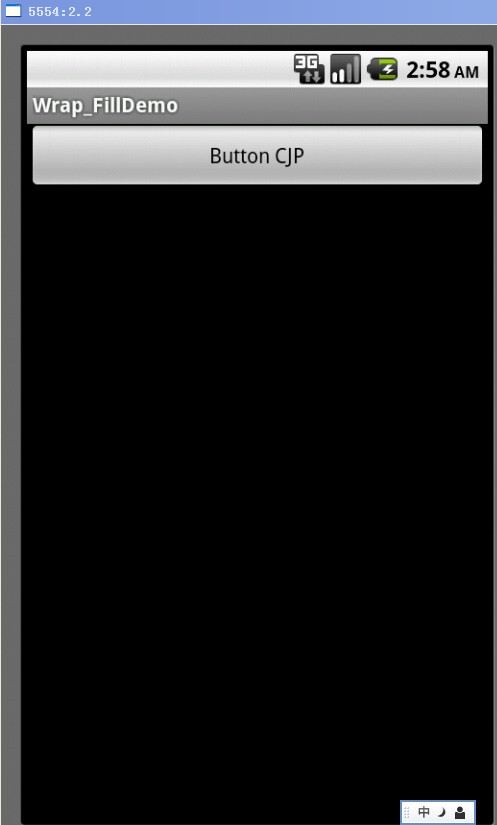
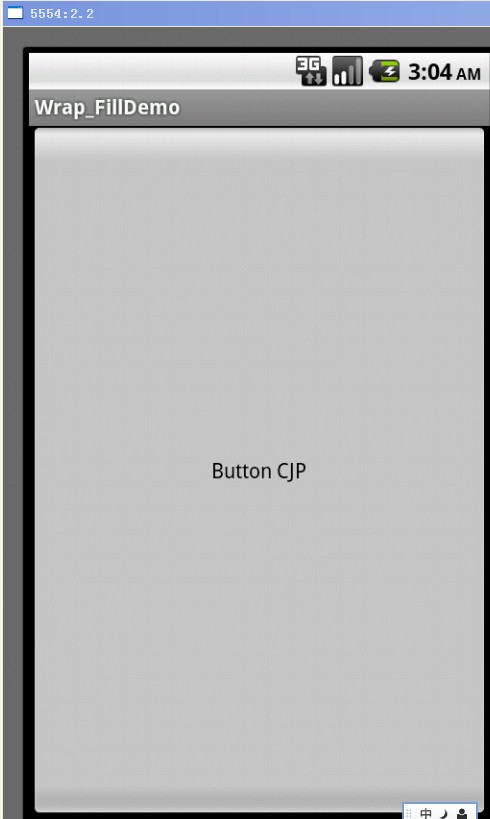
fill_parent设置一个顶部布局或控件强制性让它布满整个屏幕。(这是不管内容大小,直接适应整个屏幕的大小,例长度设置了这,就只有长度适应屏幕的长度)
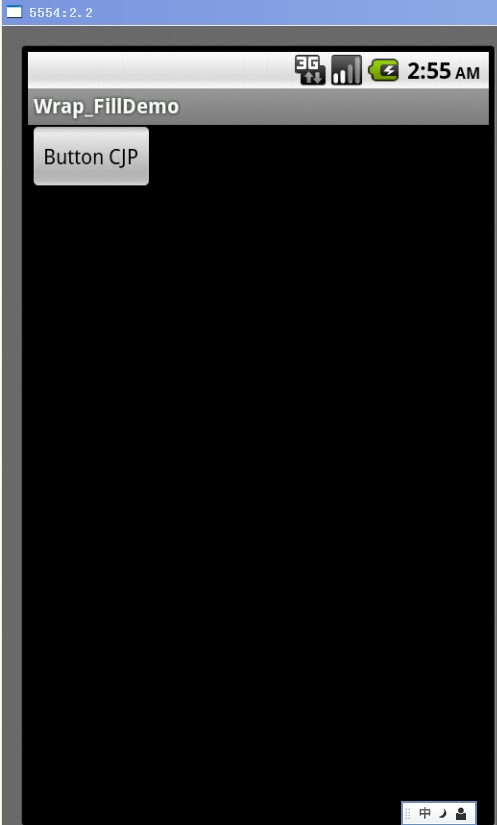
wrap_content布局指根据视图内部内容自动扩展以适应其大小。(简单来说根据里面的图片或文字等内容的大小去适应,例如按钮内容就button cjp两个英文字这么大,所以按钮长和宽就适应这两个英文字大小。)
1. wrap_content
< ?xml version="1.0" encoding="utf-8"?>
< RelativeLayout xmlns:android="http://schemas.android.com/apk/res/android"
android:layout_width="fill_parent"
android:layout_height="fill_parent" >
<Button
android:id="@+id/btnButton1"
android:layout_width="wrap_content"
android:layout_height="wrap_content"
android:text="Button CJP"/>
< /RelativeLayout>
2. fill_parent – width
< ?xml version="1.0" encoding="utf-8"?>
< RelativeLayout xmlns:android="http://schemas.android.com/apk/res/android"
android:layout_width="fill_parent"
android:layout_height="fill_parent" >
<Button
android:id="@+id/btnButton1"
android:layout_width="fill_parent"
android:layout_height="wrap_content"
android:text="Button CJP"/>
< /RelativeLayout>
3. fill_parent – height
< ?xml version="1.0" encoding="utf-8"?>
< RelativeLayout xmlns:android="http://schemas.android.com/apk/res/android"
android:layout_width="fill_parent"
android:layout_height="fill_parent" >
<Button
android:id="@+id/btnButton1"
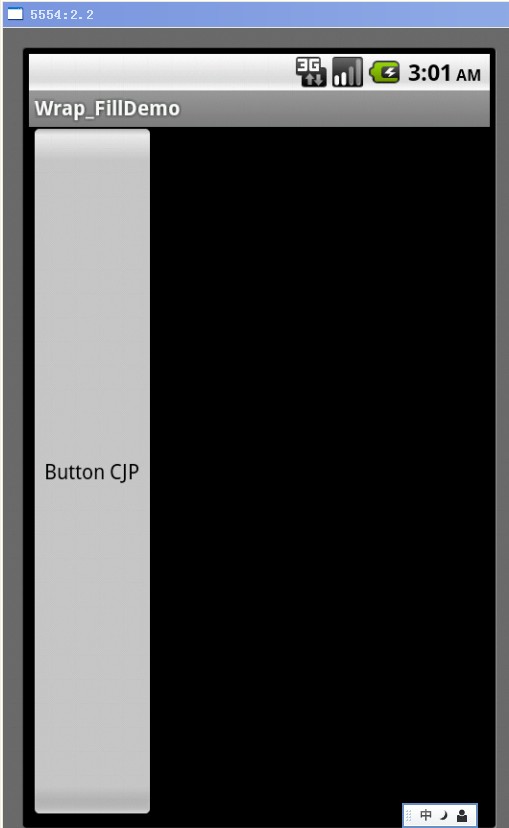
android:layout_width="wrap_content"
android:layout_height="fill_parent"
android:text="Button CJP"/>
< /RelativeLayout>
4. fill_parent – width, height
< ?xml version="1.0" encoding="utf-8"?>
< RelativeLayout xmlns:android="http://schemas.android.com/apk/res/android"
android:layout_width="fill_parent"
android:layout_height="fill_parent" >
<Button
android:id="@+id/btnButton1"
android:layout_width="fill_parent"
android:layout_height="fill_parent"
android:text="Button CJP"/>
< /RelativeLayout>
Android fill_parent和wrap_content分析的更多相关文章
- 【转】Android fill_parent和wrap_content分析
fill_parent设置一个顶部布局或控件强制性让它布满整个屏幕. wrap_content布局指根据视图内部内容自动扩展以适应其大小. 1. wrap_content <?xml versi ...
- android布局--Android fill_parent、wrap_content和match_parent的区别
来自:http://www.cnblogs.com/nikyxxx/archive/2012/06/15/2551390.html 三个属性都用来适应视图的水平或垂直大小,一个以视图的内容或尺寸为基础 ...
- Android fill_parent、wrap_content和match_parent的区别
三个属性都用来适应视图的水平或垂直大小,一个以视图的内容或尺寸为基础的布局比精确地指定视图范围更加方便. 1)fill_parent 设置一个构件的布局为fill_parent将强制性地使构件扩展,以 ...
- 【转】android布局--Android fill_parent、wrap_content和match_parent的区别
三个属性都用来适应视图的水平或垂直大小,一个以视图的内容或尺寸为基础的布局比精确地指定视图范围更加方便. 1)fill_parent 设置一个构件的布局为fill_parent将强制性地使构件扩展,以 ...
- fill_parent和wrap_content的区别
在Android布局文件中定义视图垂直或水平大小: android:layout_width和android_layout_height的属性有fill_parent.wrap_content和mat ...
- android wifi ANR问题分析总结
android wifi ANR问题分析总结 1 看看main进程阻塞在那里? 2 调用关系的函数阻塞在那里? 3 最终阻塞函数的阻塞前的log以及状态
- 从Android系统出发,分析Android控件构架
从Android系统出发,分析Android控件构架 Android中所有的控件追溯到根源,就是View 和ViewGroup,相信这个大家都知道,但是大家也许会不太清楚它们之间的具体关系是什么,在A ...
- [转] Android实时抓包分析 : 善用adb调试桥
Android实时抓包分析 : 善用adb调试桥 谈到android网络抓包,很多人都能想到牛逼轰轰的神器tcpdump.方法就是在android机器上面安装tcpdump,然后通过-w参数把抓包 ...
- [置顶] Android开发之serviceManager分析
Android 开发之serviceManager分析 在Android系统中用到最多的通信机制就是Binder,Binder主要由Client.Server.ServiceManager和Binde ...
随机推荐
- 服务器http请求https服务时报错解决方案
问题一. 问题二. java.security.KeyException 解决: Java.security.KeyException的解决 程序调用环信的接口时,出现此异常. 环境:centos , ...
- POJ 2485 Highways【最小生成树最大权——简单模板】
链接: http://poj.org/problem?id=2485 http://acm.hust.edu.cn/vjudge/contest/view.action?cid=22010#probl ...
- DumpBinary
stdafx.h #include "targetver.h" #include <stdio.h> #include <tchar.h> #include ...
- 解决john不能开多个进程的问题
在使用john进行shadow文件破解时,如果已经开了一个john的进程,这回提示以下错误: Crash recovery file is locked: /root/.john/john.rec ...
- Django 视图系统(views)
介绍 一个视图函数(类),简称视图,是一个简单的Python 函数(类),它接受Web请求并且返回Web响应. 响应可以是一张网页的HTML内容,一个重定向,一个404错误,一个XML文档,或者一张图 ...
- python基础:while循环,for循环
---恢复内容开始--- 1.使用while循环输出1 2 3 4 5 6 8 9 10 2.求1-100的所有数的和 3.输出 1-100 内的所有奇数 4.输出 1-100 内的所有偶数 ...
- HDU 4193 Non-negative Partial Sums(单调队列)
题目大意: 给定一个长度为n的循环序列.从n个不同位置開始,问有几个位置使得一下情况成立:全部前缀的和都大等于0(n <=1000000). 下午的训练赛.之前没学过单调队列所以用的线段树 ...
- android自定义控件(四)坐标系
1.局部坐标系(Local Coordinate) 所谓本地坐标系,就是坐标系以物体的中心为坐标原点,物体旋转.平移等操作都是围绕局部坐标系进行的.这时当物体模型进行旋转.平移等操作时, 局部坐标系也 ...
- PyNN standard model(转)
PyNN standard model 转自http://blog.csdn.net/qq_34886403/article/details/76667477
- 入坑第二式 golang入坑系列
史前必读: 这是入坑系列的第二式,如果错过了第一式,可以去gitbook( https://andy-zhangtao.gitbooks.io/golang/content/ )点个回放,看个重播.因 ...