
Switching from Redhat Linux to Oracle Linux in about 5,000 easy steps

Wayback When
I remember being at Oracle Open World when Larry Ellison unveiled Oracle Enterprise Linux (OEL, which is now just Oracle Linux, or OL). I think I even have a foam Oracle penguin and maybe even a t-shirt somewhere. I was trying to understand why, as a loyal RedHat customer, I’d ever consider switching over to the “dark side”. I even remember laughing to a colleague “Who in their right mind would want Oracle to support their Linux environment, they can’t even support their database?”.
Warming up to the idea
I thought it might be useful to note, for a moment, my experience level with Linux. I’ve been using some flavor of Unix/Linux in various workplaces since 1999. I hold an RHCSA (Red Hat Certified System Administrator) cert and I hope to pursue the next level, RHCE, within a few months. Why am I mentioning this? To demonstrate that I’m not an Oracle fan boy and if anything I have more of an inclination to run Red Hat than any other flavor of Linux at the moment.
As I mentioned in another post, we recently did a fairly major hardware refresh in our datacenter. My 11i production database is currently a physical machine, and the box was available to me to tinker with prior to migration. We’d even gotten to the point where we’d installed Red Hat Enterprise Linux (RHEL) 5.7 before I got the crazy idea to take a 2nd look at Oracle Linux. I have no idea what the adoption rate is for OL, but they claim 8,000 customers on their information page. I don’t know if that’s a lot or not.
What initially drove me to even consider Oracle Linux was not cost, but rather a series of really bad support tickets I had with Red Hat. Unrelated, system service requests where Red Hat support went 0 for 3. Why did my system lock up and the kernel panic? Redhat: No idea. Twice. The second time with really good logging enabled. Then I had an issue where the system CPU (as opposed to user CPU) time was crazy high – in some sar reports as much as 20% of the total CPU usage. Why is it so high? Redhat: No idea. At this point the little light bulb went off in my head. I can pay less than half as much for bad support from Oracle. And that’s really a pessimistic view. In truth, there are some actual advantages to running Oracle on Oracle Linux, especially when you consider the Oracle Unbreakable Enterprise Kernel (UEK).
The Flavors of Oracle Linux
You can go, right now and pull Oracle Linux and install it on you machine. You will, of course not be able to open a ticket (through my Oracle Support). Basically, there’s 3 flavors of support with different cost levels:
- Network Support: patches and updates only (this flavor was not offered by sales, not sure about this level)
- Basic Support: add “complete Linux server lifecycle management, cluster software” (this is what we have)
- Premier Support: add ksplice
I think I should take a minute to define a few things more clearly, as I wish my sales team would have:
- Unbreakable Enterprise Kernel (UEK): Oracle’s home-grown kernel, available at any level of support. From what I can tell, this kernel especially optimizes what Oracle perceives as deficiencies in the Red Hat kernel’s ability to handle big multi-processor (SMP) machines.
- ksplice: a zero-downtime kernel patcher. This is available only if you buy Premier Support and only if you are running the Oracle Unbreakable Enterprise Kernel (UEK)
- Red Hat compatible kernel: the kernel Oracle creates based upon the same open-source feed Red Hat gets. You can run Oracle Linux using either the UEK or the RH Compatible kernel, selected at boot time via grub
- The Physical Address Extension (PAE) 32-bit kernel is available for Oracle Linux 5 (x86). This was important to me because I run the 11i front end (has to be 32-bit!) on the PAE kernel which gets around the 4gb RAM limit imposed by 32-bit architecture.
Things I wish I’d known (or researched better) in retrospect
Before I dig into the “how” part of how to convert your Red Hat 5 machine to Oracle Linux, I thought I’d tell you more about the areas in which I have buyer’s remorse.
- UEK. This was one of the big upsells for me to Oracle Linux. I planned to cut over to the Red Hat compatible kernel, then begin regression testing the “super” UEK kernel. Except for one thing. We’re a VMWare shop. It’s not certified to run as a VMWare guest. Until that changes, UEK is DOA in our datacenter. If UEK is DOA, then so is ksplice. If ksplice is DOA, then that means I definitely don’t need premier support.
- Unbreakable Linux Network (ULN) pales in comparison to the Redhat Network. You cannot release patches for update to the servers like you can with the Red Hat network. Basically you can see what systems are registered, if they need updates, and what your CSI is. Beyond that, you can see what versions of what packages are available in what release.
- Managing servers is rather manual. There is some promise that Enterprise Manager may make server management easier, but I can’t verify this.
Switching to Oracle Linux
I’m assuming at this point, that you’re running RHEL 5.7. While certainly you could be running something else, you’d have to be smart enough to make some changes in the steps I will outline. RH6 isn’t certified with much, as far as I can tell.
This outline is derived from a lot of disparate sources. In fact, I wish Oracle would have one, good, thorough document to walk me through all this, but they don’t appear to.
- Go get the appropriate up2date packages from Oracle, based on the RH release you’re running, and land the RPMs somewhere on your server.
- Install the up2date RPMs
- rpm -Uvh up2date*rpm
- Import the GPG Key for RPMs
- rpm –import /usr/share/rhn/RPM-GPG-KEY
- Save yourself a headache, update the RHN uuid of your server
- # /usr/bin/uuidgen -r
- e949dadc-c182-3ec2-9de7-44ag8a0d2bea
- vi /etc/sysconfig/rhn/up2date-uuid
- confirm the line rhnuuid matches the key you just generated
- if not, pound it out and replace it:
- rhnuuid=e949dadc-c182-3ec2-9de7-44ag8a0d2bea
- # /usr/bin/uuidgen -r
- Run the Oracle Registration TUI (Text User Interface)
- up2date-nox – – register (this actually launches the TUI) ** for OL6, it’s bundled now just run uln_register
- If you have a proxy server between you and the internet
- export http_proxy=http://username:password@yourproxy.domain.com:<yourrt>
- edit /etc/yum.conf for future ease
- under [main] add this line
- proxy=http://username:password@yourproxy.domain.com:<yourrt>
- Import the GPG Key for RPMs
- Here’s screenshots from the TUI

It always seems to say this...

Hit next to waive all your rights

Not sure I like hard coding my ULN login

Hardware gathered information
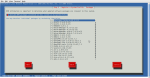
RPMs
- Update your Repos and packages
- cd /etc/yum.repos.d
- rename your existing .repo files
- mv rhel-source.repo rhel-source.repo.old
- mv rhel-debuginfo.repo rhel-debuginfo.repo.old
- note that the .repo suffix is what signifies that a repo file is “active”
- use wget to fetch the oracle repos
- edit the public-yum-el5.repo to activate (enable) the appropriate subscription channels
- [ol5_u7_base]
- …
- enabled=1
- update your packages
- # up2date -i yum-rhn-plugin
- # yum update
- #yum install kernel
- #yum install kernel-uek (optional, install the unbreakable kernel)
- #yum install oracle-linux (optional Oracle packages, pair with UEK I believe)
- reboot to new kernel
- check /etc/grub.conf to ensure it is to your satisfaction
- #reboot -i to restart the host, select the appropriate kernel when the grub menu option appears
First Impressions
So what I failed to mention in my original post were impressions about the migration. We’ve been running Oracle Linux 5.7 for 3 weeks now. Aside from the branding/logo changes (A penguin in Oracle armor instead of the Red Hat shadow man) I don’t see much difference at all. Not that I’d really have any reason to expect to.
Since this OS upgrade coincided with a hardware upgrade, I feel it would be unfair to speculate on performance improvement. Meaning, I suspect anything works better on the latest CPU and hardware architecture. Suffice it to say, after a short period of fretting about the new OS, I just don’t monitor it anymore. It works fine.
My concern about how much more manual the Oracle Linux experience hasn’t changed much. I now understand that I could create a local RPM mirror, which would be updated daily through Oracle Enterprise Manger 11g, and thus through Enterprise Manager, I could push or release updates to my Oracle Linux servers. That’s all fine and good, but that’s just one more layer of complication I’d rather not have to deal with. I may go that route eventually, but since I’m comparing apples to apples, I simply say: “I don’t have to do that with Red Hat”.
One impression I got throughout the whole conversion process was a general disjointedness from Oracle. One of the main reasons I posted this blog entry was because the whole process, from information (sales) to install is all over the place. I mean literally, all over the place. The steps above are provided in a complete manner nowhere that I am aware of. There’s a document here about how to wget the repo’s, a document there about how to deal with duplicate RHN UUID’s, another page to download the up2date RPMs, another page telling you how to register with the Oracle Linux network. I suppose I can’t expect Oracle to advertise that the UEK kernel isn’t certified for VMWare, but it’s important, and I’d rather have learned that up front than on my own trying to boot a DEV VM into UEK. Support told me to use up2date to update my packages, but when I put that in my (original) blog posting here, I was corrected in the comments and told of yum-rhn-plugin (noted in the steps above). I looked back to see what Open World I was at when Oracle Linux was announced: it was Fall of 2006. I would think that after 5 years, this would be a bit more refined.
All that said, my final word on this is that while frustrating and non-intuitive, the migration to Oracle Linux has been fine. It’s too early to say I recommend it, but I will say at this point, that I’m not regretting moving to it, and I think it’s worth a look. Even if you’re from the old-school Sun/RedHat/AIX/HPUX environments like me.
Switching from Redhat Linux to Oracle Linux in about 5,000 easy steps的更多相关文章
- Oracle Linux下载教程(以Oracle Linux 6.9为例)
一.说明 Oracle Linux是Oracle基于Redhat,针对Oracle系列软件(尤其是Oracle数据库)进行优化后的Linux发行版. 虽然Oracle Linux下载是免费的,但是并不 ...
- 在 Oracle Linux 6.5 上安装 Oracle 11g 单实例数据库
Checking the Hardware Requirements 系统必须满足下面最小的硬件要求 Memory Requirements Minimum: 1 GB of RAMRecommend ...
- 转 Comparison of Red Hat and Oracle Linux kernel versions and release strings
Originally derived from Red Hat Enterprise Linux (RHEL), Oracle Linux (OL) contains minor difference ...
- Linux学习之四-Linux发行版及版本比较
Linux发行版及版本比较 三大家族: Fedora是基于RHEL,CentOS,Scientific Linux, 和Oracle Linux的社区版本.相比RHEL,Fedora打包了显著的更多的 ...
- Linux操作系统各版本ISO镜像下载(包括oracle linux\redhat\centos\u
Linux操作系统各版本ISO镜像下载(包括oracle linux\redhat\centos\ubuntu\debian等) 1.Oracle Linux(下载地址) (1)OracleLinux ...
- Oracle Linux 5.7安装VMware Tools的问题
案例环境介绍: 虚拟机的版本:VMware® Workstation 8.0.3 build-703057 操作系统版本:Oracle Linux Server release 5.7 ...
- linux安装oracle 11g rac
安装oracle 11gR2 RAC 一.网络规划及安装虚拟主机 主机名 主机版本 Ip rac1.localdomain Redhat 6.5 RAC节点1 192.168.100.11 rac2. ...
- 在Oracle Linux Server release 6.4下配置ocfs2文件系统
① 安装ocfs-tools-1.8 如果是使用RedHat Enterprise Linux 6.4,也可以安装ocfs-tools-1.8的,只是要插入Oracle Linux Server re ...
- Solaris 和linux 之oracle 数据库的安装
本篇博文前面是一些基础知识介绍,后面才是总结篇. 一.在solaris上面装oracle 10g教程 目前官网已经没有32位的oracle11g了,取而代之的都是64位的oracle11g,为了能在3 ...
随机推荐
- javascript实例:显示时间
<!doctype html> <html lang="en"> <head> <meta charset="UTF-8&quo ...
- python面试题(五)
1 谈谈你对面向对象的理解? 面向对象的编程---object oriented programming,简称:OOP,是一种编程的思想.OOP把对象当成一个程序的基本单元,一个对象包含了数据和操作数 ...
- 斯坦福大学Andrew Ng - 机器学习笔记(5) -- 支持向量机(SVM)
大概用了一个月,Andrew Ng老师的机器学习视频断断续续看完了,以下是个人学习笔记,入门级别,权当总结.笔记难免有遗漏和误解,欢迎讨论. 鸣谢:中国海洋大学黄海广博士提供课程视频和个人笔记,在此深 ...
- Oracle学习笔记—Oracle左连接、右连接、全外连接以及(+)号用法(转载)
转载自: Oracle左连接.右连接.全外连接以及(+)号用法 对于外连接,Oracle中可以使用“(+)”来表示. 关于使用(+)的一些注意事项: (+)操作符只能出现在WHERE子句中,并且不能与 ...
- ModelForm组件介绍
照抄自:http://www.jb51.net/article/126786.htm ModelForm组件如同它的名字一样就是把model和form结合起来,在有些场景可以起到意想不到的效果. 先来 ...
- pyhton3 sys模块
Python常用模块之sys sys模块提供了一系列有关Python运行环境的变量和函数. 1 ). sys.stdin 标准输入流.2 ).sys.stdout 标准输出流.3 ). sys.std ...
- SQL Server 存储过程 分页查询
Transact-SQL中的存储过程,非常类似于Java语言中的方法,它可以重复调用.当存储过程执行一次后,可以将语句缓存中,这样下次执行的时候直接使用缓存中的语句.这样就可以提高存储过程的性能. Ø ...
- 函数的调用规则(__cdecl,__stdcall,__fastcall,__pascal)
关于函数的调用规则(调用约定),大多数时候是不需要了解的,但是如果需要跨语言的编程,比如VC写的dll要delphi调用,则需要了解. microsoft的vc默认的是__cdecl方式,而windo ...
- PHP 数字转大写
<?php header("content-type:text/html;charset=utf-8"); function numToRmb($num){ $rmbNum ...
- RocketMq入坑指南
报错信息Caused by: org.apache.rocketmq.remoting.exception.RemotingConnectException: connect to <172.1 ...