
Centos:mysql的安装和使用:yum方式
1、安装:
安装客户端
sudo yum install mysql
安装服务器
sudo yum install mysql-server
2、配置:查看配置文件
cat /etc/my.cnf
3、启动:
启动脚本:cat /etc/init.d/mysqld
sudo service mysqld start/stop/status/restart/reload/force-reload/condrestart
初次启动信息:多了启动初始化的一些工作
Initializing MySQL database: WARNING: The host '10-57-19-59' could not be looked up with resolveip.
This probably means that your libc libraries are not 100 % compatible
with this binary MySQL version. The MySQL daemon, mysqld, should work
normally with the exception that host name resolving will not work.
This means that you should use IP addresses instead of hostnames
when specifying MySQL privileges !
Installing MySQL system tables...
OK
Filling help tables...
OK
To start mysqld at boot time you have to copy
support-files/mysql.server to the right place for your system
PLEASE REMEMBER TO SET A PASSWORD FOR THE MySQL root USER !
To do so, start the server, then issue the following commands:
/usr/bin/mysqladmin -u root password 'new-password'
/usr/bin/mysqladmin -u root -h 10-57-19-59 password 'new-password'
Alternatively you can run:
/usr/bin/mysql_secure_installation
which will also give you the option of removing the test
databases and anonymous user created by default. This is
strongly recommended for production servers.
See the manual for more instructions.
You can start the MySQL daemon with:
cd /usr ; /usr/bin/mysqld_safe &
You can test the MySQL daemon with mysql-test-run.pl
cd /usr/mysql-test ; perl mysql-test-run.pl
Please report any problems with the /usr/bin/mysqlbug script!
[ OK ]
Starting mysqld: [ OK ]
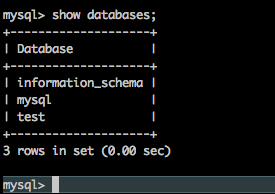
未初始化前,mysql -h127.0.0.1 -uroot登录后的表如下,root账号都默认密码为空
执行如下命令进行安装设置:
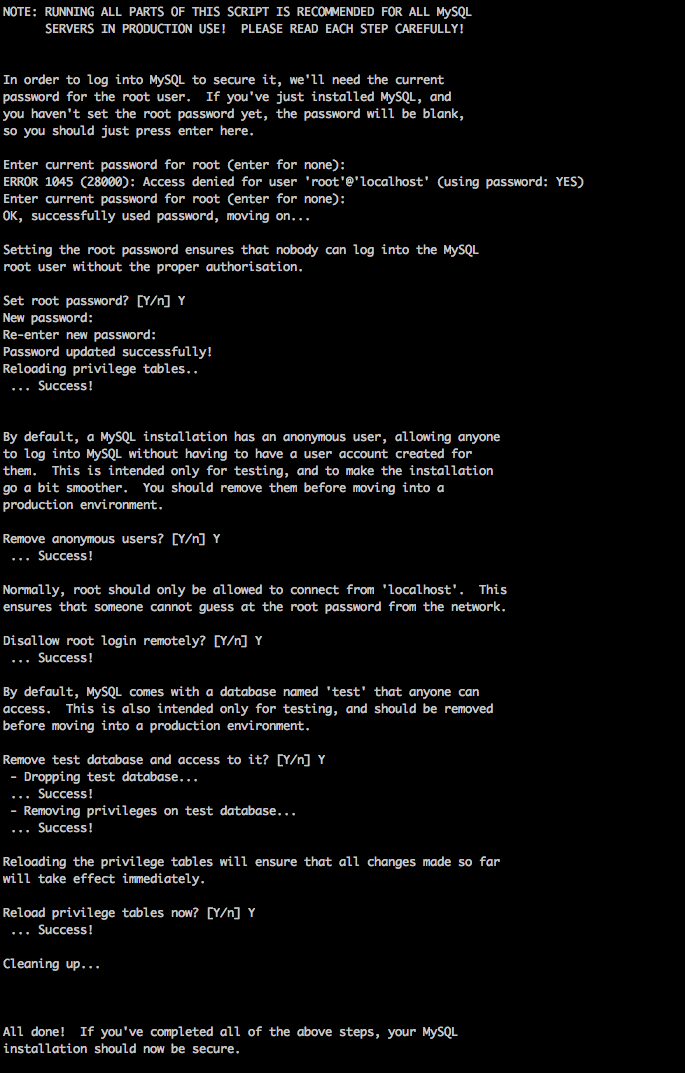
sudo mysql_secure_installation
设置root密码,禁止远程用户使用root账号登录,删除测试表test,删除匿名用户,重新设置表的权限
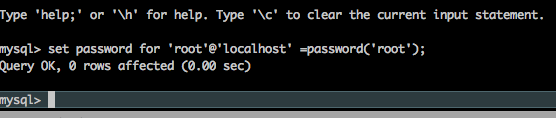
重新设置密码:password 'root'为新密码;-proot为旧密码
sudo mysqladmin -u root -h127.0.0.1 -proot password 'root'
把在所有数据库的所有表的所有权限赋值给位于所有IP地址的root用户。
mysql> grant all privileges on *.* to root@'%' identified by 'password';
如果是新用户而不是root,则要先新建用户
mysql>create user 'username'@'%' identified by 'password';
此时就可以进行远程连接了。

Centos:mysql的安装和使用:yum方式的更多相关文章
- centos mysql 编译安装
centos mysql 编译安装 1.安装 创建MySQL用户 sudo useradd mysql 下载MySQL的源码包,我们这里使用的时5.5.18 安装依赖 sudo yum -y inst ...
- 重要参考文档---MySQL 8.0.29 使用yum方式安装,开启navicat远程连接,搭建主从,读写分离(需要使用到ProxySQL,此文不讲述这个)
yum方式安装 echo "删除系统默认或之前可能安装的其他版本的 mysql" for i in $(rpm -qa|grep mysql);do rpm -e $i --nod ...
- CentOS7下常用安装服务软件yum方式的介绍
简介:介绍yum软件包的管理并配置本地yum源 yum安装:基于 C/S 架构,yum安装称之为傻瓜式安装 yum安装优点:方便快捷,不用考虑包依赖,自动下载软件包. yum安装缺点:人为无法干预,无 ...
- Centos 7 手把手教你使用YUM方式安装并配置Nginx+php7-fpm+MySQL
需要准备的内容 一台纯净系统的服务器 远程连接服务器的工具 (我这里使用Xshell) 安装nginx 链接上服务器后执行 yum install nginx 这里需要输入y 后回车,开始安装ngi ...
- CentOS虚拟机不能联网状况下yum方式从本地安装软件包(转载的)
大家都知道yum是linux下一个非常好用的软件安装/卸载软件,它方便操作,而且最厉害的是可以解决令人头疼的包依赖关系.但是若是你的linux不能联网,若想使用yum安装软件,可以依照下面的方法. 1 ...
- CentOS虚拟机不能联网状况下yum方式从本地安装软件包
大家都知道yum是linux下一个非常好用的软件安装/卸载软件,它方便操作,而且最厉害的是可以解决令人头疼的包依赖关系.但是若是你的linux不能联网,若想使用yum安装软件,可以依照下面的方法. 1 ...
- linux(centos6.8 64位)下安装mysql5.7(yum方式)
下载mysql源安装包 # wget http:.noarch.rpm 安装mysql源包 #yum localinstall mysql57.noarch.rpm 检查mysql源是否安装成功 # ...
- Centos6安装MySQL5.7(yum方式)
1. 下载并安装用来配置mysql的yum源的rpm包 # 下载 wget http://repo.mysql.com/mysql57-community-release-el6-10.noarch. ...
- 在CentOS 7上安装常用的YUM源
参考地址:https://blog.csdn.net/u010048823/article/details/51298183 以epel源为例子,来讲解如何添加额外的YUM源. Extra Packa ...
- CentOS 5.8 安装python 和 yum
centos 5.8 资源路径: http://vault.centos.org/5.8/os/x86_64/CentOS/ rpm -Uvh http://vault.centos.org/5.8 ...
随机推荐
- Invalidate()(转)
原文转自 http://m.blog.csdn.net/blog/piaopiaopiaopiaopiao/41521211 使用Invalidate(TRUE)函数时,它会向消息队列中添加了WM_E ...
- Linux终端彩色打印+终端进度条【转】
转自:https://my.oschina.net/jcseg/blog/178047 开发的一个应用程序选择了终端界面, 为了使软件稍微好看些, 研究下Linux终端的彩色打印, 并且基于这个彩色打 ...
- scrapy的CrawlSpider使用
1.创建项目 我这里的项目名称为scrapyuniversal,然后我创建在D盘根目录.创建方法如下 打开cmd,切换到d盘根目录.然后输入以下命令: scrapy startproject scra ...
- 8.read读取控制台输入
read(选项)(参数)选项:-p:指定读取值时的提示符-t:指定读取时等待的时间(秒),如果没有在指定的时间内输入,就不再等待了参数:变量:指定读取时的变量名
- golang进行加密
crc64加密 package main import ( "fmt" "hash/crc64" ) func main(){ s:="打死udhan ...
- python中的with与上下文管理器
#转载请留言联系 很多人平时需要打开文件进行读取写入操作时,通常这样: f = open('文件路径','w') f.write(data) f.close 这样写有一个潜在的问题,如果在调用 wri ...
- 《锋利的JQuery》读书要点笔记1——认识JQuery&&选择器
<锋利的jQuery>源码下载,包括了这本书中全部代码以及用到的CSS文件 第一章 认识jQuery jQuery是个Js库.首先该明确的一点是:在jQuery库中$就是jQuery的一个 ...
- Android局域网访问webservice以及其中的一些问题
应老师的要求,要做个安卓app,实现备份app上的数据到服务器上的mongodb上,网上搜了下相关的实现方式.利用webservice技术,具体来说就是客户端直接调用服务器端的接口.之前从来没接触这玩 ...
- 使用Pygame制作微信打飞机游戏PC版
前一阵子看了一篇文章:青少年如何使用Python开始游戏开发 .看完照葫芦画瓢写了一个,觉得挺好玩儿,相当于简单学了下Pygame库.这篇文章是个12岁小孩儿写的,国外小孩儿真心NB,想我12岁的时候 ...
- 用WP Super Cache和七牛为你的WordPress网站加速
众所周知,WordPress一直都是博客建站的首选程序,而现在也有越来越多的企业网站都选择采用WordPress来搭建. WordPress虽好但其过于臃肿且响应速度慢等缺点也为站长们所诟病,目前网上 ...