
Android———最详细的系统对话框(AlertDialog)详解

在实际应用开发中,用到系统对话框中的情况几乎是没有的。按开发流程来说,UI工程师都会给出每一个弹窗的样式,故而在实际开发中都是自定义弹窗的。
即使用到的地方不多,但是我们也是需要了解并且能熟练的运用它,下面为大家奉上各种系统对话框的实现。
目录
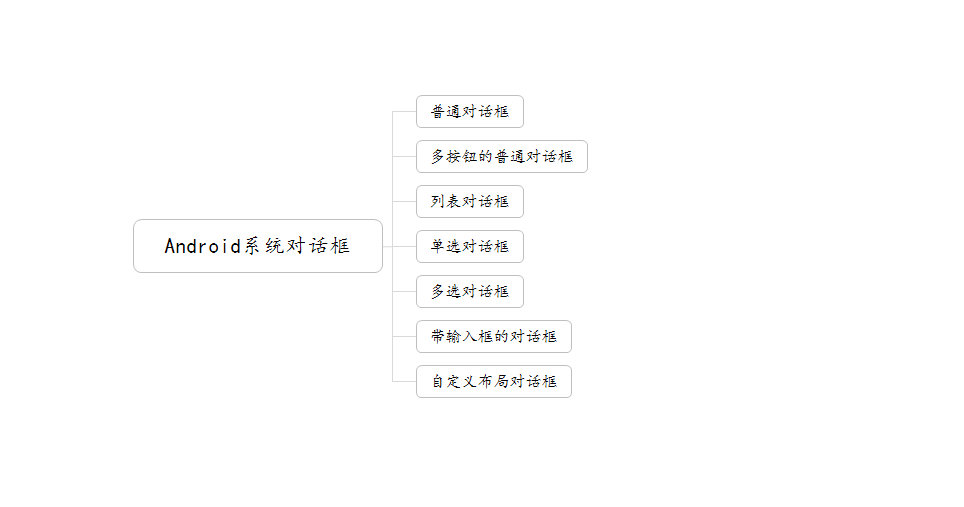
系统对话框的几种类型与实现
在项目的实际开发中,用到的系统对话框几乎是没有的。原因大概包含以下几点:
- 样式过于单一,不能满足大部分实际项目中的需求。
- 对话框的样式会根据手机系统版本的不同而变化。不能达到统一的样式。
- 能实现的功能过于简单。
在这里先附上下面代码中出现文本的string.xml文件。
<string name="dialog_normal_content">我是普通dialog</string>

<string name="dialog_normal_more_button_content">我是普通多按钮dialog</string>

<string name="dialog_btn_confirm_text">确定</string>

<string name="dialog_btn_cancel_text">取消</string>

<string name="dialog_btn_neutral_text">忽略</string>

<string name="dialog_btn_confirm_hint_text">您点击了确定按钮</string>

<string name="dialog_btn_cancel_hint_text">您点击了取消按钮</string>

<string name="dialog_btn_neutral_hint_text">您点击了忽略按钮</string>
1、普通对话框
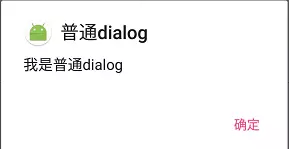
在实际项目开发中,此类型对话框中用到的地方要比其他类型的对话框多一些。但是考虑UI统一问题,也会很少用。
运行截图:
代码:
  private void showNormalDialog(){

    //创建dialog构造器

    AlertDialog.Builder normalDialog = new AlertDialog.Builder(this);

    //设置title

    normalDialog.setTitle(getString(R.string.dialog_normal_text));

    //设置icon

    normalDialog.setIcon(R.mipmap.ic_launcher_round);

    //设置内容

    normalDialog.setMessage(getString(R.string.dialog_normal_content));

    //设置按钮

    normalDialog.setPositiveButton(getString(R.string.dialog_btn_confirm_text)

            , new DialogInterface.OnClickListener() {

        @Override

        public void onClick(DialogInterface dialog, int which) {

            Toast.makeText(DialogActivity.this,getString(R.string.dialog_btn_confirm_hint_text)

                    ,Toast.LENGTH_SHORT).show();

            dialog.dismiss();

        }

    });

    //创建并显示

    normalDialog.create().show();

  }
系统对话框都是支持链式调用的,举例:
    new AlertDialog.Builder(this)

            .setTitle(getString(R.string.dialog_normal_text))

            .setIcon(R.mipmap.ic_launcher_round)

            .setMessage(getString(R.string.dialog_normal_content))

            .setPositiveButton(getString(R.string.dialog_btn_confirm_text)

                    , new DialogInterface.OnClickListener() {

                @Override

                public void onClick(DialogInterface dialog, int which) {

                    Toast.makeText(DialogActivity.this,getString(R.string.dialog_btn_confirm_hint_text)

                            ,Toast.LENGTH_SHORT).show();

                    dialog.dismiss();

                }

            })

            .create()

            .show();
下面的代码都是可以用链式调用的,这里就不展示了。
2、普通对话框(多按钮)
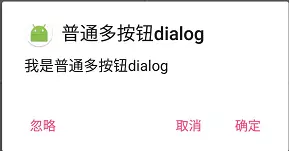
在系统对话框中最多出现三个按钮,即PositiveButton(确定)、NegativeButton(取消)、NeutralButton(忽略)。
运行截图:
代码:
  private void showNormalMoreButtonDialog(){

    AlertDialog.Builder normalMoreButtonDialog = new AlertDialog.Builder(this);

    normalMoreButtonDialog.setTitle(getString(R.string.dialog_normal_more_button_text));

    normalMoreButtonDialog.setIcon(R.mipmap.ic_launcher_round);

    normalMoreButtonDialog.setMessage(getString(R.string.dialog_normal_more_button_content));

    //设置按钮

    normalMoreButtonDialog.setPositiveButton(getString(R.string.dialog_btn_confirm_text)

            , new DialogInterface.OnClickListener() {

                @Override

                public void onClick(DialogInterface dialog, int which) {

                    Toast.makeText(DialogActivity.this

                            ,getString(R.string.dialog_btn_confirm_hint_text),Toast.LENGTH_SHORT).show();

                    dialog.dismiss();

                }

            });

    normalMoreButtonDialog.setNegativeButton(getString(R.string.dialog_btn_cancel_text)

            , new DialogInterface.OnClickListener() {

                @Override

                public void onClick(DialogInterface dialog, int which) {

                    Toast.makeText(DialogActivity.this,

                            getString(R.string.dialog_btn_cancel_hint_text),Toast.LENGTH_SHORT).show();

                    dialog.dismiss();

                }

            });

    normalMoreButtonDialog.setNeutralButton(getString(R.string.dialog_btn_neutral_text)

            , new DialogInterface.OnClickListener() {

                @Override

                public void onClick(DialogInterface dialog, int which) {

                    Toast.makeText(DialogActivity.this,

                            getString(R.string.dialog_btn_neutral_hint_text),Toast.LENGTH_SHORT).show();

                    dialog.dismiss();

                }

            });

    normalMoreButtonDialog.create().show();

  }
也可以用下面的实现方式,和上面的代码效果是一样的。
  private void showNormalMoreButtonDialog(){

    DialogInterface.OnClickListener setListener = null;

    AlertDialog.Builder normalMoreButtonDialog = new AlertDialog.Builder(this);

    normalMoreButtonDialog.setTitle(getString(R.string.dialog_normal_more_button_text));

    normalMoreButtonDialog.setIcon(R.mipmap.ic_launcher_round);

    normalMoreButtonDialog.setMessage(getString(R.string.dialog_normal_more_button_content));

    setListener = new DialogInterface.OnClickListener() {

        @Override

        public void onClick(DialogInterface dialog, int which) {

            switch (which){

                case DialogInterface.BUTTON_POSITIVE:

                    Toast.makeText(DialogActivity.this,

                            getString(R.string.dialog_btn_confirm_hint_text),Toast.LENGTH_SHORT).show();

                    dialog.dismiss();

                    break;

                case DialogInterface.BUTTON_NEUTRAL:

                    Toast.makeText(DialogActivity.this

                            ,getString(R.string.dialog_btn_neutral_hint_text),Toast.LENGTH_SHORT).show();

                    dialog.dismiss();

                    break;

                case DialogInterface.BUTTON_NEGATIVE:

                    Toast.makeText(DialogActivity.this

                            ,getString(R.string.dialog_btn_cancel_hint_text),Toast.LENGTH_SHORT).show();

                    dialog.dismiss();

                    break;

            }

        }

    };

    normalMoreButtonDialog.setPositiveButton(getString(R.string.dialog_btn_confirm_text),setListener);

    normalMoreButtonDialog.setNegativeButton(getString(R.string.dialog_btn_cancel_text),setListener);

    normalMoreButtonDialog.setNeutralButton(getString(R.string.dialog_btn_neutral_text),setListener);

    normalMoreButtonDialog.create().show();

  }
3、普通列表对话框
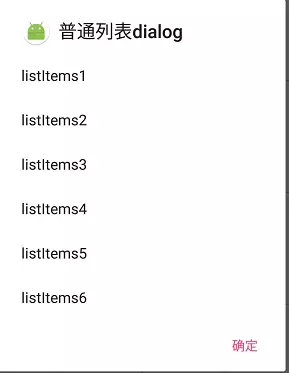
此种类型的对话框能实现简单的列表。
运行截图:
代码:
  /**

   * 普通列表dialog

   */

  private void showListDialog(){

    final String listItems[] = new String[]{"listItems1","listItems2","listItems3",

            "listItems4","listItems5","listItems6"};

    AlertDialog.Builder listDialog = new AlertDialog.Builder(this);

    listDialog.setTitle(getString(R.string.dialog_list_text));

    listDialog.setIcon(R.mipmap.ic_launcher_round);

    /*

        设置item 不能用setMessage()

        用setItems

        items : listItems[] -> 列表项数组

        listener -> 回调接口

    */

    listDialog.setItems(listItems,new DialogInterface.OnClickListener() {

        @Override

        public void onClick(DialogInterface dialog, int which) {

            Toast.makeText(DialogActivity.this,listItems[which],Toast.LENGTH_SHORT).show();

        }

    });

    //设置按钮

    listDialog.setPositiveButton(getString(R.string.dialog_btn_confirm_text)

            , new DialogInterface.OnClickListener() {

                @Override

                public void onClick(DialogInterface dialog, int which) {

                    dialog.dismiss();

                }

            });

    listDialog.create().show();

  }
4、单选对话框
运行截图:
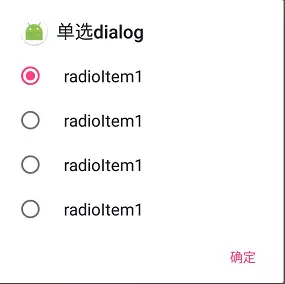
代码:
  private void showRadioDialog(){

    final String radioItems[] = new String[]{"radioItem1","radioItem1","radioItem1","radioItem1"};

    AlertDialog.Builder radioDialog = new AlertDialog.Builder(this);

    radioDialog.setTitle(getString(R.string.dialog_radio_text));

    radioDialog.setIcon(R.mipmap.ic_launcher_round);

    /*

        设置item 不能用setMessage()

        用setSingleChoiceItems

        items : radioItems[] -> 单选选项数组

        checkItem : 0 -> 默认选中的item

        listener -> 回调接口

    */

    radioDialog.setSingleChoiceItems(radioItems, 0, new DialogInterface.OnClickListener() {

        @Override

        public void onClick(DialogInterface dialog, int which) {

            Toast.makeText(DialogActivity.this,radioItems[which],Toast.LENGTH_SHORT).show();

        }

    });

    //设置按钮

    radioDialog.setPositiveButton(getString(R.string.dialog_btn_confirm_text)

            , new DialogInterface.OnClickListener() {

                @Override

                public void onClick(DialogInterface dialog, int which) {

                    dialog.dismiss();

                }

            });

    radioDialog.create().show();

  }
5、多选对话框
运行截图:
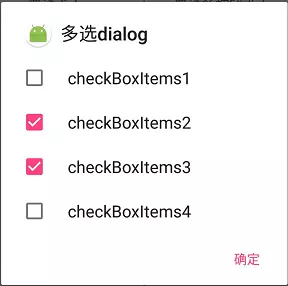
代码:
private void showCheckBoxDialog(){
    final String checkBoxItems[] = new String[]{"checkBoxItems1","checkBoxItems2",

            "checkBoxItems3","checkBoxItems4"};

    final boolean isCheck[] = new boolean[]{false,true,true,false};

    AlertDialog.Builder checkBoxDialog = new AlertDialog.Builder(this);

    checkBoxDialog.setTitle(getString(R.string.dialog_check_box_text));

    checkBoxDialog.setIcon(R.mipmap.ic_launcher_round);

    /*

        设置item 不能用setMessage()

        用setMultiChoiceItems

        items : radioItems[] -> 多选选项数组

        checkItems : isCheck[] -> 是否选中数组

        listener -> 回调接口

    */

    checkBoxDialog.setMultiChoiceItems(checkBoxItems, isCheck

            , new DialogInterface.OnMultiChoiceClickListener() {

        @Override

        public void onClick(DialogInterface dialog, int which, boolean isChecked) {

            if (isChecked){

                Toast.makeText(DialogActivity.this,

                        checkBoxItems[which] + "   选中",Toast.LENGTH_SHORT).show();

            }else {

                Toast.makeText(DialogActivity.this,

                        checkBoxItems[which] + "   未选中",Toast.LENGTH_SHORT).show();

            }

        }

    });

    //设置按钮

    checkBoxDialog.setPositiveButton(getString(R.string.dialog_btn_confirm_text)

            , new DialogInterface.OnClickListener() {

                @Override

                public void onClick(DialogInterface dialog, int which) {

                    dialog.dismiss();

                }

            });

    checkBoxDialog.create().show();

  }
6、带输入框的弹窗
运行截图:
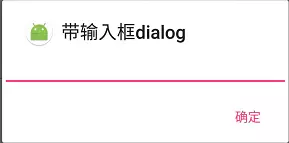
代码:
private void showEditDialog(){
    final EditText edit = new EditText(this);

    AlertDialog.Builder editDialog = new AlertDialog.Builder(this);

    editDialog.setTitle(getString(R.string.dialog_edit_text));

    editDialog.setIcon(R.mipmap.ic_launcher_round);

    //设置dialog布局

    editDialog.setView(edit);

    //设置按钮

    editDialog.setPositiveButton(getString(R.string.dialog_btn_confirm_text)

            , new DialogInterface.OnClickListener() {

                @Override

                public void onClick(DialogInterface dialog, int which) {

                    Toast.makeText(DialogActivity.this,

                            edit.getText().toString().trim(),Toast.LENGTH_SHORT).show();

                    dialog.dismiss();

                }

            });

    editDialog.create().show();

  }
7、自定义布局的对话框
此类型的对话框在实际项目开发中用到的地方比提示对话框用到的地方要多一些,不过在项目几乎上都是自定义的对话框...
运行截图:
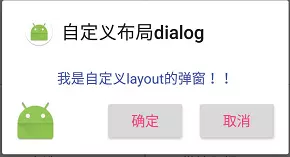
布局文件:custom_dialog_layout.xml
      <TextView

           android:id="@+id/dialog_text"

           android:layout_width="match_parent"

           android:layout_height="wrap_content"

           android:textSize="15sp"

           android:textColor="@color/colorPrimary"

           android:gravity="center"

           android:padding="12dp"/>

      <RelativeLayout

           android:layout_width="match_parent"

           android:layout_height="wrap_content">

           <ImageView

               android:layout_width="wrap_content"

               android:layout_height="wrap_content"

               android:src="@mipmap/ic_launcher"/>

          <Button

              android:id="@+id/dialog_btn_confirm"

              android:layout_width="wrap_content"

              android:layout_height="wrap_content"

              android:textColor="@color/colorAccent"

              android:textSize="15sp"

              android:text="@string/dialog_btn_confirm_text"

              android:layout_centerHorizontal="true"/>

          <Button

              android:id="@+id/dialog_btn_cancel"

              android:layout_width="wrap_content"

              android:layout_height="wrap_content"

              android:textColor="@color/colorAccent"

              android:textSize="15sp"

              android:text="@string/dialog_btn_cancel_text"

              android:layout_centerHorizontal="true"

              android:layout_alignParentRight="true"/>

      </RelativeLayout>

  </LinearLayout>
代码:
  private void showLayoutDialog() {

    //加载布局并初始化组件

    View dialogView = LayoutInflater.from(this).inflate(R.layout.custom_dialog_layout,null);

    TextView dialogText = (TextView) dialogView.findViewById(R.id.dialog_text);

    Button dialogBtnConfirm = (Button) dialogView.findViewById(R.id.dialog_btn_confirm);

    Button dialogBtnCancel = (Button) dialogView.findViewById(R.id.dialog_btn_cancel);

    final AlertDialog.Builder layoutDialog = new AlertDialog.Builder(this);

    layoutDialog.setTitle(getString(R.string.dialog_custom_layout_text));

    layoutDialog.setIcon(R.mipmap.ic_launcher_round);

    layoutDialog.setView(dialogView);

    //设置组件

    dialogText.setText("我是自定义layout的弹窗!!");

    dialogBtnConfirm .setOnClickListener(new View.OnClickListener() {

        @Override

        public void onClick(View v) {

            Toast.makeText(DialogActivity.this,"我是自定义layout的弹窗!!",Toast.LENGTH_SHORT).show();

        }

    });

    dialogBtnConfirm .setOnClickListener(new View.OnClickListener() {

        @Override

        public void onClick(View v) {

            layoutDialog.setOnDismissListener(new DialogInterface.OnDismissListener() {

                @Override

                public void onDismiss(DialogInterface dialog) {

                    dialog.dismiss();

                }

            });

        }

    });

    layoutDialog.create().show();

  }
以上就是Android系统弹窗的几种实现方式,几乎涵盖了能解决各种简单需求。其中自定义布局的方式奠定了自定义弹窗的基本实现。
尾语
可以看出上面的几种实现方式都是通过AlertDialog类实现的。有兴趣的可以看Android源码中的AlertDialog类实现。
我的个人博客:Jetictors
我的掘金:Jetictors
Github:Jetictors
欢迎各位大佬进群共同研究、探索
QQ群号:497071402
Android———最详细的系统对话框(AlertDialog)详解的更多相关文章
- Android———最详细的系统对话框使用
在实际应用开发中,用到系统对话框中的情况几乎是没有的.按开发流程来说,UI工程师都会给出每一个弹窗的样式,故而在实际开发中都是自定义弹窗的. 即使用到的地方不多,但是我们也是需要了解并且能熟练的运用它 ...
- 【转】【Android UI设计与开发】之详解ActionBar的使用,androidactionbar
原文网址:http://www.bkjia.com/Androidjc/895966.html [Android UI设计与开发]之详解ActionBar的使用,androidactionbar 详解 ...
- 分享我开发的网络电话Android手机APP正式版,图文详解及下载
分享我开发的网络电话Android手机APP正式版,图文详解及下载 分享我开发的网络电话Android手机APP正式版 实时语音通讯,可广域网实时通讯,音质清晰流畅! 安装之后的运行效果: 第一次安装 ...
- Android 颜色渲染(九) PorterDuff及Xfermode详解
版权声明:本文为博主原创文章,未经博主允许不得转载. Android 颜色渲染(九) PorterDuff及Xfermode详解 之前已经讲过了除ComposeShader之外Shader的全部子类 ...
- Android ADB命令教程二——ADB命令详解
Android ADB命令教程二——ADB命令详解 转载▼ 原文链接:http://www.tbk.ren/article/249.html 我们使用 adb -h 来看看,adb命令里面 ...
- Android 中各种权限深入体验及详解
Android 中各种权限深入体验及详解 分类: Android2012-07-15 19:27 2822人阅读 评论(0) 收藏 举报 androidpermissionsinstallersyst ...
- Android低功耗蓝牙(BLE)使用详解
代码地址如下:http://www.demodashi.com/demo/13390.html 与普通蓝牙相比,低功耗蓝牙显著降低了能量消耗,允许Android应用程序与具有更严格电源要求的BLE设备 ...
- Android逆向之旅---SO(ELF)文件格式详解(转)
第一.前言 从今天开始我们正式开始Android的逆向之旅,关于逆向的相关知识,想必大家都不陌生了,逆向领域是一个充满挑战和神秘的领域.作为一名Android开发者,每个人都想去探索这个领域,因为一旦 ...
- Android SDK中的Support兼容包详解
这篇文章主要介绍了Android SDK中的Support兼容包详解,本文详细区分了Support Library的版本区别.各种Theme的概念和使用注意事项等内容,需要的朋友可以参考下 背景 来自 ...
随机推荐
- ssh只读事务的管理
概念:从这一点设置的时间点开始(时间点a)到这个事务结束的过程中,其他事务所提交的数据,该事务将看不见!(查询中不会出现别人在时间点a之后提交的数据) 应用场合: 如果你一次执行单条查询语句,则没有必 ...
- 普通用户 crontab 任务不运行
今天发如今linux下,普通用户的crontab任务不运行.网上搜了好多.好多说要在运行的脚本前面加上例如以下内容 if [ -f ~/.bash_profile ]; then . ~/.bas ...
- PHP怎么实现站点保存快捷方式
PHP怎么实现站点保存快捷方式 <?php $Shortcut = "[InternetShortcut] URL=http://blog.csdn.net/phpfenghuo/ I ...
- Grow heap (frag case) to 6.437MB for 1114126-byte allocation
本篇文章是对Grow heap (frag case) 堆内存过大的问题进行了详细的分析介绍,需要的朋友参考下 对于Android开发者来说虽然使用了可以自动管理内存的Java语言,但是对于内存管理不 ...
- mysql的innodb数据库引擎详解
http://www.jb51.net/softjc/158474.html 这篇文章主要介绍了mysql的innodb数据库引擎,需要的朋友可以参考下 一.mysql体系结构和存储引擎 1. ...
- jquery遍历DOM方法总结
1.jQuery 遍历 - 祖先 向上遍历 DOM 树 这些 jQuery 方法很有用,它们用于向上遍历 DOM 树: parent() parents() parentsUntil() jQuery ...
- tcpdump抓包(转)
Linux 环境下,通常通过 tcpdump 来进行抓包和分析.它是几乎所有 Linux 发行版本预装的数据包抓取和分析工具. tcpdump 工具的获取和安装可以参阅相应操作系统的官方文档,本文不再 ...
- C++语言基础(15)-友元函数和友元类
一个类中可以有 public.protected.private 三种属性的成员,通过对象可以访问 public 成员,只有本类中的函数可以访问本类的 private 成员.现在,我们来介绍一种例外情 ...
- 内核并发管理---spin lock
自旋锁最初是为了在smp系统上使用而设计. 1.在单处理器非抢占模式下,自旋锁不做任何事情. #ifdef CONFIG_PREEMPT_COUNT //支持抢占模式 #define pree ...
- iOS 学习笔记六 【APP中的文字和APP名字的国际化多语言处理】
今天为新手解决下APP中的文字和APP名字的国际化多语言处理, 不多说了,直接上步骤: 1.打开你的项目,单机project名字,选中project,直接看图吧: 2.创建Localizable.st ...