
Android(java)学习笔记51:ScrollView用法
1. 理论部分
(1)ScrollView和HorizontalScrollView是为控件或者布局添加滚动条
(2)上述两个控件只能有一个孩子,但是它并不是传统意义上的容器
(3)上述两个控件可以互相嵌套
(4)滚动条的位置现在的实验结果是:可以由layout_width和layout_height设定
(5)ScrollView用于设置垂直滚动条,HorizontalScrollView用于设置水平滚动条:需要注意的是,有一个属性是 scrollbars 可以设置滚动条的方向:但是ScrollView设置成horizontal是和设置成none是效果同,HorizontalScrollView设置成vertical和none的效果同。
代码实践:
 <?xml version="1.0" encoding="utf-8"?>

 <ScrollView xmlns:android="http://schemas.android.com/apk/res/android"

     android:id="@+id/mScrollView"

     android:layout_width="fill_parent"

     android:layout_height="wrap_content"

     android:scrollbars="vertical" >

     <LinearLayout

         android:layout_width="fill_parent"

         android:layout_height="wrap_content"

         android:orientation="vertical" >

         <LinearLayout

             android:layout_width="fill_parent"

             android:layout_height="fill_parent"

             android:orientation="horizontal" >

             <Button

                 android:id="@+id/openNetCard"

                 android:layout_width="wrap_content"

                 android:layout_height="wrap_content"

                 android:layout_weight="1"

                 android:text="打开无线网卡" />

             <Button

                 android:id="@+id/closeNetCard"

                 android:layout_width="wrap_content"

                 android:layout_height="wrap_content"

                 android:layout_weight="1"

                 android:text="关闭无线网卡" />

             <Button

                 android:id="@+id/checkNetCardState"

                 android:layout_width="wrap_content"

                 android:layout_height="wrap_content"

                 android:layout_weight="1"

                 android:text="检查网卡状态" />

         </LinearLayout>

         <LinearLayout

             android:layout_width="fill_parent"

             android:layout_height="fill_parent"

             android:orientation="horizontal" >

             <Button

                 android:id="@+id/scan"

                 android:layout_width="wrap_content"

                 android:layout_height="wrap_content"

                 android:layout_weight="1"

                 android:text="扫描网络" />

             <Button

                 android:id="@+id/getScanResult"

                 android:layout_width="wrap_content"

                 android:layout_height="wrap_content"

                 android:layout_weight="1"

                 android:text="扫描结果" />

         </LinearLayout>

         <LinearLayout

             android:layout_width="fill_parent"

             android:layout_height="fill_parent"

             android:orientation="horizontal" >

             <Button

                 android:id="@+id/connect"

                 android:layout_width="wrap_content"

                 android:layout_height="wrap_content"

                 android:layout_weight="1"

                 android:text="连接Wifi" />

             <Button

                 android:id="@+id/disconnect"

                 android:layout_width="wrap_content"

                 android:layout_height="wrap_content"

                 android:layout_weight="1"

                 android:text="断开Wifi" />

             <Button

                 android:id="@+id/checkNetWorkState"

                 android:layout_width="wrap_content"

                 android:layout_height="wrap_content"

                 android:layout_weight="1"

                 android:text="Wifi连接状态" />

         </LinearLayout>

         <TextView

             android:id="@+id/scanResult"

             android:layout_width="fill_parent"

             android:layout_height="wrap_content" />

     </LinearLayout>

 </ScrollView>
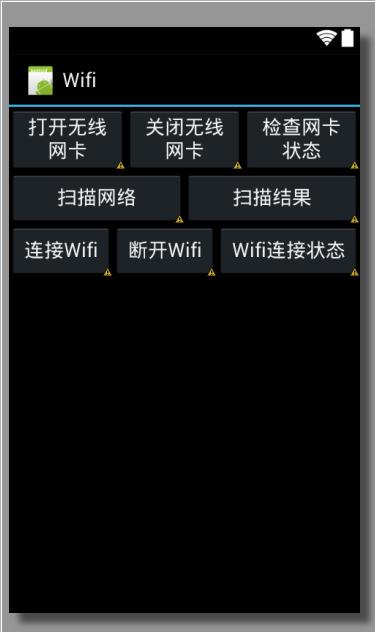
布局图如下:
……
public void onCreate(Bundle savedInstanceState) {
super.onCreate(savedInstanceState);
setContentView(R.layout.main);
}
……
Android(java)学习笔记51:ScrollView用法的更多相关文章
- Java学习笔记51(综合项目:家庭记账系统)
javaEE的开发模式 1.什么是模式 模式在开发过程中总结出的“套路”,总结出的一套约定俗成的设计模式 2.javaEE经历的模式 model1模式: 技术组成:jsp+javaBean model ...
- Android开发学习笔记-SharedPreferences的用法
SharedPreferences介绍: 做软件开发应该都知道,很多软件会有配置文件,里面存放这程序运行当中的各个属性值,由于其配置信息并不多,如果采用数据库来存放并不划算,因为数据库连接跟操作等 ...
- Java学习笔记51:数组转ArrayList和ArrayList转数组技巧
ArrayList转数组: public class Test { public static void main(String[] args) { List<String> list = ...
- 《Java学习笔记(第8版)》学习指导
<Java学习笔记(第8版)>学习指导 目录 图书简况 学习指导 第一章 Java平台概论 第二章 从JDK到IDE 第三章 基础语法 第四章 认识对象 第五章 对象封装 第六章 继承与多 ...
- Android动画学习笔记-Android Animation
Android动画学习笔记-Android Animation 3.0以前,android支持两种动画模式,tween animation,frame animation,在android3.0中 ...
- Android 数字签名学习笔记
Android 数字签名学习笔记 在Android系统中,所有安装到系统的应用程序都必有一个数字证书,此数字证书用于标识应用程序的作者和在应用程序之间建立信任关系,如果一个permission的pro ...
- java学习笔记之基础篇
java选择语句之switch //switch可以用于等值判断 switch (e) //int ,或则可以自动转化成int 的类型,(byte char short)枚举jdk 7中可以防止字 ...
- 0028 Java学习笔记-面向对象-Lambda表达式
匿名内部类与Lambda表达式示例 下面代码来源于:0027 Java学习笔记-面向对象-(非静态.静态.局部.匿名)内部类 package testpack; public class Test1{ ...
- Android自动化学习笔记之MonkeyRunner:官方介绍和简单实例
---------------------------------------------------------------------------------------------------- ...
- 0013 Java学习笔记-面向对象-static、静态变量、静态方法、静态块、单例类
static可以修饰哪些成员 成员变量---可以修饰 构造方法---不可以 方法---可以修饰 初始化块---可以修饰 内部类(包括接口.枚举)---可以修饰 总的来说:静态成员不能访问非静态成员 静 ...
随机推荐
- MongoDB复杂查询语句记录
前段时间做业务监控,用到了MongoDB,有一个查询是把一个含array的list里面查询array中是否存在某一对unique值,不存在的情况下插入一条记录. 类似这样一个表: Biao{ id, ...
- webstorm 搜索vue文件
1. Show IDE settings 状态修改为 ON
- Flask中的的SQLAlchemy
好久没有更新Blog了 今天来聊一聊 Python 的 ORM 框架 SQLAlchemy 有的孩子已经听说过这个框架的大名了,也听说了 SQLAlchemy 没有 Django 的 Models 好 ...
- 牛客网Java刷题知识点之OSI七层参考模型 和 TCP/IP五层参考模型
不多说,直接上干货! 福利 => 每天都推送 欢迎大家,关注微信扫码并加入我的4个微信公众号: 大数据躺过的坑 Java从入门到架构师 人工智能躺过的坑 ...
- 阿里云Tomcat运行shutdown.sh命令关闭时遇到的问题
1.安装完成jdk之后,然后安装tomcat. tomcat安装成功后,进入tomcat的安装目录,找到bin所在的目录. 使用./startup.sh,启动tomcat; 使用./shutdown. ...
- 为什么一段时间后网站后台自动退出 php中session过期时间设置
修改php配置文件中的session.gc_maxlifetime.如果想了解更多session回收机制,继续阅读.(本文环境php5.2) 概述:每一次php请求,会有1/100的概率(默认值)触发 ...
- php高手干货【必看】
1.用单引号代替双引号来包含字符串,这样做会更快一些.因为PHP会在双引号包围的字符串中搜寻变量, 单引号则不会,注意:只有echo能这么做,它是一种可以把多个字符串当作参数的"函数&quo ...
- vim代码折叠命令
1. 折叠方式 可用选项 'foldmethod' 来设定折叠方式:set fdm=*****. 有 6 种方法来选定折叠: manual 手工定义折叠 ind ...
- 【Ubuntu】ubuntu 16.04 设置root用户初始密码
安装ubuntu成功后,都是普通用户权限,并没有最高root权限,如果需要使用root权限的时候,通常都会在命令前面加上 sudo . 我们一般使用su命令来直接切换到root用户的,但是如果没有给r ...
- python高阶函数sorted
原文 排序也是在程序中经常用到的算法.无论使用冒泡排序还是快速排序,排序的核心是比较两个元素的大小.如果是数字,我们可以直接比较,但如果是字符串或者两个dict呢?直接比较数学上的大小是没有意义的,因 ...