
选择改变事件OnCheckedChange
1.效果图:选择正确的提示选对,选择错误提示选错
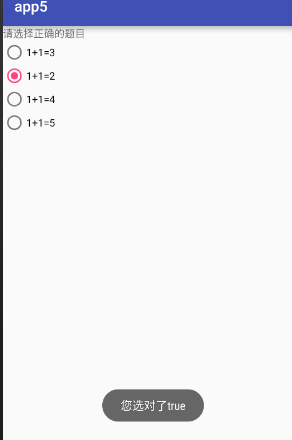
2.activity_main.xml
 <?xml version="1.0" encoding="utf-8"?>

 <LinearLayout xmlns:android="http://schemas.android.com/apk/res/android"

     xmlns:tools="http://schemas.android.com/tools"

     android:layout_width="match_parent"

     android:layout_height="match_parent"

    android:orientation="vertical"

     tools:context="com.example.app5.MainActivity">

     <TextView

         android:layout_width="wrap_content"

         android:layout_height="wrap_content"

         android:text="请选择正确的题目" />

     <RadioGroup

         android:id="@+id/rg"

         android:layout_width="wrap_content"

         android:layout_height="wrap_content">

         <RadioButton

             android:id="@+id/rb_1"

             android:text="1+1=3"

             android:layout_width="wrap_content"

             android:layout_height="wrap_content" />

         <RadioButton

             android:id="@+id/rb_2"

             android:text="1+1=2"

             android:layout_width="wrap_content"

             android:layout_height="wrap_content" />

         <RadioButton

             android:id="@+id/rb_3"

             android:text="1+1=4"

             android:layout_width="wrap_content"

             android:layout_height="wrap_content" />

         <RadioButton

             android:id="@+id/rb_4"

             android:text="1+1=5"

             android:layout_width="wrap_content"

             android:layout_height="wrap_content" />

     </RadioGroup>

 </LinearLayout>
2.MainActivity.java
 package com.example.app5;

 import android.support.v7.app.AppCompatActivity;

 import android.os.Bundle;

 import android.widget.RadioButton;

 import android.widget.RadioGroup;

 import android.widget.Toast;

 public class MainActivity extends AppCompatActivity {

     private RadioGroup rg;

     private RadioButton rb_1,rb_2,rb_3,rb_4;

     @Override

     protected void onCreate(Bundle savedInstanceState) {

         super.onCreate(savedInstanceState);

         setContentView(R.layout.activity_main);

         rg=(RadioGroup)findViewById(R.id.rg);

         rb_1 = (RadioButton) findViewById(R.id.rb_1);

         rb_2 = (RadioButton) findViewById(R.id.rb_2);

         rb_3= (RadioButton) findViewById(R.id.rb_3);

         rb_4 = (RadioButton) findViewById(R.id.rb_4);

         rg.setOnCheckedChangeListener(new RadioGroup.OnCheckedChangeListener() {

             @Override

             public void onCheckedChanged(RadioGroup group, int checkedId) {

                 //switch实现方式

                 /*switch (checkedId){

                     case R.id.rb_1:

                         Toast.makeText(MainActivity.this,"您选错了"+rb_1.isChecked(),Toast.LENGTH_SHORT).show();

                         break;

                     case R.id.rb_2:

                         Toast.makeText(MainActivity.this,"您选对了"+rb_2.isChecked(),Toast.LENGTH_SHORT).show();

                         break;

                     case R.id.rb_3:

                         Toast.makeText(MainActivity.this,"您选错了"+rb_3.isChecked(),Toast.LENGTH_SHORT).show();

                         break;

                     case R.id.rb_4:

                         Toast.makeText(MainActivity.this,"您选错了"+rb_4.isChecked(),Toast.LENGTH_SHORT).show();

                         break;*/

                  //if 判断实现方式

               /*  if(R.id.rb_2==checkedId){

                     Toast.makeText(MainActivity.this,"正确"+rb_2.isChecked(),Toast.LENGTH_SHORT).show();

                 } else {

                     Toast.makeText(MainActivity.this,"错误",Toast.LENGTH_SHORT).show();

                 }*/

                 //对象的实现方式

                 RadioButton r = (RadioButton) findViewById(checkedId);

                 if(r.equals(rb_2)){

                     Toast.makeText(MainActivity.this,"正确"+rb_2.isChecked(),Toast.LENGTH_SHORT).show();

                 }else{

                     Toast.makeText(MainActivity.this,"错误",Toast.LENGTH_SHORT).show();

                 }

             }

         });

     }

 }
2.效果图:多选按钮,选择哪个之后提示选择了XX
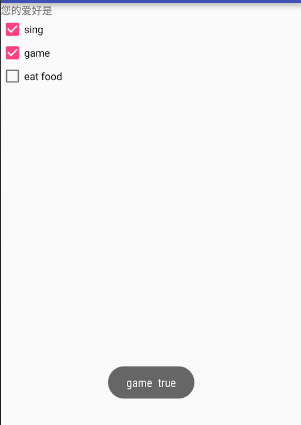
(1)activity_main.xml
 <?xml version="1.0" encoding="utf-8"?>

 <LinearLayout xmlns:android="http://schemas.android.com/apk/res/android"

     xmlns:tools="http://schemas.android.com/tools"

     android:layout_width="match_parent"

     android:layout_height="match_parent"

    android:orientation="vertical"

     tools:context="com.example.app6.MainActivity">

     <TextView

         android:layout_width="wrap_content"

         android:layout_height="wrap_content"

         android:text="您的爱好是" />

     <CheckBox

         android:id="@+id/cb_1"

         android:text="sing"

         android:layout_width="wrap_content"

         android:layout_height="wrap_content" />

     <CheckBox

         android:id="@+id/cb_2"

         android:text="game"

         android:layout_width="wrap_content"

         android:layout_height="wrap_content" />

     <CheckBox

         android:id="@+id/cb_3"

         android:text="eat food"

         android:layout_width="wrap_content"

         android:layout_height="wrap_content" />

 </LinearLayout>
(2)MainActivity.java
 package com.example.app6;

 import android.support.v7.app.AppCompatActivity;

 import android.os.Bundle;

 import android.widget.CheckBox;

 import android.widget.CompoundButton;

 import android.widget.Toast;

 public class MainActivity extends AppCompatActivity {

     private CheckBox cb_1,cb_2,cb_3;

     @Override

     protected void onCreate(Bundle savedInstanceState) {

         super.onCreate(savedInstanceState);

         setContentView(R.layout.activity_main);

         cb_1=(CheckBox)findViewById(R.id.cb_1);

         cb_2=(CheckBox)findViewById(R.id.cb_2);

         cb_3=(CheckBox)findViewById(R.id.cb_3);

         cb_1.setOnCheckedChangeListener(new myListener());

         cb_2.setOnCheckedChangeListener(new myListener());

         cb_3.setOnCheckedChangeListener(new myListener());

     }

    class myListener implements CompoundButton.OnCheckedChangeListener {

        @Override

        public void onCheckedChanged(CompoundButton buttonView, boolean isChecked) {

            //switch实现

           /* switch (buttonView.getId()){

                case R.id.cb_1:

                    Toast.makeText(MainActivity.this,cb_1.getText().toString()+"  "+((CheckBox)buttonView).isChecked() ,Toast.LENGTH_SHORT).show();

                    break;

                case R.id.cb_2:

                    Toast.makeText(MainActivity.this,cb_2.getText().toString()+"  "+((CheckBox)buttonView).isChecked() ,Toast.LENGTH_SHORT).show();

                     break;

                case R.id.cb_3:

                    Toast.makeText(MainActivity.this,cb_3.getText().toString()+"  "+((CheckBox)buttonView).isChecked() ,Toast.LENGTH_SHORT).show();

                     break;

            }*/

            //if实现

            if(isChecked){

                Toast.makeText(MainActivity.this,buttonView.getText().toString()+"  "+(buttonView).isChecked() ,Toast.LENGTH_SHORT).show();

            } else{

                Toast.makeText(MainActivity.this,buttonView.getText().toString()+"  "+(buttonView).isChecked() ,Toast.LENGTH_SHORT).show();

            }

        }

    }

 }
3.效果图
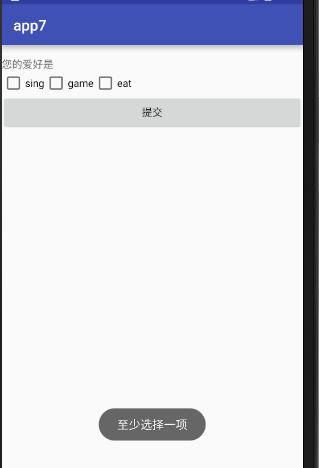
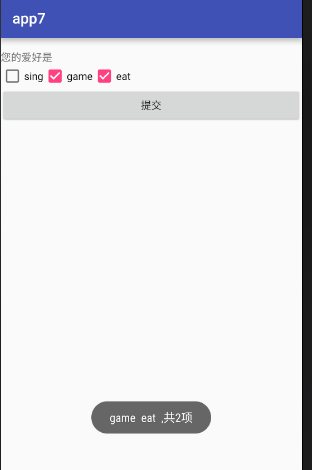
(1)activity_main.xml
<?xml version="1.0" encoding="utf-8"?>

<LinearLayout xmlns:android="http://schemas.android.com/apk/res/android"

    xmlns:tools="http://schemas.android.com/tools"

    android:layout_width="match_parent"

    android:layout_height="match_parent"

    android:orientation="vertical"

    android:paddingTop="@dimen/activity_vertical_margin"

    tools:context="com.example.app7.MainActivity">

    <TextView

        android:layout_width="wrap_content"

        android:layout_height="wrap_content"

        android:text="您的爱好是" />

    <LinearLayout

        android:layout_width="wrap_content"

        android:layout_height="wrap_content"

        android:orientation="horizontal">

        <CheckBox

            android:id="@+id/sing"

            android:text="sing"

            android:layout_width="wrap_content"

            android:layout_height="wrap_content" />

        <CheckBox

            android:id="@+id/game"

            android:text="game"

            android:layout_width="wrap_content"

            android:layout_height="wrap_content" />

        <CheckBox

            android:id="@+id/eat"

            android:text="eat"

            android:layout_width="wrap_content"

            android:layout_height="wrap_content" />

    </LinearLayout>

    <Button

        android:id="@+id/bt"

        android:text="提交"

        android:layout_width="match_parent"

        android:layout_height="wrap_content" />

</LinearLayout>
(2)MainAcivity.xml
 package com.example.app7;

 import android.support.v7.app.AppCompatActivity;

 import android.os.Bundle;

 import android.view.View;

 import android.widget.Button;

 import android.widget.CheckBox;

 import android.widget.Toast;

 import java.util.ArrayList;

 import java.util.List;

 public class MainActivity extends AppCompatActivity {

     private Button bt;

     private CheckBox sing;

     private  CheckBox game;

     private  CheckBox eat;

     private List<CheckBox> list;

     private int count=0;

     @Override

     protected void onCreate(Bundle savedInstanceState) {

         super.onCreate(savedInstanceState);

         setContentView(R.layout.activity_main);

         sing = (CheckBox) findViewById(R.id.sing);

         game = (CheckBox) findViewById(R.id.game);

         eat = (CheckBox) findViewById(R.id.eat);

         bt = (Button) findViewById(R.id.bt);

         list = new ArrayList<>();

         list.add(sing);

         list.add(game);

         list.add(eat);

         bt.setOnClickListener(new View.OnClickListener() {

             @Override

             public void onClick(View v) {

                 StringBuffer sb = new StringBuffer();;

                 for (CheckBox checkbox:list){

                     if (checkbox.isChecked()){

                         count++;

                         sb.append(checkbox.getText().toString()+"  ");

                     }

                 }

                 if(sb==null||"".equals(sb.toString())){

                     Toast.makeText(MainActivity.this,"至少选择一项",Toast.LENGTH_SHORT).show();

                 }else {

                     Toast.makeText(MainActivity.this,sb.toString()+",共"+count+"项",Toast.LENGTH_SHORT).show();

                     count=0;

                 }

             }

         });

     }

 }
选择改变事件OnCheckedChange的更多相关文章
- DropDownList 下拉框选择改变,促发事件和防全局刷新(记录)
代码: <asp:ScriptManager ID="ScriptManager1" runat="server"> </asp:Script ...
- 下拉框改变事件:获取下拉框中当前选择的文本 SelectionChanged事件
/// <summary> /// 下拉框改变事件:获取下拉框中当前选择的文本 /// </summary> /// <param name="sender&q ...
- select change下拉框改变事件 设置选定项,禁用select
select change下拉框改变事件 设置选定项,禁用select 1 <!DOCTYPE html PUBLIC "-//W3C//DTD XHTML 1.0 Transitio ...
- js获取select改变事件
js获取select改变事件onchage前的值 和 onclick事件 <select id="wupin_id" name="wupin_id" on ...
- Android 监听EditView中的文本改变事件
android中的编辑框EditText也比较常用,那比如在搜索框中,没输入一个字,下面的搜索列表就显示有包含输入关键字的选项,这个输入监听怎么实现的呢? 我们可以建一个例子,效果图如下: 我们可以监 ...
- ComboBox赋值ItemsSource数据源的时候会触发SelectionChanged改变事件的解决办法
我用的方法是设置开关 bool flag = false;//默认开关关闭(全局变量) flag = false;在赋值数据源之前设置关闭box.ItemsSource = lstProperty;/ ...
- div、span绑定内容改变事件
内容改变事件onchange只适用于form表单标签(input.select.textarea) 当需要对div.span标签进行内容改变监听则无法适用,查阅了一些资料发现jquery有针对的方法, ...
- 单选框radio改变事件详解(用的jquery的radio的change事件)
单选框radio改变事件详解(用的jquery的radio的change事件) 一.总结 1.用的jquery的radio的change事件:当元素的值发生改变时,会发生 change 事件,radi ...
- 监听EditView中的文本改变事件详解--转
转自: http://blog.csdn.net/zoeice/article/details/7700529 android中的编辑框EditText也比较常用,那比如在搜索框中,没输入一个字,下面 ...
随机推荐
- 使用UMeditor富文本编辑器上传图片
注:本文系作者原创,但可随意转载. 最近写自己的网站玩儿,写到博客的部分,打算使用UMeditor,因为之前也用过(但是好像没实现图片上传的功能),感觉用起来还比较简单. 不过还是折腾了一下午...遇 ...
- tomcat work目录
1 用tomcat作web服务器的时候,部署的程序在webApps下,这些程序都是编译后的程序(发布到tomcat的项目里含的类,会被编译成.class后才发布过来,源文件没有发布过来,但这里的 ...
- bzoj4240 zkw版
复习一波zkw树 很显然最后建出来的图不是单调序列就是一个类似 ...
- bzoj 1022 SJ定理
与传统的SG游戏不同的是,完成最后一个状态的人是输的,我们把这一类问题称作Anti-SG,这类问题的解决我们需要引入一个定理—SJ定理: 对于任意一个Anti-SG游戏,如果我们规定当局面中所有的单一 ...
- linux设备驱动中的并发控制【转】
转自:http://www.cnblogs.com/plinx/archive/2013/01/28/2873121.html 在linux内核中,主要的静态发生于以下几种情况: 1.对称多处理器(S ...
- ARM内核全解析,从ARM7,ARM9到Cortex-A7,A8,A9,A12,A15到Cortex-A53,A57【转】
转自:http://www.myir-tech.com/resource/448.asp 前不久ARM正式宣布推出新款ARMv8架构的Cortex-A50处理器系列产品,以此来扩大ARM在高性能与低功 ...
- 重启nginx后丢失nginx.pid,如何重新启动nginx
http://blog.csdn.net/llnara/article/details/8691049 一句话结论: /alidata/server/nginx/sbin/nginx -c /alid ...
- eclipse启动几秒后报错 (一闪而过)
eclipse启动报错,让查看.metadata/.log日志 1 !SESSION 2013-09-23 17:28:28.484 ------------------------------- ...
- 存储过程 ----- navicat 创建存储过程
以下为navicat 创建存储过程步骤图解: 1. 2. 3. 4. 在存储过程正文中是输入一行语句测试用,点击保存 5.输入存储过程名称,点击确定 6.到这来那么问题来了,会提示错误 7.切记存储过 ...
- 简单unix 局域网的TCP会话
client.c #include <stdio.h> #include <stdlib.h> #include <string.h> #include <e ...