
【Head First Servlets and JSP】笔记17:JSP所生成的servlet相关问题
1、容器根据你所写的JSP生成一个类,
/*

 * Generated by the Jasper component of Apache Tomcat

 * Version: Apache Tomcat/7.0.77

 * Generated at: 2017-06-11 15:47:28 UTC

 * Note: The last modified time of this file was set to

 *       the last modified time of the source file after

 *       generation to assist with modification tracking.

 */

package org.apache.jsp;

import javax.servlet.*;

import javax.servlet.http.*;

import javax.servlet.jsp.*;

public final class HelloWorld_jsp extends org.apache.jasper.runtime.HttpJspBase

    implements org.apache.jasper.runtime.JspSourceDependent {

  private static final javax.servlet.jsp.JspFactory _jspxFactory =

          javax.servlet.jsp.JspFactory.getDefaultFactory();

  private static java.util.Map<java.lang.String,java.lang.Long> _jspx_dependants;

  private org.apache.jasper.runtime.TagHandlerPool _005fjspx_005ftagPool_005fs_005fproperty_0026_005fvalue_005fnobody;

  private volatile javax.el.ExpressionFactory _el_expressionfactory;

  private volatile org.apache.tomcat.InstanceManager _jsp_instancemanager;

  public java.util.Map<java.lang.String,java.lang.Long> getDependants() {

    return _jspx_dependants;

  }

  public javax.el.ExpressionFactory _jsp_getExpressionFactory() {

    if (_el_expressionfactory == null) {

      synchronized (this) {

        if (_el_expressionfactory == null) {

          _el_expressionfactory = _jspxFactory.getJspApplicationContext(getServletConfig().getServletContext()).getExpressionFactory();

        }

      }

    }

    return _el_expressionfactory;

  }

  public org.apache.tomcat.InstanceManager _jsp_getInstanceManager() {

    if (_jsp_instancemanager == null) {

      synchronized (this) {

        if (_jsp_instancemanager == null) {

          _jsp_instancemanager = org.apache.jasper.runtime.InstanceManagerFactory.getInstanceManager(getServletConfig());

        }

      }

    }

    return _jsp_instancemanager;

  }

  public void _jspInit() {

    _005fjspx_005ftagPool_005fs_005fproperty_0026_005fvalue_005fnobody = org.apache.jasper.runtime.TagHandlerPool.getTagHandlerPool(getServletConfig());

  }

  public void _jspDestroy() {

    _005fjspx_005ftagPool_005fs_005fproperty_0026_005fvalue_005fnobody.release();

  }

  public void _jspService(final javax.servlet.http.HttpServletRequest request, final javax.servlet.http.HttpServletResponse response)

        throws java.io.IOException, javax.servlet.ServletException {

    final javax.servlet.jsp.PageContext pageContext;

    javax.servlet.http.HttpSession session = null;

    final javax.servlet.ServletContext application;

    final javax.servlet.ServletConfig config;

    javax.servlet.jsp.JspWriter out = null;

    final java.lang.Object page = this;

    javax.servlet.jsp.JspWriter _jspx_out = null;

    javax.servlet.jsp.PageContext _jspx_page_context = null;

    try {

      response.setContentType("text/html; charset=UTF-8");

      pageContext = _jspxFactory.getPageContext(this, request, response,

                  null, true, 8192, true);

      _jspx_page_context = pageContext;

      application = pageContext.getServletContext();

      config = pageContext.getServletConfig();

      session = pageContext.getSession();

      out = pageContext.getOut();

      _jspx_out = out;

      out.write("\r\n");

      out.write("\r\n");

      out.write("<html>\r\n");

      out.write("<head>\r\n");

      out.write("<title>Hello World</title>\r\n");

      out.write("</head>\r\n");

      out.write("<body>\r\n");

      out.write("   Hello World, ");

      if (_jspx_meth_s_005fproperty_005f0(_jspx_page_context))

        return;

      out.write("\r\n");

      out.write("</body>\r\n");

      out.write("</html>");

    } catch (java.lang.Throwable t) {

      if (!(t instanceof javax.servlet.jsp.SkipPageException)){

        out = _jspx_out;

        if (out != null && out.getBufferSize() != 0)

          try {

            if (response.isCommitted()) {

              out.flush();

            } else {

              out.clearBuffer();

            }

          } catch (java.io.IOException e) {}

        if (_jspx_page_context != null) _jspx_page_context.handlePageException(t);

        else throw new ServletException(t);

      }

    } finally {

      _jspxFactory.releasePageContext(_jspx_page_context);

    }

  }

  private boolean _jspx_meth_s_005fproperty_005f0(javax.servlet.jsp.PageContext _jspx_page_context)

          throws java.lang.Throwable {

    javax.servlet.jsp.PageContext pageContext = _jspx_page_context;

    javax.servlet.jsp.JspWriter out = _jspx_page_context.getOut();

    //  s:property

    org.apache.struts2.views.jsp.PropertyTag _jspx_th_s_005fproperty_005f0 = (org.apache.struts2.views.jsp.PropertyTag) _005fjspx_005ftagPool_005fs_005fproperty_0026_005fvalue_005fnobody.get(org.apache.struts2.views.jsp.PropertyTag.class);

    boolean _jspx_th_s_005fproperty_005f0_reused = false;

    try {

      _jspx_th_s_005fproperty_005f0.setPageContext(_jspx_page_context);

      _jspx_th_s_005fproperty_005f0.setParent(null);

      // /HelloWorld.jsp(8,16) name = value type = java.lang.String reqTime = false required = false fragment = false deferredValue = false expectedTypeName = null deferredMethod = false methodSignature = null

      _jspx_th_s_005fproperty_005f0.setValue("name");

      int _jspx_eval_s_005fproperty_005f0 = _jspx_th_s_005fproperty_005f0.doStartTag();

      if (_jspx_th_s_005fproperty_005f0.doEndTag() == javax.servlet.jsp.tagext.Tag.SKIP_PAGE) {

        return true;

      }

      _005fjspx_005ftagPool_005fs_005fproperty_0026_005fvalue_005fnobody.reuse(_jspx_th_s_005fproperty_005f0);

      _jspx_th_s_005fproperty_005f0_reused = true;

    } finally {

      org.apache.jasper.runtime.JspRuntimeLibrary.releaseTag(_jspx_th_s_005fproperty_005f0, _jsp_getInstanceManager(), _jspx_th_s_005fproperty_005f0_reused);

    }

    return false;

  }

}
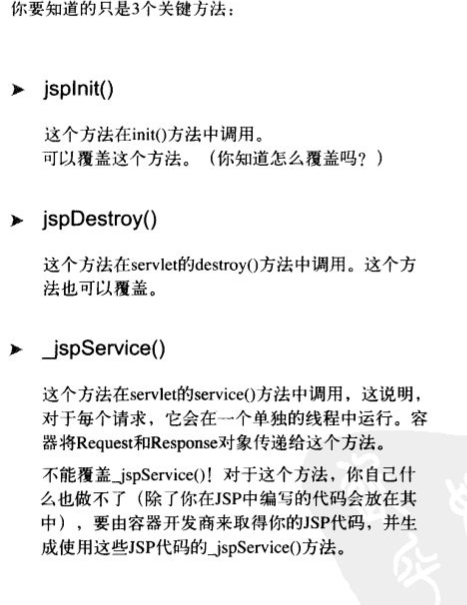
2、需要知道的一些问题

对于问题1:JSP有一个内置对象叫config,它相当于servlet中的ServletConfig,在servlet中我们需要通过getServletConfig来获得它,然后再通过例如getInitParameter("name");获得参数,整个过程类似这样
而在JSP,由于它本身具有这样一个内置对象,因此只需要像下面这样就可以了

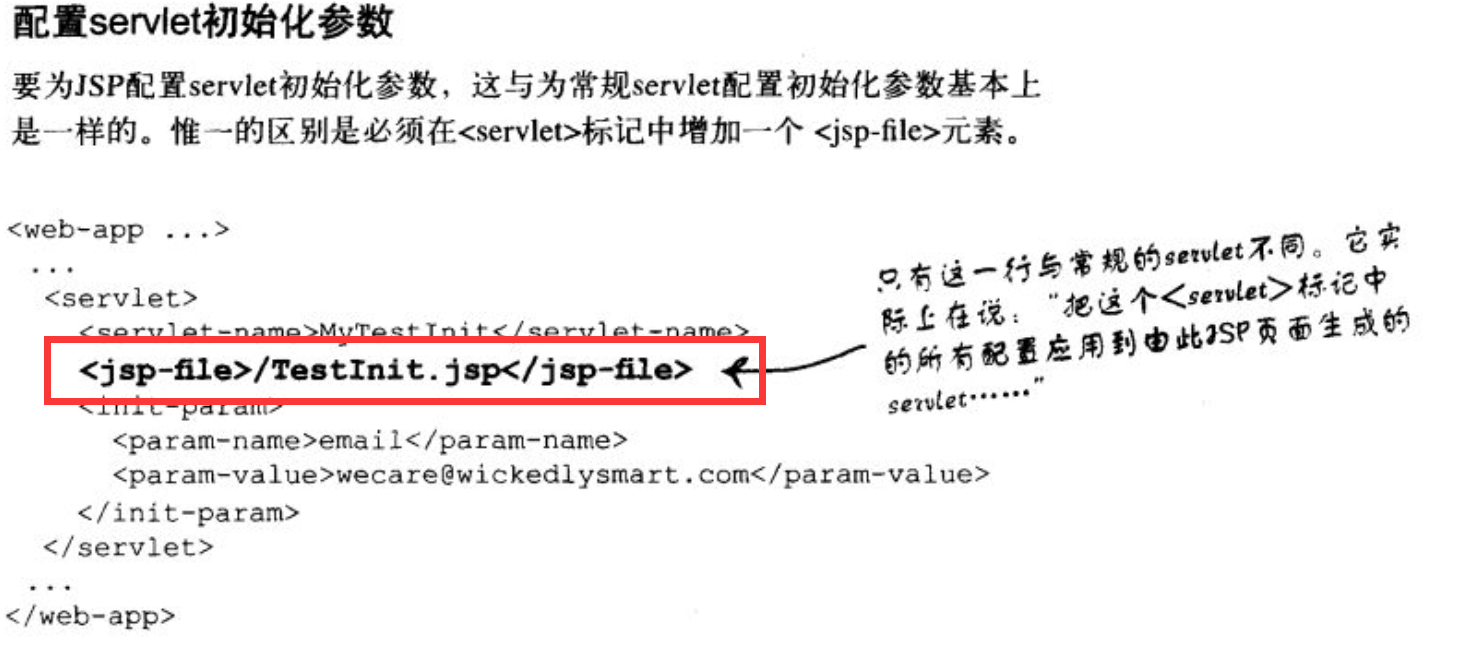
对于问题2:我猜想也是在web.xml中配置,因为JSP说到底不过是servlet的另外一种“书写方式”罢了。
事实证明这是正确的,
对于问题3:直接在<%!%>中进行覆盖就可以了

分享一段话

【Head First Servlets and JSP】笔记17:JSP所生成的servlet相关问题的更多相关文章
- Python学习笔记17:标准库之数学相关(math包,random包)
前面几节看得真心累.如今先来点简单easy理解的内容. 一 math包 math包主要处理数学相关的运算. 常数 math.e # 自然常数e math.pi # 圆周率pi 运算函数 math ...
- 【Head First Servlets and JSP】笔记19:JavaBeans与JSP动作元素(<jsp:setProperty.....>、<jsp:getProperty.....>)
内容来自imooc. 1.什么是JSP动作元素 2.在JSP页面中如何使用Javabeans <jsp:......>表示这是一个JSP动作元素 3.使用JSP动作元素创建JavaBean ...
- Message /index.jsp (line: [17], column: [45]) The JSP specification requires that an attribute name is preceded by whitespace
Error: Message /index.jsp (line: [17], column: [45]) The JSP specification requires that an attribut ...
- 超全面的JavaWeb笔记day12<Jsp&JavaBean&El表达式>
1.JSP三大指令 page include taglib 2.9个内置对象 out page pageContext request response session application exc ...
- 1.3(学习笔记)JSP(Java Server Pages)内置对象
一.内置对象 内置对象又称内建对象.隐式对象,是由服务器自动创建实例化的, 用户在使用时不需要显示的创建,可直接使用. jsp内置对象名称,类型及作用域 Scope代表该内置对象的作用范围,page表 ...
- JSP笔记02——概述(转)
不完全翻译,结合谷歌,一定主观性,还可能有误,原始内容地址:https://www.tutorialspoint.com/jsp/jsp_overview.htm 主要内容如下: 什么是JSP? 为什 ...
- Java Web学习笔记之---JSP
Java Web学习笔记之---JSP (一)JSP常用语法 (1)HTML注释 <!--所要注释的内容 --> 在客户端显示一个注释. (2)隐藏注释 <%--所要注释的内容--% ...
- [Java] JSP笔记 - Filter 过滤器
一.什么是Web过滤器 Servlet API 很久以前就已成为企业应用开发的基石,而 Servlet 过滤器则是对 J2EE 家族的相对较新的补充. Servlet 过滤器是可插入的 Web 组件, ...
- jsp笔记
Jsp Web服务器访问jsp的过程. 如果是第一次访问jsp文件,web服务器会把jsp翻译成一个servlet文件.再将其编译成一个.class文件.然后加载到内存.蓝色的地方也是为什么jav ...
随机推荐
- struts.properties文件
此配置文件提供了一种机制来更改默认行为的框架.其实所有的struts.propertiesconfiguration文件中包含的属性也可以被配置在web.xml中使用的init-param,以及在st ...
- 通信协议之广播---recvfrom 放回客户端的ip地址第一次全为0.0.0.0
遇到一个很恶心的问题. while(1) { recvfrom(sockfd, readbuff, UDP_CMD_BUFF_LENGTH - 1, 0, (struct sockaddr *)&am ...
- What is /dev/null 2>&1?
>> /dev/null redirects standard output (stdout) to /dev/null, which discards it. (The >> ...
- ASP.NET动态网站制作(28)-- 三层框架(2)
前言:三层框架的第二节课,继续上次课的内容. 内容: 1.三层框架的使用目的:可以将视图层和业务逻辑层及实体层分开,可以提高代码的扩展性,安全性,可以实现程序的低耦合性. 2.GetModel方法及G ...
- Unity3D学习笔记——NGUI之UIButton
前言:用于接受点击,悬停,触摸等事件.UIButton还有重要的用途,就是改变控件不同状态下的颜色. 一:使用方式: 1.在UI Root中右键创建一个Sprite 2.为其添加一个碰撞组件,就添加B ...
- Android-ViewPagerIndicator框架使用——Circle
前言:Circle适用于应用新功能的展示页和商品的多张图片的展示功能. 1.定义布局文件:SampleCirclesDefault中添加了一个布局:simple_circles. 布局中定义一个Lin ...
- vue高级路由
1.html <script src="https://unpkg.com/vue/dist/vue.js"></script><script src ...
- linux下shell程序(一)
shell结构 1.#!指定执行脚本的shell 2.#注释行 3.命令和控制结构 创建shell程序的步骤 第一步:创建一个包含命令和控制结构的文件. 第二步:修改这个文件的权限使它可以执行.使用c ...
- iOS-获取的NSDate date时间与实际相差8个小时解决方案
本文转载至 http://blog.sina.com.cn/s/blog_51a995b70101iptl.html NSDate *date = [NSDate date]; NSTimeZone ...
- Codeforces 678E Another Sith Tournament 状压DP
题意: 有\(n(n \leq 18)\)个人打擂台赛,编号从\(1\)到\(n\),主角是\(1\)号. 一开始主角先选一个擂主,和一个打擂的人. 两个人之中胜的人留下来当擂主等主角决定下一个人打擂 ...