
Shell编程之循环控制及状态返回值
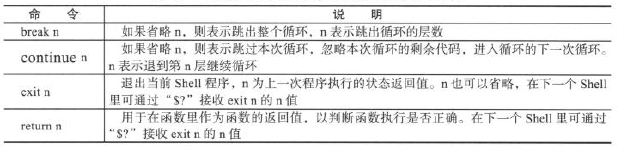
1.break、continue、exit、return的对比
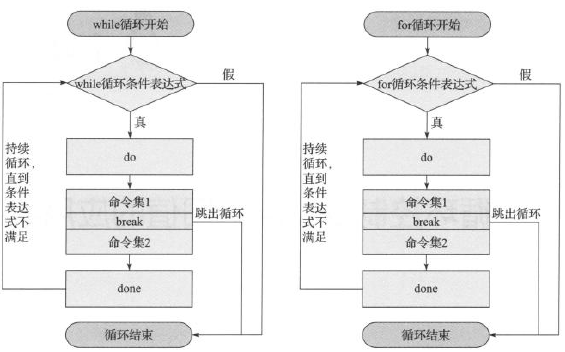
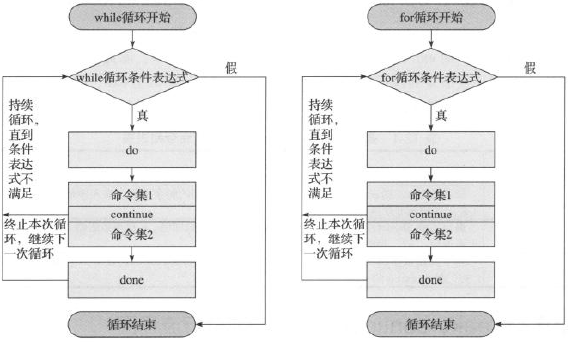
break、continue在条件语句和循环语句中用于控制程序走向;
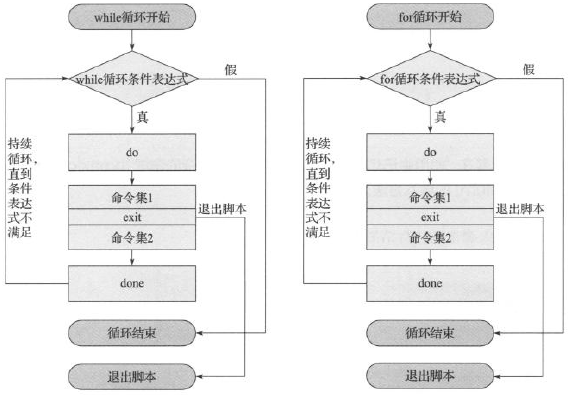
exit用于终止所有语句并退出当前脚本,还可以返回上一次程序或命令的执行状态值给当前shell;
return用于在函数内部返回函数执行的状态值。
2.基础示例
(1)break
[root@codis-178 ~]# cat 12_1.sh

#!/bin/bash

if [ $# -ne 1 ];then

	echo $"usage:$0 {break|continue|exit|return}"

	exit 1

fi

test(){

	for((i=0;i<=5;i++))

	do

		if [ $i -eq 3 ];then

			$*;

		fi

		echo $i

	done

	echo "I am in func."

}

test $*

func_ret=$?

if [ `echo $*|grep return|wc -l` -eq 1 ]

	then

		echo "return's exit status:$func_ret"

fi

echo "ok"

[root@codis-178 ~]# sh 12_1.sh

usage:12_1.sh {break|continue|exit|return}

[root@codis-178 ~]# sh 12_1.sh break

0

1

2

I am in func.

ok

[root@codis-178 ~]# sh 12_1.sh continue

0

1

2

4

5

I am in func.

ok
3.企业案例
(1)实现服务器临时配置多个IP,并且可以随时撤销配置的所有IP,IP范围:10.0.3.1~10.0.3.16,其中10不能配置。
[root@codis-178 ~]# cat 12_2.sh

#!/bin/bash

[ -f /etc/init.d/functions ] && . /etc/init.d/functions

RETVAL=0

op(){

	if [ "$1" == "del" ];then

		list=`echo {16..1}`

	else

		list=`echo {1..16}`

	fi

	for ip in $list

	do

		if [ $ip -eq 10 ];then

			continue

		fi

		ip addr $1 10.0.2.$ip/24 dev eth1 label eth1:$ip &>/dev/null

		RETVAL=$?

		if [ $RETVAL -eq 0 ];then

			action "$1 $ip" /bin/true

		else

			action "$1 $ip" /bin/false

		fi

	done

	return $RETVAL

}

case "$1" in

	start)

		op add

		RETVAL=$?

		;;

	stop)

		op del

		RETVAL=$?

		;;

	restart)

		op del

		sleep 2

		op add

		RETVAL=$?

		;;

	*)

		printf "Usage:$0 {start|stop|restart}\n"

esac

exit $RETVAL
(2)分析Apache访问日志,把日志中每行的访问字节数所对应的字段数字相加,计算总和
[root@codis-178 ~]# cat 12_3.sh

#!/bin/bash

exec <$1

sum=0

while read line

do

	num=`echo $line|awk '{print $10}'`

	[ -n "$num" -a "$num" = "${num//[^0-9]/}"] || continue

	((sum=sum+num))

done

echo "${1}:${sum} byte = `echo $((${sum}/1024))`KB"
(3)已知下面的字符串是通过RANDOM随机数采用md5sum加密后任意取出的连续10为数字,请破解这些字符串对应的md5sum数字
4fe8bf20ed
思路:

1.RANDOM取值0~32767,通过md5sum加密后,把加密后的字符串和加密前的数字存入文本中

[root@codis-178 ~]# cat 12_4.sh

#!/bin/bash

for n in {0..32767}

do

	echo "`echo $n|md5sum` $n" >>zhiwen.log

done

[root@codis-178 ~]# sh 12_4.sh

[root@codis-178 ~]# cat zhiwen.log |head -5

897316929176464ebc9ad085f31e7284  - 0

b026324c6904b2a9cb4b88d6d61c81d1  - 1

26ab0db90d72e28ad0ba1e22ee510510  - 2

6d7fce9fee471194aa8b5b6e47267f03  - 3

48a24b70a0b376535542b996af517398  - 4

2.将字符串与文本进行对比

[root@codis-178 ~]# cat 12_4_1.sh

#!/bin/bash

md5char="4fe8bf20ed"

while read line

do

	if [ `echo $line|grep "$md5char"|wc -l` -eq 1 ];then

		echo $line

		break

	fi

done </root/zhiwen.log

[root@codis-178 ~]# sh 12_4_1.sh

1dcca23355272056f04fe8bf20edfce0 - 5
Shell编程之循环控制及状态返回值的更多相关文章
- 【Linux】循环控制及状态返回值break、continue、exit、return
一.break.continue.exit.return的区别和对比 break n :如果省略n,则表示跳出整个循环,n表示跳出循环的层数 continue n:如果省略n,则表示跳过本次循 ...
- Bash脚本编程学习笔记04:测试命令test、状态返回值、位置参数和特殊变量
我自己接触Linux主要是大学学习的Turbolinux --> 根据<鸟哥的Linux私房菜:基础篇>(第三版) --> 马哥的就业班课程.给我的感觉是这些课程对于bash的 ...
- linux编程中接收主函数返回值以及错误码提示
程序A创建子进程,并调用进程B,根据不调用的不同情况,最后显示结果不同. #include <stdio.h> #include <unistd.h> #include < ...
- 关于用python作为第三方程序,来调用shell命令的问题,以及返回值格式解析
1.用python语言作为第三方,调用shell 在python2.x中,可以通过包commands来进行调用shell命令.如下: cmd就是你要调用的shell命令,把环境配置好,输入正确的命令格 ...
- [shell]管道连接的命令判断返回值
场景: 在bash执行管道连接的命令,需要获取到各个命令的返回值用于判断 在脚本中我们可能需要将执行结果打印到屏幕,同时保存在文件中供后面分析用,写出如下的命令 command 2>&1 ...
- HTTP各个状态返回值
转载来自于:http://desert3.iteye.com/blog/1136548 502 Bad Gateway:tomcat没有启动起来 504 Gateway Time-out: nginx ...
- http 各个状态返回值
code 定义在 org.apache.http.HttpStatus 转载来自于:http://desert3.iteye.com/blog/1136548 502 Bad Gateway:tomc ...
- Shell脚本获取C语言可执行程序返回值
#!/bin/sh #./test是c程序,该程序 返回0 ./test OP_MODE=$? echo $OP_MODE # $? 显示最后命令的退出状态.0表示没有错误,其他任何值表明有错误.
- 在shell脚本中使用函数的返回值
#!/bin/bash - function mytest() { echo "arg1 = $1" if [ $1 = "1" ] ;then return ...
随机推荐
- php windows 扩展redis
一:客户端安装redis (1)下载地址:https://github.com/dmajkic/redis/downloads 根据电脑是多少位的使用对应的文件,如我的是64bit,那么我就选择64b ...
- linux grep sed awk
$ grep ‘test’ d* 显示所有以d开头的文件中包含 test的行. $ grep ‘test’ aa bb cc 显示在aa,bb,cc文件中匹配test的行. $ grep ‘[a-z] ...
- cookie小细节
设置cookie时,不像设置session,可以马上生效,它的生效时间是下一次请求页面.
- Quartz.NET 作业调度
Quartz 简介: Quartz.NET是一个开源的作业调度框架,非常适合在平时的工作中,定时轮询数据库同步,定时邮件通知,定时处理数据等. Quartz.NET允许开发人员根据时间间隔(或天)来调 ...
- 【BZOJ4724】[POI2017]Podzielno 数学+二分
[BZOJ4724][POI2017]Podzielno Description B进制数,每个数字i(i=0,1,...,B-1)有a[i]个.你要用这些数字组成一个最大的B进制数X(不能有前导零, ...
- Centos之常见目录作用介绍(九)
我们先切换到系统根目录 / 看看根目录下有哪些目录 [root@localhost ~]# cd / [root@localhost /]# ls bin dev home lib64 mn ...
- 处理 Java 的“Cannot allocate memory”错误
今天在配置 DCA 服务器的时候,检验 java 版本的时候忽然遇到了一个 Cannot allocate memory 错误 [root@elcid-prod1 ~]# java -version ...
- 使用selenium进行密码破解(绕过账号密码JS加密)
经常碰到网站,账号密码通过js加密后进行提交.通过burp拦截抓到的账号密码是加密后的,所以无法通过burp instruder进行破解.只能模拟浏览器填写表单并点击登录按钮进行破解.于是想到了自动化 ...
- 安装CentOS 7.4 可能会出现的坑以及解决方案
安装CentOS 7.4 可能会出现的坑以及解决方案 (解决方法不唯一,如果行不通的话emmmm~~, 百度会啥你会啥~~) 坑.0X01 解决: 退出虚拟机,以管理员权限运行 坑.0X02 解决: ...
- 【JDBC】java程序通过jdbc连接oracle数据库方法
版权声明:本文为博主原创文章(原文:blog.csdn.net/clark_xu 徐长亮的专栏).未经博主同意不得转载. https://blog.csdn.net/u011538954/articl ...