
【整理】Android中的gravity和layout_gravity区别
【背景】
在Android中,想要设置个按钮的水平对齐,都累死了:
【已解决】ADT中已设置TableLayout布局的情况下如何设置按钮居中对齐 所以现在有必要搞清楚,到底gravity和layout_gravity到底有啥区别。
1.参考:
Android – gravity and layout_gravity
Android中gravity与layout_gravity的区别
中的解释,可以总结为:
- android:gravity : 表示当前View,即控件,内部的东西的,对齐方式
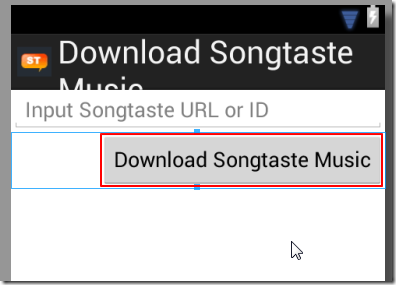
- TableRow内部的Button
- 右对齐:
- 代码:
<TableRow

    android:layout_width="fill_parent"

    android:layout_height="fill_parent"

    android:gravity="right">

    <Button

        android:layout_width="fill_parent"

        android:layout_height="fill_parent"

        android:gravity="center"

        android:layout_gravity="center"

        android:onClick="preformDownload"

        android:text="@string/btn_download" />

</TableRow>
- 效果:
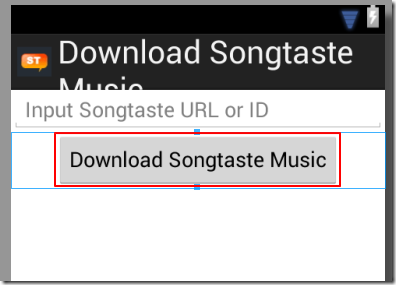
- 居中对齐:
- 代码:
 	<TableRow

	    android:layout_width="fill_parent"

	    android:layout_height="fill_parent"

	    android:gravity="center">

 	    <Button

 	        android:layout_width="fill_parent"

 	        android:layout_height="fill_parent"

 	        android:gravity="center"

 	        android:layout_gravity="center"

 	        android:onClick="preformDownload"

 	        android:text="@string/btn_download" />

 	</TableRow>
- 效果:
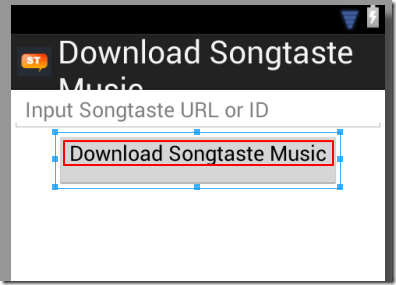
- Button内部的文字(Text):
- 垂直方向:顶端Top
- 代码:
 	    <Button

 	        android:layout_width="fill_parent"

 	        android:layout_height="fill_parent"

 	        android:layout_gravity="bottom"

 	        android:gravity="top"

 	        android:onClick="preformDownload"

 	        android:text="@string/btn_download" />
- 效果:
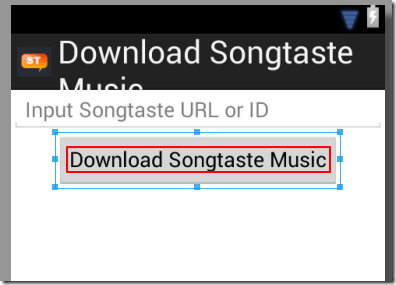
- 垂直方向:居中对齐:
- 代码:
 	    <Button

 	        android:layout_width="fill_parent"

 	        android:layout_height="fill_parent"

 	        android:layout_gravity="bottom"

 	        android:gravity="center_vertical"

 	        android:onClick="preformDownload"

 	        android:text="@string/btn_download" />
- 效果:
- android:layout_gravity: 表示,当前View,即控件,本身,(在父一级的控件所分配的显示范围内)的对齐方式
- EditText(在父一级的LinearLayout内)
- EditText居中对齐:
- 代码:
 	<LinearLayout

	    xmlns:android="http://schemas.android.com/apk/res/android"

	    android:orientation="vertical"

	    android:layout_width="fill_parent"

	    android:layout_height="fill_parent">

	    <EditText

	        android:layout_width="wrap_content"

	        android:layout_height="wrap_content"

	        android:layout_gravity="center"

	        android:gravity="center"

	        android:text="one" />

	</LinearLayout>
- 效果:
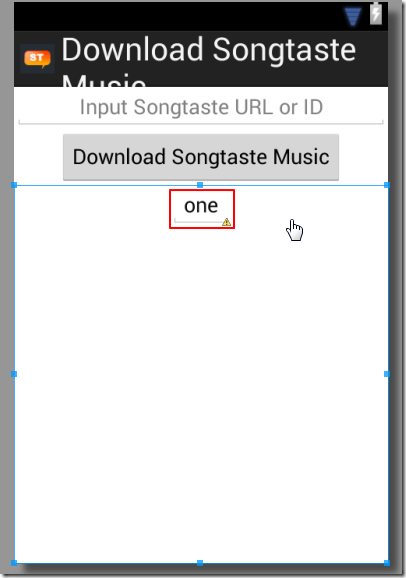
- EditText右对齐:
- 代码:
 	<LinearLayout

	    xmlns:android="http://schemas.android.com/apk/res/android"

	    android:orientation="vertical"

	    android:layout_width="fill_parent"

	    android:layout_height="fill_parent">

	    <EditText

	        android:layout_width="wrap_content"

	        android:layout_height="wrap_content"

	        android:layout_gravity="right"

	        android:gravity="center"

	        android:text="one" />

	</LinearLayout>
- 效果:
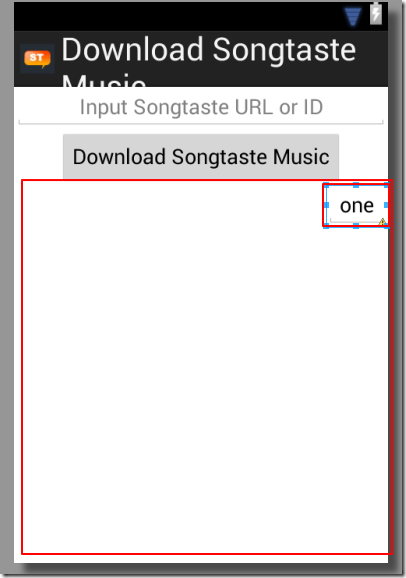
【总结】
- android:gravity : 表示当前View,即控件,内部的东西的,对齐方式
- 常见的是:
- TableRow中的Button
- EditText(内部)的文字
- Button(内部)的文字
- android:layout_gravity: 表示当前View,即控件本身,在父一级内的(即父一级控件所给当前子控件所分配的显示范围内)的对齐方式
- 常见的是:
- 当前EditText(在父一级LineLayout所分配给其的显示范围内)的对齐方式
- 当前的Button(在父一级TableRow所分配给其的显示范围内)的对齐方式 ->此处需要注意的是,很多时候,改变Button内的layout_gravity,常看不到改动的效果,是因为其显示范围和位置,已经由父一级的TableRow的gravity决定了。
总之,拿着代码,多试试,就容易理解了。
【整理】Android中的gravity和layout_gravity区别的更多相关文章
- Android中style和theme的区别
在学习Xamarin android的过程中,最先开始学习的还是熟练掌握android的六大布局-LinearLayout .RelativeLayout.TableLayout.FrameLayou ...
- Android中Popupwindow和Dialog的区别
Android中的对话框有两种:PopupWindow和AlertDialog.它们都可以实现弹窗功能,但是他们之间有一些差别,下面总结了一点. (1)Popupwindow在显示之前一定要设置宽高, ...
- Android中px和dip的区别
在Android手机的诞生之初,由于Android系统是开源的,一开始便有众多的OEM厂商对Android手机进行深度定制,于是乎Android手机的皮肤和屏幕大小都变得百花齐放,这可苦逼了我们这群开 ...
- 浅谈Android中Serializable和Parcelable使用区别
版权声明:本文出自汪磊的博客,转载请务必注明出处. 一.概述 Android开发的时候,我们时长遇到传递对象的需求,但是我们无法将对象的引用传给Activity或者Fragment,我们需要将这些对象 ...
- 【Android】android中Invalidate和postInvalidate的区别
Android中实现view的更新有两组方法,一组是invalidate,另一组是postInvalidate,其中前者是在UI线程自身中使用,而后者在非UI线程中使用. Android提供了Inva ...
- android中Invalidate和postInvalidate的区别
Android中实现view的更新有两组方法,一组是invalidate,另一组是postInvalidate,其中前者是在UI线程自身中使用,而后者在非UI线程中使用. Android提供了Inva ...
- [转]Android 中fill_parent与wrap_content的区别
在Android中,对于组件的属性“layout_width”和“layout_height”, 其值总是设置为“wrap_content”或“fill_parent”. 那么,这两个值有什么 ...
- Android中Bundle和Intent的区别
Bundle的作用,以及和Intent的区别: 一.Bundle: A mapping from String values to various Parcelable types 键值对的集合 类继 ...
- android中接口和抽象类的区别
最近发现很多基础有点生疏了,特地写一点博客来巩固一下.今天主要来谈谈接口和抽象类的区别,我们在项目的很多地方都会用到接口或者抽象类,但是它们之间的一些区别和相同点不知道大家有没有注意到,还有就是,什么 ...
随机推荐
- HTML 中 id与name 区别
一个name可以同时对应多个控件,比如checkbox和radio而id必须是全文档中唯一的 id的用途1) id是HTML元素的Identity,主要是在客户端脚本里用.2) label与form控 ...
- 【lightoj-1063】Ant Hills(求割点)
求割点模板题 #include <bits/stdc++.h> using namespace std; const int N = 10004; int dfn[N], low[N]; ...
- ARM的编程模式和7种模式
ARM采用的是32位架构 ARM阅读 --Byte: 8 bits --Halfword: 16 bits(2 byte) 半字 --Word: 32 bits( ...
- Zip 压缩
ICSharpCode.SharpZipLib.dll using ICSharpCode.SharpZipLib.Zip; string[] filenames = Directory.GetFil ...
- LeetCode OJ:Longest Palindromic Substring(最长的回文字串)
Given a string S, find the longest palindromic substring in S. You may assume that the maximum lengt ...
- LeetCode OJ:Remove Duplicates from Sorted Array(排好序的vector去重)
Given a sorted array, remove the duplicates in place such that each element appear only once and ret ...
- 持久层框架:MyBatis 3.2(2)
每个MyBatis应用程序主要都是使用SqlSessionFactory实例的,一个SqlSessionFactory实例可以通过SqlSessionFactoryBuilder获得.SqlSessi ...
- ng 双向数据绑定 实现 注册协议效果
效果: 代码: <!DOCTYPE html> <html ng-app="myApp"> <head lang="en"> ...
- MySql 批量创建、导入实例
1.创建sql(例如,taobao,dangdang): DROP DATABASE IF EXISTS taobao; CREATE DATABASE taobao CHARSET=utf8; US ...
- Python读取指定目录下指定后缀文件并保存为docx
最近有个奇葩要求 要项目中的N行代码 申请专利啥的 然后作为程序员当然不能复制粘贴 用代码解决.. 使用python-docx读写docx文件 环境使用python3.6.0 首先pip安装pytho ...