
【整理】Android中的gravity和layout_gravity区别
【背景】
在Android中,想要设置个按钮的水平对齐,都累死了:
【已解决】ADT中已设置TableLayout布局的情况下如何设置按钮居中对齐 所以现在有必要搞清楚,到底gravity和layout_gravity到底有啥区别。
1.参考:
Android – gravity and layout_gravity
Android中gravity与layout_gravity的区别
中的解释,可以总结为:
- android:gravity : 表示当前View,即控件,内部的东西的,对齐方式
- TableRow内部的Button
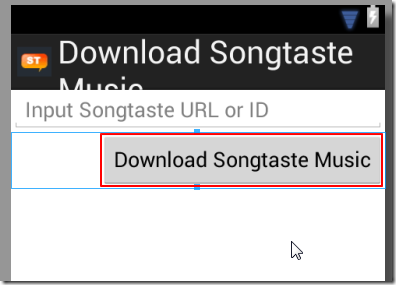
- 右对齐:
- 代码:
<TableRow

    android:layout_width="fill_parent"

    android:layout_height="fill_parent"

    android:gravity="right">

    <Button

        android:layout_width="fill_parent"

        android:layout_height="fill_parent"

        android:gravity="center"

        android:layout_gravity="center"

        android:onClick="preformDownload"

        android:text="@string/btn_download" />

</TableRow>
- 效果:
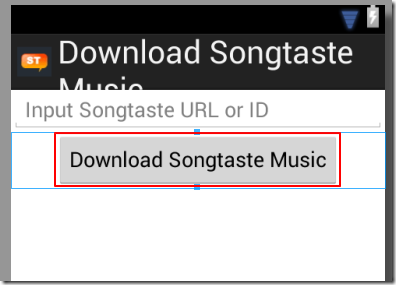
- 居中对齐:
- 代码:
 	<TableRow

	    android:layout_width="fill_parent"

	    android:layout_height="fill_parent"

	    android:gravity="center">

 	    <Button

 	        android:layout_width="fill_parent"

 	        android:layout_height="fill_parent"

 	        android:gravity="center"

 	        android:layout_gravity="center"

 	        android:onClick="preformDownload"

 	        android:text="@string/btn_download" />

 	</TableRow>
- 效果:
- Button内部的文字(Text):
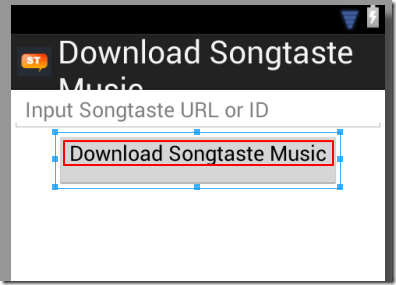
- 垂直方向:顶端Top
- 代码:
 	    <Button

 	        android:layout_width="fill_parent"

 	        android:layout_height="fill_parent"

 	        android:layout_gravity="bottom"

 	        android:gravity="top"

 	        android:onClick="preformDownload"

 	        android:text="@string/btn_download" />
- 效果:
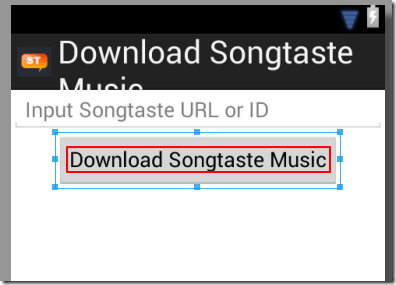
- 垂直方向:居中对齐:
- 代码:
 	    <Button

 	        android:layout_width="fill_parent"

 	        android:layout_height="fill_parent"

 	        android:layout_gravity="bottom"

 	        android:gravity="center_vertical"

 	        android:onClick="preformDownload"

 	        android:text="@string/btn_download" />
- 效果:
- android:layout_gravity: 表示,当前View,即控件,本身,(在父一级的控件所分配的显示范围内)的对齐方式
- EditText(在父一级的LinearLayout内)
- EditText居中对齐:
- 代码:
 	<LinearLayout

	    xmlns:android="http://schemas.android.com/apk/res/android"

	    android:orientation="vertical"

	    android:layout_width="fill_parent"

	    android:layout_height="fill_parent">

	    <EditText

	        android:layout_width="wrap_content"

	        android:layout_height="wrap_content"

	        android:layout_gravity="center"

	        android:gravity="center"

	        android:text="one" />

	</LinearLayout>
- 效果:
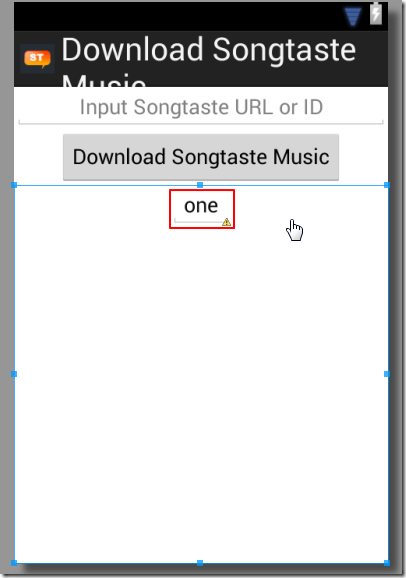
- EditText右对齐:
- 代码:
 	<LinearLayout

	    xmlns:android="http://schemas.android.com/apk/res/android"

	    android:orientation="vertical"

	    android:layout_width="fill_parent"

	    android:layout_height="fill_parent">

	    <EditText

	        android:layout_width="wrap_content"

	        android:layout_height="wrap_content"

	        android:layout_gravity="right"

	        android:gravity="center"

	        android:text="one" />

	</LinearLayout>
- 效果:
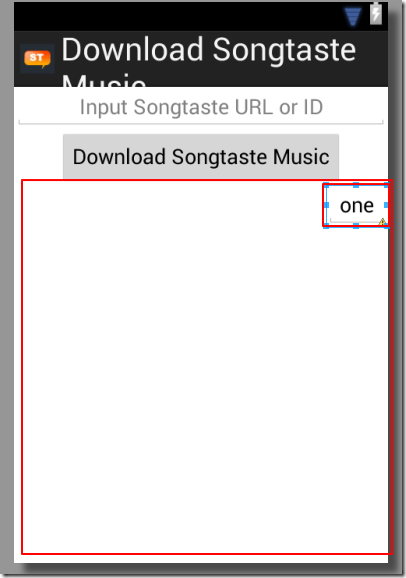
【总结】
- android:gravity : 表示当前View,即控件,内部的东西的,对齐方式
- 常见的是:
- TableRow中的Button
- EditText(内部)的文字
- Button(内部)的文字
- android:layout_gravity: 表示当前View,即控件本身,在父一级内的(即父一级控件所给当前子控件所分配的显示范围内)的对齐方式
- 常见的是:
- 当前EditText(在父一级LineLayout所分配给其的显示范围内)的对齐方式
- 当前的Button(在父一级TableRow所分配给其的显示范围内)的对齐方式 ->此处需要注意的是,很多时候,改变Button内的layout_gravity,常看不到改动的效果,是因为其显示范围和位置,已经由父一级的TableRow的gravity决定了。
总之,拿着代码,多试试,就容易理解了。
【整理】Android中的gravity和layout_gravity区别的更多相关文章
- Android中style和theme的区别
在学习Xamarin android的过程中,最先开始学习的还是熟练掌握android的六大布局-LinearLayout .RelativeLayout.TableLayout.FrameLayou ...
- Android中Popupwindow和Dialog的区别
Android中的对话框有两种:PopupWindow和AlertDialog.它们都可以实现弹窗功能,但是他们之间有一些差别,下面总结了一点. (1)Popupwindow在显示之前一定要设置宽高, ...
- Android中px和dip的区别
在Android手机的诞生之初,由于Android系统是开源的,一开始便有众多的OEM厂商对Android手机进行深度定制,于是乎Android手机的皮肤和屏幕大小都变得百花齐放,这可苦逼了我们这群开 ...
- 浅谈Android中Serializable和Parcelable使用区别
版权声明:本文出自汪磊的博客,转载请务必注明出处. 一.概述 Android开发的时候,我们时长遇到传递对象的需求,但是我们无法将对象的引用传给Activity或者Fragment,我们需要将这些对象 ...
- 【Android】android中Invalidate和postInvalidate的区别
Android中实现view的更新有两组方法,一组是invalidate,另一组是postInvalidate,其中前者是在UI线程自身中使用,而后者在非UI线程中使用. Android提供了Inva ...
- android中Invalidate和postInvalidate的区别
Android中实现view的更新有两组方法,一组是invalidate,另一组是postInvalidate,其中前者是在UI线程自身中使用,而后者在非UI线程中使用. Android提供了Inva ...
- [转]Android 中fill_parent与wrap_content的区别
在Android中,对于组件的属性“layout_width”和“layout_height”, 其值总是设置为“wrap_content”或“fill_parent”. 那么,这两个值有什么 ...
- Android中Bundle和Intent的区别
Bundle的作用,以及和Intent的区别: 一.Bundle: A mapping from String values to various Parcelable types 键值对的集合 类继 ...
- android中接口和抽象类的区别
最近发现很多基础有点生疏了,特地写一点博客来巩固一下.今天主要来谈谈接口和抽象类的区别,我们在项目的很多地方都会用到接口或者抽象类,但是它们之间的一些区别和相同点不知道大家有没有注意到,还有就是,什么 ...
随机推荐
- MongoCola使用教程 1 - MongoDB的基本操作和聚合功能---Mongdb客户端软件操作说明
前言 在开始正文之前,感谢博客园的Nosql爱好者对于MongoCola工具的试用(使用).特别感谢 呆呆 这位朋友的Bug报告,让我纠正了一个很严重的Bug.同时也感谢以前的多个网友在博客留言中给我 ...
- 2017.11.7 Python 制作EFM32/ AVR批量烧录工具
Customer need program quickly asap. ok,I need to set up a table for test. 1 reference data http://ww ...
- 网站 安全 ---- 常见的 web 攻击
网站 安全 ---- 常见的 web 攻击 1 sql 注入(常用的攻击性)(django的orm是做过sql防护处理的) 危害: 非法读取,篡改,删除数据库中的数据 盗取用户的各类敏感信息.获取利益 ...
- 边缘检测︱基于 HED网络TensorFlow 和 OpenCV 实现图片边缘检测
本文摘录自<手机端运行卷积神经网络的一次实践 – 基于 TensorFlow 和 OpenCV 实现文档检测功能> 只截取感兴趣 的片段. . 一.边缘检测 1.传统边缘检测 Google ...
- Android快速开发-选项卡
介绍 几行代码实现Android选项卡界面,支持标准底部Tab自定义视图选项卡,头部文字选项卡. 底部自定义视图选项卡 先来看看实现下图中的效果我们代码应该怎么写? 实现上图效果只需以下代码: pub ...
- 9.详解引擎(InnoDB,MyISAM)的内存优化攻略?
整理自互联网!! 本篇我们讲解内存优化. 注意:以下都是在MySQL目录下的my.ini文件中改写. 一.InnoDB内存优化 InnoDB用一块内存区域做I/O缓存池,该缓存池不仅用来缓存InnoD ...
- PHP内核研究
深入理解PHP内核:Think In PHP Internals(TIPI)是一个开源项目 ,分享PHP内部实现的细节,如内核,扩展等.官网见:http://www.php-internals.com ...
- RIPng 知识要点
RIPng --------------------------------------------------------- UDP:521 多播地址:FF02::9 -------------- ...
- 【MFC】MFC DLEdit 设计属于自己的编辑框_鼠标悬停
MFC DLEdit 设计属于自己的编辑框 2012-02-04 13:00 by 捣乱小子, 3543 阅读, 5 评论, 收藏, 编辑 起因 无意间看到了大牛们写的自定义编辑框控件,于是找了个时间 ...
- Android中的service
1.service简介:service可以在和多场合的应用中使用,比如播放多媒体的时候用户启动了其他Activity这个时候程序要在后台继续播放,比如检测SD卡上文件的变化,再或者在后台记录你地理信息 ...