
thingsboard在windows下安装和使用
在官网下载thingsboard和tb-gateway
需要安装java8
thingsboard服务安装
https://thingsboard.io/docs/user-guide/install/windows/
把thingsboard-windows-1.4.zip解压到C盘
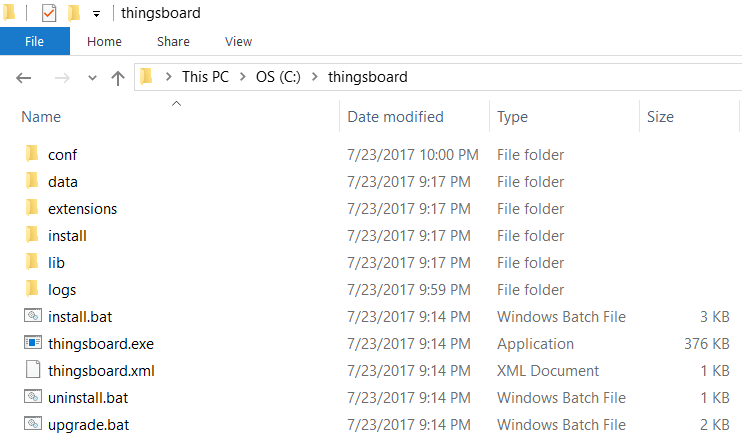
在这个文件夹打开管理员模式cmd 输入
install.bat
安装服务,成功后提示
  C:\thingsboard>install.bat --loadDemo

  Detecting Java version installed.

  Detecting if it is 64 bit machine

  CurrentVersion

  Detecting if it is 32 bit machine

  CurrentVersion 1.8

  Java 1.8 found!

  Installing thingsboard ...

   ===================================================

   :: ThingsBoard ::       (v1.4)

   ===================================================

  Starting ThingsBoard Installation...

  Installing DataBase schema...

  Installing Cassandra DataBase schema...

  Loading system data...

  Installation finished successfully!

  2017-07-23 21:47:12,079 INFO  - Starting ServiceWrapper in the CLI mode

  2017-07-23 21:47:12,317 INFO  - Completed. Exit code is 0

  ThingsBoard installed successfully!
tb-gateway服务安装
https://thingsboard.io/docs/iot-gateway/install/windows/
下载tb-gateway-windows-1.2.1.zip解压到c盘
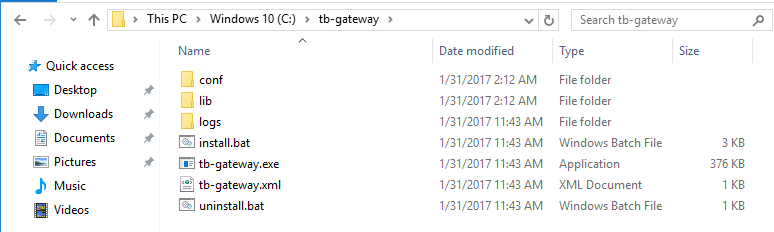
输入
install.bat
出现下文就安装成功
C:\tb-gateway>install.bat

Detecting if it is 64-bit machine

CurrentVersion 1.8

Java 1.8 found!

Installing tb-gateway ...

2017-01-31 02:26:50,704 INFO  - Starting ServiceWrapper in the CLI mode

2017-01-31 02:26:50,907 INFO  - Completed. Exit code is 0

DONE.
启动服务
安装成功后启动thingsboard服务
net start thingsboard
如果需要重启thingsboard服务:
net stop thingsboard
net start thingsboard
启动服务后查看C:\thingsboard\logs下的log,出现这些才算启动完成
2018-04-13 09:42:59,091 [main] INFO  o.s.b.c.e.t.TomcatEmbeddedServletContainer - Tomcat started on port(s): 8080 (http)

2018-04-13 09:42:59,108 [main] INFO  o.t.s.ThingsboardServerApplication - Started ThingsboardServerApplication in 54.39 seconds (JVM running for 56.581)
可能的错误:
2018-04-02 14:29:23,215 [main] ERROR o.t.s.s.c.rpc.ClusterGrpcService - Failed to start RPC server!

java.io.IOException: Failed to bind
原因是端口占用,删除占用端口的进程
netstat   -ano|findstr  9001

taskkill  /pid  4708  /f
使用ThingsBoard GUI进行后续工作
log提示thingsboard启动后可以打开网页 它的作用和live demo一样 只不过在本地
http://localhost:8080/先登录admin
sysadmin@thingsboard.org

sysadmin
在租户添加下面账号
- Username: tenant@thingsboard.org
- Password: tenant
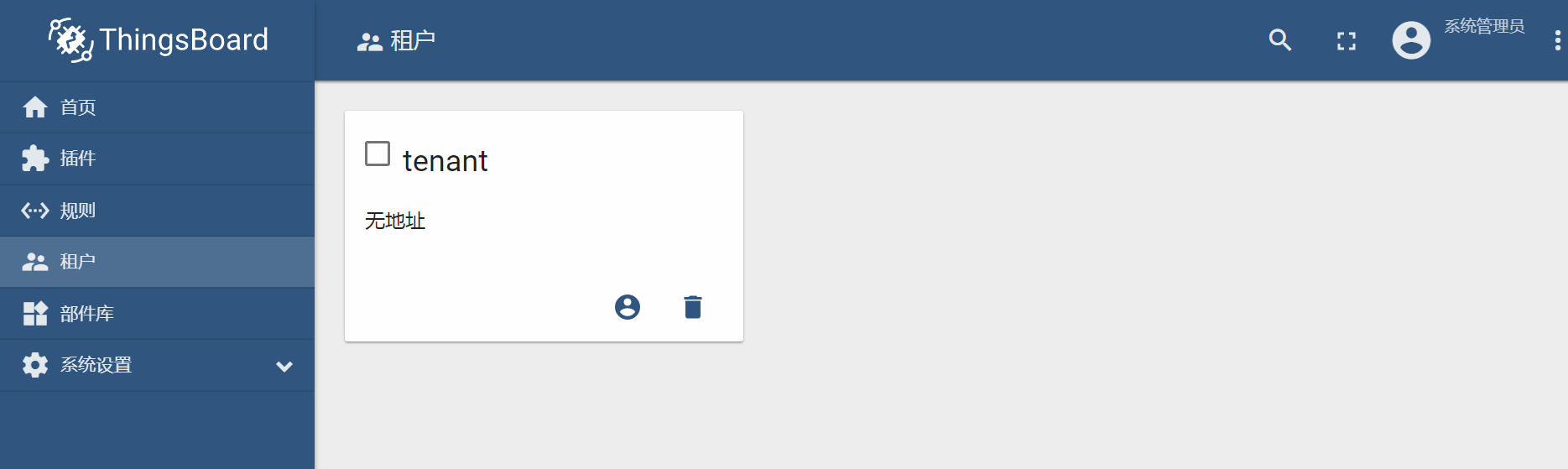
登录租户tenant,tenant可以管理设备,添加规则等
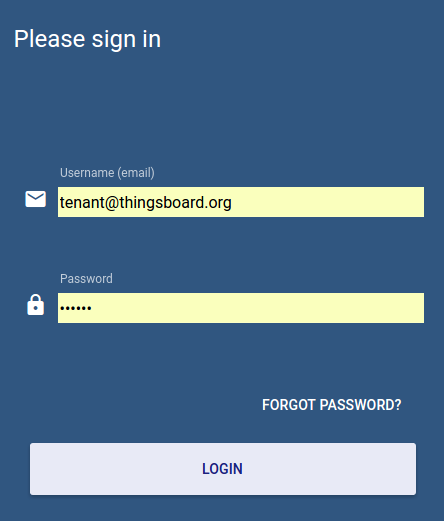
启动完thingsboard后可以启动tb-gateway
net start tb-gateway
启动成功:
YYYY-MM-DD HH:mm:ss,sss [main] INFO o.t.gateway.GatewayApplication - Started GatewayApplication in x.xxx seconds (JVM running for x.xxx)
装完服务后这两个服务会开机启动,如果log提示有问题只能一个个重启,先重启thingsboard再重启tb-gateway
net stop thingsboard

net start thingsboard

net stop tb-gateway

net start tb-gateway
如果要在本地启动,修改 tb-gateway.yml,不然yml写的是live demo的配置,之后再启动tb-gateway
live demo 网址,需注册
https://demo.thingsboard.io/signup
IoT Gateway Configuration
Change gateway.connection.host and gateway.connection.port properties to your ThingsBoard host (leave without modifications in case of live demo instance).
Change gateway.connection.security.accessToken property to your access token that was copied during step 3.
原来的配置:
gateway:

  reporting:

    interval: 60000

  persistence:

    type: file

    path: storage

    bufferSize: 1000

  connection:

    host: "demo.thingsboard.io"

    port: 1883

    retryInterval: 3000

    maxInFlight: 1000

    security:

      accessToken: your_token

#      keystore: mqttclient.jks

#      keystorePassword: password

#      keystoreKeyAlias: clientalias

#      truststore: mqttclient.jks

#      truststorePassword: password

opc:

  enabled: false

  configuration: opc-config.json

mqtt:

  enabled: false

  configuration: mqtt-config.json

sigfox:

  enabled: false

  configuration: sigfox-config.json

server:

  # Server bind address

  address: "0.0.0.0"

  # Server bind port

  port: "9090"

# Check new version updates parameters

updates:

  # Enable/disable updates checking.

  enabled: "${UPDATES_ENABLED:true}"
本地使用,修改了host 和accessToken :
如果要通过ThingsBoard GUI设置ThingsBoard Gateway, remoteConfiguration在tb-gateway.yaml必须设置为true:
gateway:

  tenants:

      label: "Tenant"

      # Some configuration omitted

      remoteConfiguration: true

  reporting:

    interval: 60000

  persistence:

    type: file

    path: storage

    bufferSize: 1000

  connection:

    host: "localhost"

    port: 1883

    retryInterval: 3000

    maxInFlight: 1000

    security:

      accessToken: "6BW88NMt0nbsfVefQsGc"

#      keystore: mqttclient.jks

#      keystorePassword: password

#      keystoreKeyAlias: clientalias

#      truststore: mqttclient.jks

#      truststorePassword: password

opc:

  enabled: false

  configuration: opc-config.json

mqtt:

  enabled: false

  configuration: mqtt-config.json

sigfox:

  enabled: false

  configuration: sigfox-config.json

server:

  # Server bind address

  address: "0.0.0.0"

  # Server bind port

  port: "9090"

# Check new version updates parameters

updates:

  # Enable/disable updates checking.

  enabled: "${UPDATES_ENABLED:true}"
remoteConfiguration官方例子:
gateways:

  tenants:

    -

      label: "Tenant"

      # Some configuration omitted

      remoteConfiguration: true
If remoteConfiguration is set to false, GUI configuration will not take effect and ThingsBoard Gateway will look for configuration in config files.
获得Gateway的Access Token
在租户账号下:
In order to connect your IoT gateway to ThingsBoard server, you need to provision gateway credentials first. We will use access token credentials as the most simple one. See device authentication options for more details.
新建设备
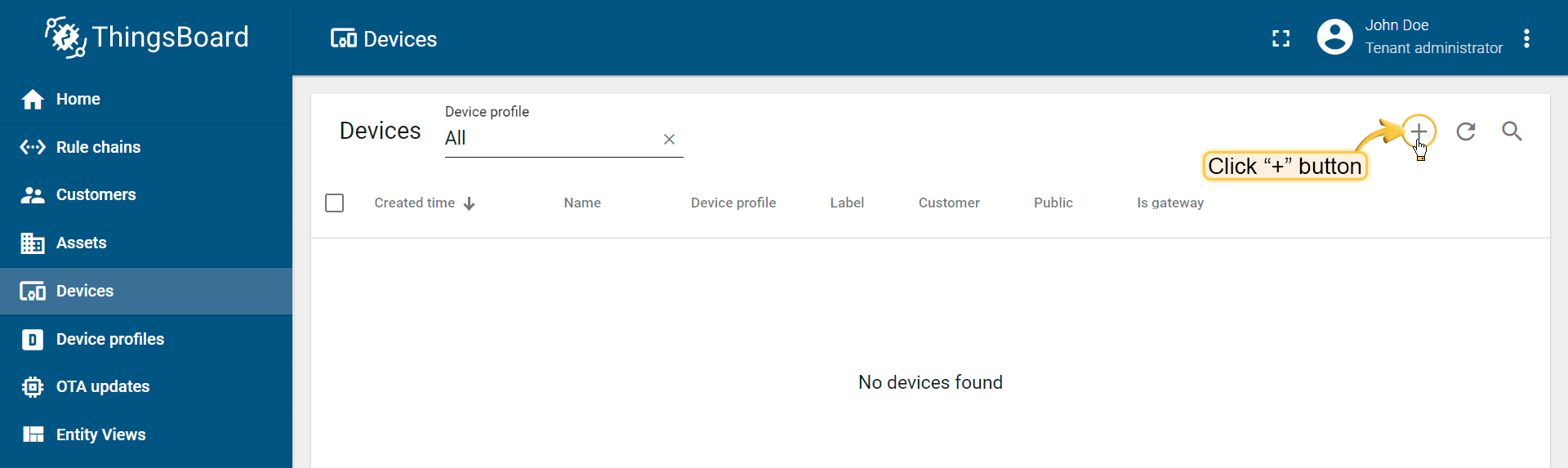
Login as tenant administrator. Use default credentials in case of local ThingsBoard server. Open Devices and click on big red “+” button in the bottom right corner.
Populate your gateway name and select “Is gateway” checkbox.
设置为网关
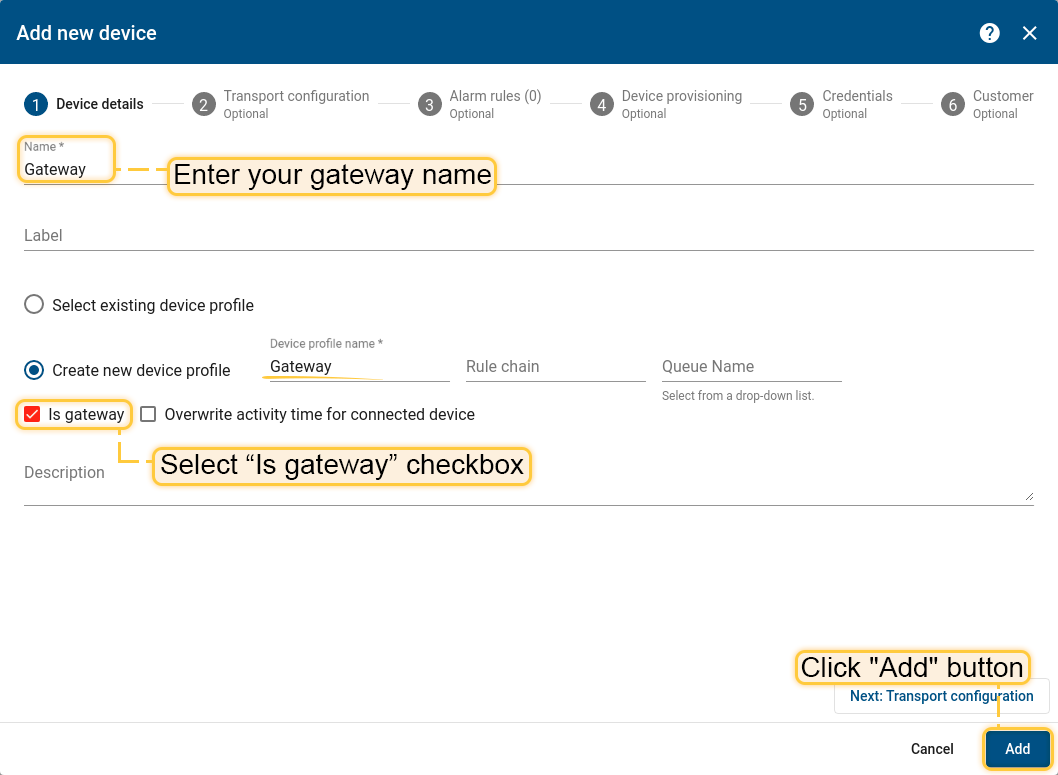
NOTE: Gateway and device names should be unique in the scope of a tenant.
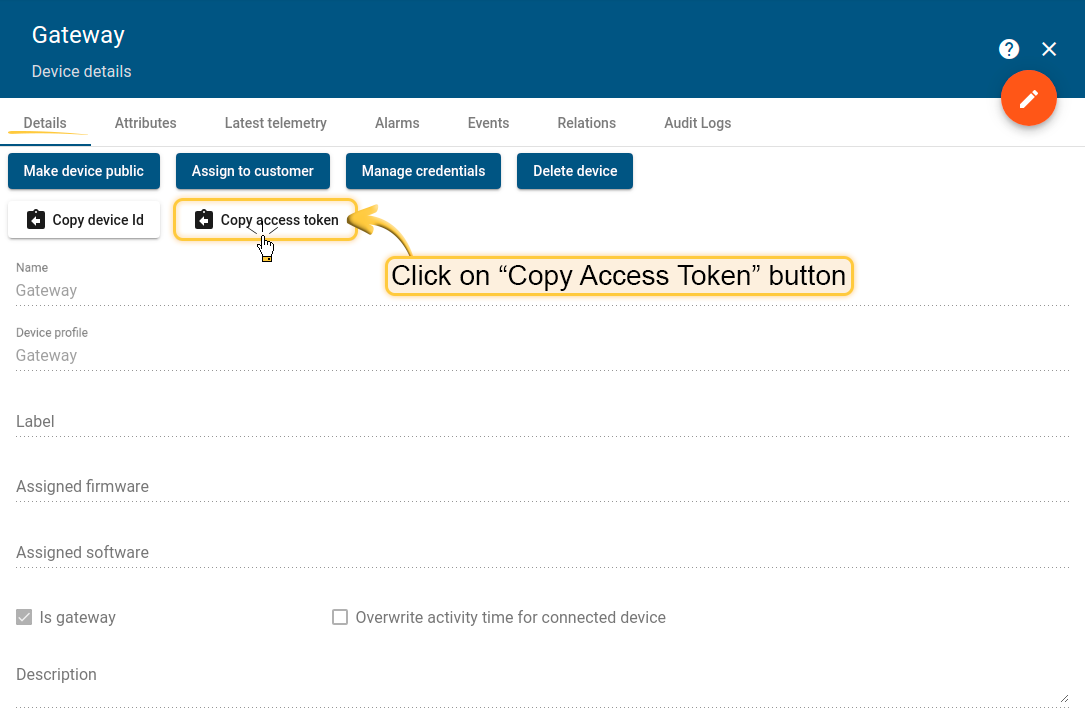
Open new device card and click on “Copy Access Token” button.
查看gateway设备详情,复制 Access Token
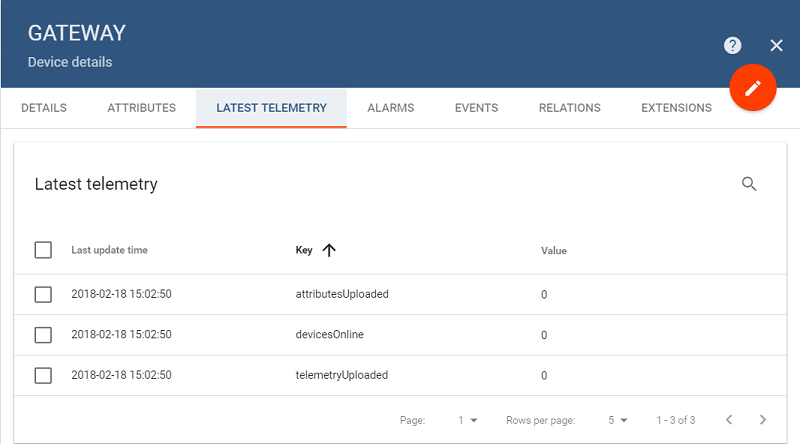
如果gateway和thingsboard连上gateway设备的last elementry会出现“devicesOnline”, “attributesUploaded” and “telemetryUploaded”.:
Open the web UI of your ThingsBoard server and review statistics that is uploaded from your thingsboard gateway. Login as Tenant Administrator and open Devices page. Click on the gateway device card. Open “Latest Telemetry” tab and review following statistics: “devicesOnline”, “attributesUploaded” and “telemetryUploaded”. All values should be set to “0”.
使用GateWay连接到MQTT broker
https://thingsboard.io/docs/iot-gateway/getting-started/#step-8-connect-to-external-mqtt-broker
首先下载安装Mosquitto MQTT broker
有两种配置方式,一种是通过file configuration,一种是在ThingsBoard GUI
tb-gateway.yaml配置文件需要注意:
file configuration:remoteConfiguration:false
ThingsBoard GUI:remoteConfiguration:ture
同时如果用file启动要修改配置文件mqtt-config.json,且tb-gateway.yaml应该修改
mqtt:

  enabled: true

  configuration: mqtt-config.json
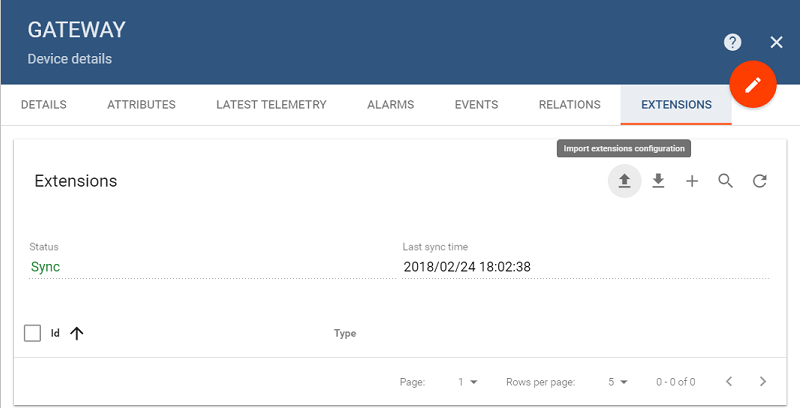
官方的配置不管怎么做都无法做到status出现sync希望会的人告知(不管是mqtt还是opcua)
不需要网关Sync连接MQTT并建立dashboard:
救命视频:Creating an MQTT (IOT) Dashboard Using Thingsboard
https://www.youtube.com/watch?v=eqbTNXf2m7s
视频中的代码
http://www.steves-internet-guide.com/thingsboard-mqtt-dashboard/
用kafka plugin发送数据到kafka
Kafka plugin is responsible for sending messages to Kafka brokers triggered by specific rules
https://thingsboard.io/docs/reference/plugins/kafka/
需要注意的最后发送数据他写错了,引号写的不对,应该是
mosquitto_pub -d -h "localhost" -p 1883 -t "v1/devices/me/telemetry" -u "1EU6SlQetuBTC4I5a0bk" -m "{'temp':73.4}"
这里1883是tb-gateway的端口,mqtt和它本来是同一个端口,我修改了mqtt的端口
v1/devices/me/telemetry是固定的语句
1EU6SlQetuBTC4I5a0bk是accesstoken
关键点是把数据发送到特定access token,这样有这个access token的device就可以读取发送的数据
Kafka Plugin Action 没试过
This component allows creating a kafka message by substitution of device attributes and message data into configurable templates.
https://thingsboard.io/docs/reference/actions/kafka-plugin-action/
thingsboard拜拜喽
thingsboard在windows下安装和使用的更多相关文章
- 在windows下安装gulp —— 基于 Gulp 的前端集成解决方案(一)
相关连接导航 在windows下安装gulp —— 基于 Gulp 的前端集成解决方案(一) 执行 $Gulp 时发生了什么 —— 基于 Gulp 的前端集成解决方案(二) 常用 Gulp 插件汇总 ...
- Windows 下安装 MongoDB
Windows 下安装 MongoDB 的步骤:1.官网www.mongodb.com下载安装包或zip包2.解压下载的文件到文件夹 D:\mongo .3.使用管理员权限打开CMD,导航到目录 D: ...
- Coreseek Windows下安装调试
由于项目需要全文检索,后面就去网上查了下资料,找到了Sphinx[中文是狮身人面像]这个全文检索引擎,听说挺好用的,不过没有中文分词.后面又去找了一下,找到了Coreseek,一款中文全文检索/搜索软 ...
- 从零开始学 Java - Windows 下安装 Tomcat
谁都想分一杯羹 没有一个人是真正的无私到伟大的,我们试着说着做自己,与人为善,世界和平!殊不知,他们的真实目的当你知道后,你会被恶心到直摇头并下意识地迅速跑开,下辈子都不想见到他.不过,他没错,你也没 ...
- 从零开始学 Java - Windows 下安装 JDK
关于未来 "我要死在火星.在我死去的时候能够想着人类能有一个美好的未来--有可持续的能源,同时能够殖民其他的星球来避免人类灭绝的最坏可能." 官网下载 直接打开官网:http:// ...
- windows下安装nginx
说起开发,自己感到非常惭愧,由于公司让我给<绿电侠>项目写整体架构解决方案,才开始接触nginx这个东东,突然觉得它是一把非常好的利器. 本文主要记录在windows下安装nginx,另参 ...
- Redhat/Ubuntu/Windows下安装Docker
Redhat/Ubuntu/Windows下安装Docker 什么是Docker Docker是Docker.inc公司开源的一个基于LXC技术之上构建的Container容器引擎,基于Go语言并遵从 ...
- Windows下安装Redis
1.首先,Redis官方是支持Linux系统的,我这里不多说,需要的可以参考:http://www.oschina.net/question/12_18065/ 2.Windows 64位下载地址:h ...
- 【转】linux和windows下安装python集成开发环境及其python包
本系列分为两篇: 1.[转]windows和linux中搭建python集成开发环境IDE 2.[转]linux和windows下安装python集成开发环境及其python包 3.windows和l ...
随机推荐
- scrapy结构及各部件介绍
1.总览,数据流图: 2.Engine:引擎负责控制系统所有组件之间的数据流,并在发生某些操作时触发事件. 3.Scheduler:调度程序接收来自引擎的请求,并将它们排入队列,并在之后,当Engin ...
- AFNetworking网络请求与图片上传工具(POST)
AFNetworking网络请求与图片上传工具(POST) .h文件 #import <Foundation/Foundation.h> /** 成功Block */ typedef vo ...
- 如何在PostgreSQL中建只读账号
转: 如何在PostgreSQL中建只读账号 Posted on 2014-01-21 22:00:15 by osdba 在PostgreSQL中并没有CREATE TABLE权限名称,这是与其它数 ...
- 前端画图之iphoneSE主屏
今天逛园子,无意间看到一个用div+css画的Macbook Air的博客,瞬间想到很久之前我也做过类似的事, 而且,当时写完之后,真的是成就感爆棚啊!我去开源中国上翻到了我当时贴的源码,当时是在手机 ...
- iOS编译集成linux开源c库的一些记录
最近一个iOS项目需要使用一些Linux下面的开源c库,说是Linux的其实是跨平台的,各种Unix系统都有支持.理论上iOS来自MacOS,而MacOS其实是一种兼容的Unix系统,所以这些库应该也 ...
- VS调试配置外网可访问
1.首先找到项目的配置文件夹(一般是隐藏的) 2.在里面的config文件夹找到applicationhost.config配置文件,打开,在sites节点找到你项目的那个site配置,新建一个绑定:
- I.MX6 recovery mode hacking
/******************************************************************************** * I.MX6 recovery m ...
- MpVue解析
前言 mpvue是一款使用Vue.js开发微信小程序的前端框架.使用此框架,开发者将得到完整的 Vue.js 开发体验,同时为H5和小程序提供了代码复用的能力.如果想将 H5 项目改造为小程序,或开发 ...
- 【剑指offer】数组中的逆序对,C++实现
原创博文,转载请注明出处!本题牛客网地址 博客文章索引地址 博客文章中代码的github地址 1.题目 2.思路 3.代码 class Solution { public: int InversePa ...
- [转载] ffmpeg摄像头视频采集-采集步骤概述并采集一帧视频
近期由于工作任务,需要开发一个跨平台视频聊天系统,其中就用到了ffmpeg进行采集与编码,网上找了一大堆的资料,虽然都有一些有用的东西,但实在太碎片化了,这几天一直在整理和实验这些资料,边整理,边做一 ...