
突破单机多实例Elasticsearch
默认大家都是单机单实例es,在实验环境下想尽可能模拟各种场景。单机多实例就出来了。。。
实验拓扑图
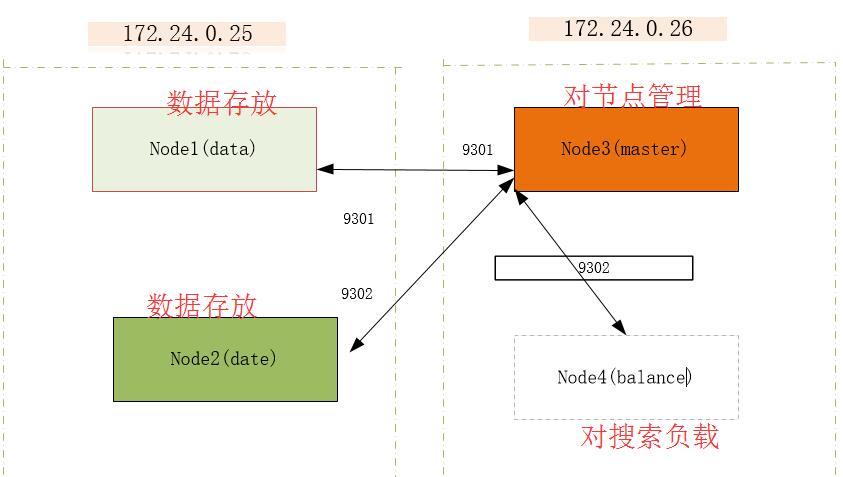
01、es安装这里就不说了
详情:http://www.cnblogs.com/xiaochina/p/6852677.html
02、讲elasticsearch.yml配置
要做到单机上开多个实例,需要修改ES的默认配置:
node.max_local_storage_nodes: 2 #单机开启2个实例
配置限制了单节点上可以开启的ES存储实例的个数
http.port: 9200
配置是elasticsearch对外提供服务的http端口配置,默认情况下ES会取用9200~9299之间的端口,如果9200被占用就会自动使用9201
在单机多实例的配置中这个配置实际是不需要修改的,但是为了更好地进行配置管理,建议根据需求修改9201 9202
transport.tcp.port: 9300
配置指定了elasticsearch集群内数据通讯使用的端口,默认情况下为9300,与上面的http.port配置类似,ES也会自动为已占用的端口选择下一个端口号。我们可以将第一个实例的tcp传输端口配置为9300,第二实例配置为9301。
discovery.zen.ping.unicast.hosts 由于到了2.x版本之后,ES取消了默认的广播模式来发现master节点,需要使用该配置来指定发现master节点。这个配置在单机双实例的配置中需要特别注意下,因为习惯上我们配置时并未指定master节点的tcp端口,如果实例的transport.tcp.port配置为9301,那么实例启动后会认为discovery.zen.ping.unicast.hosts中指定的主机tcp端口也是9301,可能导致这些节点无法找到master节点。
该配置中需要指定master节点提供服务的tcp端口。
配置示例:
discovery.zen.ping.unicast.hosts: ["172.24.0.26:9301"]
node.name
同一主机上的两个实例需要使用不同的node.name
path.data
同一主机上两个实例需要对应不同的数据目录
path.logs
由于默认情况下日志用集群名称来命名,因此同一主机两个实例对应的日志目录需要分开
#禁止HTTP
http.enabled: false
配置样例
node1-es-data
[elk@ config]$ cat elasticsearch.yml

# ======================== Elasticsearch Configuration =========================

#

# NOTE: Elasticsearch comes with reasonable defaults for most settings.

#       Before you set out to tweak and tune the configuration, make sure you

#       understand what are you trying to accomplish and the consequences.

#

# The primary way of configuring a node is via this file. This template lists

# the most important settings you may want to configure for a production cluster.

#

# Please consult the documentation for further information on configuration options:

# https://www.elastic.co/guide/en/elasticsearch/reference/index.html

#

# ---------------------------------- Cluster -----------------------------------

#

# Use a descriptive name for your cluster:

#

cluster.name: mvpbang

#

# ------------------------------------ Node ------------------------------------

#

# Use a descriptive name for the node:

#

node.name: node-

node.master: false

node.data: true                 #数据存储

node.max_local_storage_nodes: 2 #本机最大两个es

transport.tcp.port: 9301        #节点通信端口

http.enabled: false             #关闭http接口

#

# Add custom attributes to the node:

#

#node.attr.rack: r1

#

# ----------------------------------- Paths ------------------------------------

#

# Path to directory where to store the data (separate multiple locations by comma):

#

#path.data: /path/to/data

#

# Path to log files:

#

#path.logs: /path/to/logs

#

# ----------------------------------- Memory -----------------------------------

#

# Lock the memory on startup:

#

bootstrap.memory_lock: false

bootstrap.system_call_filter: false

#

# Make sure that the heap size is set to about half the memory available

# on the system and that the owner of the process is allowed to use this

# limit.

#

# Elasticsearch performs poorly when the system is swapping the memory.

#

# ---------------------------------- Network -----------------------------------

#

# Set the bind address to a specific IP (IPv4 or IPv6):

#

network.host: 172.24.0.25

#

# Set a custom port for HTTP:

#

#http.port:

#

# For more information, consult the network module documentation.

#

# --------------------------------- Discovery ----------------------------------

#

# Pass an initial list of hosts to perform discovery when new node is started:

# The default list of hosts is ["127.0.0.1", "[::1]"]

#

discovery.zen.ping.unicast.hosts: ["172.24.0.26:9301"]  #候选主节点地址

#

# Prevent the "split brain" by configuring the majority of nodes (total number of master-eligibl

e nodes /  + ):#

discovery.zen.minimum_master_nodes:

#

# For more information, consult the zen discovery module documentation.

#

# ---------------------------------- Gateway -----------------------------------

#

# Block initial recovery after a full cluster restart until N nodes are started:

#

#gateway.recover_after_nodes:

#

# For more information, consult the gateway module documentation.

#

# ---------------------------------- Various -----------------------------------

#

# Require explicit names when deleting indices:

#

#action.destructive_requires_name: true
node2-es-data
[elk@ config]$ cat elasticsearch.yml

# ======================== Elasticsearch Configuration =========================

#

# NOTE: Elasticsearch comes with reasonable defaults for most settings.

#       Before you set out to tweak and tune the configuration, make sure you

#       understand what are you trying to accomplish and the consequences.

#

# The primary way of configuring a node is via this file. This template lists

# the most important settings you may want to configure for a production cluster.

#

# Please consult the documentation for further information on configuration options:

# https://www.elastic.co/guide/en/elasticsearch/reference/index.html

#

# ---------------------------------- Cluster -----------------------------------

#

# Use a descriptive name for your cluster:

#

cluster.name: mvpbang

#

# ------------------------------------ Node ------------------------------------

#

# Use a descriptive name for the node:

#

node.name: node-2

node.master: false

node.data: true

node.max_local_storage_nodes: 2

transport.tcp.port: 9302

http.enabled: false

#

# Add custom attributes to the node:

#

#node.attr.rack: r1

#

# ----------------------------------- Paths ------------------------------------

#

# Path to directory where to store the data (separate multiple locations by comma):

#

#path.data: /path/to/data

#

# Path to log files:

#

#path.logs: /path/to/logs

#

# ----------------------------------- Memory -----------------------------------

#

# Lock the memory on startup:

#

bootstrap.memory_lock: false

bootstrap.system_call_filter: false

#

# Make sure that the heap size is set to about half the memory available

# on the system and that the owner of the process is allowed to use this

# limit.

#

# Elasticsearch performs poorly when the system is swapping the memory.

#

# ---------------------------------- Network -----------------------------------

#

# Set the bind address to a specific IP (IPv4 or IPv6):

#

network.host: 172.24.0.25

#

# Set a custom port for HTTP:

#

#http.port:

#

# For more information, consult the network module documentation.

#

# --------------------------------- Discovery ----------------------------------

#

# Pass an initial list of hosts to perform discovery when new node is started:

# The default list of hosts is ["127.0.0.1", "[::1]"]

#

discovery.zen.ping.unicast.hosts: ["172.24.0.26:9301"]

#

# Prevent the "split brain" by configuring the majority of nodes (total number of master-eligibl

e nodes /  + ):#

discovery.zen.minimum_master_nodes:

#

# For more information, consult the zen discovery module documentation.

#

# ---------------------------------- Gateway -----------------------------------

#

# Block initial recovery after a full cluster restart until N nodes are started:

#

#gateway.recover_after_nodes:

#

# For more information, consult the gateway module documentation.

#

# ---------------------------------- Various -----------------------------------

#

# Require explicit names when deleting indices:

#

#action.destructive_requires_name: true
node3-es-master
[elk@ config]$ cat elasticsearch.yml

# ======================== Elasticsearch Configuration =========================

#

# NOTE: Elasticsearch comes with reasonable defaults for most settings.

#       Before you set out to tweak and tune the configuration, make sure you

#       understand what are you trying to accomplish and the consequences.

#

# The primary way of configuring a node is via this file. This template lists

# the most important settings you may want to configure for a production cluster.

#

# Please consult the documentation for further information on configuration options:

# https://www.elastic.co/guide/en/elasticsearch/reference/index.html

#

# ---------------------------------- Cluster -----------------------------------

#

# Use a descriptive name for your cluster:

#

cluster.name: mvpbang

#

# ------------------------------------ Node ------------------------------------

#

# Use a descriptive name for the node:

#

node.name: node-3

node.master: true

node.data: false

node.max_local_storage_nodes:

transport.tcp.port:

http.enabled: true

#

# Add custom attributes to the node:

#

#node.attr.rack: r1

#

# ----------------------------------- Paths ------------------------------------

#

# Path to directory where to store the data (separate multiple locations by comma):

#

#path.data: /path/to/data

#

# Path to log files:

#

#path.logs: /path/to/logs

#

# ----------------------------------- Memory -----------------------------------

#

# Lock the memory on startup:

#

bootstrap.memory_lock: false

bootstrap.system_call_filter: false

#

# Make sure that the heap size is set to about half the memory available

# on the system and that the owner of the process is allowed to use this

# limit.

#

# Elasticsearch performs poorly when the system is swapping the memory.

#

# ---------------------------------- Network -----------------------------------

#

# Set the bind address to a specific IP (IPv4 or IPv6):

#

network.host: 172.24.0.26

#

# Set a custom port for HTTP:

#

http.port:

#

# For more information, consult the network module documentation.

#

# --------------------------------- Discovery ----------------------------------

#

# Pass an initial list of hosts to perform discovery when new node is started:

# The default list of hosts is ["127.0.0.1", "[::1]"]

#

discovery.zen.ping.unicast.hosts: ["172.24.0.26:9301"]

#

# Prevent the "split brain" by configuring the majority of nodes (total number of master-eligibl

e nodes /  + ):#

discovery.zen.minimum_master_nodes:

#

# For more information, consult the zen discovery module documentation.

#

# ---------------------------------- Gateway -----------------------------------

#

# Block initial recovery after a full cluster restart until N nodes are started:

#

#gateway.recover_after_nodes:

#

# For more information, consult the gateway module documentation.

#

# ---------------------------------- Various -----------------------------------

#

# Require explicit names when deleting indices:

#

#action.destructive_requires_name: true
node4-es-data
[elk@ config]$ cat elasticsearch.yml

# ======================== Elasticsearch Configuration =========================

#

# NOTE: Elasticsearch comes with reasonable defaults for most settings.

#       Before you set out to tweak and tune the configuration, make sure you

#       understand what are you trying to accomplish and the consequences.

#

# The primary way of configuring a node is via this file. This template lists

# the most important settings you may want to configure for a production cluster.

#

# Please consult the documentation for further information on configuration options:

# https://www.elastic.co/guide/en/elasticsearch/reference/index.html

#

# ---------------------------------- Cluster -----------------------------------

#

# Use a descriptive name for your cluster:

#

cluster.name: mvpbang

#

# ------------------------------------ Node ------------------------------------

#

# Use a descriptive name for the node:

#

node.name: node-4

node.master: false

node.data: false
node.ingest: false

node.max_local_storage_nodes:

transport.tcp.port:

http.enabled: true

#

# Add custom attributes to the node:

#

#node.attr.rack: r1

#

# ----------------------------------- Paths ------------------------------------

#

# Path to directory where to store the data (separate multiple locations by comma):

#

#path.data: /path/to/data

#

# Path to log files:

#

#path.logs: /path/to/logs

#

# ----------------------------------- Memory -----------------------------------

#

# Lock the memory on startup:

#

bootstrap.memory_lock: false

bootstrap.system_call_filter: false

#

# Make sure that the heap size is set to about half the memory available

# on the system and that the owner of the process is allowed to use this

# limit.

#

# Elasticsearch performs poorly when the system is swapping the memory.

#

# ---------------------------------- Network -----------------------------------

#

# Set the bind address to a specific IP (IPv4 or IPv6):

#

network.host: 172.24.0.26

#

# Set a custom port for HTTP:

#

http.port:

#

# For more information, consult the network module documentation.

#

# --------------------------------- Discovery ----------------------------------

#

# Pass an initial list of hosts to perform discovery when new node is started:

# The default list of hosts is ["127.0.0.1", "[::1]"]

#

discovery.zen.ping.unicast.hosts: ["172.24.0.26:9301"]

#

# Prevent the "split brain" by configuring the majority of nodes (total number of master-eligibl

e nodes /  + ):#

discovery.zen.minimum_master_nodes:

#

# For more information, consult the zen discovery module documentation.

#

# ---------------------------------- Gateway -----------------------------------

#

# Block initial recovery after a full cluster restart until N nodes are started:

#

#gateway.recover_after_nodes:

#

# For more information, consult the gateway module documentation.

#

# ---------------------------------- Various -----------------------------------

#

# Require explicit names when deleting indices:

#

#action.destructive_requires_name: true
效果图
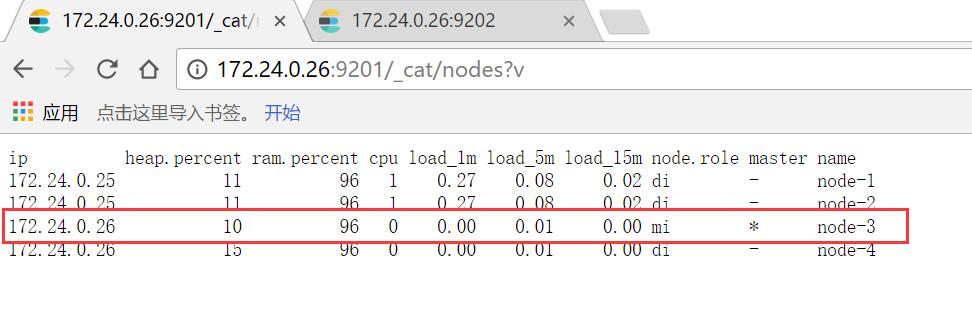
注意:复制的elasticsearch文件夹下包含了data文件中示例一的节点数据,需要把示例二data文件下的文件清空
Kibana的elasticsearch.url:配置load-balancedi地址 http://172.24.0.26:9202
学习参考:http://www.tuicool.com/articles/VBVFzyi
https://www.elastic.co/guide/en/kibana/current/production.html#load-balancing #搜索请求节点负载
突破单机多实例Elasticsearch的更多相关文章
- elasticsearch单机多实例环境部署
elasticsearch的功能,主要用在搜索领域,这里,我来研究这个,也是项目需要,为公司开发了一款CMS系统,网站上的搜索栏功能,我打算采用elasticsearch来实现. elasticsea ...
- Mysql 数据库单机多实例部署手记
最近的研发机器需要部署多个环境,包括数据库.为了管理方便考虑将mysql数据库进行隔离,即采用单机多实例部署的方式.找了会资料发现用的人也不是太多,一般的生产环境为了充分发挥机器性能都是单机单 ...
- MySQL单机多实例安装并配置主从复制
单机多实例据说可以最大程度提高硬件使用,谁知道呢,但是以前的公司喜欢这样搞,我最近也在学习复制什么的,电脑搞不起两台虚拟机,刚好单机多实例可以解救我.下面就说说步骤. 承上文http://www.cn ...
- 聊聊 Tomcat 的单机多实例
Tomcat 从何而来? 先说 Tomcat 这一单词解释,如果你不是一个开发者,当然它在美国口语中并非是褒义词:如果你是开发者,那你一定听过 Web 应用服务器.Sun 公司和 Tomcat .如你 ...
- Redis集群(单机多实例)
Redis介绍 Redis是一个分布式缓存数据库服务器,提供基于内存访问的缓存服务,并且无论是在单服务器还是服务器集群上都有着较为灵活方便的扩展能力. 单个的Redis实例是单进程单线程的,由 ...
- centos7 下zookeeper 部署 单机多实例模式
centos7 下zookeeper 部署 本文参考https://www.linuxidc.com/Linux/2016-09/135052.htm 1.创建/usr/local/zookeeper ...
- 单机多实例mysq 8.0l部署安装
单机多实例mysql部署安装 目的需求 在单台虚拟机部署部署多实例mysql,用于配置mysql replication,MHA等. 思路 多实例安装mysql可以参考<源编译MySQL8.0的 ...
- tomcat单机多实例部署
最近在面试的过程中,一家公司在面试时提到了有关tomcat单机多实例部署的提问, 正好, 之前使用IntelliJ IDEA 13.1.4这款IDE开发web项目,在开发的过程中,因为有多个web项目 ...
- TIDB单机多实例进程
TIDB节点: TIKV节点(tidb服务也有放在这里也有) tidb进程 tikv进程 当使用单机多实例(就是一个机器多个tikv的存储节点)的时候,每个实例都有对应的一个进程,这个进程号就是我们在 ...
随机推荐
- kafka分区原理图
一个Topic的多个分区,被分布在kafka集群中的多个server上.每一个分区都有一个server为"leader";leader负责全部的读写操作,假设leader失效,那么 ...
- [翻译] DFXCoreTextView
DFXCoreTextView https://github.com/davefoxy/DFXCoreTextView A CoreText wrapper for the formatting an ...
- Unity3d通用工具类之数据配置加载类-ini配置文件加载
Unity3d通用工具类之数据配置加载类-ini配置文件加载 上次我们讲过xml文件的加载配置管理,今天我们换个配置文件,也是比较常见的配置文件.ini格式的数据. 按照国际管理先贴一张啥是.ini文 ...
- Informatica 常用组件Lookup缓存之四 使用不高速缓存的查找或静态高速缓存
默认情况下,在为高速缓存配置查找转换时,PowerCenter 将创建静态查找高速缓存.PowerCenter 将在处理第一个查找请求时创建高速缓存.它将根据查找条件为传递给转换的每行查询高速缓存.P ...
- Informatica 常用组件Source Qualifier之八 Distinct
如果希望 PowerCenter 从源选择唯一值,您可以使用"选择相异"选项.例如,您可以使用此功能从列出总销售额的表中提取唯一客户标识.使用"选择相异"过滤器 ...
- 科幻大片中那些牛X代码真相
在<黑客帝国>中,救世主Neo的队友通过屏幕上"1"和"0"构成的数据流,就能看到鲜活的画面,这应该算是科幻大片中对代码最极致的表现了.其他科幻电影 ...
- NYOJ-61 传纸条(一)
传纸条(一) 时间限制:2000 ms | 内存限制:65535 KB 难度:5 描述 小渊和小轩是好朋友也是同班同学,他们在一起总有谈不完的话题.一次素质拓展活动中,班上同学安排做成一个m行 ...
- POJ 1651 Multiplication Puzzle (区间DP)
Description The multiplication puzzle is played with a row of cards, each containing a single positi ...
- SSIS包部署错误之运行环境设置
在SQLServer代理处新建了一个job,步骤里面的操作是指向一个SSIS模型包 执行,报错如下 根据报错信息是64bit,于是做出修改如下图 再次执行 OK
- java 读取本地的json文件
首先,要先去下载相关的jar包,否则你是无法做到的. 在百度或者谷歌里面输入java json jar包下载就行了(共7个包). xom-1.1.jar ezmorph-1.0.6.jar json ...