
iOS-APP启动页加载广告
概述
详细
目前市场上很多APP(如淘宝、美团、微博、UC)在启动图加载完毕后,还会显示几秒的广告,右上角都有个跳过按钮可以选择立即跳过这个广告,有的APP在点击广告页之后还会进入一个广告页。
他们玩的乐此不疲,产品汪们见了自然也是不会放过这个效果!
一、主要思路
1. 封装广告页, 展现跳过按钮实现倒计时功能
2.判断广告页面是否更新。异步下载新图片, 删除老图片
3.广告页显示
4.广告页点击后展示页
二、程序实现
Step1. 封装广告页, 展现跳过按钮实现倒计时功能
ZLAdvertView.h: 先封装出来广告页,露出显示广告页面方法和图片路径
/**

*  显示广告页面方法

*/

- (void)show;

/**

 *  图片路径

 */

@property (nonatomic, copy) NSString *filePath;
ZLAdvertView.m:
定义广告显示的时间:
static int const showtime = 3;
为广告页面添加一个点击手势,跳转到广告页面.
- (NSTimer *)countTimer {

    if (!_countTimer) {

        _countTimer = [NSTimer scheduledTimerWithTimeInterval:1.0 target:self selector:@selector(countDown) userInfo:nil repeats:YES];

    }

    return _countTimer;

}
- (instancetype)initWithFrame:(CGRect)frame {

    if (self = [super initWithFrame:frame]) {

        // 1.广告图片

        _adView = [[UIImageView alloc] initWithFrame:frame];

        _adView.userInteractionEnabled = YES;

        _adView.contentMode = UIViewContentModeScaleAspectFill;

        _adView.clipsToBounds = YES;

        // 为广告页面添加一个点击手势,跳转到广告页面

        UITapGestureRecognizer *tap = [[UITapGestureRecognizer alloc] initWithTarget:self action:@selector(pushToAd)];

        [_adView addGestureRecognizer:tap];

        // 2.跳过按钮

        CGFloat btnW = 60;

        CGFloat btnH = 30;

        _countBtn = [[UIButton alloc] initWithFrame:CGRectMake(kscreenWidth - btnW - 24, btnH, btnW, btnH)];

        [_countBtn addTarget:self action:@selector(removeAdvertView) forControlEvents:UIControlEventTouchUpInside];

        [_countBtn setTitle:[NSString stringWithFormat:@"跳过%d", showtime] forState:UIControlStateNormal];

        _countBtn.titleLabel.font = [UIFont systemFontOfSize:15];

        [_countBtn setTitleColor:[UIColor whiteColor] forState:UIControlStateNormal];

        _countBtn.backgroundColor = [UIColor colorWithRed:38 /255.0 green:38 /255.0 blue:38 /255.0 alpha:0.6];

        _countBtn.layer.cornerRadius = 4;

        [self addSubview:_adView];

        [self addSubview:_countBtn];

    }

    return self;

}
- (void)setFilePath:(NSString *)filePath {

    _filePath = filePath;

    _adView.image = [UIImage imageWithContentsOfFile:filePath];

}
- (void)pushToAd {

    [self removeAdvertView];

    [[NSNotificationCenter defaultCenter] postNotificationName:@"ZLPushToAdvert" object:nil userInfo:nil];

}
2. 广告页面的跳过按钮倒计时功能可以通过定时器或者GCD实现(这里以广告倒计时3s 做例子)
- (void)countDown {

    _count --;

    [_countBtn setTitle:[NSString stringWithFormat:@"跳过%d",_count] forState:UIControlStateNormal];

    if (_count == 0) {

        [self removeAdvertView];

    }

}
广告页面的跳过按钮倒计时功能可以通过定时器或者GCD实现:
- (void)show {

    // 倒计时方法1:GCD

//    [self startCoundown];

    // 倒计时方法2:定时器

    [self startTimer];

    UIWindow *window = [UIApplication sharedApplication].keyWindow;

    [window addSubview:self];

}
定时器倒计时:
- (void)startTimer {

    _count = showtime;

    [[NSRunLoop mainRunLoop] addTimer:self.countTimer forMode:NSRunLoopCommonModes];

}
GCD倒计时:
- (void)startCoundown {

    __weak __typeof(self) weakSelf = self;

    __block int timeout = showtime + 1; //倒计时时间 + 1

    dispatch_queue_t queue = dispatch_get_global_queue(DISPATCH_QUEUE_PRIORITY_DEFAULT, 0);

    dispatch_source_t _timer = dispatch_source_create(DISPATCH_SOURCE_TYPE_TIMER, 0, 0,queue);

    dispatch_source_set_timer(_timer,dispatch_walltime(NULL, 0),1.0 * NSEC_PER_SEC, 0); //每秒执行

    dispatch_source_set_event_handler(_timer, ^{

        if(timeout <= 0){ //倒计时结束,关闭

            dispatch_source_cancel(_timer);

            dispatch_async(dispatch_get_main_queue(), ^{

                [weakSelf removeAdvertView];

            });

        }else{

            dispatch_async(dispatch_get_main_queue(), ^{

                [_countBtn setTitle:[NSString stringWithFormat:@"跳过%d",timeout] forState:UIControlStateNormal];

            });

            timeout--;

        }

    });

    dispatch_resume(_timer);

}
移除广告页面:
- (void)removeAdvertView {

    // 停掉定时器

    [self.countTimer invalidate];

    self.countTimer = nil;

    [UIView animateWithDuration:0.3f animations:^{

        self.alpha = 0.f;

    } completion:^(BOOL finished) {

        [self removeFromSuperview];

    }];

}
Step2. 判断广告页面是否更新。异步下载新图片, 删除老图片
因为广告页的内容要实时显示,在无网络状态或者网速缓慢的情况下不能延迟加载,或者等到首页出现了再加载广告页。所以这里不采用网络请求广告接口去获取图片地址然后加载图片的方式,而是先将图片异步下载到本地,并保存图片名,每次打开app时先根据本地存储的图片名查找沙盒中是否存在该图片,如果存在,则显示广告页。
在AppDelegate.m 里设置启动页广告:
- (BOOL)application:(UIApplication *)application didFinishLaunchingWithOptions:(NSDictionary *)launchOptions {

    self.window = [[UIWindow alloc] initWithFrame:[UIScreen mainScreen].bounds];

    self.window.rootViewController = [[UINavigationController alloc] initWithRootViewController:[[HomeViewController alloc] init]];

    [self.window makeKeyAndVisible];

    // 设置启动页广告

    [self setupAdvert];

    return YES;

}
判断沙盒中是否存在广告图片,如果存在,直接显示
/**

 *  设置启动页广告

 */

- (void)setupAdvert {

    // 1.判断沙盒中是否存在广告图片,如果存在,直接显示

    NSString *filePath = [self getFilePathWithImageName:[kUserDefaults valueForKey:adImageName]];

    BOOL isExist = [self isFileExistWithFilePath:filePath];

    if (isExist) { // 图片存在

        ZLAdvertView *advertView = [[ZLAdvertView alloc] initWithFrame:self.window.bounds];

        advertView.filePath = filePath;

        [advertView show];

    }

    // 2.无论沙盒中是否存在广告图片,都需要重新调用广告接口,判断广告是否更新

    [self getAdvertisingImage];

}

/**

 *  判断文件是否存在

 */

- (BOOL)isFileExistWithFilePath:(NSString *)filePath {

    NSFileManager *fileManager = [NSFileManager defaultManager];

    BOOL isDirectory = FALSE;

    return [fileManager fileExistsAtPath:filePath isDirectory:&isDirectory];

}
2.无论沙盒中是否存在广告图片,都需要重新调用获取广告接口,判断广告是否更新
/**

 *  初始化广告页面

 */

- (void)getAdvertisingImage {

    // TODO 请求广告接口

    // 这里原本应该采用广告接口,现在用一些固定的网络图片url代替

    NSArray *imageArray = @[

                            @"https://ss2.baidu.com/-vo3dSag_xI4khGko9WTAnF6hhy/super/whfpf%3D425%2C260%2C50/sign=a4b3d7085dee3d6d2293d48b252b5910/0e2442a7d933c89524cd5cd4d51373f0830200ea.jpg",

                            @"https://ss0.baidu.com/-Po3dSag_xI4khGko9WTAnF6hhy/super/whfpf%3D425%2C260%2C50/sign=a41eb338dd33c895a62bcb3bb72e47c2/5fdf8db1cb134954a2192ccb524e9258d1094a1e.jpg",

                            @"http://c.hiphotos.baidu.com/image/w%3D400/sign=c2318ff84334970a4773112fa5c8d1c0/b7fd5266d0160924c1fae5ccd60735fae7cd340d.jpg"

                            ];

    NSString *imageUrl = imageArray[arc4random() % imageArray.count];

    // 获取图片名:43-130P5122Z60-50.jpg

    NSArray *stringArr = [imageUrl componentsSeparatedByString:@"/"];

    NSString *imageName = stringArr.lastObject;

    // 拼接沙盒路径

    NSString *filePath = [self getFilePathWithImageName:imageName];

    BOOL isExist = [self isFileExistWithFilePath:filePath];

    if (!isExist){ // 如果该图片不存在,则删除老图片,下载新图片

        [self downloadAdImageWithUrl:imageUrl imageName:imageName];

    }

}
3.异步下载新图片, 删除老图片
/**

 *  下载新图片

 */

- (void)downloadAdImageWithUrl:(NSString *)imageUrl imageName:(NSString *)imageName {

    dispatch_async(dispatch_get_global_queue(DISPATCH_QUEUE_PRIORITY_DEFAULT, 0), ^{

        NSData *data = [NSData dataWithContentsOfURL:[NSURL URLWithString:imageUrl]];

        UIImage *image = [UIImage imageWithData:data];

        NSString *filePath = [self getFilePathWithImageName:imageName]; // 保存文件的名称

        if ([UIImagePNGRepresentation(image) writeToFile:filePath atomically:YES]) {// 保存成功

            NSLog(@"保存成功");

            [self deleteOldImage];

            [kUserDefaults setValue:imageName forKey:adImageName];

            [kUserDefaults synchronize];

            // 如果有广告链接,将广告链接也保存下来

        }else{

            NSLog(@"保存失败");

        }

    });

}

/**

 *  删除旧图片

 */

- (void)deleteOldImage {

    NSString *imageName = [kUserDefaults valueForKey:adImageName];

    if (imageName) {

        NSString *filePath = [self getFilePathWithImageName:imageName];

        NSFileManager *fileManager = [NSFileManager defaultManager];

        [fileManager removeItemAtPath:filePath error:nil];

    }

}

/**

 *  根据图片名拼接文件路径

 */

- (NSString *)getFilePathWithImageName:(NSString *)imageName {

    if (imageName) {

        NSArray *paths = NSSearchPathForDirectoriesInDomains(NSCachesDirectory,NSUserDomainMask, YES);

        NSString *filePath = [[paths objectAtIndex:0] stringByAppendingPathComponent:imageName];

        return filePath;

    }

    return nil;

}
Step3. 广告页显示
广告页的显示代码可以放在AppDeleate中,也可以放在首页的控制器中。如果代码是在AppDelegate中,可以通过发送通知的方式,让首页push到广告详情页.
首页控制器HomeViewController.m:
#import "HomeViewController.h"

#import "ZLAdvertViewController.h"

@interface HomeViewController ()

@end

@implementation HomeViewController

- (void)viewDidLoad {

    [super viewDidLoad];

    self.title = @"首页";

    self.view.backgroundColor = [UIColor greenColor];

   [[NSNotificationCenter defaultCenter] addObserver:self selector:@selector(pushToAd) name:@"ZLPushToAdvert" object:nil];

}

// 进入广告链接页

- (void)pushToAd {

    ZLAdvertViewController *adVc = [[ZLAdvertViewController alloc] init];

    [self.navigationController pushViewController:adVc animated:YES];

}

@end
Step4. 广告页点击后展示页。
如果点击广告需要跳转广告详情页面,那么广告链接地址也需要用NSUserDefaults存储。注意:广告详情页面是从首页push进去的
广告链接页ZLAdvertViewController, 露出广告url :
@property (nonatomic, copy) NSString *adUrl;
ZLAdvertViewController.m 测试连接 :
- (void)setAdUrl:(NSString *)adUrl {

    _adUrl = adUrl;

}
三、压缩文件截图及运行效果
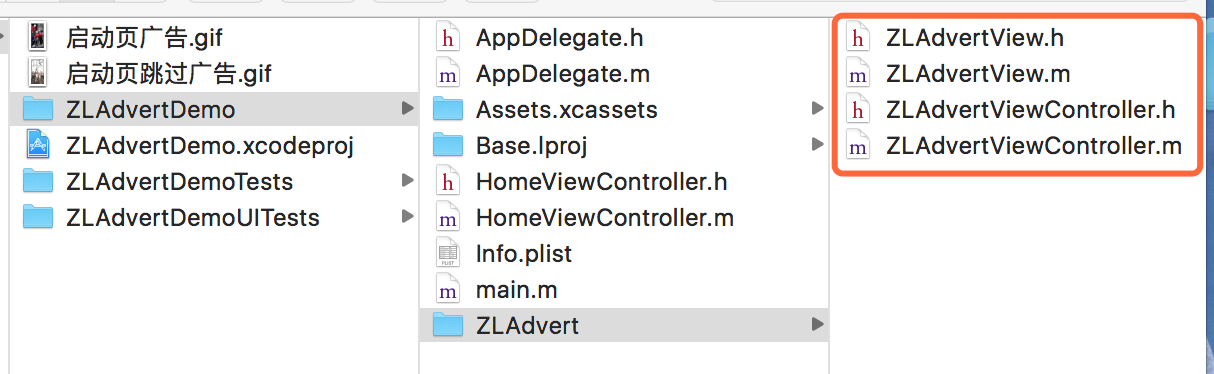
1、压缩文件截图
2、 运行时的效果
启动页进入广告效果:
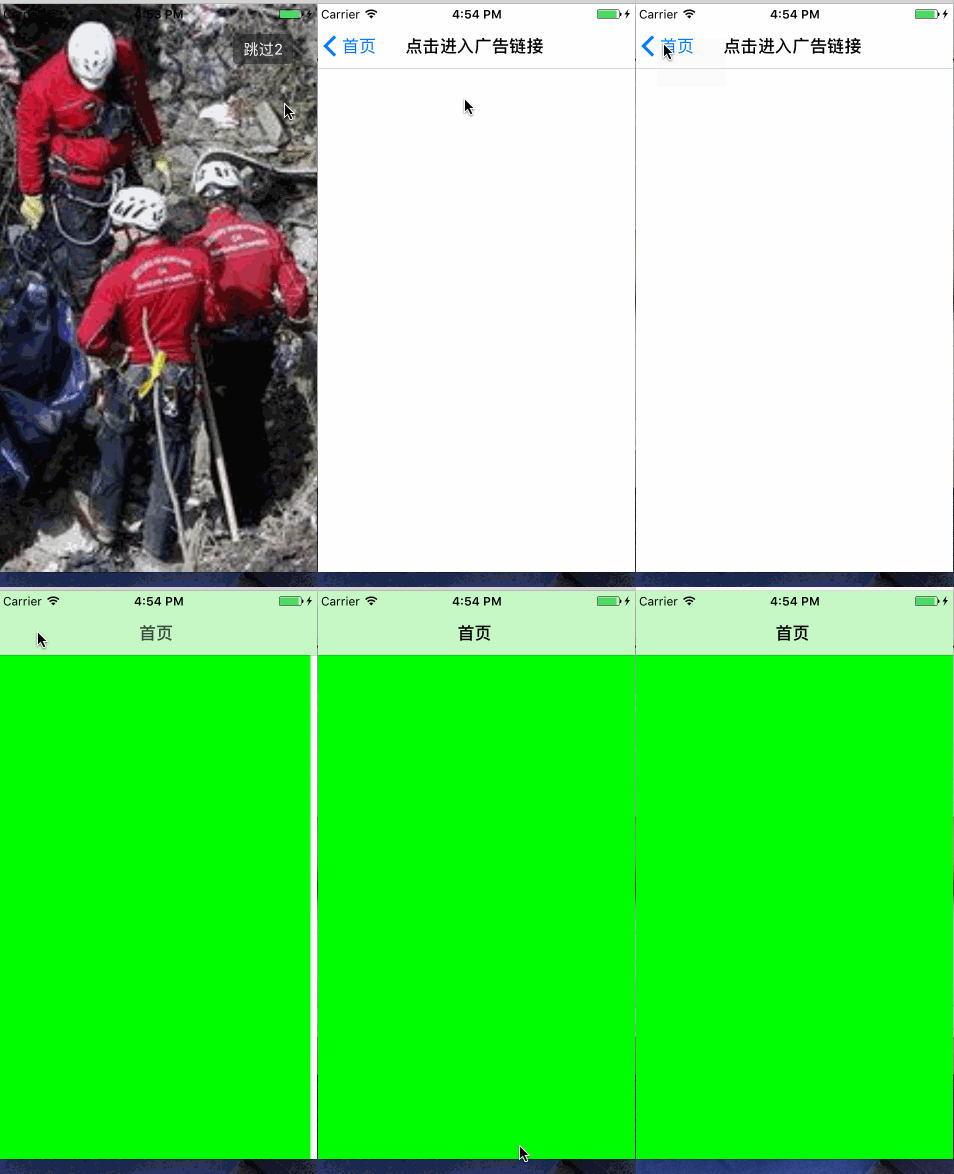
启动页跳过广告效果:
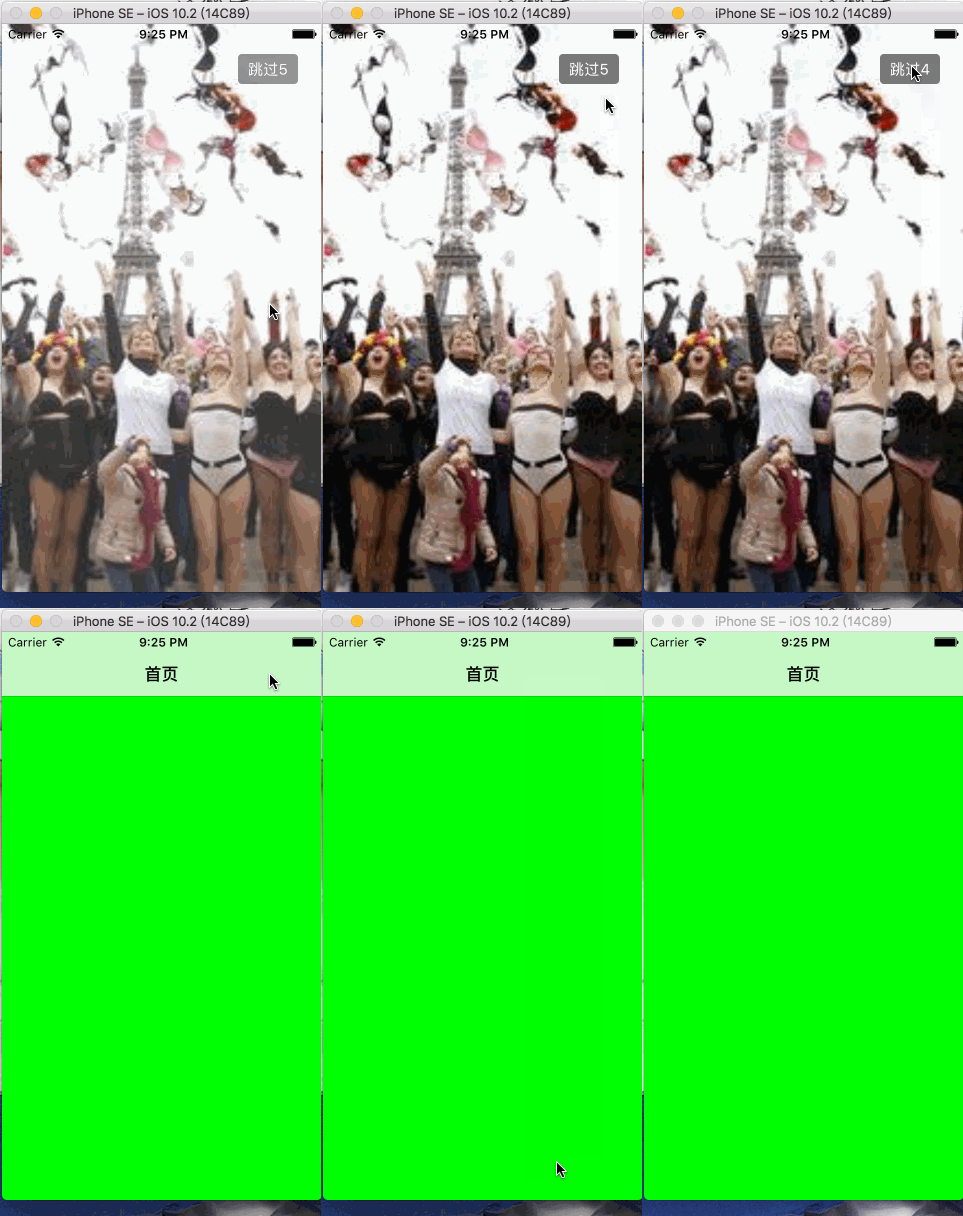
四、其他补充
注意:
广告页面的底部和启动图的底部一般都是相同的,给用户的错觉就是启动图加载完之后把广告图放在了启动图上,而且不能有偏差。所以我们开发要图时需要提醒美工在制作广告图的时候要注意下。
界面性问题可以根据自己项目需求调整即可, 具体可参考代码, 项目能够直接运行!
注:本文著作权归作者,由demo大师发表,拒绝转载,转载需要作者授权
iOS-APP启动页加载广告的更多相关文章
- iOS swift 启动页加载广告(图片广告+视频广告)
一般app在启动的时候都会有广告页,广告页用来加载自己的或者第三方的广告,广告的展示形式也多种多样,最近在看swift相关的东西,这里将提供支持加载图片广告和视频广告的解决方案 思路: 我们知道在加载 ...
- iOS启动页加载广告
1.定义全局成员变量 @interface AppDelegate () @property (strong, nonatomic) UIImageView *adImageView; @proper ...
- iOS App中数据加载的6种方式
我们看到的APP,往往有着华丽的启动界面,然后就是漫长的数据加载等待,甚至在无网络的时候,整个处于不可用状态.那么我们怎么处理好界面交互中的加载设计,保证体验无缝衔接,保证用户没有漫长的等待感,而可以 ...
- iOS app应用界面加载卡顿的问题
刚发布版本,忽然发现加载界面需要3-5秒延迟,那么问题来了. 首先,发现问题: 1.看代码,基于之前版本更新都没出问题,还是比较确信不是代码中的bug,以防万一,还是仔细看了下关于界面跳转部分的代码, ...
- iOS关于启动页自定义特殊处理
平常开发中对于启动页可能会有一些特别的要求,比如在启动页加动画或加一些按键可以响应事件等,最近项目中要在启动页增加版本号,因为版本号是不断的改变,所以要动态实现把它加到启动页上:在XCode上面配置的 ...
- App启动加载广告页面思路
需求 很多app(如淘宝.美团等)在启动图加载完毕后,还会显示几秒的广告,一般都有个跳过按钮可以跳过这个广告,有的app在点击广告页之后还会进入一个广告页面,点击返回进入首页.今天我们就来开发一个广告 ...
- App 启动加载广告页面思路
需求 很多app(如淘宝.美团等)在启动图加载完毕后,还会显示几秒的广告,一般都有个跳过按钮可以跳过这个广告,有的app在点击广告页之后还会进入一个广告页面,点击返回进入首页.今天我们就来开发一个广告 ...
- 关于App启动加载广告页面思路
需求 很多app(如淘宝.美团等)在启动图加载完毕后,还会显示几秒的广告,一般都有个跳过按钮可以跳过这个广告,有的app在点击广告页之后还会进入一个广告页面,点击返回进入首页.虽然说这个广告页面对用户 ...
- iOSAPP启动时实现加载广告
现在很多APP在启动的时候都在加载广告,现在也很流行,主要是盈利啊.笔者也做了很多关于广告的事情.现在记录下自己在APP启动的时候,怎么加载广告的. 下面总结下广告加载的三种方式 1.现在很多APP的 ...
随机推荐
- Spring注解方式实现任务调度【官方文档翻译】
原文:http://docs.spring.io/spring/docs/4.0.1.BUILD-SNAPSHOT/javadoc-api/ 注解类型:EnableScheduling @Target ...
- pgm转jpg
clc;clear all;for i=1:40for j=1:10image=imread(strcat('N:\FACE\orl_faces\s',...int2str(i),'\',int2st ...
- OTL翻译(8) -- otl_long_string/otl_long_unicode_string类
otl_long_string/olt_long_unicode_string 这两个类主要用来处理大对象数据.从OTL4.0版本开始,otl_long_string还可以处理任何类型的RAW/BIA ...
- Python并发编程-进程 线程 同步锁 线程死锁和递归锁
进程是最小的资源单位,线程是最小的执行单位 一.进程 进程:就是一个程序在一个数据集上的一次动态执行过程. 进程由三部分组成: 1.程序:我们编写的程序用来描述进程要完成哪些功能以及如何完成 2.数据 ...
- Memento 备忘录 快照模式 MD
备忘录模式 简介 在不破坏封装的前提下,捕获一个对象的[内部状态],并在该对象之外保存这个状态,这样以后就可以将该对象恢复到原先保存的状态. 角色: 发起人Originator:要被备份的成员,它提供 ...
- scala 学习笔记五 foreach, map, reduce
例子 val v = Vector(,,,) ) println(s) //输出:Vector(2, 4, 6, 8) val v2 = Vector(,,,) var v3 = v2.reduce( ...
- WordPress 后台上传自定义网站Logo
需求: 众所周知一般网站的logo都是固定的所以我在做网站时也是使用的静态logo文件,但最近用wp给一个客户做的网站时,因为网站现在的logo可能会需要重新设计,所以客户提出了需要在后台可以自己修改 ...
- 一次真实的蓝屏分析 ntkrnlmp.exe
故事背景: 话说我一直都是远程公司的电脑,在我晚上11点敲代码敲得正爽的时候,被远程的主机挂掉了,毫无征兆的挂掉了,我特么还好有闲着没事就ctrl + s保存代码的习惯,要不然白敲了那么久,我以为是公 ...
- [Javascript] Prototype 1
You can add prototype to any object in Jacascript likes Object, Array, String... prototype 有继承的作用,比如 ...
- 给MySQL中某表增加一个新字段,设为主键值为自动增长。
alter table test_tb add ID int(10) primary key AUTO_INCREMENT; 设定完成后,原有记录的该字段会增加并自动设上值.以后的值会在已有记录的最 ...