
ReportMachine OCX
http://rmachine.haotui.com/thread-55-1-1.html
偏高偏低提示
[IF( [RMDBDataSet1."abnormalIndicator"]='h','↑',IF( [RMDBDataSet1."abnormalIndicator"]='l','↓',''))]
RMReport.ocx
RMEngine.Init(); // 初始化

RMEngine.LoadFromFile('c:\1.rmf'); // 读入报表模版

RMEngine.AddDataSet(DataModule2.Customers, 'CustomersDS'); // 增加一个数据表

RMEngine.DesignReport; // 设计报表

RMReport.ShowReport; // 预览报表
c#调用
this.dataSet1 = new System.Data.DataSet();

this.dataView1 = new System.Data.DataView();

this.rmReport1 = new RMReportEngine.RMReport();

this.dataSet1.Reset();

            this.oleDbDataAdapter1.SelectCommand.CommandText = "select * from Customer";

            this.oleDbDataAdapter1.Fill(this.dataSet1, "Customer");

            this.dataView1.Table = this.dataSet1.Tables["Customer"];

            this.dataView1.RowFilter = "CustNo >= 3000";

            //this.dataGrid1.DataSource = this.dataView1;

            rmReport1.ModifyPrepared = false;

            rmReport1.Init(this, TxRMReportType.rmrtReport);

            //rmReport1.PreviewOptions.BtnDesignVisible = true;

            //rmReport1.AddDataSet(this.dataSet1.Tables["Customer"], "db1");

            rmReport1.AddDataSet(this.dataView1, "db1");

            rmReport1.LoadFromFile(MainPath + "reports\\SimpleList.rmf"); //SimpleList.rmf

            rmReport1.AddVariable("公司名称", "我的公司名称", true);

            rmReport1.AddVariable("公司简称", "我的公司简称", true);

            rmReport1.AddVariable("公司电话", "我的公司电话", true);

            if (radioButton1.Checked)

            {

                    rmReport1.ShowReport();

            }

            else

            {

                rmReport1.DesignReport();

            }
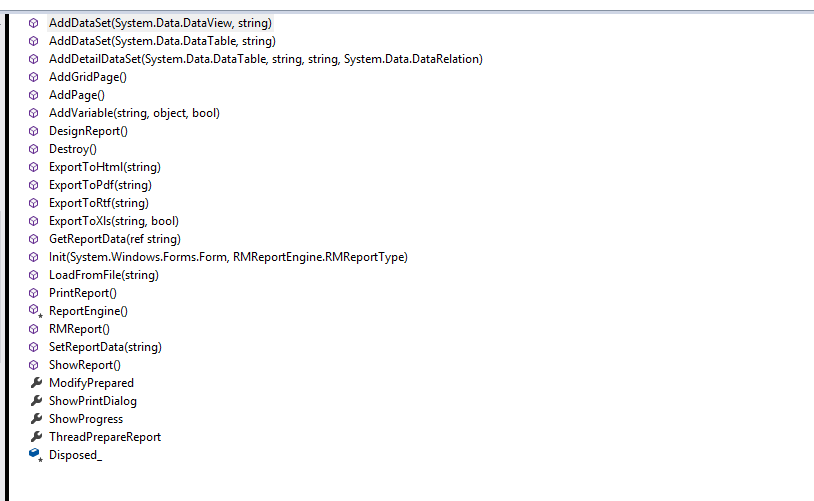
public void AddDataSet(System.Data.DataView aDataView, string aDatasetName)
public void AddDataSet(System.Data.DataTable aDataTable, string aDatasetName)
public void AddDetailDataSet(System.Data.DataTable aDataTable, string aDatasetName, string aMasterName, System.Data.DataRelation aDataRelation)
public void AddVariable(string aVarName, object aVarValue, bool aIsString)
public void GetReportData(ref string aReportData)
public void Init(System.Windows.Forms.Form aOwner, RMReportEngine.RMReportType aReportType)
web版 RMViewer.ocx
http://rmachine.haotui.com/thread-56-1-1.html
编译client_ActiveForm目录中的项目就会生成RMViewer.ocx
com版本
COM控件(ocx)可以在VB、.Net、VC、Delphi等支持ADO的开发工具中使用
ocx版本
Dim conn

    Dim rs

    Dim sql

    Dim rq

    Dim Engine

    Set conn = OpenDBConnection

    Set rs = Server.CreateObject ("ADODB.recordset")

    sql = "SELECT * from customer"

    rs.Open sql, conn, ,

    Set Engine = Server.CreateObject("RMEngine.Engine")

    Engine.Init

    Engine.AddDataSet "db1", rs

    Engine.SetReportFile RootPath & "SimpleList.rmf"

    Engine.ViewerVersion = ViewerVersion

    Engine.ViewerFileName = ViewerFileName

    Engine.SaveReportURL = "asp/DesignReportSave.asp?Report=" & "SimpleList.rmf"

    Engine.AddVariable "NowTime", Now, false

    Engine.ShowProgress = True

    Set rs = nothing

    conn.Close

    Set conn = nothing
报表机器,双屏切换到单屏看不见预览界面了,解决方法修改注册表
计算机\HKEY_USERS\S-1-5-21-3613803311-2736177264-1221004870-500\Software\WHF SoftWare\Report Machine\Form\TRMPreviewForm
XPosition 1606 改为0
YPosition -173改为0
if GetFieldValue('RMDBDataSet1."SFYYFSX"') then // 是否用药方式行
begin
//ShowMessage(Memo12.Text);
Memo12.HAlign:=rmhRight;
end
else
begin
Memo12.HAlign:=rmhLeft;
end;
procedure MasterData1_OnBeforePrint(Sender: TObject);
begin
if GetFieldValue('RMDBDataSet1."SFZZYZX"') then // 是否重整医嘱行
begin
Line1.Visible:=true;
end
else
begin
Line1.Visible:=false;
end;
end;
procedure Memo13_OnAfterCalc(Sender: TObject);
begin
if Pos('┐',Memo13.Text)<>0 then
begin
Memo13.Visible:=true;
Shape2.Shape:=rmVertLine;
Shape2.Visible:=true;
Shape1.Visible:=false;
Shape3.Visible:=false;
end
else if Pos('┘',Memo13.Text)<>0 then
begin
Memo13.Visible:=true;
Shape3.Shape:=rmVertLine;
Shape3.Visible:=true;
Shape1.Visible:=false;
Shape2.Visible:=false;
end
else if Pos('│',Memo13.Text)<>0 then
begin
//Memo13.text:='';
Memo13.Visible:=true;
Shape1.Shape:=rmVertLine;
Shape1.Visible:=true;
Shape2.Visible:=false;
Shape3.Visible:=false;
end
else
begin
Memo13.Visible:=true;
Shape1.Visible:=false;
Shape2.Visible:=false;
Shape3.Visible:=false;
end;
end;
procedure Memo12_OnAfterCalc(Sender: TObject);
begin
if GetFieldValue('RMDBDataSet1."SFYYFSX"') then // 是否用药方式行
begin
//ShowMessage(Memo12.Text);
Memo12.HAlign:=rmhRight;
end
else
begin
Memo12.HAlign:=rmhLeft;
end;
end;
ReportMachine OCX的更多相关文章
- ReportMachine OCX 的使用方法
ReportMachine OCX http://rmachine.haotui.com/thread-55-1-1.html RMReport.ocx RMEngine.Init(1); // 初始 ...
- Web获取客户端物理MAC地址(ocx插件)
主要是通过ActiveX控件 从本地获取到MAC地址,传入到浏览器打开的网页中,再提交到服务器. 具体详解与步骤看文档中: 文件实例包下载 DotNetFX 文件夹附件文件:(可能安装时需用) dot ...
- 注册OCX失败
今天注册某个OCX时,Windows报告以下错误: 模块“XXX.ocx”已加载,但对 DllRegisterServer 的调用失败,错误代码为 0x80040200. 这是Windows权限引起的 ...
- RegSvr32注册OCX时报错
RegSvr32注册OCX时报错. 错误1: 模块“dsoframer2007.ocx”已加载,但对 DllRegisterServer 的调用失败,错误代码为 0x80070005. 有关此问题的详 ...
- C#利用AxImp工具在WPF中使用OCX控件
一.注册OCX并利用工具生成dll @echo off color a ::Failed REGSVR32 /S /I "MSCOMCTL.OCX" if exist %windi ...
- 如何注册OCX控件
32位系统: 将文件放到c:\windows\system目录 注册 运行:Regsvr32 c:\windows\system\xxx.ocx 取消注册运行:Regsvr32.exe /u c:\w ...
- ocx控件 编译成C#调用的dll 方法 转
打开VS命令提示行 1.注册ActiveX控件(带上 VCbox.ocx的路径) regsvr32 VCbox.ocx 2.编译OCX文件 aximp VCbox.ocx 生成两个dll文件,项 ...
- MapWinGIS.ocx 注册
(1)不管对版本4.8还是4.9.3,运行环境都必须为32位的.Net Frame 3.5,低了高了都不行,会导致注册OCX失败. (2)对于MapWinGIS.ocx 4.8 版本,需要32位的 M ...
- #include <objsafe.h>//OCX控件在IE8浏览器下不能使用问题
一.OCX控件开发常见的问题 1.OCX控件在IE8浏览器下不能使用问题 原因:IE8会拦截OCX控件的方法. 解决方法:在OCX控件开发时加入安全接口. (1)在有"Crtl"字 ...
随机推荐
- mysql安装笔记-rpm
基本内容: 1.需要解决两个依赖 2.需要解决一个包冲突 3.安装mysql服务,以及客户端client 4.修改root的随机密码 5.授予root用户,从任何机器访问任何数据库的任何表的权限 1. ...
- "诗词大闯关"调查过程心得体会
为了充分满足客户需求来更好地完成我们的项目--"诗词大闯关",我们根据项目内容,制定了调查表.我们小组以网上问卷调查的形式制作了调查表,并收集了122份有效的问卷调查表. 通过这次 ...
- 70. Climbing Stairs (Array; DP)
You are climbing a stair case. It takes n steps to reach to the top. Each time you can either climb ...
- Island Transport
Island Transport http://acm.hdu.edu.cn/showproblem.php?pid=4280 Time Limit: 20000/10000 MS (Java/Oth ...
- SQL时间格式化 转载备用~
Sel1 取值后格式化{0:d}小型:如2005-5-6{0:D}大型:如2005年5月6日{0:f}完整型 2 当前时间获取 DateTime.Now.ToShortDateString 3 取值中 ...
- 11-简单解释spingmvc项目的结构
可以简单的理解为下面这样子:
- c语言定义函数指针和typedef简写
二种方法来定义函数指针 #include<stdio.h> #include<stdlib.h> #include<Windows.h> int add(int a ...
- 【笔记】C#往TextBox的方法AppendText加入的内容里插入换行符
C# TextBox换行[huan hang]时你往往会想到直接付给一个含有换行[huan hang]符"\n"的字符[zi fu]串[zi fu chuan]给Text属性[sh ...
- BZOJ1699: [Usaco2007 Jan]Balanced Lineup排队 - 线段树
description 查询区间最大和最小 题解 线段树 愉悦身心啊 代码 #include<cstring> #include<cstdio> #include<alg ...
- 如何看待阿里 AI 每秒制作 8000 张海报?
看了其他设计老师们的回答,给了我一些启发,于是更新一波. 设计本质上是产品和服务的一部分,如果只站在设计师角度看这问题,免不了会有一种被取代的危机感. 来源:千锋UI 但如果站在整个产品和服务的角度 ...