
RHEL6.5安装11.2.0.3 RAC并打补丁
[TOC]
一,主机配置
1.修改hosts文件(两节点)
#127.0.0.1 localhost localhost.localdomain localhost4 localhost4.localdomain4 crm-4g-nm-dahsxw1#::1 localhost localhost.localdomain localhost6 localhost6.localdomain6 crm-4g-nm-dahsxw1127.0.0.1 localhost.localdomain localhost# Public10.142.89.88 crm-4g-nm-dahsxw110.142.89.89 crm-4g-nm-dahsxw2# Private192.168.255.153 crm-4g-nm-dahsxw1-priv192.168.255.154 crm-4g-nm-dahsxw2-priv# Virtual10.142.89.123 crm-4g-nm-dahsxw1-vip10.142.89.124 crm-4g-nm-dahsxw2-vip# SCAN10.142.89.125 dahsxw-scan
2.修改内核参数及安全限制(两节点)
cat >> /etc/sysctl.conf<<EOF#ORACLE SETTINGfs.aio-max-nr = 1048576fs.file-max = 6815744kernel.shmall = 2097152kernel.shmmax = 4181979136kernel.shmmni = 4096kernel.sem = 250 32000 100 128net.ipv4.ip_local_port_range = 9000 65500net.core.rmem_default = 262144net.core.rmem_max = 4194304net.core.wmem_default = 262144net.core.wmem_max = 1048576EOFsysctl -pcat >> /etc/security/limits.conf<<EOF#ORACLE SETTINGoracle soft nofile 1024oracle hard nofile 65536oracle soft nproc 2047oracle hard nproc 16384oracle soft stack 10240oracle hard stack 32768grid soft nofile 1024grid hard nofile 65536grid soft nproc 2047grid hard nproc 16384grid soft stack 10240grid hard stack 32768EOFcat >> /etc/pam.d/login<<EOFsession required pam_limits.soEOF
3.创建用户,目录及权限修改(两节点)
/usr/sbin/groupadd -g 54321 oinstall/usr/sbin/groupadd -g 54322 dba/usr/sbin/groupadd -g 54359 opergroupadd -g 54323 asmadmingroupadd -g 54328 asmopergroupadd -g 54324 asmdba/usr/sbin/useradd -u 54321 -g oinstall -G asmadmin,asmoper,asmdba grid/usr/sbin/useradd -u 54322 -g oinstall -G dba,asmdba oracleecho '!QAZxsw@' | passwd --stdin gridecho '!QAZxsw@' | passwd --stdin oraclemkdir -p /oracle/app/11.2.0/gridmkdir -p /oracle/app/gridmkdir -p /oracle/app/oraclechown -R grid:oinstall /oraclechown oracle:oinstall /oracle/app/oraclechmod -R 775 /oracle
4.安装所需软件包(两节点)
yum install binutils -yyum install compat-libcap1 -yyum install compat-libstdc++-33 -yyum install compat-libstdc++-33.i686 -yyum install gcc -yyum install gcc-c++ -yyum install glibc -yyum install glibc.i686 -yyum install glibc-devel -yyum install glibc-devel.i686 -yyum install ksh -yyum install libgcc -yyum install libgcc.i686 -yyum install libstdc++ -yyum install libstdc++.i686 -yyum install libstdc++-devel -yyum install libstdc++-devel.i686 -yyum install libaio -yyum install libaio.i686 -yyum install libaio-devel -yyum install libaio-devel.i686 -yyum install libXext -yyum install libXext.i686 -yyum install libXtst -yyum install libXtst.i686 -yyum install libX11 -yyum install libX11.i686 -yyum install libXau -yyum install libXau.i686 -yyum install libxcb -yyum install libxcb.i686 -yyum install libXi -yyum install libXi.i686 -yyum install make -yyum install sysstat -yyum install unixODBC -yyum install unixODBC-devel -yyum install -y libXp
5.设置环境变量
节点一
grid用户su - gridvi .bash_profile添加下面的内容:export TMP=/tmpexport TMPDIR=$TMPexport GRID_HOME=/oracle/app/11.2.0/gridexport ORACLE_SID=+ASM1export ORACLE_BASE=/oracle/app/gridexport ORACLE_HOME=$GRID_HOMEexport PATH=${PATH}:/usr/bin:/bin:/usr/bin/X11:/usr/local/bin:$ORACLE_HOME/binexport LD_LIBRARY_PATH=$ORACLE_HOME/lib:/lib:/usr/libexport CLASSPATH=$ORACLE_HOME/JRE:$ORACLE_HOME/jlib:$ORACLE_HOME/rdbms/jlibif [ $USER = "grid" ]; thenif [ $SHELL = "/bin/ksh" ]; thenulimit -p 16384ulimit -n 65536elseulimit -u 16384 -n 65536fifioracle用户su - oraclevi .bash_profile添加下面的内容:################################################### User specific environment and startup programs##################################################export ORACLE_BASE=/oracle/app/oracleexport ORACLE_HOME=$ORACLE_BASE/product/11.2.0export ORACLE_PATH=$ORACLE_BASE/common/oracle/sql:.:$ORACLE_HOME/rdbms/adminexport ORACLE_SID=dahsxw1export PATH=${PATH}:/usr/bin:/bin:/usr/bin/X11:/usr/local/bin:$ORACLE_HOME/binexport ORACLE_TERM=xterm#export TNS_ADMIN=$ORACLE_HOME/network/adminexport LD_LIBRARY_PATH=$ORACLE_HOME/libexport LD_LIBRARY_PATH=${LD_LIBRARY_PATH}:$ORACLE_HOME/oracm/libexport LD_LIBRARY_PATH=${LD_LIBRARY_PATH}:/lib:/usr/lib:/usr/local/libexport CLASSPATH=$ORACLE_HOME/JREexport CLASSPATH=${CLASSPATH}:$ORACLE_HOME/jlibexport CLASSPATH=${CLASSPATH}:$ORACLE_HOME/rdbms/jlibexport CLASSPATH=${CLASSPATH}:$ORACLE_HOME/network/jlibexport THREADS_FLAG=nativeexport TEMP=/tmpexport TMPDIR=/tmp
节点二
grid用户su - gridvi .bash_profile添加下面的内容:export TMP=/tmpexport TMPDIR=$TMPexport GRID_HOME=/oracle/app/11.2.0/gridexport ORACLE_SID=+ASM2export ORACLE_BASE=/oracle/app/gridexport ORACLE_HOME=$GRID_HOMEexport PATH=${PATH}:/usr/bin:/bin:/usr/bin/X11:/usr/local/bin:$ORACLE_HOME/binexport LD_LIBRARY_PATH=$ORACLE_HOME/lib:/lib:/usr/libexport CLASSPATH=$ORACLE_HOME/JRE:$ORACLE_HOME/jlib:$ORACLE_HOME/rdbms/jlibif [ $USER = "grid" ]; thenif [ $SHELL = "/bin/ksh" ]; thenulimit -p 16384ulimit -n 65536elseulimit -u 16384 -n 65536fifioracle用户su - oraclevi .bash_profile添加下面的内容:################################################### User specific environment and startup programs##################################################export ORACLE_BASE=/oracle/app/oracleexport ORACLE_HOME=$ORACLE_BASE/product/11.2.0export ORACLE_PATH=$ORACLE_BASE/common/oracle/sql:.:$ORACLE_HOME/rdbms/adminexport ORACLE_SID=dahsxw2export PATH=${PATH}:/usr/bin:/bin:/usr/bin/X11:/usr/local/bin:$ORACLE_HOME/binexport ORACLE_TERM=xterm#export TNS_ADMIN=$ORACLE_HOME/network/adminexport LD_LIBRARY_PATH=$ORACLE_HOME/libexport LD_LIBRARY_PATH=${LD_LIBRARY_PATH}:$ORACLE_HOME/oracm/libexport LD_LIBRARY_PATH=${LD_LIBRARY_PATH}:/lib:/usr/lib:/usr/local/libexport CLASSPATH=$ORACLE_HOME/JREexport CLASSPATH=${CLASSPATH}:$ORACLE_HOME/jlibexport CLASSPATH=${CLASSPATH}:$ORACLE_HOME/rdbms/jlibexport CLASSPATH=${CLASSPATH}:$ORACLE_HOME/network/jlibexport THREADS_FLAG=nativeexport TEMP=/tmpexport TMPDIR=/tmp
6.udev绑定(两节点)
执行(d e f为一个节点上的盘符如:sdd,sde,sdf)
for i in c f d e g l m;doecho "KERNEL==\"sd*\", SUBSYSTEM==\"block\", PROGRAM==\"/sbin/scsi_id --whitelisted --replace-whitespace --device=/dev/\$name\", RESULT==\"`/sbin/scsi_id -g -u -d /dev/sd$i`\", NAME=\"asm-disk$i\", OWNER=\"grid\", GROUP=\"asmadmin\", MODE=\"0660\""done
把执行结果加入到规则文件
[root@crm-4g-nm-dahsxw1 rules.d]# vi 99-oracle-asmdisk.rulesKERNEL=="sd*", SUBSYSTEM=="block", PROGRAM=="/sbin/scsi_id --whitelisted --replace-whitespace --device=/dev/$name", RESULT=="36000c2969bb4b014ffcc39ac6b263f23", NAME="ocr-disk1", OWNER="grid", GROUP="asmadmin", MODE="0660"KERNEL=="sd*", SUBSYSTEM=="block", PROGRAM=="/sbin/scsi_id --whitelisted --replace-whitespace --device=/dev/$name", RESULT=="36000c29c82f14c872d96945a6fcdc96b", NAME="ocr-disk1", OWNER="grid", GROUP="asmadmin", MODE="0660"KERNEL=="sd*", SUBSYSTEM=="block", PROGRAM=="/sbin/scsi_id --whitelisted --replace-whitespace --device=/dev/$name", RESULT=="36000c29407d4cb76cd272d2c233111b5", NAME="ocr-disk3", OWNER="grid", GROUP="asmadmin", MODE="0660"[root@crm-4g-nm-dahsxw1 ~]# start_udev正在启动 udev:[确定]
特别注意:两节点对应的盘符不一定一致,通过UUID识别!特别需要检查好各节点是对应的绑定设备
二,安装GRID软件
1.授权解压
[grid@crm-4g-nm-dahsxw1 soft_ora]$ unzip p10404530_112030_Linux-x86-64_3of7.zip
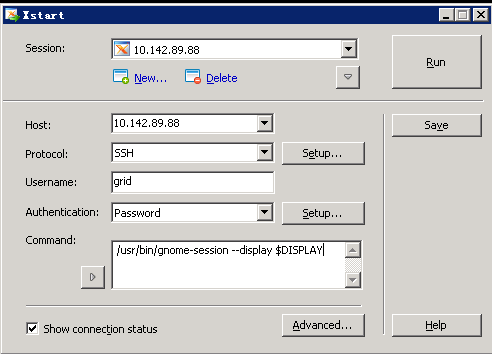
2.使用xstart连接到图形界面
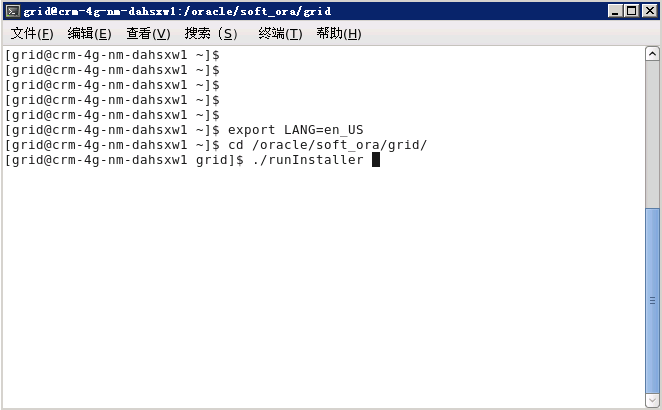
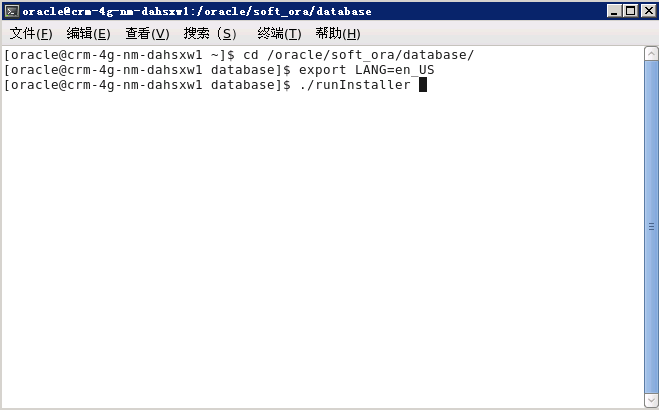
3.临时设置LANG为英文环境,启动安装程序
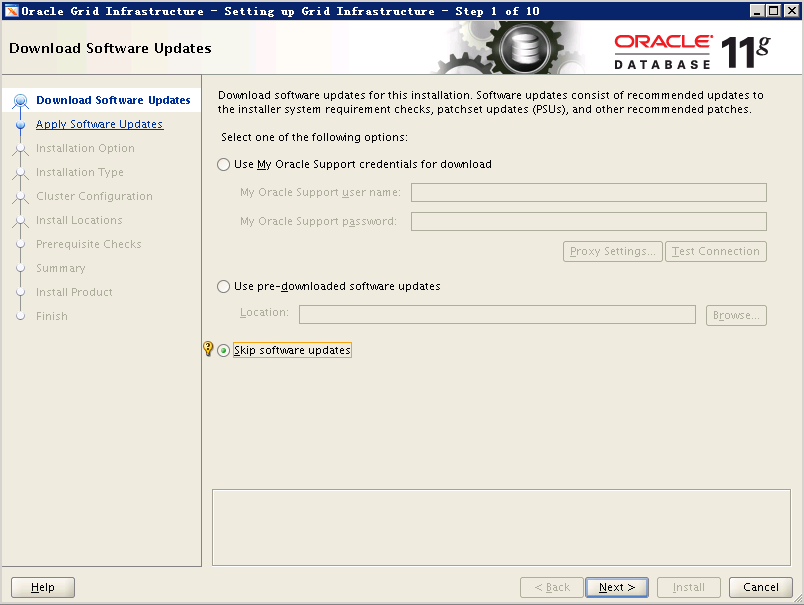
4.跳过更新程序
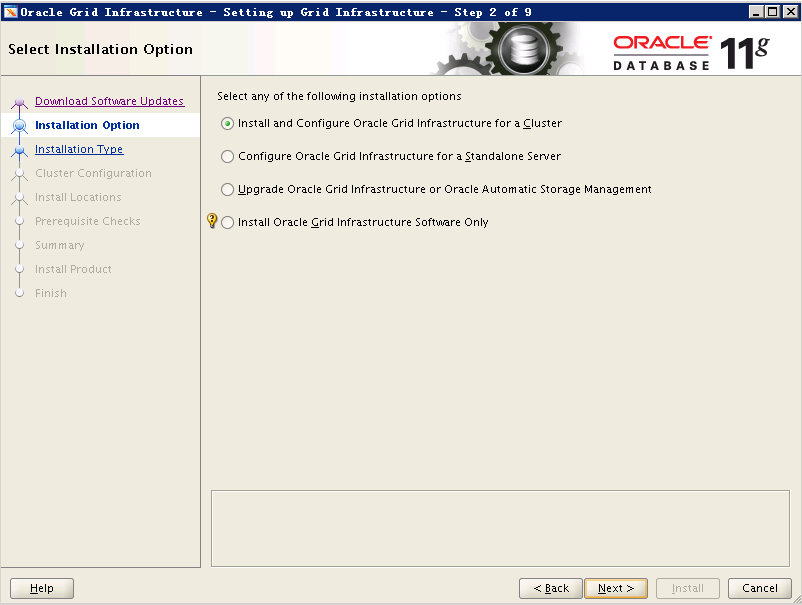
5.Install and Configure Oracle Grid Infrastructure for a Cluster
6.Typical Instrallation
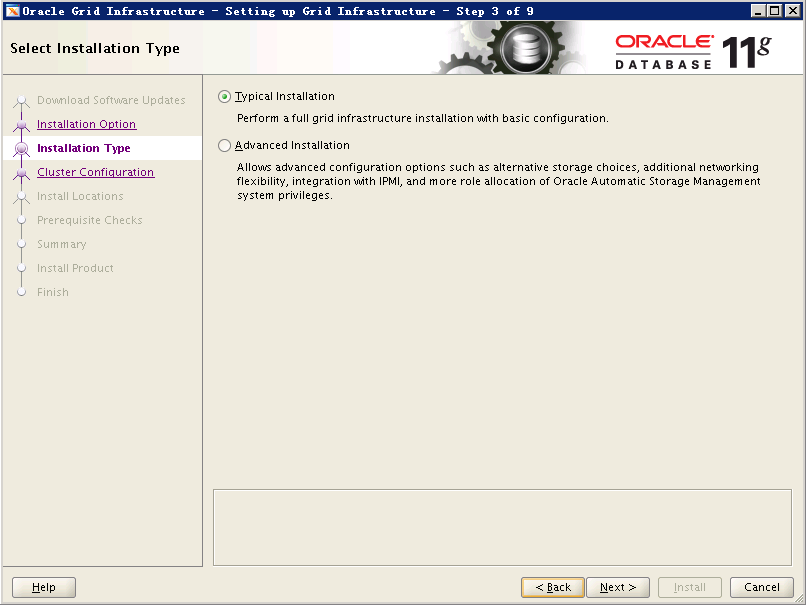
7.修改Scan Name,并添加所有节点的主机名和VIP名,注意多一个localhost主机,这是由于hosts文件配置有问题导致,并且Scan Name名字不能太长,具体解析见文档最后问题汇总
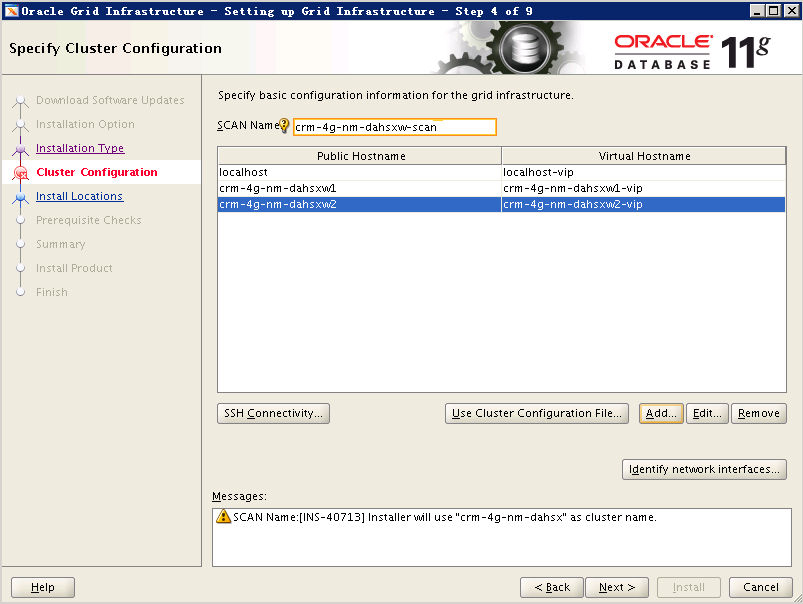
正确如下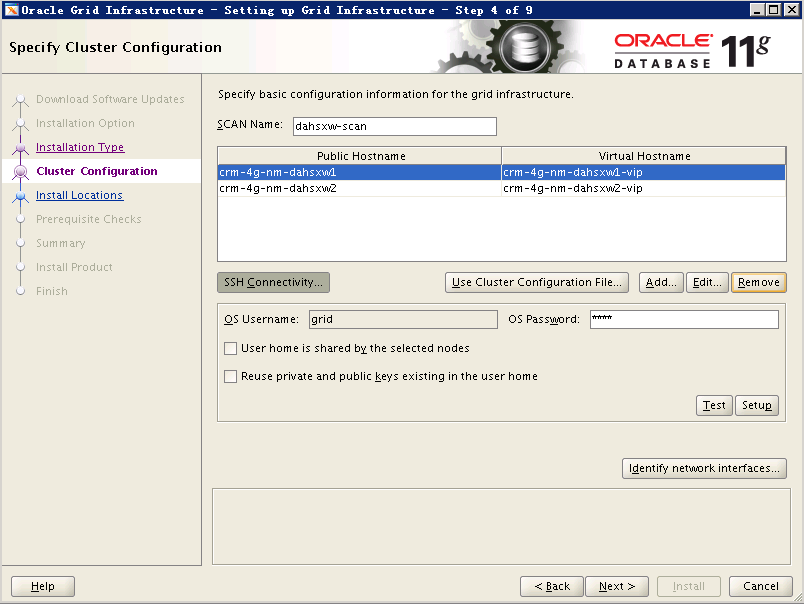
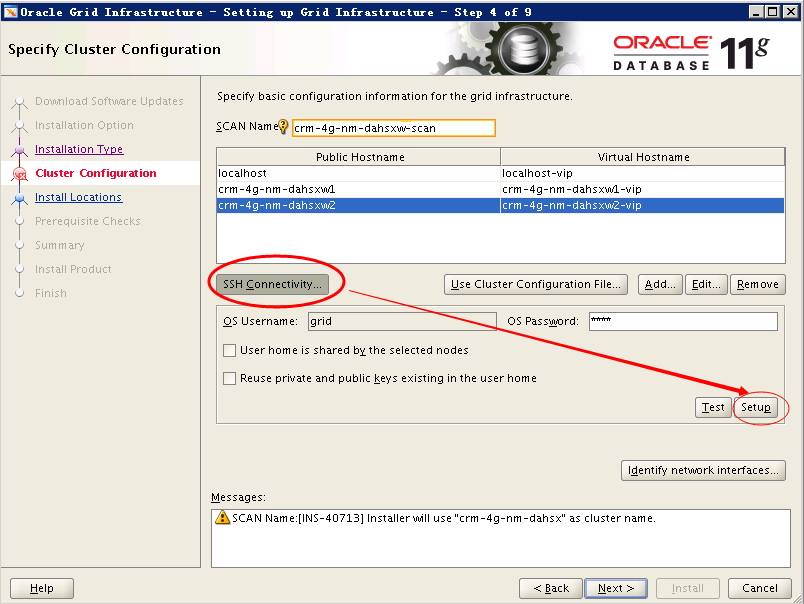
8.输入grid用户密码,配置互信,先setup,再执行test,test通过后再点Next
9.选择网络接口类型
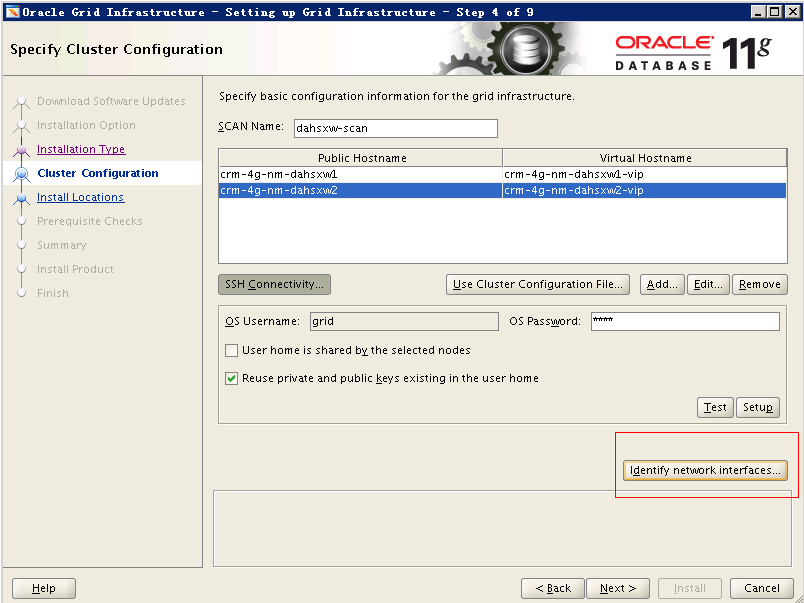
如下: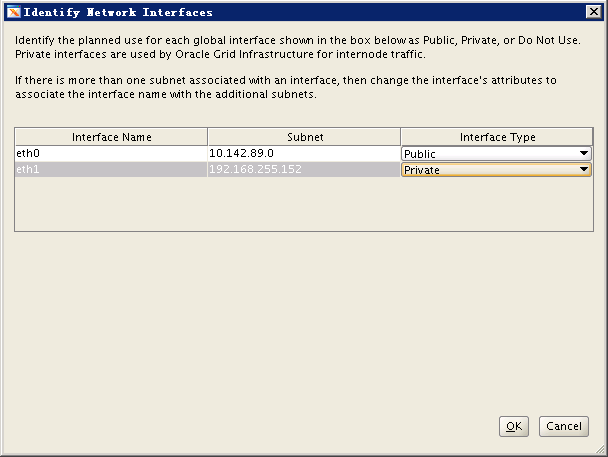
10.选择正确的ORACLE_BASE与ORACLE_HOME,选择ASM管理,设置ASM实例密码
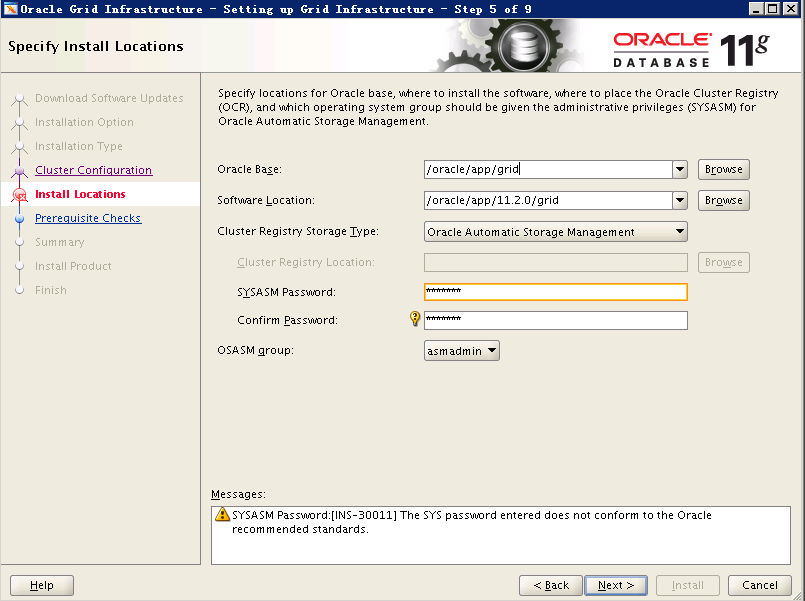
11.创建放置OCR和Voting File文件的磁盘组,选择nomal方式冗余
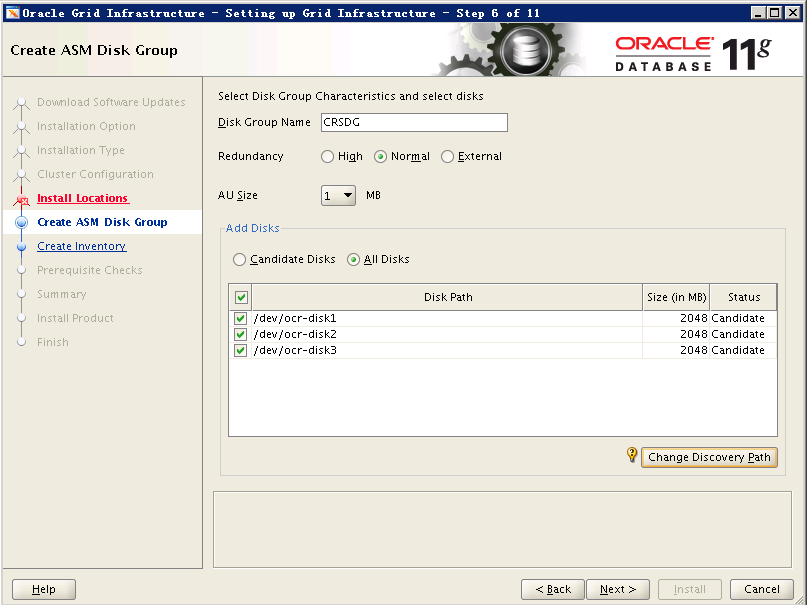
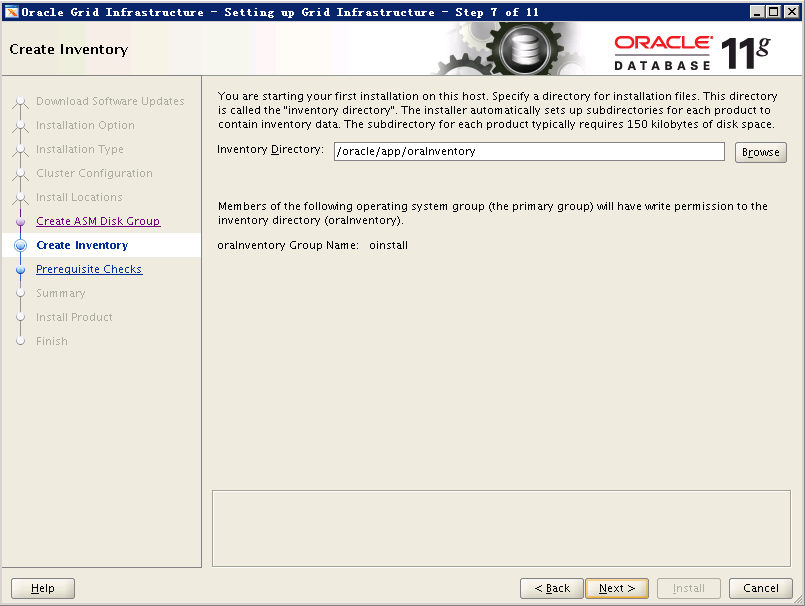
12清单目录
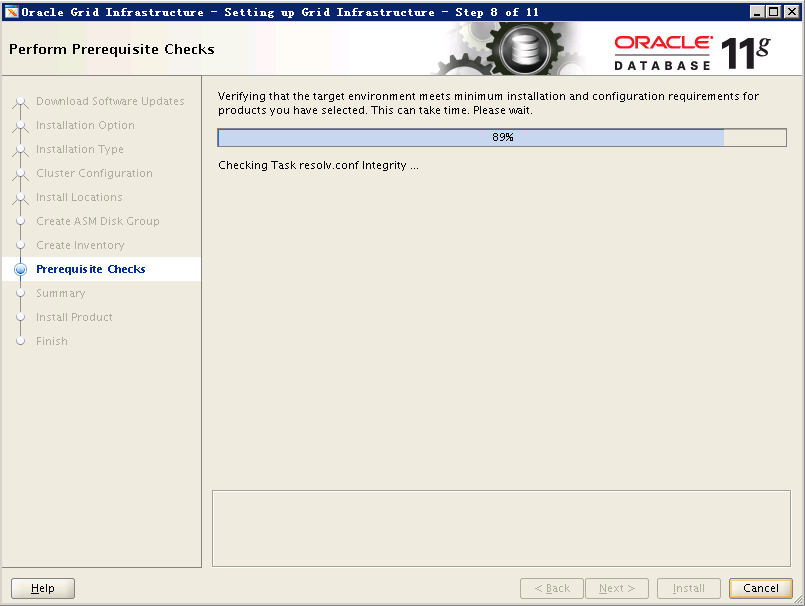
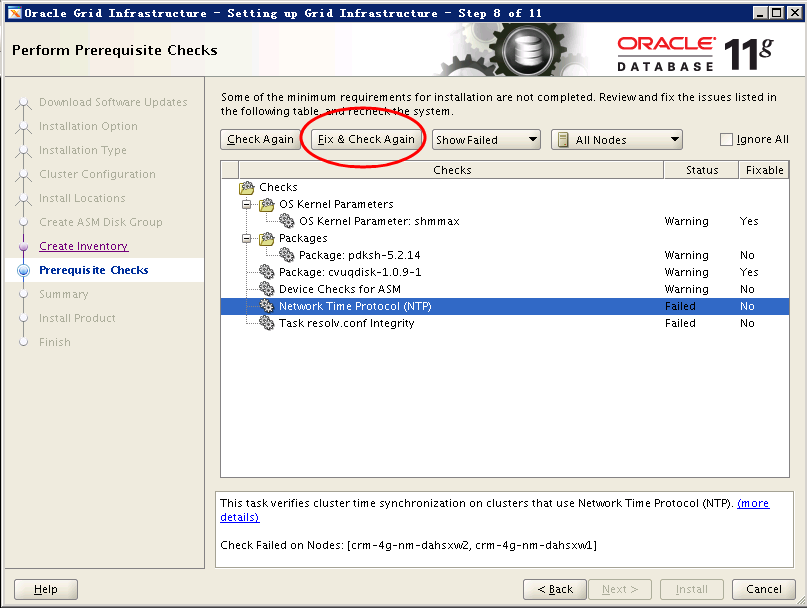
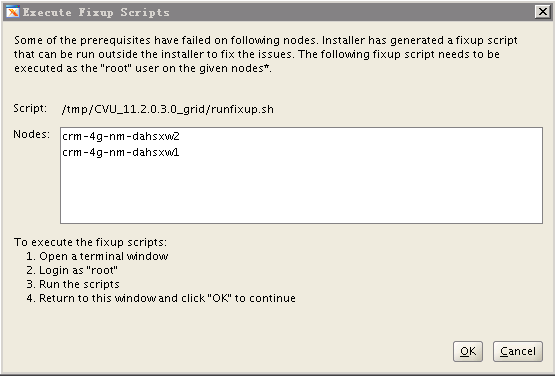
13.可先点击Fix & Check Again修复,不能修复的,可暂时ignore
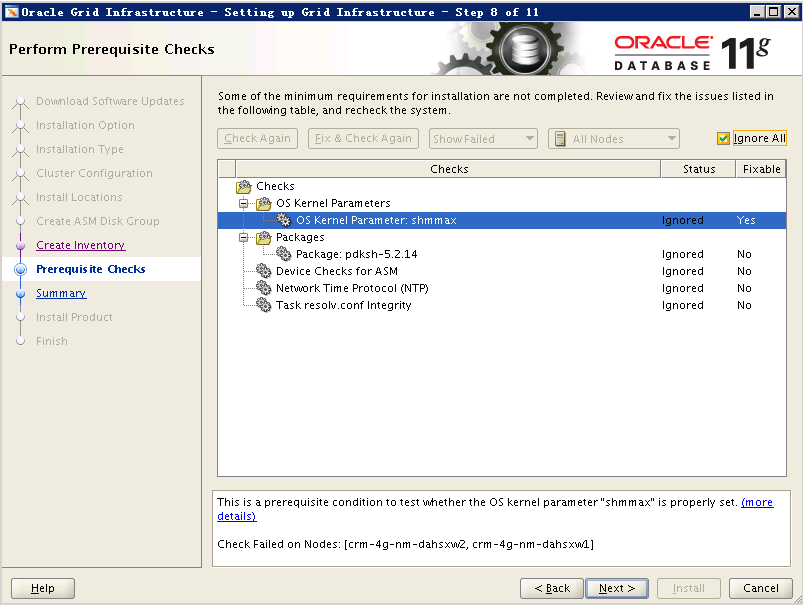
安装进度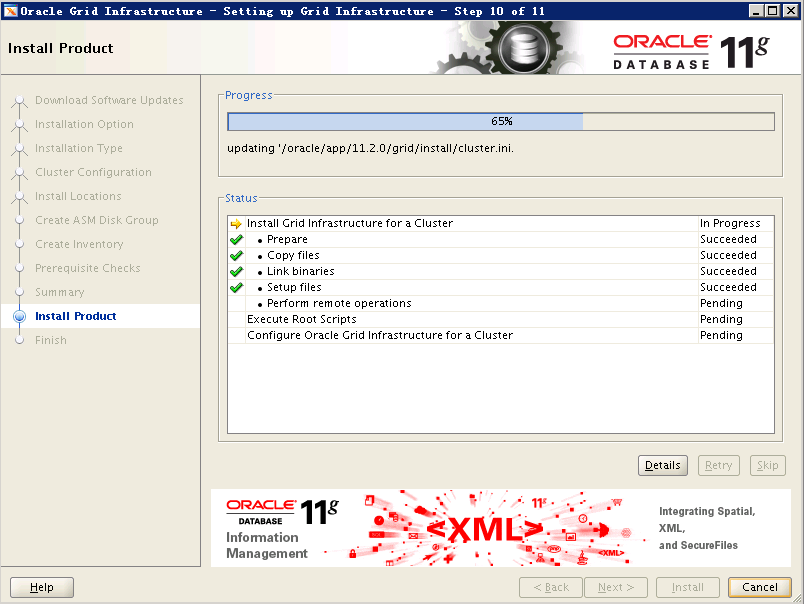
14.两节点以root用户执行脚本
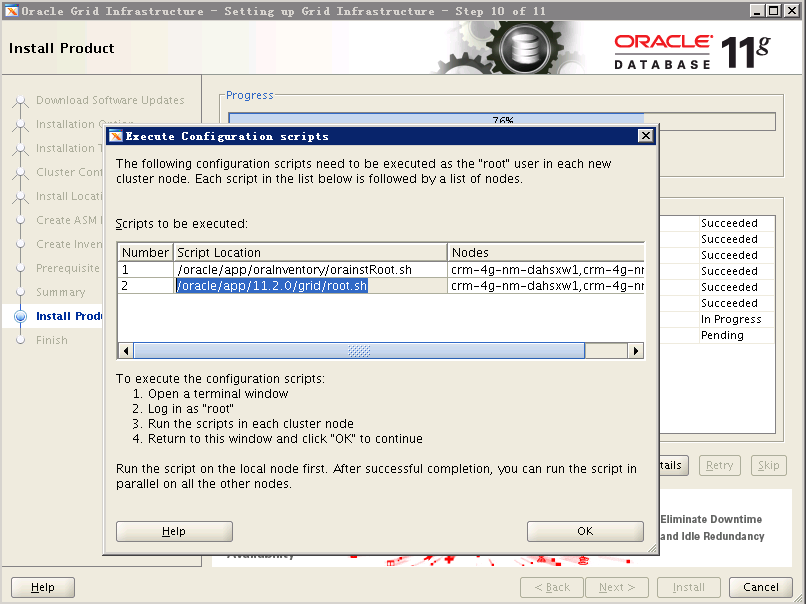
节点一
[root@crm-4g-nm-dahsxw1 ~]# /oracle/app/oraInventory/orainstRoot.shChanging permissions of /oracle/app/oraInventory.Adding read,write permissions for group.Removing read,write,execute permissions for world.Changing groupname of /oracle/app/oraInventory to oinstall.The execution of the script is complete.[root@crm-4g-nm-dahsxw1 ~]#[root@crm-4g-nm-dahsxw1 ~]#[root@crm-4g-nm-dahsxw1 ~]# /oracle/app/11.2.0/grid/root.shPerforming root user operation for Oracle 11gThe following environment variables are set as:ORACLE_OWNER= gridORACLE_HOME= /oracle/app/11.2.0/gridEnter the full pathname of the local bin directory: [/usr/local/bin]:The contents of "dbhome" have not changed. No need to overwrite.The contents of "oraenv" have not changed. No need to overwrite.The contents of "coraenv" have not changed. No need to overwrite.Creating /etc/oratab file...Entries will be added to the /etc/oratab file as needed byDatabase Configuration Assistant when a database is createdFinished running generic part of root script.Now product-specific root actions will be performed.Using configuration parameter file: /oracle/app/11.2.0/grid/crs/install/crsconfig_paramsCreating trace directoryUser ignored Prerequisites during installationOLR initialization - successfulroot walletroot wallet certroot cert exportpeer walletprofile reader walletpa walletpeer wallet keyspa wallet keyspeer cert requestpa cert requestpeer certpa certpeer root cert TPprofile reader root cert TPpa root cert TPpeer pa cert TPpa peer cert TPprofile reader pa cert TPprofile reader peer cert TPpeer user certpa user certAdding Clusterware entries to upstartCRS-2672: Attempting to start 'ora.mdnsd' on 'crm-4g-nm-dahsxw1'CRS-2676: Start of 'ora.mdnsd' on 'crm-4g-nm-dahsxw1' succeededCRS-2672: Attempting to start 'ora.gpnpd' on 'crm-4g-nm-dahsxw1'CRS-2676: Start of 'ora.gpnpd' on 'crm-4g-nm-dahsxw1' succeededCRS-2672: Attempting to start 'ora.cssdmonitor' on 'crm-4g-nm-dahsxw1'CRS-2672: Attempting to start 'ora.gipcd' on 'crm-4g-nm-dahsxw1'CRS-2676: Start of 'ora.cssdmonitor' on 'crm-4g-nm-dahsxw1' succeededCRS-2676: Start of 'ora.gipcd' on 'crm-4g-nm-dahsxw1' succeededCRS-2672: Attempting to start 'ora.cssd' on 'crm-4g-nm-dahsxw1'CRS-2672: Attempting to start 'ora.diskmon' on 'crm-4g-nm-dahsxw1'CRS-2676: Start of 'ora.diskmon' on 'crm-4g-nm-dahsxw1' succeededCRS-2676: Start of 'ora.cssd' on 'crm-4g-nm-dahsxw1' succeeded已成功创建并启动 ASM。已成功创建磁盘组CRSDG。clscfg: -install mode specifiedSuccessfully accumulated necessary OCR keys.Creating OCR keys for user 'root', privgrp 'root'..Operation successful.CRS-4256: Updating the profileSuccessful addition of voting disk 567e6cc21e054fb5bf2e8084a9a2fb73.Successful addition of voting disk 27b3677670ac4fcabfed0678bd3f138c.Successful addition of voting disk 64f240b0bacc4fd0bf09d9fb24f71b49.Successfully replaced voting disk group with +CRSDG.CRS-4256: Updating the profileCRS-4266: Voting file(s) successfully replaced## STATE File Universal Id File Name Disk group-- ----- ----------------- --------- ---------1. ONLINE 567e6cc21e054fb5bf2e8084a9a2fb73 (/dev/ocr-diska) [CRSDG]2. ONLINE 27b3677670ac4fcabfed0678bd3f138c (/dev/ocr-diskb) [CRSDG]3. ONLINE 64f240b0bacc4fd0bf09d9fb24f71b49 (/dev/ocr-diskc) [CRSDG]Located 3 voting disk(s).CRS-2672: Attempting to start 'ora.asm' on 'crm-4g-nm-dahsxw1'CRS-2676: Start of 'ora.asm' on 'crm-4g-nm-dahsxw1' succeededCRS-2672: Attempting to start 'ora.CRSDG.dg' on 'crm-4g-nm-dahsxw1'CRS-2676: Start of 'ora.CRSDG.dg' on 'crm-4g-nm-dahsxw1' succeededConfigure Oracle Grid Infrastructure for a Cluster ... succeeded
看到最后一句话,执行成功。
节点二
[root@crm-4g-nm-dahsxw2 ~]# /oracle/app/oraInventory/orainstRoot.shChanging permissions of /oracle/app/oraInventory.Adding read,write permissions for group.Removing read,write,execute permissions for world.Changing groupname of /oracle/app/oraInventory to oinstall.The execution of the script is complete.[root@crm-4g-nm-dahsxw2 ~]#[root@crm-4g-nm-dahsxw2 ~]#[root@crm-4g-nm-dahsxw2 ~]#[root@crm-4g-nm-dahsxw2 ~]#[root@crm-4g-nm-dahsxw2 ~]#[root@crm-4g-nm-dahsxw2 ~]#[root@crm-4g-nm-dahsxw2 ~]#[root@crm-4g-nm-dahsxw2 ~]#[root@crm-4g-nm-dahsxw2 ~]# /oracle/app/11.2.0/grid/root.shPerforming root user operation for Oracle 11gThe following environment variables are set as:ORACLE_OWNER= gridORACLE_HOME= /oracle/app/11.2.0/gridEnter the full pathname of the local bin directory: [/usr/local/bin]:The contents of "dbhome" have not changed. No need to overwrite.The contents of "oraenv" have not changed. No need to overwrite.The contents of "coraenv" have not changed. No need to overwrite.Creating /etc/oratab file...Entries will be added to the /etc/oratab file as needed byDatabase Configuration Assistant when a database is createdFinished running generic part of root script.Now product-specific root actions will be performed.Using configuration parameter file: /oracle/app/11.2.0/grid/crs/install/crsconfig_paramsCreating trace directoryUser ignored Prerequisites during installationOLR initialization - successfulAdding Clusterware entries to upstartCRS-4402: The CSS daemon was started in exclusive mode but found an active CSS daemon on node crm-4g-nm-dahsxw1, number 1, and is terminatingAn active cluster was found during exclusive startup, restarting to join the clusterConfigure Oracle Grid Infrastructure for a Cluster ... succeeded
点击OK继续执行的时候会报一个错,在日志中看基本是NTP的问题,忽略,下一步即可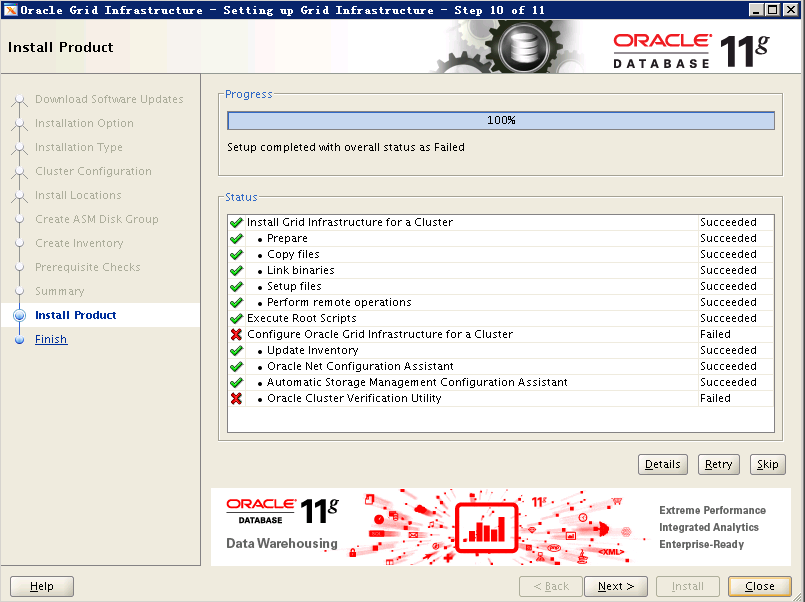
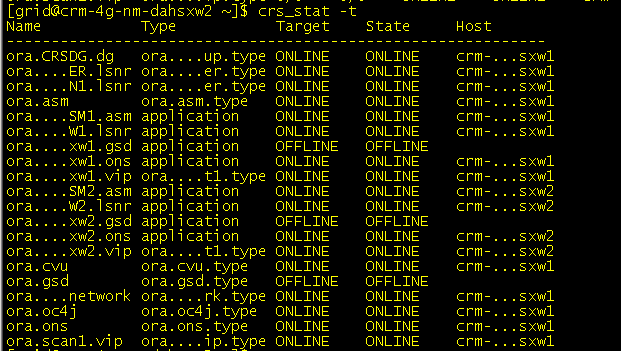
两边看状态,继续爽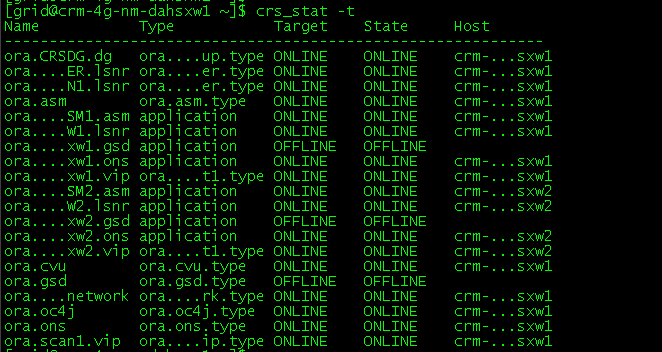
三,开始安装数据库软件
按照截图进行安装按照截图进行安装
[root@crm-4g-nm-dahsxw1 soft_ora]# su - oracle
[oracle@crm-4g-nm-dahsxw1 ~]cd/oracle/softora/[oracle@crm−4g−nm−dahsxw1softora] unzip p10404530_112030_Linux-x86-64_1of7.zip
[oracle@crm-4g-nm-dahsxw1 soft_ora]$ unzip p10404530_112030_Linux-x86-64_2of7.zip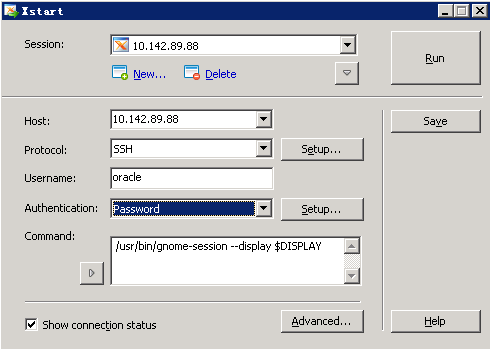
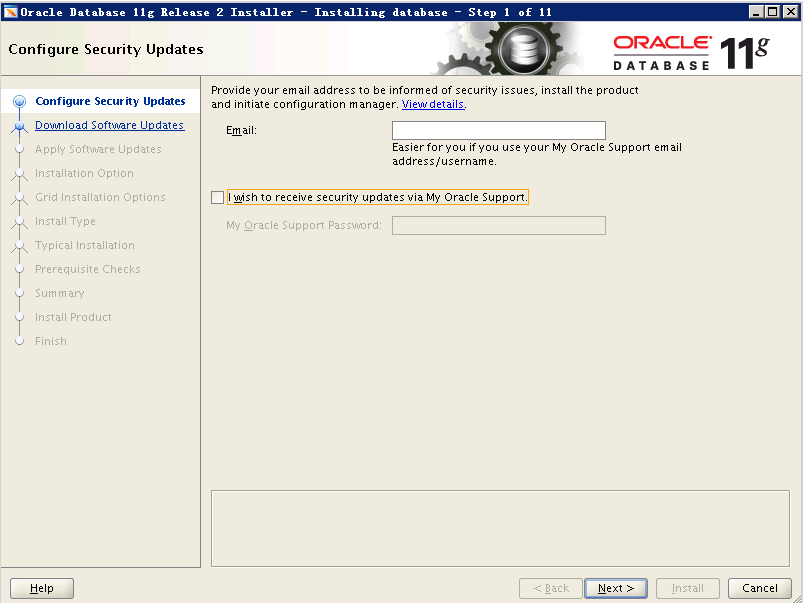
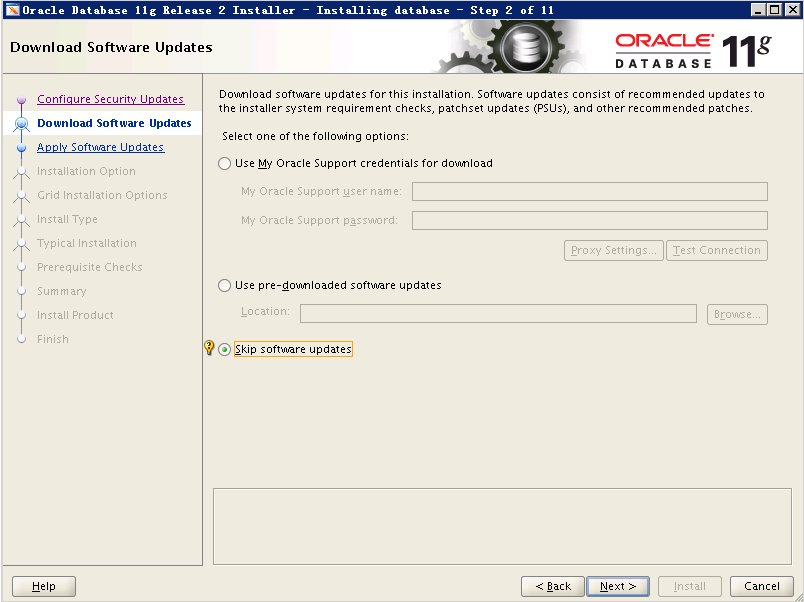
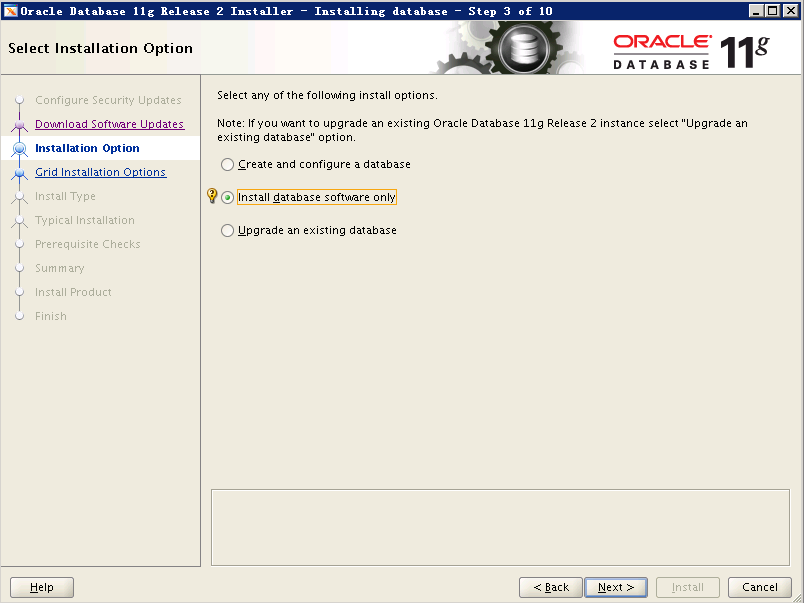
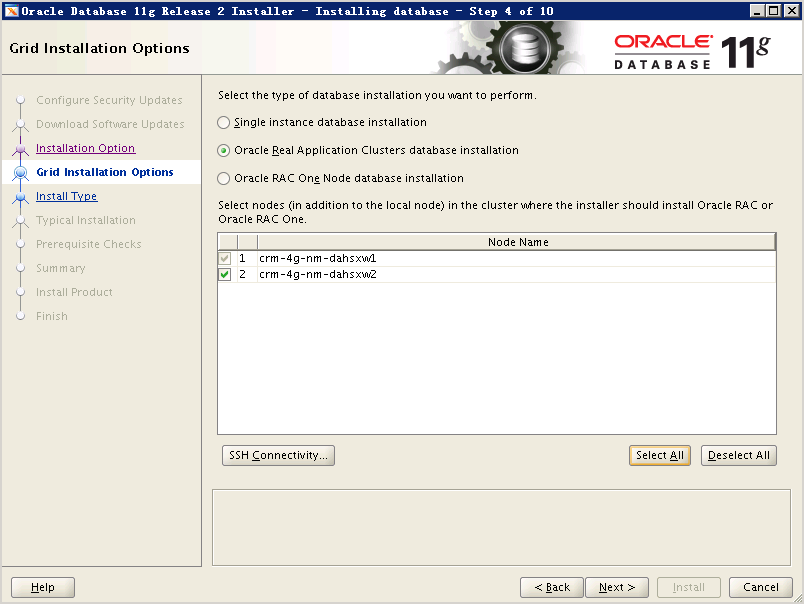
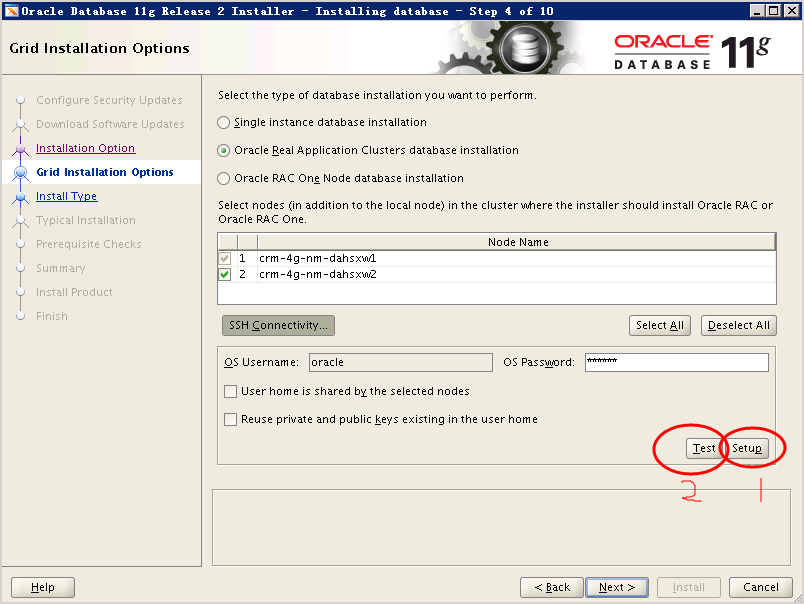
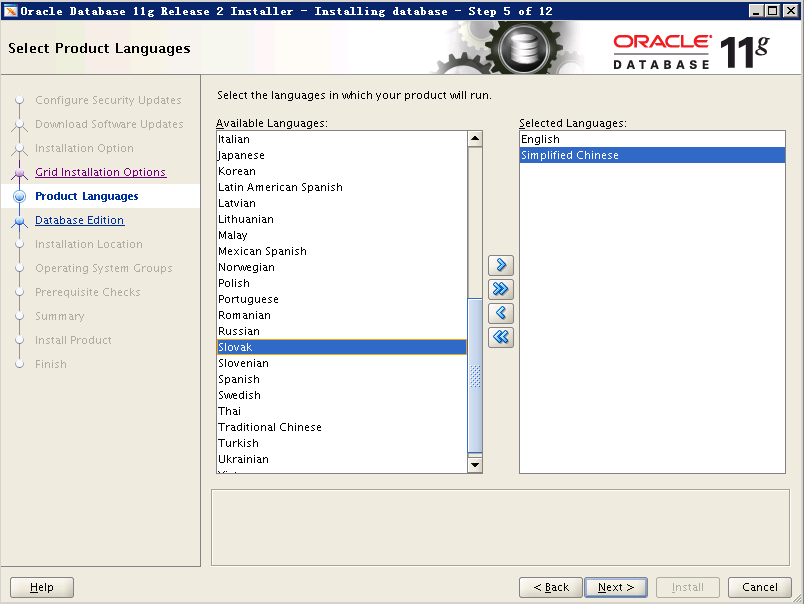
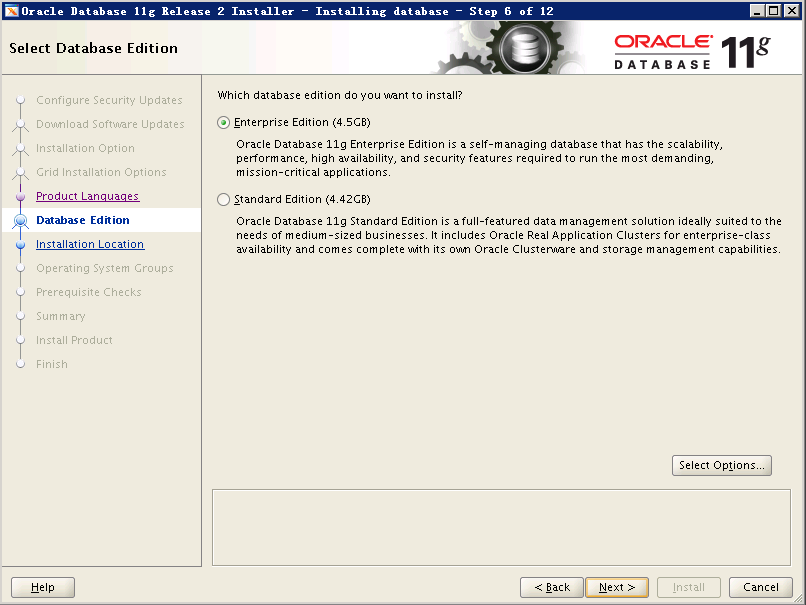
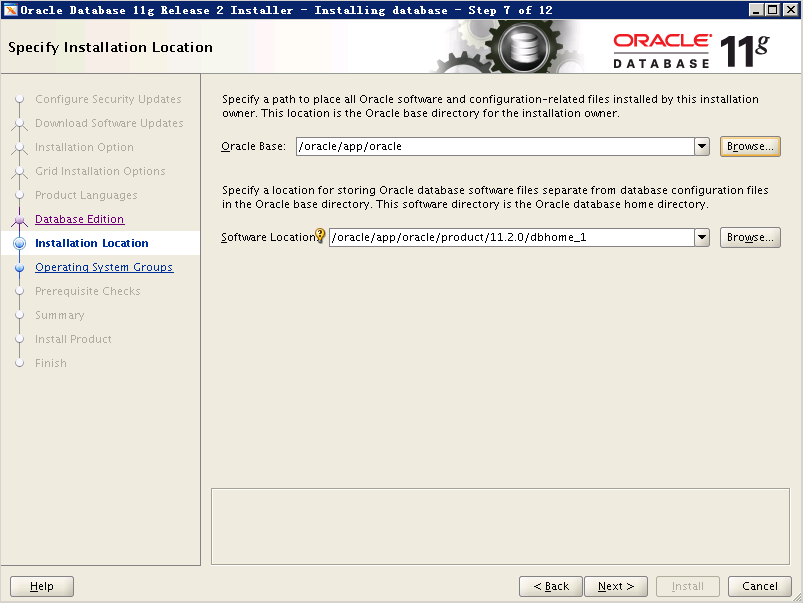
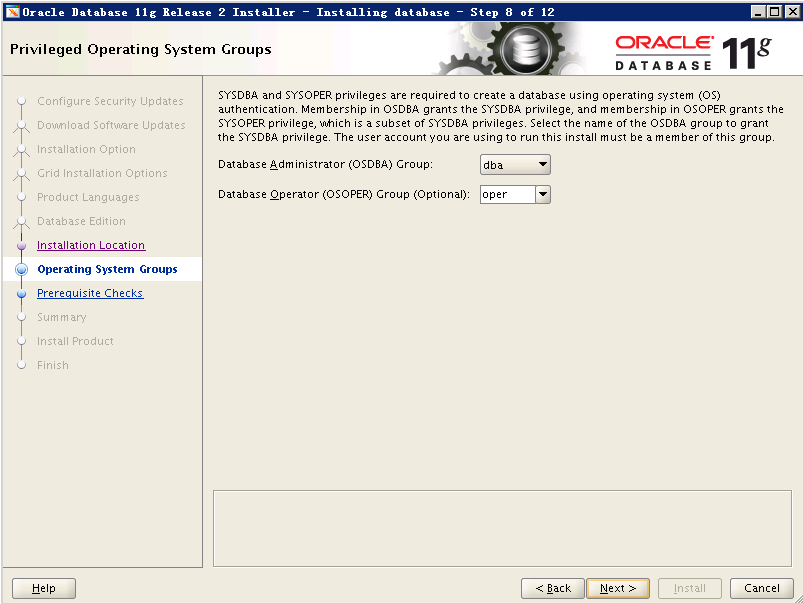
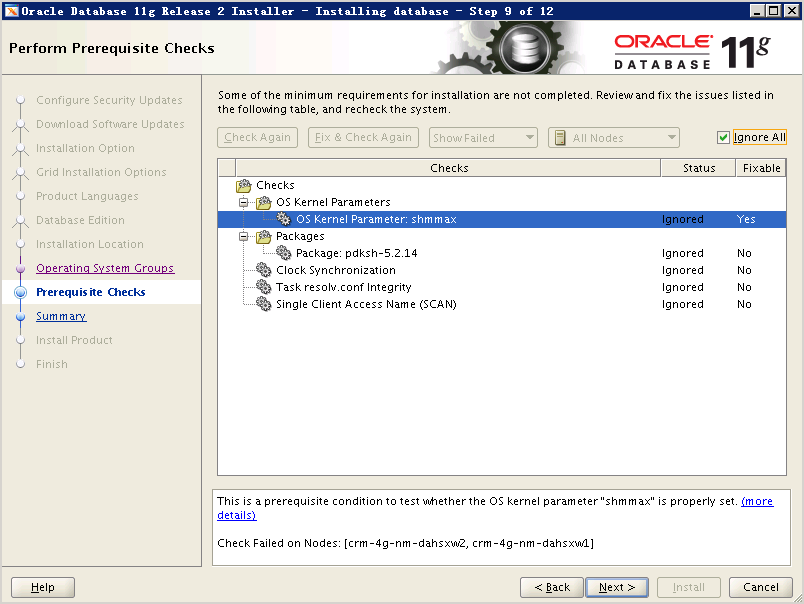
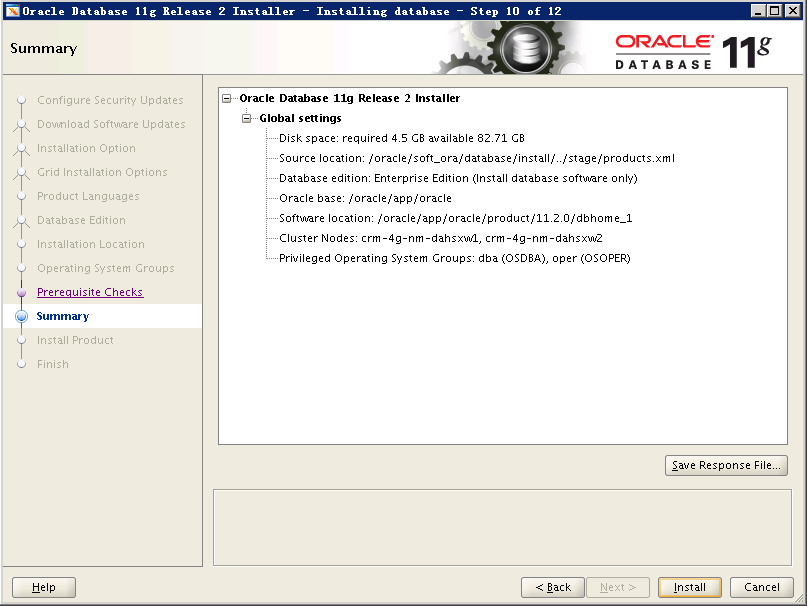
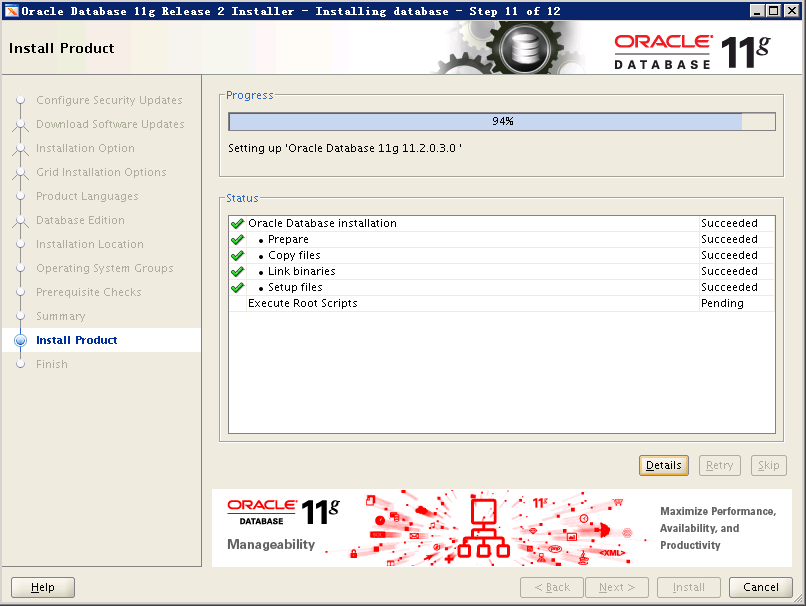
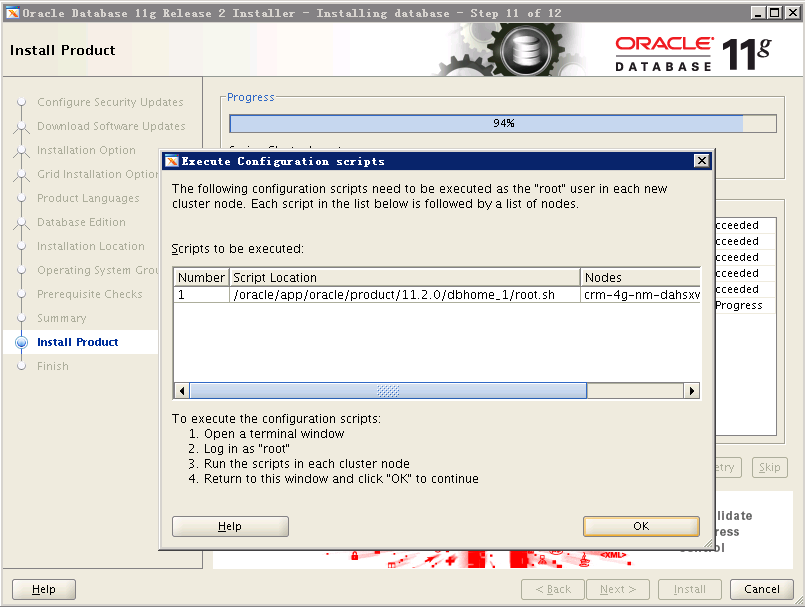
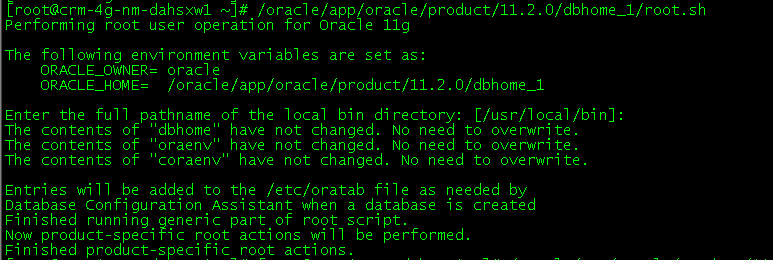
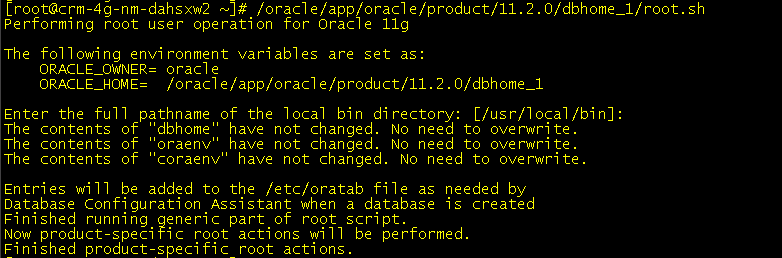
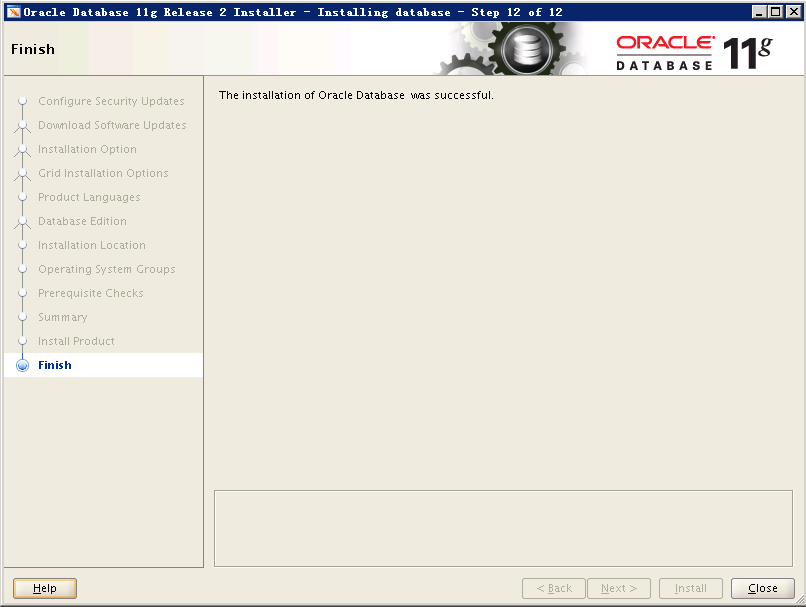
完成!
四,打补丁
根据Readme文档及实际操作总结
1.更新OPatch(同时更新grid下的和oracle下)-- 两个节点都进行
根据Readme中要求,下载安装最新的Opatch包,以grid和oracle用户解压到ORACLE_HOME下
2.生成ocm响应文件(两个节点)
su - grid$ORACLE_HOME/OPatch/ocm/bin/emocmrsp
export ORACLE_HOME=/oracle/app/11.2.0/gridexport PATH=$PATH:$ORACLE_HOME/OPatchopatch lsinventory创建放置补丁的目录mkdir -p /oracle/soft_ora/grid_patchs用grid用户把补丁解压到此目录下(解压后生成多个目录)
3.两节点进行一致行检查
su - grid$ORACLE_HOME/OPatch/opatch lsinventory -detail -oh $ORACLE_HOMEsu - oralce$ORACLE_HOME/OPatch/opatch lsinventory -detail -oh $ORACLE_HOMEopatch prereq CheckConflictAgainstOHWithDetail -ph ./$ORACLE_HOME/bin/emctl stop dbconsoleroot用户执行下面的命令不能执行,不知为何?----如果不在补丁目录,auto后指定补丁目录#####/oracle/app/11.2.0/grid/OPatch/opatch auto /oracle/soft_ora/grid_patchs -och /oracle/app/11.2.0/grid -ocmrf /oracle/app/11.2.0/grid/OPatch/ocm/bin/ocm.rsp---进入目录执行下面的命令(两个节点)一节点/oracle/app/11.2.0/grid/OPatch/opatch auto -ocmrf /oracle/app/11.2.0/grid/OPatch/ocm/bin/ocm.rsp- -ocmrf 后面跟生成的响应文件二节点/oracle/app/11.2.0/grid/OPatch/opatch auto /oracle/soft_ora/grid_patchs -ocmrf /oracle/app/11.2.0/grid/OPatch/ocm/bin/ocm.rsp- auto后跟补丁所在目录
---为什么两个节点执行的命令还有区别,是个疑问
五,DB打补丁
在任一个节点以oracle用户执行opatch apply 即可完成两个节点的补丁(其他节点的补丁会进行远程复制)
六,问题汇总
1.setup完成后,点击下一步,报下面的错误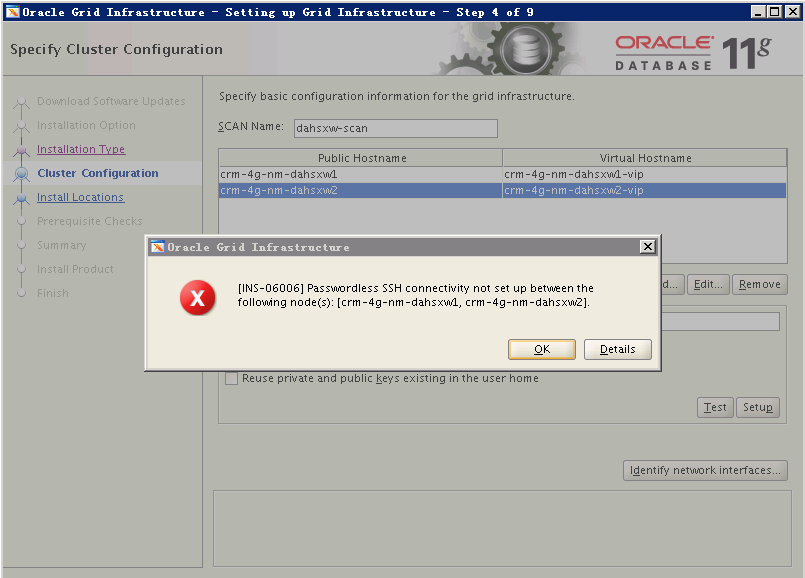
手动在各节点间进行ssh切换都可行,查看安装日志,如下
sNativeVolName:/oracle/app/oraInventory/m_asNodeArray:localhost,crm-4g-nm-dahsxw1,crm-4g-nm-dahsxw23---可见这里多了一个localhost,一定是hosts文件的问题m_sLocalNode:localhostINFO: Running command '/tmp/OraInstall2015-11-18_05-02-34PM/oui/bin/platform/linux64/runInstaller -jreLoc /tmp/OraInstall2015-11-18_05-02-34PM/jdk/jre -paramFile /tmp/OraInstall2015-11-18_05-02-34PM/oui/clusterparam.ini -silent -ignoreSysPrereqs -attachHome -noClusterEnabled ORACLE_HOME=/oracle/app/11.2.0/grid ORACLE_HOME_NAME=Ora11g_gridinfrahome1 CLUSTER_NODES=localhost,crm-4g-nm-dahsxw1,crm-4g-nm-dahsxw2 "INVENTORY_LOCATION=/oracle/app/oraInventory" LOCAL_NODE=crm-4g-nm-dahsxw1 -remoteInvocation -invokingNodeName localhost -logFilePath "/oracle/app/oraInventory/logs" -timestamp 2015-11-18_05-02-34PM' on the nodes 'crm-4g-nm-dahsxw1'.INFO: Invoking OUI on cluster nodes crm-4g-nm-dahsxw1INFO: /tmp/OraInstall2015-11-18_05-02-34PM/oui/bin/platform/linux64/runInstaller -jreLoc /tmp/OraInstall2015-11-18_05-02-34PM/jdk/jre -paramFile /tmp/OraInstall2015-11-18_05-02-34PM/oui/clusterparam.ini -silent -ignoreSysPrereqs -attachHome -noClusterEnabled ORACLE_HOME=/oracle/app/11.2.0/grid ORACLE_HOME_NAME=Ora11g_gridinfrahome1 CLUSTER_NODES=localhost,crm-4g-nm-dahsxw1,crm-4g-nm-dahsxw2 "INVENTORY_LOCATION=/oracle/app/oraInventory" LOCAL_NODE=crm-4g-nm-dahsxw1 -remoteInvocation -invokingNodeName localhost -logFilePath "/oracle/app/oraInventory/logs" -timestamp 2015-11-18_05-02-34PMSEVERE: oracle.sysman.oii.oiip.oiipg.OiipgRemoteOpsException: Error occured while trying to run Unix command /tmp/OraInstall2015-11-18_05-02-34PM/oui/bin/platform/linux64/runInstaller -jreLoc /tmp/OraInstall2015-11-18_05-02-34PM/jdk/jre -paramFile /tmp/OraInstall2015-11-18_05-02-34PM/oui/clusterparam.ini -silent -ignoreSysPrereqs -attachHome -noClusterEnabled ORACLE_HOME=/oracle/app/11.2.0/grid ORACLE_HOME_NAME=Ora11g_gridinfrahome1 CLUSTER_NODES=localhost,crm-4g-nm-dahsxw1,crm-4g-nm-dahsxw2 "INVENTORY_LOCATION=/oracle/app/oraInventory" LOCAL_NODE=crm-4g-nm-dahsxw1 -remoteInvocation -invokingNodeName localhost -logFilePath "/oracle/app/oraInventory/logs" -timestamp 2015-11-18_05-02-34PM on nodes crm-4g-nm-dahsxw1. [Invalid characters found in path '/oracle/app/oraInventory"' for 'inventory_loc' in file '/etc/oraInst.loc'.Please enter correct path for central inventory location.: No such file or directory :failed]at oracle.sysman.oii.oiip.oiipg.OiipgClusterRunCmd.runCmdOnUnix(OiipgClusterRunCmd.java:276)at oracle.sysman.oii.oiip.oiipg.OiipgClusterRunCmd.runAnyCmdOnNodes(OiipgClusterRunCmd.java:369)at oracle.sysman.oii.oiip.oiipg.OiipgClusterRunCmd.runCmd(OiipgClusterRunCmd.java:314)at oracle.sysman.oii.oiic.OiicBaseInventoryApp.runRemoteInvOpCmd(OiicBaseInventoryApp.java:278)at oracle.sysman.oii.oiic.OiicAttachHome.clsCmdAttachHome(OiicAttachHome.java:502)at oracle.sysman.oii.oiif.oiifw.OiifwClusterSaveInventoryWCCE.doOperation(OiifwClusterSaveInventoryWCCE.java:307)at oracle.sysman.oii.oiif.oiifb.OiifbCondIterator.iterate(OiifbCondIterator.java:171)at oracle.sysman.oii.oiif.oiifw.OiifwActionsPhaseWCDE.doOperation(OiifwActionsPhaseWCDE.java:633)at oracle.sysman.oii.oiif.oiifb.OiifbLinearIterator.iterate(OiifbLinearIterator.java:147)at oracle.sysman.oii.oiic.OiicInstallAPISession$OiicAPISelCompsInstall.doOperation(OiicInstallAPISession.java:1095)at oracle.sysman.oii.oiif.oiifb.OiifbCondIterator.iterate(OiifbCondIterator.java:171)at oracle.sysman.oii.oiic.OiicInstallAPISession.doInstallAction(OiicInstallAPISession.java:679)at oracle.sysman.oii.oiic.OiicInstallAPISession.access$000(OiicInstallAPISession.java:94)at oracle.sysman.oii.oiic.OiicInstallAPISession$OiicActionsThread.run(OiicInstallAPISession.java:971)Caused by: oracle.ops.mgmt.cluster.ClusterException: Invalid characters found in path '/oracle/app/oraInventory"' for 'inventory_loc' in file '/etc/oraInst.loc'.Please enter correct path for central inventory location.: No such file or directory :failedat oracle.ops.mgmt.cluster.ClusterCmd.runCmd(ClusterCmd.java:2126)at oracle.sysman.oii.oiip.oiipg.OiipgClusterRunCmd.runCmdOnUnix(OiipgClusterRunCmd.java:270)... 13 moreINFO: Running command '/tmp/OraInstall2015-11-18_05-02-34PM/oui/bin/platform/linux64/runInstaller -jreLoc /tmp/OraInstall2015-11-18_05-02-34PM/jdk/jre -paramFile /tmp/OraInstall2015-11-18_05-02-34PM/oui/clusterparam.ini -silent -ignoreSysPrereqs -attachHome -noClusterEnabled ORACLE_HOME=/oracle/app/11.2.0/grid ORACLE_HOME_NAME=Ora11g_gridinfrahome1 CLUSTER_NODES=localhost,crm-4g-nm-dahsxw1,crm-4g-nm-dahsxw2 "INVENTORY_LOCATION=/oracle/app/oraInventory" LOCAL_NODE=crm-4g-nm-dahsxw2 -remoteInvocation -invokingNodeName localhost -logFilePath "/oracle/app/oraInventory/logs" -timestamp 2015-11-18_05-02-34PM' on the nodes 'crm-4g-nm-dahsxw2'.INFO: Invoking OUI on cluster nodes crm-4g-nm-dahsxw2INFO: /tmp/OraInstall2015-11-18_05-02-34PM/oui/bin/platform/linux64/runInstaller -jreLoc /tmp/OraInstall2015-11-18_05-02-34PM/jdk/jre -paramFile /tmp/OraInstall2015-11-18_05-02-34PM/oui/clusterparam.ini -silent -ignoreSysPrereqs -attachHome -noClusterEnabled ORACLE_HOME=/oracle/app/11.2.0/grid ORACLE_HOME_NAME=Ora11g_gridinfrahome1 CLUSTER_NODES=localhost,crm-4g-nm-dahsxw1,crm-4g-nm-dahsxw2 "INVENTORY_LOCATION=/oracle/app/oraInventory" LOCAL_NODE=crm-4g-nm-dahsxw2 -remoteInvocation -invokingNodeName localhost -logFilePath "/oracle/app/oraInventory/logs" -timestamp 2015-11-18_05-02-34PMSEVERE: Remote 'AttachHome' failed on nodes: 'crm-4g-nm-dahsxw1'. Refer to '/oracle/app/oraInventory/logs/installActions2015-11-18_05-02-34PM.log' for details.It is recommended that the following command needs to be manually run on the failed nodes:/oracle/app/11.2.0/grid/oui/bin/runInstaller -attachHome -noClusterEnabled ORACLE_HOME=/oracle/app/11.2.0/grid ORACLE_HOME_NAME=Ora11g_gridinfrahome1 CLUSTER_NODES=localhost,crm-4g-nm-dahsxw1,crm-4g-nm-dahsxw2 "INVENTORY_LOCATION=/oracle/app/oraInventory" LOCAL_NODE=<node on which command is to be run>.Please refer 'AttachHome' logs under central inventory of remote nodes where failure occurred for more details.
解决:(修改hosts文件)
修改如下:
#127.0.0.1 localhost localhost.localdomain localhost4 localhost4.localdomain4 crm-4g-nm-dahsxw1#::1 localhost localhost.localdomain localhost6 localhost6.localdomain6 crm-4g-nm-dahsxw1127.0.0.1 localhost.localdomain localhost# Public10.142.89.88 crm-4g-nm-dahsxw110.142.89.89 crm-4g-nm-dahsxw2# Private192.168.255.153 crm-4g-nm-dahsxw1-priv192.168.255.154 crm-4g-nm-dahsxw2-priv# Virtual10.142.89.123 crm-4g-nm-dahsxw1-vip10.142.89.124 crm-4g-nm-dahsxw2-vip# SCAN10.142.89.125 dahsxw-scan
原来
127.0.0.1 localhost localhost.localdomain localhost4 localhost4.localdomain4 crm-4g-nm-dahsxw1::1 localhost localhost.localdomain localhost6 localhost6.localdomain6 crm-4g-nm-dahsxw1# Public10.142.89.88 crm-4g-nm-dahsxw110.142.89.89 crm-4g-nm-dahsxw2# Private192.168.255.153 crm-4g-nm-dahsxw1-priv192.168.255.154 crm-4g-nm-dahsxw2-priv# Virtual10.142.89.123 crm-4g-nm-dahsxw1-vip10.142.89.124 crm-4g-nm-dahsxw2-vip# SCAN10.142.89.125 dahsxw-scan
---这里又一次体现了hosts文件的重要性,使用原来错误的hosts文件,在安装的时候在第4步的时候不会自动显示主机名,而且多一个名为localhost的主机,见截图
2.由于安装失败,多次执行root.sh脚本,再次执行脚本时,导致执行报错
OLR initialization - successfulroot walletroot wallet certroot cert exportpeer walletprofile reader walletpa walletpeer wallet keyspa wallet keyspeer cert requestpa cert requestpeer certpa certpeer root cert TPprofile reader root cert TPpa root cert TPpeer pa cert TPpa peer cert TPprofile reader pa cert TPprofile reader peer cert TPpeer user certpa user certCRS-2728: A resource type with the name 'ora.daemon.type' is already registeredCRS-4000: Command Add failed, or completed with errors.CRS-2728: A resource type with the name 'ora.haip.type' is already registeredCRS-4000: Command Add failed, or completed with errors.CRS-2728: A resource type with the name 'ora.mdns.type' is already registeredCRS-4000: Command Add failed, or completed with errors.Failed to register Grid Infrastructure type ora.mdns.type at /oracle/app/11.2.0/grid/crs/install/crsconfig_lib.pm line 7777./oracle/app/11.2.0/grid/perl/bin/perl -I/oracle/app/11.2.0/grid/perl/lib -I/oracle/app/11.2.0/grid/crs/install /oracle/app/11.2.0/grid/crs/install/rootcrs.pl execution failed
处理过程:
[root@crm-4g-nm-dahsxw1 ~]# cd /oracle/app/11.2.0/grid/crs/install[root@crm-4g-nm-dahsxw1 install]# ./rootcrs.pl -deconfig -force -verboseUsing configuration parameter file: ./crsconfig_paramsPRCR-1119 : 无法查找 ora.cluster_vip_net1.type 类型的 CRS 资源PRCR-1068 : 无法查询资源Cannot communicate with crsdPRCR-1070 : 无法检查 资源 ora.gsd 是否已注册Cannot communicate with crsdPRCR-1070 : 无法检查 资源 ora.ons 是否已注册Cannot communicate with crsdCLSU-00100: Operating System function: failed failed with error data: 2CLSU-00101: Operating System error message: No such file or directoryCLSU-00103: error location: scrsearch3CLSU-00104: additional error information: id doesnt exist scls_scr_setvalCRS-2791: Starting shutdown of Oracle High Availability Services-managed resources on 'crm-4g-nm-dahsxw1'CRS-2673: Attempting to stop 'ora.ctssd' on 'crm-4g-nm-dahsxw1'CRS-2673: Attempting to stop 'ora.cluster_interconnect.haip' on 'crm-4g-nm-dahsxw1'CRS-2673: Attempting to stop 'ora.mdnsd' on 'crm-4g-nm-dahsxw1'CRS-2677: Stop of 'ora.mdnsd' on 'crm-4g-nm-dahsxw1' succeededCRS-2677: Stop of 'ora.ctssd' on 'crm-4g-nm-dahsxw1' succeededCRS-2677: Stop of 'ora.cluster_interconnect.haip' on 'crm-4g-nm-dahsxw1' succeededCRS-2673: Attempting to stop 'ora.cssd' on 'crm-4g-nm-dahsxw1'CRS-2677: Stop of 'ora.cssd' on 'crm-4g-nm-dahsxw1' succeededCRS-2673: Attempting to stop 'ora.gipcd' on 'crm-4g-nm-dahsxw1'CRS-2677: Stop of 'ora.gipcd' on 'crm-4g-nm-dahsxw1' succeededCRS-2673: Attempting to stop 'ora.gpnpd' on 'crm-4g-nm-dahsxw1'CRS-2677: Stop of 'ora.gpnpd' on 'crm-4g-nm-dahsxw1' succeededCRS-2793: Shutdown of Oracle High Availability Services-managed resources on 'crm-4g-nm-dahsxw1' has completedCRS-4133: Oracle High Availability Services has been stopped.Successfully deconfigured Oracle clusterware stack on this nodedd if=/dev/zero of=/dev/ocr-diska bs=1024 count=100dd if=/dev/zero of=/dev/ocr-diskb bs=1024 count=100dd if=/dev/zero of=/dev/ocr-diskc bs=1024 count=100再次执行root.sh
使用udev绑定后,原来的名字会改变为udev中名字
参考:http://blog.csdn.net/ora01555/article/details/24392833
遇到的一个低级问题:由于盘号不一样,使用节点二的盘号去查节点一的uuid,导致磁盘绑定选错使用udev绑定磁盘,操作系统的磁盘号是多少无所谓,只要使用两边的uuid对应就可以,并且使用udev绑定后,原来的名字会改变为udev中名字
RHEL6.5安装11.2.0.3 RAC并打补丁的更多相关文章
- RHEL7或CentOS7安装11.2.0.4 RAC碰到的问题
RHEL7或CentOS7安装11.2.0.4 RAC碰到的问题 随着Linux 版本的普及,但Oracle数据库主流版本仍是11gR2, 的支持不很完美,在Linux 上安装会遇到几处问题,以此记录 ...
- 11.2.0.4 RAC 手动打补丁
1. 下载补丁和最新OPatchGI PSU : p25869727_112040_Linux-x86-64.zipOPatch : p6880880_112000_Linux-x86-64.zip ...
- RHEL7.X 安装 11.2.0.4 RAC 问题
随着Linux 7 版本的普及,但Oracle数据库主流版本仍是11gR2,11.2.0.4 是生产安装首选.由于11.2.0.4对Linux 7 的支持不很完美,在Linux 7 上安装会遇到几处问 ...
- 【Oracle】11G 11.2.0.4 RAC环境打补丁
一.准备工作 1,数据库环境 操作系统版本 : RedHat 7.2 x64 数据库版本 : Oracle 11.2.0.4 x64 RAC Grid : 11.2 ...
- Oracle 11.2.0.4 RAC安装最新PSU补丁
环境:两节点RAC(RHEL 6.4 + GI 11.2.0.4 + Oracle 11.2.0.4) 需求:安装最新PSU补丁11.2.0.4.7 1.下载补丁和最新OPatch 2.检查数据库当前 ...
- ORACLE LINUX 6.3 + ORACLE 11.2.0.3 RAC + VBOX安装文档
ORACLE LINUX 6.3 + ORACLE 11.2.0.3 RAC + VBOX安装文档 2015-10-21 12:51 525人阅读 评论(0) 收藏 举报 分类: Oracle RA ...
- HPDL380G8平台11.2.0.3 RAC实施手册
HPDL380G8平台11.2.0.3 RAC实施手册 1 前言 此文档详细描述了Oracle 11gR2 数据库在HPDL380G上的安装RAC的检查及安装步骤.文档中#表示root用户执行,$ ...
- oracle 11.2.0.4 rac 打补丁
本次安装pus环境是11.2.0.4 rac,打的patch为11.2.0.4.180717 (Includes Database PSU),gi补丁和数据库补丁一起打 安装最新opatch版本 un ...
- opatch auto 安装11.2.0.4.20190115 PSU遇到 OUI-67133: Execution of PRE script failed,with returen value 1 报错
AIX 7.2 下Oracle 11.2.0.4 RAC数据库root用户在使用 /u01/app/11.2.0/grid/OPatch/opatch auto /soft/28813878 -oc ...
随机推荐
- PHP数组函数总结
array_change_key_case - 返回字符串键名全为小写或大写的数组 array_chunk - 将一个数组分割成多个 array_column - 返回数组中指定的一列 array_c ...
- 记一次WinForm程序中主进程打开子进程并传递参数的操作过程(进程间传递参数)
目标:想在WinForm程序之间传递参数.以便子进程作出相应的处理. 一种错误的方法 父进程的主程序: ProcessStartInfo psi = new ProcessStartInfo(); p ...
- 代码质量管理工具——SonarQube
写在前面 SonarQube(简称Sonar)是管理代码质量的开放平台,它可以快速地对代码质量进行分析,并给出合理的解决方案,提高管理效率,保证代码质量. SonarQube的流行,在于以下几点: 开 ...
- 分享10款非常有用的 Ajax 插件
这篇文章与大家分享的是10款非常有用的 Ajax 插件,有用于图片的,用于分页的,还有用于导航的.这些作者的想法特别新颖,希望你能从中找到自己需要的插件. 1. AJAX-ZOOM 非常强大的一款插件 ...
- RESTful API URI 设计的一些总结
非常赞的四篇文章: Resource Naming Best Practices for Designing a Pragmatic RESTful API 撰写合格的 REST API JSON 风 ...
- [译]flexbox全揭秘
原文:http://css-tricks.com/snippets/css/a-guide-to-flexbox/ 弹性布局(弹性盒子,现今仍是w3c的候选推荐),目标在于,对于一个容器中的各个项目块 ...
- 给Excel2013添加WebADI的Oracle加载项
大家都知道,在Excel2013的加载项中是找不到WebADI的加载项的,EBS貌似有一个补丁,这里讲手动设置的步骤: 打开一个下载的WebADI的模板: 依次打开菜单: 文件>选项>自定 ...
- 【转】ORACLE的REDO与UNDO
一.什么是redo?redo:oracle在在线或者归档重做日志文件中的记录的信息,外以出现失败时可以利用这些数据来"重放"事务.每个oracle数据都至少有二个在线重做日志组,每 ...
- windows安装zookeeper-单机模式
zookeeper下载地址:http://zookeeper.apache.org/releases.html#download 本次使用的是3.4.9版本 前提:请安装JDK 安装: 创建安装目 ...
- java开发人员,最应该学习和熟练使用的工具类。google guava.(谷歌 瓜娃)
学习参考文章: http://blog.csdn.net/wisgood/article/details/13297535 http://ifeve.com/google-guava/ http:// ...