
Eclipse – Java.Lang.OutOfMemoryError: Java Heap Space(转)
In Eclipse IDE, if your program is consuming a lot of memory (loading big data) like this :
  List<Domain> list = domainBo.findAllDomain(100000);


  for(Domain domain : list){

	process(domain.getDomainName());

  }
It can easily hit java.lang.OutOfMemoryError: Java heap space :
Exception in thread "main" java.lang.OutOfMemoryError: Java heap space

	at java.util.HashMap.<init>(HashMap.java:209)

	at java.util.LinkedHashMap.<init>(LinkedHashMap.java:181)
1. Solution – VM arguments
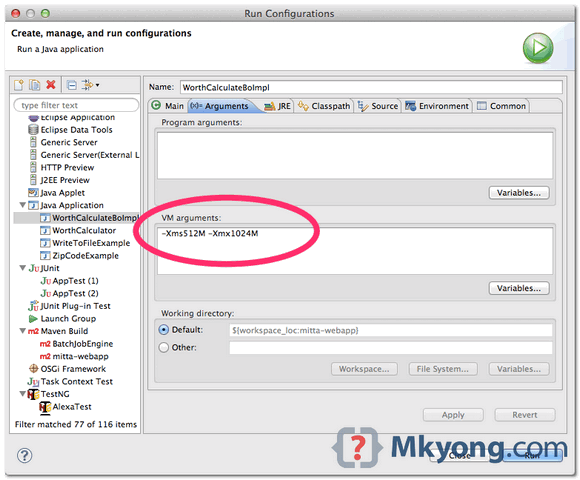
On Eclipse menu, clicks Run -> Run Configurations.., select the Java application you want to run, clicks on theArguments tab, update the VM arguments with the following options
-Xms<size> - Set initial Java heap size

-Xmx<size> - Set maximum Java heap size
For example, -Xms512M -Xmx1024M
2. Mistake – eclipse.ini
The memory settings in eclipse.ini is allocated to Eclipse IDE only, not the program you want to run. A very common mistake is updated the heap size in eclipse.ini, and expects it to solve above out of memory problem.
The Java application, Ant / Maven build scripts, or unit test cases, are run as an external tool from Eclipse, and it does not inherit the VM settings in eclipse.ini.
But, if your Eclipse IDE is always crashed by no reason, you can try to increase the heap size and perm gen ineclipse.ini.
	-startu

	openFile

	-showsplash

        //...

	-XX:MaxPermSize=512m

	-Xms512m

	-Xmx1024m

        //...

	-Xdock:icon=../Resources/Eclipse.icns

	-XstartOnFirstThread
P.S eclipse.ini is located in the Eclipse installation folder.
Eclipse – java.lang.OutOfMemoryError: Java heap space
http://www.mkyong.com/eclipse/eclipse-java-lang-outofmemoryerror-java-heap-space/
Eclipse – Java.Lang.OutOfMemoryError: Java Heap Space(转)的更多相关文章
- eclipse内存溢出报错:java.lang.OutOfMemoryError:Java heap space
今天执行了一个比較大的程序,处理的数据达到126MB数据,将数据导入数据库中,用eclipse 来訪问时候,总是出现java.lang.OutOfMemoryError:Java heap space ...
- eclipse:Tomcat设置jvm,解决java.lang.OutOfMemoryError: Java heap space 堆内存溢出
eclipse 有启动参数里设置jvm大小,因为eclipse运行时自己也需要jvm,所以eclipse.ini里设置的jvm大小不是具体某个程序运行时所用jvm的大小,这和具体程序运行的jvm大小无 ...
- eclipse中报错:java.lang.OutOfMemoryError: Java heap space
问题: 在eclipse中执行java程序.去重100多万的数据,报例如以下错误: java.lang.OutOfMemoryError: Java heap space 异常原因: 在JVM中假设9 ...
- Eclipse迅速执行:Exception in thread "main" java.lang.OutOfMemoryError: Java heap space
问题叙述性说明: Exception in thread "main" java.lang.OutOfMemoryError: Java heap space 问题原因: 程序中对 ...
- eclipse运行程序时报java.lang.OutOfMemoryError: Java heap space内存不足问题
System.setProperty("webdriver.firefox.bin", "D:\\Mozilla Firefox\\firefox.exe"); ...
- 解决eclipse maven install 造成JVM 内存溢出(java.lang.OutOfMemoryError: Java heap space)
maven install 报错信息: The system is out of resources.Consult the following stack trace for details.jav ...
- 【转】java.lang.OutOfMemoryError: Java heap space的解决
原文地址:http://blog.sina.com.cn/s/blog_4b12778b0100v0bb.html Myeclipse下java.lang.OutOfMemoryError: Java ...
- 关于java.lang.OutOfMemoryError: Java heap space的错误分析
今天无意间遇到这个错误:java.lang.OutOfMemoryError: Java heap space 问题出现原因:使用a标签实现快速下载[当然已经实现了,但想了想还是要归纳解决这类问题] ...
- Exception in thread "main" java.lang.OutOfMemoryError: Java heap space
Exception in thread "main" java.lang.OutOfMemoryError: Java heap space解决方法 问题描述 Exception ...
随机推荐
- spring study
Dependency Injection The Inversion of Control(IoC) is a general concept, and it can be expressed in ...
- Python之并发编程-多线程
目录 一.threading模块介绍二.使用说明三.进一步介绍(守护线程,锁(互斥锁.递归锁),信号量,队列,event,condition,定时器) 1.守护线程 2.锁(互斥锁.递归锁) 3.信号 ...
- iOS 动态库、静态库 . framework 总结(2017.1.25 修改)
修改于2017.1.25 使用Xcode Version 8.2.1 1.怎么创建.framework? 打开Xcode, 选择File ----> New ---> Project 选择 ...
- java判断字符串编码
是 public static String getEncoding(String str){ String encoding = "UTF-8"; try { if (str.e ...
- Daily Scrum 11.15
今日完成任务: 1.在回答页面显示用户的相关信息 2.重写了搜索方法,并在自己的Demo网站测试成功 3.修改问题实体属性,加入悬赏积分:并在问题列表页面显示问题悬赏分数 遇到困难:一个是对于学长的搜 ...
- 第十二节 Linux下软件安装
apt-get:apt-get使用各用于处理apt包的公用程序集,我们可以用它来在线安装.卸载和升级软件包等,下面列出一些apt-get包含的常用的一些工具 常用参数: 重新安装: 软件升级:
- 剑指offer:旋转数组的最小数字
题目描述: 把一个数组最开始的若干个元素搬到数组的末尾,我们称之为数组的旋转. 输入一个非减排序的数组的一个旋转,输出旋转数组的最小元素. 例如数组{3,4,5,1,2}为{1,2,3,4,5}的一个 ...
- HDU 5925 Coconuts 离散化
题目链接: http://acm.hdu.edu.cn/showproblem.php?pid=5925 Coconuts Time Limit: 9000/4500 MS (Java/Others) ...
- iis托管管道模式-学习
文章;IIS 7 托管管道模式 经典模式(Classic) 集成模式(Integrated) 分析与理解 我们可以通过应用程序池设置管道模式,这项功能对IIS管理员尤其有用,因为这样既可以令一台服务器 ...
- Linux(Red hat)无网离线安装TensorFlow
文件下载 首先,下载想要安装的版本,目前最新的是1.8.0 根据你的python版本下载对应的whl文件,下载连接:https://pypi.org/project/tensorflow/#files ...