
linux系统编程之文件与IO(五):stat()系统调用获取文件信息
一、stat()获取文件元数据
stat系统调用原型:
#include <sys/stat.h>
int stat(const char *path, struct stat *buf);
int fstat(int fd, struct stat *buf);
int lstat(const char *path, struct stat *buf);
帮助信息可通过:man 2 stat 查看
DESCRIPTION
These functions return information about a file. No permissions are
required on the file itself, but — in the case of stat() and lstat() —
execute (search) permission is required on all of the directories in
path that lead to the file.
stat() stats the file pointed to by path and fills in buf.
lstat() is identical to stat(), except that if path is a symbolic link,
then the link itself is stat-ed, not the file that it refers to.
fstat() is identical to stat(), except that the file to be stat-ed is
specified by the file descriptor fd.
All of these system calls return a stat structure, which contains the
following fields:
struct stat {
dev_t st_dev; /* ID of device containing file :该文件所属设备的设备号,设备号包括主设备和和次设备号,dev_t是16位整数,高8位表示主设备号,低8位表示次设备号*/
ino_t st_ino; /* inode number */
mode_t st_mode; /* protection :包含文件访问权限信息及文件类型*/
nlink_t st_nlink; /* number of hard links */
uid_t st_uid; /* user ID of owner */
gid_t st_gid; /* group ID of owner */
dev_t st_rdev; /* device ID (if special file):如果该文件是特殊文件即设备文件,则表示设备号 */
off_t st_size; /* total size, in bytes */
blksize_t st_blksize; /* blocksize for file system I/O */
blkcnt_t st_blocks; /* number of 512B blocks allocated :分配的块数量*/
time_t st_atime; /* time of last access */
time_t st_mtime; /* time of last modification */
time_t st_ctime; /* time of last status change:如修改文件的权限 */
};
文件类型有两种方式获得:
1.通过以下的一些宏进行验证:m为struct stat中得st_mode字段
S_ISREG(m) is it a regular file?
S_ISDIR(m) directory?
S_ISCHR(m) character device?
S_ISBLK(m) block device?
S_ISFIFO(m) FIFO (named pipe)?
S_ISLNK(m) symbolic link? (Not in POSIX.1-1996.)
S_ISSOCK(m) socket? (Not in POSIX.1-1996.)
2.利用struct stat中得st_mode字段与S_IFMT进行与运算:mode&S_IFMT,然后将得到的结果与下列的常量比较,相等就是
The following flags are defined for the st_mode field:
S_IFMT 0170000 bit mask for the file type bit fields
S_IFSOCK 0140000 socket
S_IFLNK 0120000 symbolic link
S_IFREG 0100000 regular file
S_IFBLK 0060000 block device
S_IFDIR 0040000 directory
S_IFCHR 0020000 character device
S_IFIFO 0010000 FIFO
文件访问权限获得:利用struct stat中得st_mode字段与S_IFMT进行与运算:mode&S_IFMT,然后将得到的结果与下列的常量比较,相等就是
S_IFMT 0170000 bit mask for the file type bit fields
S_ISUID 0004000 set UID bit
S_ISGID 0002000 set-group-ID bit (see below)
S_ISVTX 0001000 sticky bit (see below)
S_IRWXU 00700 mask for file owner permissions
S_IRUSR 00400 owner has read permission
S_IWUSR 00200 owner has write permission
S_IXUSR 00100 owner has execute permission
S_IRWXG 00070 mask for group permissions
S_IRGRP 00040 group has read permission
S_IWGRP 00020 group has write permission
S_IXGRP 00010 group has execute permission
S_IRWXO 00007 mask for permissions for others (not in group)
S_IROTH 00004 others have read permission
S_IWOTH 00002 others have write permission
S_IXOTH 00001 others have execute permission
示例程序:
#include <unistd.h>

#include <sys/stat.h>

#include <sys/types.h>

#include <sys/stat.h>

#include <fcntl.h>

#include <stdlib.h>

#include <stdio.h>

#include <errno.h>

#include <string.h>

#define ERR_EXIT(m) \

    do \

    { \

        perror(m); \

        exit(EXIT_FAILURE); \

    } while()

#define MAJOR(a) (int)((unsigned short)a >> 8) //高8位:主设备号

#define MINOR(a) (int)((unsigned short)a & 0xFF)//低8位:次设备号

int filetype(struct stat *buf);

void fileperm(struct stat *buf, char *perm);

int main(int argc, char *argv[])

{

    if (argc != )

    {

        fprintf(stderr, "Usage %s file\n", argv[]);

        exit(EXIT_FAILURE);

    }

    struct stat sbuf;

    printf("Filename:%s\n", argv[]);

    if (lstat(argv[], &sbuf) == -)

        ERR_EXIT("stat error");

    printf("File number:major %d,minor %d inode %d\n", MAJOR(sbuf.st_dev), MINOR(sbuf.st_dev), (int)sbuf.st_ino);

    if (filetype(&sbuf))

    {

        printf("Device number:major %d,minor %d\n", MAJOR(sbuf.st_rdev), MINOR(sbuf.st_rdev));

    }

    char perm[] = {};

    fileperm(&sbuf, perm);

    printf("File permission bits=%o %s\n", sbuf.st_mode & , perm);

    return ;

}

int filetype(struct stat *buf)

{

    int flag = ;

    printf("Filetype:");

    mode_t mode;

    mode = buf->st_mode;

    switch (mode & S_IFMT)

    {

    case S_IFSOCK:

        printf("socket\n");

        break;

    case S_IFLNK:

        printf("symbolic link\n");

        break;

    case S_IFREG:

        printf("regular file\n");

        break;

    case S_IFBLK:

        printf("block device\n");

        flag = ; //该文件为设备文件

        break;

    case S_IFDIR:

        printf("directory\n");

        break;

    case S_IFCHR:

        printf("character device\n");

        flag = ;

        break;

    case S_IFIFO:

        printf("FIFO\n");

        break;

    default:

        printf("unknown file type\n");

        break;

    }

    return flag;

}

void fileperm(struct stat *buf, char *perm)

{

    strcpy(perm, "----------");

    perm[] = '?';

    mode_t mode;

        mode = buf->st_mode;

        switch (mode & S_IFMT)

        {

        case S_IFSOCK:

        perm[] = 's';

                break;

        case S_IFLNK:

        perm[] = 'l';

                break;

        case S_IFREG:

        perm[] = '-';

                break;

        case S_IFBLK:

        perm[] = 'b';

                break;

        case S_IFDIR:

        perm[] = 'd';

                break;

        case S_IFCHR:

        perm[] = 'c';

                break;

        case S_IFIFO:

        perm[] = 'p';

                break;

    }

    if (mode & S_IRUSR)

        perm[] = 'r';

    if (mode & S_IWUSR)

        perm[] = 'w';

    if (mode & S_IXUSR)

        perm[] = 'x';

    if (mode & S_IRGRP)

        perm[] = 'r';

    if (mode & S_IWGRP)

        perm[] = 'w';

    if (mode & S_IXGRP)

        perm[] = 'x';

    if (mode & S_IROTH)

        perm[] = 'r';

    if (mode & S_IWOTH)

        perm[] = 'w';

    if (mode & S_IXOTH)

        perm[] = 'x';

    perm[] = '\0';

}
运行结果:
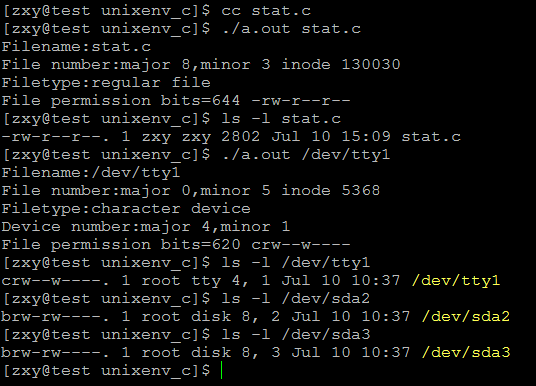
以下是man手册上的一个示例:
#include <sys/types.h>

#include <sys/stat.h>

#include <time.h>

#include <stdio.h>

#include <stdlib.h>

int

main(int argc, char *argv[])

{

    struct stat sb;

    if (argc != ) {

    fprintf(stderr, "Usage: %s <pathname>\n", argv[]);

    exit(EXIT_FAILURE);

    }

    if (stat(argv[], &sb) == -) {

    perror("stat");

    exit(EXIT_SUCCESS);

    }

    printf("File type:                ");

    switch (sb.st_mode & S_IFMT) {

       case S_IFBLK:  printf("block device\n");            break;

       case S_IFCHR:  printf("character device\n");        break;

       case S_IFDIR:  printf("directory\n");               break;

       case S_IFIFO:  printf("FIFO/pipe\n");               break;

       case S_IFLNK:  printf("symlink\n");                 break;

       case S_IFREG:  printf("regular file\n");            break;

       case S_IFSOCK: printf("socket\n");                  break;

       default:       printf("unknown?\n");                break;

       }

       printf("I-node number:            %ld\n", (long) sb.st_ino);

       printf("Mode:                     %lo (octal)\n",

               (unsigned long) sb.st_mode);

       printf("Link count:               %ld\n", (long) sb.st_nlink);

       printf("Ownership:                UID=%ld   GID=%ld\n",

               (long) sb.st_uid, (long) sb.st_gid);

       printf("Preferred I/O block size: %ld bytes\n",

               (long) sb.st_blksize);

       printf("File size:                %lld bytes\n",

               (long long) sb.st_size);

       printf("Blocks allocated:         %lld\n",

               (long long) sb.st_blocks);

       printf("Last status change:       %s", ctime(&sb.st_ctime));

       printf("Last file access:         %s", ctime(&sb.st_atime));

       printf("Last file modification:   %s", ctime(&sb.st_mtime));

       exit(EXIT_SUCCESS);

}
linux系统编程之文件与IO(五):stat()系统调用获取文件信息的更多相关文章
- linux系统编程之文件与io(五)
上一节中已经学习了文件描述符的复制,复制方法有三种,其中最后一种fcntl还并未使用到,关于这个函数,不光只有复制文件描述符的功能,还有其它一些用法,本节就对其进行一一剖析: fcntl常用操作: 这 ...
- Linux系统编程--文件IO操作
Linux思想即,Linux系统下一切皆文件. 一.对文件操作的几个函数 1.打开文件open函数 int open(const char *path, int oflags); int open(c ...
- linux系统编程之文件与io(一)
经过了漫长的学习,C语言相关的的基础知识算是告一段落了,这也是尝试用写博客的形式来学习c语言,回过头来看,虽说可能写的内容有些比较简单,但是个人感觉是有史起来学习最踏实的一次,因为里面的每个实验都是自 ...
- Linux C 程序 文件操作(Linux系统编程)(14)
文件操作(Linux系统编程) 创建一个目录时,系统会自动创建两个目录.和.. C语言实现权限控制函数 #include<stdio.h> #include<stdlib.h> ...
- Linux 网络编程的5种IO模型:多路复用(select/poll/epoll)
Linux 网络编程的5种IO模型:多路复用(select/poll/epoll) 背景 我们在上一讲 Linux 网络编程的5种IO模型:阻塞IO与非阻塞IO中,对于其中的 阻塞/非阻塞IO 进行了 ...
- Linux 系统编程 学习:01-进程的有关概念 与 创建、回收
Linux 系统编程 学习:01-进程的有关概念 与 创建.回收 背景 上一讲介绍了有关系统编程的概念.这一讲,我们针对 进程 开展学习. 概念 进程的身份证(PID) 每一个进程都有一个唯一的身份证 ...
- Linux系统编程温故知新系列 --- 01
1.大端法与小端法 大端法:按照从最高有效字节到最低有效字节的顺序存储,称为大端法 小端法:按照从最低有效字节到最高有效字节的顺序存储,称为小端法 网际协议使用大端字节序来传送TCP分节中的多字节整数 ...
- 读书笔记之Linux系统编程与深入理解Linux内核
前言 本人再看深入理解Linux内核的时候发现比较难懂,看了Linux系统编程一说后,觉得Linux系统编程还是简单易懂些,并且两本书都是讲Linux比较底层的东西,只不过侧重点不同,本文就以Linu ...
- linux系统编程:cp的另外一种实现方式
之前,这篇文章:linux系统编程:自己动手写一个cp命令 已经实现过一个版本. 这里再来一个版本,涉及知识点: linux系统编程:open常用参数详解 Linux系统编程:简单文件IO操作 /*= ...
- linux系统编程(一)概述
glibc库封装了linux系统调用,并提供c语言接口 所以学习linux系统编程,主要参考glibc库系统调用相关api 一.进程控制: fork 创建一个新进程 clone 按指定条件创建子进程 ...
随机推荐
- Winform关于OpenFileDialog的使用方法
1.OpenFileDialog控件有以下基本属性InitialDirectory 对话框的初始目录Filter 要在对话框中显示的文件筛选器,例如,"文本文件(*.txt)|*.txt|所 ...
- 安装完CentOS可以不做的事
添加用户到sudo. 打开/etc/sudoers 找到root ALL=(ALL) ALL这一行,在后面再加上一行就可以了(不用引号): username ALL=(ALL) ALL 注意,都用ta ...
- 二叉树的最大/小/平衡 深度 depth of binary tree
[抄题]: 给定一个二叉树,找出其最大深度. 二叉树的深度为根节点到最远叶子节点的距离. [思维问题]: [一句话思路]: 分合法的定义 [输入量]:空: 正常情况:特大:特小:程序里处理到的特殊情况 ...
- 【SQL模板】四.插入/更新 列模板TSQL
---Name: 插入/更新 列模板.sql ---Purpose: 用于更新 数据库中 列 的脚本模板 ---Author: xx ---Time: 2015-12-18 10:26:06 ---R ...
- Judy Array - Example
“ In computer science and software engineering, a Judy array is a data structure that has high perfo ...
- winobj
查看系统对象 windbg+pdb符号信息 查询各个系统的内核对象结构
- Mockplus教程:分分钟搞定APP首页原型设计
Mockplus是一款快速原型设计工具,支持包括APP原型在内的多种原型与线框图设计.除了快速,Mockplus广受欢迎更因为它极低的上手门槛.今天小编就为大家展示如何用Mockplus在3分钟内完成 ...
- 向文件写入一个数据块---write
函数原型:ssize_t write(int fd,const void *buf,size_t count); 参数说明:fd:文件描述符,buf:写入数据的缓冲区,count:写入数据的最大长度. ...
- QQ使用技巧
1.改变真实地理位置 大家知道,现在很多QQ都是显示IP和地理位置的版本,这样一来,自己的位置就暴露了.其实想隐藏自己的位置也简单,只要用代理服务器就是了.不要把它看成很复杂的东西,建议去下载&quo ...
- PythonWEB框架之Flask--2
10.请求扩展 1 before_request 类比django中间件中的process_request,在青丘收到之前绑定一个函数做一些事情 #基于它做用户登录认证 @app.before_req ...