
MVC日期格式化,后台使用Newtonsoft.Json序列化日期,前端使用”f”格式化日期
MVC控制器中,经常使用Newtonsoft.Json把对象序列化成json字符串传递到前端视图。当对象中有DateTime类型的属性时,前后台如何处理才能把DateTime类型转换成想要的格式呢?
有这样的一个类具有DateTime类型属性:
using System;
namespace MvcApplication1.Models
{
public class Sample
{
public int Id { get; set; }
public string Name { get; set; }
public DateTime Date { get; set; }
}
}
.csharpcode, .csharpcode pre
{
font-size: small;
color: black;
font-family: consolas, "Courier New", courier, monospace;
background-color: #ffffff;
/*white-space: pre;*/
}
.csharpcode pre { margin: 0em; }
.csharpcode .rem { color: #008000; }
.csharpcode .kwrd { color: #0000ff; }
.csharpcode .str { color: #006080; }
.csharpcode .op { color: #0000c0; }
.csharpcode .preproc { color: #cc6633; }
.csharpcode .asp { background-color: #ffff00; }
.csharpcode .html { color: #800000; }
.csharpcode .attr { color: #ff0000; }
.csharpcode .alt
{
background-color: #f4f4f4;
width: 100%;
margin: 0em;
}
.csharpcode .lnum { color: #606060; }
控制器中使用Newtonsoft.Json把对象实例序列化成json字符串:
using System.Web.Mvc;
using MvcApplication1.Models;
using Newtonsoft.Json;
using Newtonsoft.Json.Converters;
namespace MvcApplication1.Controllers
{
public class HomeController : Controller
{
public ActionResult Index()
{
var sample = new Sample()
{
Id = 1,
Name = "good",
Date = DateTime.Now
};
JsonSerializerSettings microsoftDateFormatSettings = new JsonSerializerSettings
{
DateFormatHandling = DateFormatHandling.MicrosoftDateFormat,
DateTimeZoneHandling = DateTimeZoneHandling.Utc
};
ViewData["json"] = Newtonsoft.Json.JsonConvert.SerializeObject(sample, microsoftDateFormatSettings);
return View();
}
}
}
.csharpcode, .csharpcode pre
{
font-size: small;
color: black;
font-family: consolas, "Courier New", courier, monospace;
background-color: #ffffff;
/*white-space: pre;*/
}
.csharpcode pre { margin: 0em; }
.csharpcode .rem { color: #008000; }
.csharpcode .kwrd { color: #0000ff; }
.csharpcode .str { color: #006080; }
.csharpcode .op { color: #0000c0; }
.csharpcode .preproc { color: #cc6633; }
.csharpcode .asp { background-color: #ffff00; }
.csharpcode .html { color: #800000; }
.csharpcode .attr { color: #ff0000; }
.csharpcode .alt
{
background-color: #f4f4f4;
width: 100%;
margin: 0em;
}
.csharpcode .lnum { color: #606060; }
前台视图使用一个叫"f"的js文件,把json中的日期格式转换成期望的样子:
@{
ViewBag.Title = "Index";
Layout = "~/Views/Shared/_Layout.cshtml";
}
<p>
<span id="jsonDate">@ViewData["json"]</span>
</p>
<p>
转换后的时间格式为:<span id="fDate"></span>
</p>
@section scripts
{
<script src="~/Scripts/date.f-0.5.0.js"></script>
<script type="text/javascript">
$(function () {
var obj = $.parseJSON($('#jsonDate').text());
//$('#fDate').text(new Date(parseInt(obj.Date.substr(6))).f("yyyy-MM-dd HH:mm:ss"));
$('#fDate').text(new Date(parseInt(obj.Date.substr(6))).f("yyyy-MM-dd"));
});
</script>
}
.csharpcode, .csharpcode pre
{
font-size: small;
color: black;
font-family: consolas, "Courier New", courier, monospace;
background-color: #ffffff;
/*white-space: pre;*/
}
.csharpcode pre { margin: 0em; }
.csharpcode .rem { color: #008000; }
.csharpcode .kwrd { color: #0000ff; }
.csharpcode .str { color: #006080; }
.csharpcode .op { color: #0000c0; }
.csharpcode .preproc { color: #cc6633; }
.csharpcode .asp { background-color: #ffff00; }
.csharpcode .html { color: #800000; }
.csharpcode .attr { color: #ff0000; }
.csharpcode .alt
{
background-color: #f4f4f4;
width: 100%;
margin: 0em;
}
.csharpcode .lnum { color: #606060; }
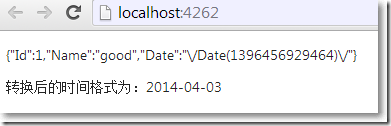
结果:
参考资料:
关于"f" 的js文件:http://fisforformat.sourceforge.net/
关于Newtonsoft.Json:http://james.newtonking.com/json/help/index.html?topic=html/DatesInJSON.htm
MVC日期格式化,后台使用Newtonsoft.Json序列化日期,前端使用”f”格式化日期的更多相关文章
- MVC web api 返回JSON的几种方式,Newtonsoft.Json序列化日期时间去T的几种方式。
原文链接:https://www.muhanxue.com/essays/2015/01/8623699.html MVC web api 返回JSON的几种方式 1.在WebApiConfig的Re ...
- Newtonsoft.Json序列化日期时间去T的几种方式。
原文地址:MVC web api 返回JSON的几种方式,Newtonsoft.Json序列化日期时间去T的几种方式. http://www.cnblogs.com/wuball/p/4231343. ...
- [C#][Newtonsoft.Json] Newtonsoft.Json 序列化时的一些其它用法
Newtonsoft.Json 序列化时的一些其它用法 在进行序列化时我们一般会选择使用匿名类型 new { },或者添加一个新类(包含想输出的所有字段).但不可避免的会出现以下情形:如属性值隐藏(敏 ...
- Newtonsoft.Json 序列化和反序列化 以及时间格式 2 高级使用
手机端应用讲究速度快,体验好.刚好手头上的一个项目服务端接口有性能问题,需要进行优化.在接口多次修改中,实体添加了很多字段用于中间计算或者存储,然后最终用Newtonsoft.Json进行序列化返回数 ...
- C# 使用Newtonsoft.Json序列化自定义类型
Json.Net是一个读写Json效率比较高的.Net框架.Json.Net 使得在.Net环境下使用Json更加简单.通过Linq To JSON可以快速的读写Json,通过JsonSerializ ...
- c# 使用 Newtonsoft.Json 序列化json字符串以及,反序列化对象
1. 序列化 对象 /** 使用 Newtonsoft.Json 序列化对象 **/ [WebMethod] public String getPersonInfos() { // 初始化数据 Lis ...
- Newtonsoft.Json 序列化踩坑之 IEnumerable
Newtonsoft.Json 序列化踩坑之 IEnumerable Intro Newtonsoft.Json 是 .NET 下最受欢迎 JSON 操作库,使用起来也是非常方便,有时候也可能会不小心 ...
- Newtonsoft.Json序列化字符串-格式化
转自:https://blog.csdn.net/wlphlj/article/details/51982866最近C#中需要将实体进行json序列化,使用了Newtonsoft.Json publi ...
- Newtonsoft.Json序列化字符串-格式化和时间格式问题
最近C#中需要将实体进行json序列化,使用了Newtonsoft.Json public static void TestJson() { DataTable d ...
随机推荐
- Centos之命令搜索命令whereis与which
Centos之命令搜索命令whereis与which whereis 命令名 #搜索命令所在路径及帮助文档所在位置 选项: -b :只查找可执行文件位置 -m:只查找帮助文件 [root@localh ...
- sql server中扩展存储过程
--列出服务器上安装的所有OLEDB提供的程序 execute master..xp_enum_oledb_providers --得到硬盘文件信息 --参数说明:目录名,目录深度,是否显示文件 (少 ...
- Linux学习笔记:ps -ef、ps aux、kill -9
一.查看进程命令 1.ps命令 Linux中的ps命令是Process Status的缩写. ps命令用来列出系统中当前运行的那些进程. ps命令列出的是当前那些进程的快照,就是执行ps命令的那个时刻 ...
- Linux学习笔记:wc查看文件字节数、字数、行数
Linux系统中的wc(Word Count)命令可以统计指定文件中的字节数.字数.行数,并将统计结果显示输出. 若不指定文件名称,或是所给予的文件名为“-”,则wc指令会从标准输入设备读取数据. 语 ...
- Python 面试题学习
Python的函数参数传递 在Python中,strings,tuples=('abc',123,2.2,'join),numbers 是不可更改的对象. list=['abc',123,2.23,' ...
- 开发 Material Design+RxJava+Retrofit+MVP App 参考资料
前言 在开发一个基于 Material Design+RxJava+Retrofit+MVP 框架的 App 过程中学习的资料整理 —— 由G军仔分享 这里记录了我开发 大象 项目时,所学习的 ...
- centos7上使用locate命令
https://blog.csdn.net/yqh19880321/article/details/72426879
- IE6 验证码刷新失败显示空白解决办法
原因:点击a标签看不清?换图片 结果验证码显示的空白! 解决办法:在对应的点击事件最后加上return false 即可解决问题. 下面是HTML源码: <p class="regis ...
- filebeat安装部署
简单概述 最近在了解ELK做日志采集相关的内容,这篇文章主要讲解通过filebeat来实现日志的收集.日志采集的工具有很多种,如fluentd, flume, logstash,betas等等.首先要 ...
- Bad connection to FS. command aborted. exception: Call to chaoren/192.168.80.100:9000 failed on connection exception: java.net.ConnectException: Connection refused
Bad connection to FS. command aborted. exception: Call to chaoren/192.168.80.100:9000 failed on conn ...