
一步一步实现web程序信息管理系统之一----登陆界面实现
一步一步实现web程序信息管理系统
在web程序中特别是信息管理系统,登陆功能必须有而且特别重要。每一个学习程序开发或以后工作中,都会遇到实现登陆功能的需求。而登陆功能最终提供给客户或展现给客户的最基本的就是2个文本框一个按钮用户名与密码,外加一个登陆按钮。本篇记录一下登陆功能的前端界面的实现。
1.界面布局
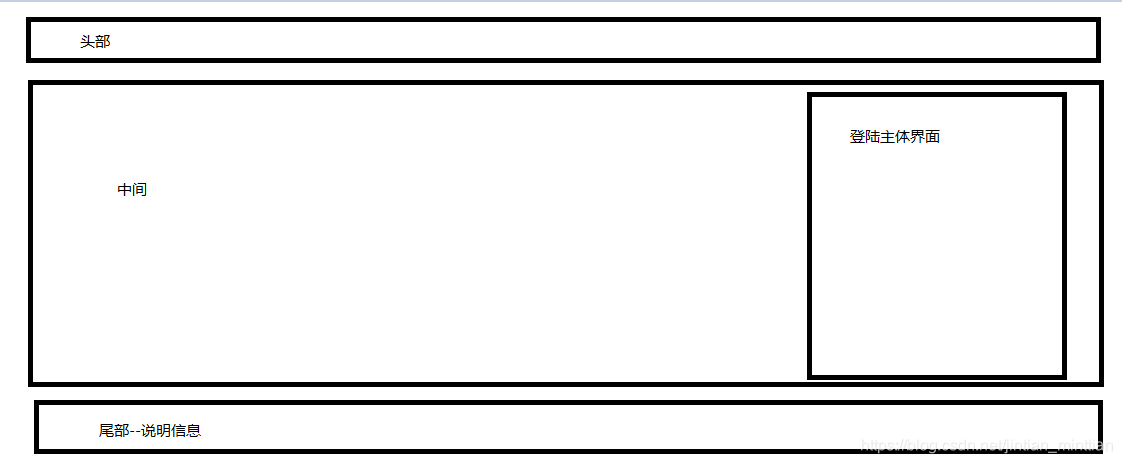
整个页面的布局分为3个部分
- 上部 可以放置公司logo
- 中部 登陆功能主体部分
- 尾部 可以放置 说明信息、版权等
2.实现
- 头部实现
html代码
 <div id="ops-login-header">

        <div class="ops-logo ops-main-content">

            <h1><a href="#" title="xxx平台">账号登录</a></h1>

            <ul class="ops-login-header-linker">

                <li><a href="#">关于我们</a></li>

                <li><a href="#">帮助中心</a></li>

            </ul>

        </div>

    </div>
css代码
.ops-logo{

    height: 74px;

    line-height: 74px;

}

.ops-main-content{

    margin:0 auto;

    width:1200px;

}

.ops-logo h1{

    float:left;

}

.ops-logo h1 a{

    display: block;

    height: 74px;

    padding-left: 170px;

    line-height: 80px;

    font-weight: bold;

    font-size: 18px;

    color:#000;

    background:url('../images/login/login_logo2.png?14622422798') left center no-repeat;

}

.ops-logo h1 a:hover{

    text-decoration:none;

}

.ops-logo .ops-login-header-linker{

    float:right;

}

.ops-logo .ops-login-header-linker li{

    float:left;

    margin-left:20px;

    font-size:12px;

}

.ops-logo .ops-login-header-linker li a{

    color:#808080;

}
最终效果展示

- 中间主体部分
html代码
<div id="login-bd" class="ops-login-bd">

        <div class="ops-main-content">

            <div class="ops-input-box">

                <div class="ops-input-title">

                    <h2>用户登录</h2>

                </div>

                <div class="ops-input-area">

                    <form>

                        <div class="ops-input-item">

                            <p>登录名:</p>

                            <input type="text" id="username"  placeholder="请输入账号/邮箱" />

                        </div>

                        <div class="ops-input-item">

                            <p>登录密码:</p>

                            <input type="password" id="password"  placeholder="请输入密码" />

                        </div>

                        <div class="ops-input-item">

                            <p>验证码:</p>

                            <input type="text" placeholder="" id="code"  class="ops-img-code" />

                            <img src="../images/login/1.png" id="codeImg" alt="点击更换" title="点击更换" />

                        </div>

                        <div class="ops-login-btn" onclick="loginCheck();">登录</div>

                    </form>

                    <p class="ops-input-other">忘记密码?<a href="#">联系我们</a></p>

                </div>

            </div>

        </div>

    </div>
css代码
.ops-login-bd{

    margin-bottom: 38px;

    height:529px;

    background: #00a2ca; /*#29a176*/

}

.ops-login-bd .ops-main-content{

    position: relative;

    height:100%;

    background: url('../images/login/loginbg.png?14622422798') no-repeat;

}

.ops-login-bd .ops-input-box{

    position: absolute;

    right: 80px;

    top:50%;

    margin-top:-200px;

    background:#fff;

    box-shadow: 2px 2px 3px #696363,-2px 0 3px #696363;

}

.ops-login-bd .ops-input-box .ops-input-title{

    margin-top:22px;

    padding:0 10px;

    border-left:4px solid #fc880c;

    font-size:22px;

    color:#000;

}

.ops-login-bd .ops-input-box .ops-input-title h2{

    padding-bottom:8px;

    border-bottom:1px solid #d9d9d9;

    font-size: 20px;

}

.ops-login-bd .ops-input-box .ops-input-area{

    padding:0 22px;

    padding-top:20px;

}

.ops-login-bd .ops-input-box .ops-input-area .ops-input-item{

    margin-bottom:15px;

}

.ops-login-bd .ops-input-box .ops-input-area .ops-input-item p{

    margin-bottom:5px;

    font-size:12px;

    font-weight:bold;

}

.ops-login-bd .ops-input-box .ops-input-area .ops-input-item img{

    cursor:pointer;

    width:98px;

    height:32px;

}

.ops-login-bd .ops-input-box .ops-input-area input{

    padding:0 10px;

    border:1px solid #cacaca;

    width:264px;

    height:32px;

    outline:none;

    border-radius: 3px;

    background:url('../images/login/logininputbg.png?14622422798');

}

.ops-login-bd .ops-input-box .ops-input-area .ops-img-code{

    float:left;

    width:160px;

    margin-right:5px;

    border-radius: 3px;

}

.ops-login-bd .ops-input-box .ops-input-area .ops-login-btn{

    display:block;

    width:100%;

    height:36px;

    line-height: 36px;

    text-align:center;

    background:#00a2ca;

    border-radius: 4px;

    border:none;

    color:#fff;

    cursor: pointer;

    font-size:16px;

    outline:none;

}

.ops-login-bd .ops-input-box .ops-input-other{

    padding:22px;

    text-align:right;

}

.ops-login-bd .ops-input-box .ops-input-other a{

    margin-left:10px;

}
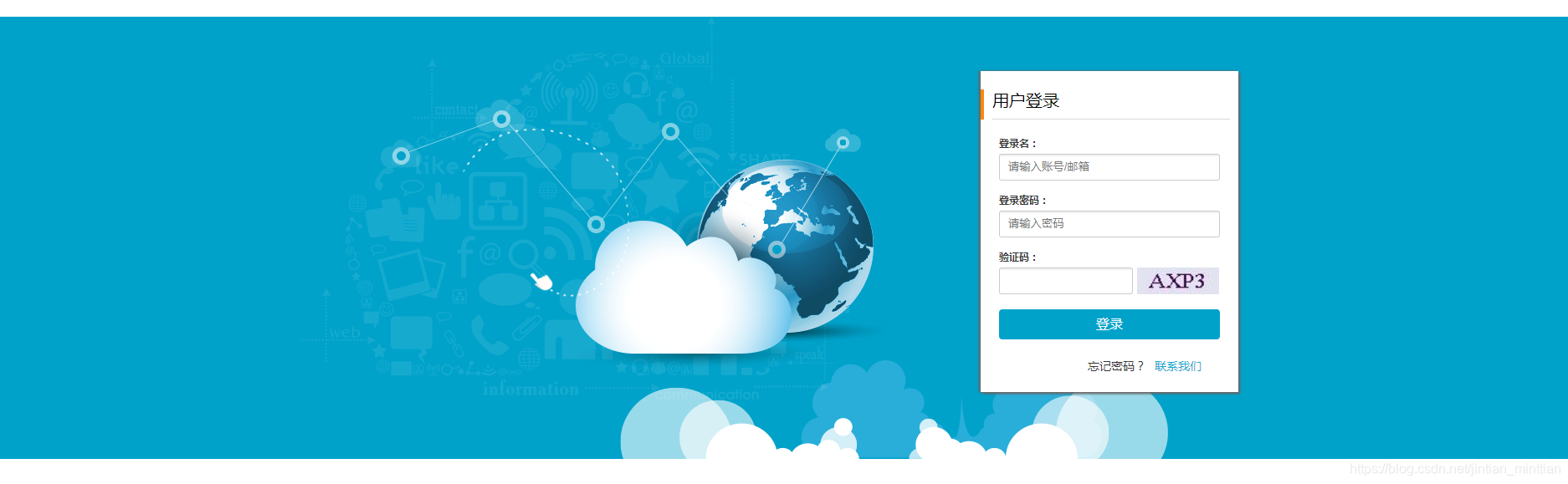
效果图展示
- 尾部信息
html代码
<div id="login-footer" class="ops-login-footer">
<div class="ops-footer-copyright">
<p class="ops-clearfix ops-links">
<a href="javascript:;" target="_blank">关于我们</a>
<a href="javascript:;" target="_blank">法律声明</a>
<a href="javascript:;" target="_blank">服务条款</a>
<a href="javascript:;" target="_blank">联系方式</a>
<p style="font-family:arial;">地址:xxxxxxxxxxxxxxxx xxxxxxxxxx许可证B1-20160901 COPYRIGHT © 2010-2016<a href="http://www.uimaker.com">uimaker</a> 版权所有 ICP证:苏A2-20160101</p>
<p style="font-family:arial;">xxxxxxx许可证B1-20150962 xxxxx 版权所有</p>
</p>
</div>
</div>
css代码
.ops-login-footer{

    padding-top:20px;

    padding-bottom: 35px;

    border-top:1px solid #e5e5e5;

    font-size:12px;

}

.ops-login-footer .ops-footer-copyright{

    text-align: center;

}

.ops-login-footer .ops-footer-copyright p{

    color:#999;

    margin-top:10px;

}

.ops-login-footer .ops-footer-copyright p:first-child{

    margin-top:0px;

}

.ops-login-footer .ops-footer-copyright .ops-links a {

    margin-left:15px;

    color:#666666;

}

.ops-login-footer .ops-footer-copyright .ops-links a:first-child {

    margin-left:0

}
3.最终整体界面效果图
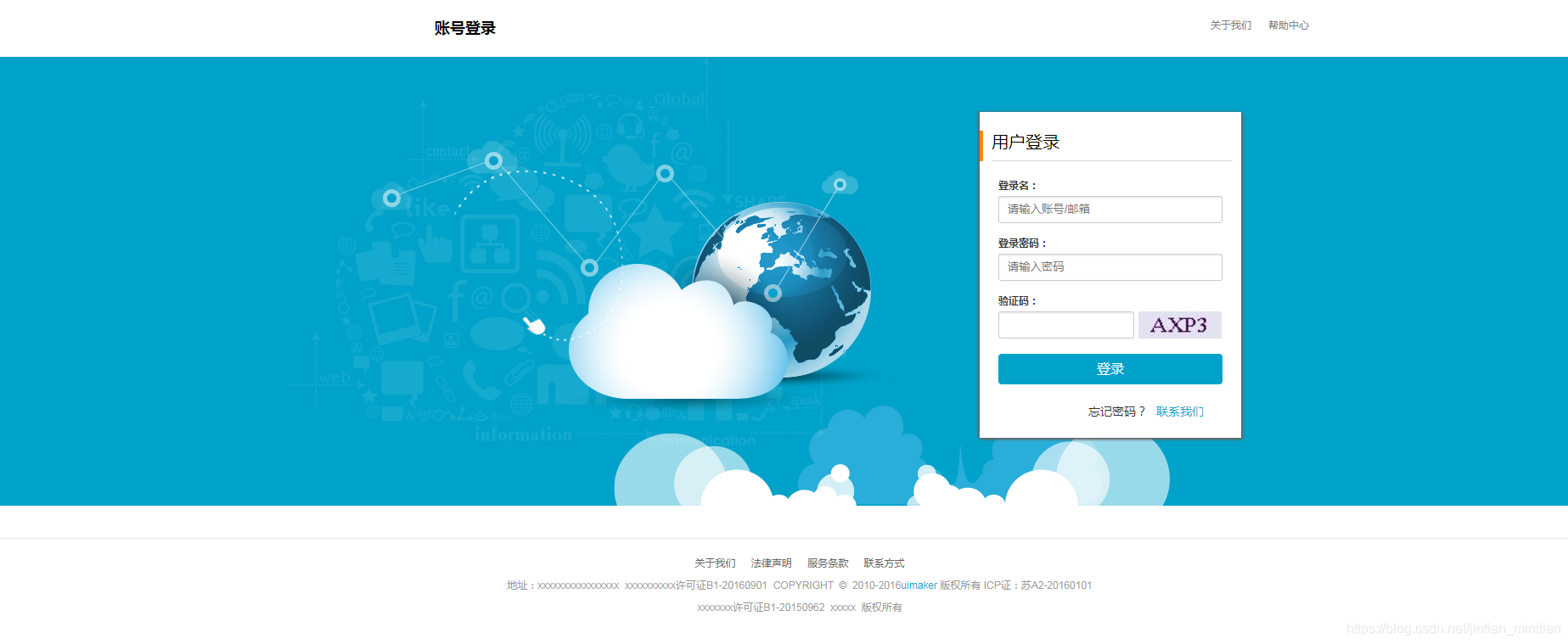
到此,整个登陆界面完成。
资源下载链接
一步一步实现web程序信息管理系统之一----登陆界面源码下载
一步一步实现web程序信息管理系统之一----登陆界面实现的更多相关文章
- 一步一步实现web程序信息管理系统之三----登陆业务逻辑实现(验证码功能+参数获取)
本篇紧接着上一篇文章[一步一步实现web程序信息管理系统之二----后台框架实现跳转登陆页面] 验证码功能 一般验证码功能实现方式为,前端界面访问一个url请求,后端服务代码生成一个图片流返回至浏览器 ...
- 一步一步实现web程序信息管理系统之二----后台框架实现跳转登陆页面
SpringBoot springboot的目的是为了简化spring应用的开发搭建以及开发过程.内部使用了特殊的处理,使得开发人员不需要进行额外繁锁的xml文件配置的编写,其内部包含很多模块的配置只 ...
- 一个低级shell简易学生信息管理系统-新增登陆注册功能
还有bug 不修改了 小声bb一下 这玩意真的要控制版本 随手保存 本来有个超完整的版本 一开心被我rm - f 了 后续还出现了 更多的bug 仔细仔细 源码如下: record=stu.db if ...
- .NET跨平台:在Mac上跟着错误信息一步一步手写ASP.NET 5程序
今天坐高铁时尝试了一种学习ASP.NET 5的笨方法,从空文件夹开始,根据运行dnx . kestrel命令的错误信息,一步一步写代码,直至将一个最简单的ASP.NET程序运行起来. 尝试的具体步骤如 ...
- 一步一步学习SignalR进行实时通信_9_托管在非Web应用程序
原文:一步一步学习SignalR进行实时通信_9_托管在非Web应用程序 一步一步学习SignalR进行实时通信\_9_托管在非Web应用程序 一步一步学习SignalR进行实时通信_9_托管在非We ...
- 干净win7要做几步才能运行第一个Spring MVC 写的动态web程序
干净win7要做几步才能运行第一个Spring MVC 写的动态web程序: 1. 下载安装jdk 2. 配置Java环境变量 3. 测试一下第1,2两步是否完全成功:http://jingyan.b ...
- 【新手出发】从搭虚拟机开始,一步一步在CentOS上跑起来.Net Core程序
文章背景 微软6月26号发布core 1.0版本后,园子里关于这方面的文章就更加火爆了,不管是从文章数量还是大家互动的热情来看,绝对是最热门的技术NO.1.我从去年底开始接触.net core到现在也 ...
- 一步一步创建ASP.NET MVC5程序[Repository+Autofac+Automapper+SqlSugar](一)
前言 大家好,我是Rector 从今天开始,Rector将为大家推出一个关于创建ASP.NET MVC5程序[Repository+Autofac+Automapper+SqlSugar]的文章系列, ...
- 一步一步创建ASP.NET MVC5程序[Repository+Autofac+Automapper+SqlSugar](九)
前言 童鞋们,大家好 我是专注.NET开发者社区建设的实践者Rector. 首先,为自己间隔了两个星期五再更新本系列文章找个不充分的理由:Rector最近工作,家庭的各种事务所致,希望大家谅解. 本文 ...
随机推荐
- poj3070 Fibonacci(矩阵快速幂)
矩阵快速幂基本应用. 对于矩阵乘法与递推式之间的关系: 如:在斐波那契数列之中 f[i] = 1*f[i-1]+1*f[i-2] f[i-1] = 1*f[i-1] + 0*f[i-2].即 所以, ...
- 约瑟夫(Josephus)问题~转
本文都是转的,一个是转博客,一个是转贴吧,前者详细,后者"强,无敌"! 博客转: 以前就知道约瑟夫问题是模拟,今天我才发现一些约瑟夫问题可以使用数学解法得出!真是强悍啊!约瑟夫问题 ...
- HDU 1710Binary Tree Traversals(已知前序中序,求后序的二叉树遍历)
题目链接:http://acm.hdu.edu.cn/showproblem.php?pid=1710 解题思路:可以由先序和中序的性质得到 : 先序的第一个借点肯定是当前子树的根结点, 那么在 中序 ...
- Sublime Text 格式化JSON-pretty json
1.安装install package 按control + `,打开命令输入框 输入一下命令: import urllib2,os; pf='Package Control.sublime-pack ...
- [Swift实际操作]七、常见概念-(2)点CGPoint和变形CGAffineTransform的使用
本文将为你演示点对象CGPoint的使用,其中CG表示来自CoreGraphic(核心图形)这个跨平台框架 首先导入需要使用的两个框架第一个框架表示界面工具框架第二个框架表示核心绘图和动画框架 imp ...
- this引用逃逸(使用内部类获取未外部类未初始化完的变量),多态父类使用子类未初始化完的变量
1,this引用逃逸 并发编程实践中,this引用逃逸("this"escape)是指对象还没有构造完成,它的this引用就被发布出去了. 这是危及到线程安全的,因为其他线程有可能 ...
- 消息中间件(一)MQ详解及四大MQ比较
一.消息中间件相关知识 1.概述 消息队列已经逐渐成为企业IT系统内部通信的核心手段.它具有低耦合.可靠投递.广播.流量控制.最终一致性等一系列功能,成为异步RPC的主要手段之一.当今市面上有很多主流 ...
- day 65 crm(2) admin源码解析,以及简单的仿造admin组件
前情提要: crm中的admin组件重写. 一:admin的autodiscover 作用:实现扫面该项目中的所有的admin 1:执行顺序-> 按照注册的顺序执行 二:单例模式 1:普通案例的 ...
- WPF一步步开发XMPP IM客户端2:主窗体设计
UI设计方案: 在设计窗体UI之前,先要了解一些主要的接口和帮助类: 对于主窗的左侧列表,容器内的Item必须实现ILeftItem的接口,比如联系人.系统消息.群等,接口包含点击事件 public ...
- python3模块: json & pickle
概念: 序列化(Serialization): 将对象的状态信息转换为可以存储或可以通过网络传输的过程,传输的格式可以是JSON,XML等.反序列化就是从存储区域(JSON,XML)读取反序列化对象的 ...