
ansible--03
一。 Ad-hoc命令简介
1. 格式:ansible <host> [opion]
2. option参数:
-v:输出详细的执行过程, -vvv最详细的结果
-i:指定inventory的路径
-f:并发的线程数量,默认是5
-m:调用的模块
-u: 指令执行的账号
-b:调用sudo
3. 场景使用:
3.1 ansible all -f 5 -m ping
3.2 ansible proxy -s -m command -a 'hostname' -vvv
3.3 ansible web-list
3.4 time ansible 10.21.40.61 -B 5 -P 2 -T 2 -m command -a 'sleep 20' -u root
二。Ad-Hoc查看系统设置:
1. ansible app -a 'df -h'
2.ansible app -m shell -a 'free -m'
三。 Ad-Hoc的并发特性:
1. -f 参数实现多线程
2. 并发数量为cpu核数的偶数倍,如 4core8GB的,最多配20个线程。
四。Ad-Hoc的模块使用:
1. 查询使用说明: ansible-doc
1.1 ansible-doc -l
1.2 ansible-doc yum
2. 场景:
2.1 安装redhat-lsb
ansible apps -m yum -a 'name=redhat-lsb state=present'
2.2 查看系统版本号:
ansible apps -m command -a 'lsb_release -a'
2.3 为所有机器安装ntp服务
ansible apps -s -m yum -a 'name=ntp state=present'
ansible apps -m service -a 'name=ntpd state=started enabled=yes'
五。特定主机的变更
1. --limit参数实现:
ansible app -m command -a 'service ntpd status' --limit '192.168.0.2'
2. 指定ip
ansible 192.168.0.2 -m command -a 'service ntpd status'
3. 用‘:’做分隔,多台:
ansible '192.168.0.2:192.168.0.3' -m command -a 'service ntpd status'
4. 通过‘*’,泛匹配
ansible 192.168.0.2* -m command -a 'service ntpd status'
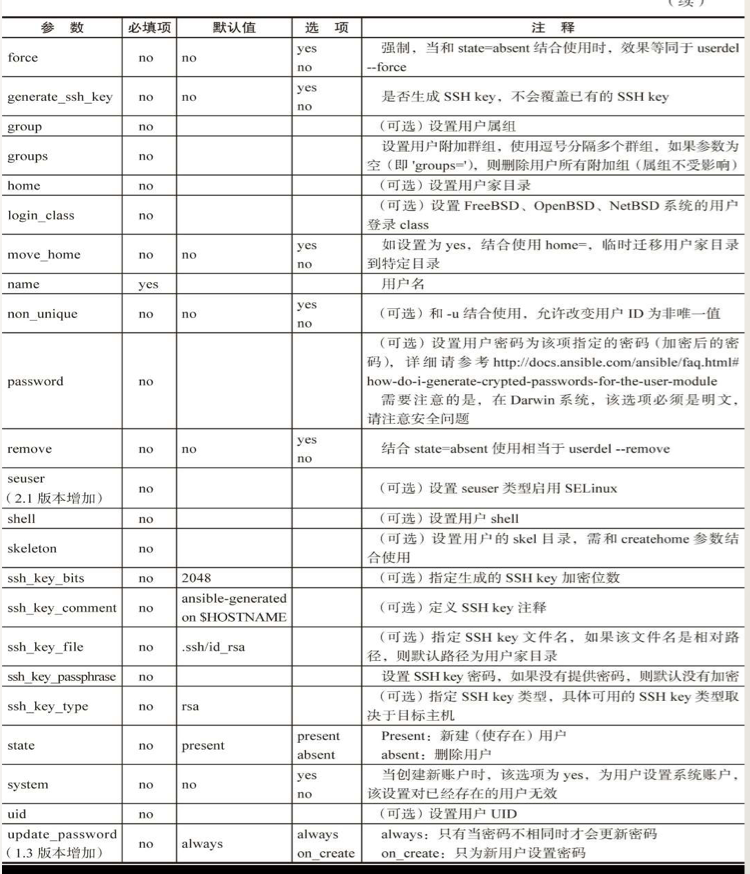
六。用户及用户组管理

ansible--03的更多相关文章
- ansible 主机清单 /etc/ansible/hosts
主机清单 [webservers] ansible01 ansible02 ansible03 ansible04 [root@ftp:/root] > ansible webservers - ...
- ansible自动化运维03
ansible自动化运维常用模块 常用模块实现的功能:安装软件包:修改配置文件:创建程序用户组:创建目录,并修改所属和权限:挂载:启动服务:测试. command模块: shell模块: 注意:com ...
- 03: saltstack和ansible的区别和原理
1.1 SaltStack.Ansible.Puppet比较 1.SaltStack 1. saltStack由Python编写,为server-client模式的系统,自己本身支持多master. ...
- 如何利用ansible callback插件对执行结果进行解析
最近在写一个批量巡检工具,利用ansible将脚本推到各个机器上执行,然后将执行的结果以json格式返回来. 如下所示: # ansible node2 -m script -a /root/pyth ...
- 运维自动化之ansible的安装与使用(包括模块与playbook使用)(转发)
原文 http://dl528888.blog.51cto.com/2382721/1435415 我使用过puppet(地址是http://dl528888.blog.51cto.com/2382 ...
- ansible网络模块安装httplib2
ansible网络模块安装httplib2 在进行使用ansible的网络模块的时候,需要安装httplib2模块 下载地址: https://pypi.python.org/pypi?%3Aacti ...
- ansible安装(批量执行命令
rpm安装 下载epl源 : Download the latest epel-release rpm from:http://dl.fedoraproject.org/pub/epel/6/x86 ...
- 自动化运维工具之ansible
自动化运维工具之ansible 一,ansible简介 ansible是新出现的自动化运维工具,基于Python开发,集合了众多运维工具(puppet.cfengine.chef.func.fab ...
- ansible小结
一.Ansible的安装 1.yum源安装 以centos为例,默认在源里没有ansible,不过在fedora epel源里有ansible,配置完epel 源后,可以直接通过yum 进行安装.这里 ...
- Ansible 入门 (1) - 安装和配置
本文参考 <Ansible 自动化运维和最佳实践>,这两天刚读这本书,写写总结.主控机环境是 centos 7,被控机均是 centos 6.8 . 确保 python 版本大于 2.6 ...
随机推荐
- 关于PLSQL启动用时较长的问题解决
问题: 打开登陆界面缓慢. 解决: 1.删除控制面板中的打印机 2.将打印机改为手动并停止启动状态 .
- springboot面试专题及答案
声明:此文章非本人所 原创,是别人分享所得,如有知道原作者是谁可以联系本人,如有转载请加上此段话 问题一 什么是 Spring Boot? 多年来,随着新功能的增加,spring 变得越来越复杂.只需 ...
- Java基础——JDBC
今天学习的内容是:JDBC 通常jdbc连接分6步: 1)注册驱动: 2)建立连接: 3)创建Statement: 4)执行sql 语句: 5)处理结果集(若sql 语句为查询语句): 6)关闭连接. ...
- js 数组删除元素,并获得真实长度
前言:js数组删除一般采用数组的 splice 方法和 delete 方法,但是采用 delete 方法后直接数组.kength 来获取数组长度是获取不了真实长度的,下面详细讲解一下. 一.splic ...
- java设计模式-----10、享元模式
Flyweight模式也叫享元模式,是构造型模式之一,它通过与其他类似对象共享数据来减小内存占用.它使用共享物件,用来尽可能减少内存使用量以及分享资讯给尽可能多的相似物件:它适合用于只是因重复而导致使 ...
- Golang beego ORM + CRUP 操作详解
构建beego Web 项目 首先构建一个beego 的web 项目,这个我们完全可以参考beego 官网中的开发文档,上面介绍的非常的详细,在这我就不给大家介绍,主要是介绍ORM ...
- Linux 文件缓存 (一)
缓存印象 缓存给人的感觉就是可以提高程序运行速度,比如在桌面环境中,第一次打开一个大型程序可能需要10秒,但是关闭程序后再次打开可能只需5秒了.这是因为运行程序需要的代码.数据文件在操作系统中得到了缓 ...
- oracle 用户对象权限
drop user test cascade;create user test identified by test;grant create session to test;grant create ...
- 5maven工程莫名其妙只在项目名称那里有一个红叉
manven工程里面没有报错的地方,编译也没有问题,只是项目名称那里有一个红叉. 解决办法: 右击项目-->maven-->update project 注意: 这种方法有时可 ...
- maven 结合mybaits整合框架,打包时mapper.xml文件,mapper目录打不进war包去问题
首先,来看下MAVENx项目标准的目录结构: 一般情况下,我们用到的资源文件(各种xml,properites,xsd文件等)都放在src/main/resources下面,利用maven打包时,ma ...