
SSH 整合 (Maven)
1.SSH 教程详见我的上一篇博客 SSH(Struts 2.3.31 + Spring 4.1.6 + Hibernate 5.0.12 + Ajax)框架整合实现简单的增删改查(包含分页,Ajax 无刷新验证该用户是否存在)
(地址如下:http://www.cnblogs.com/yjq520/p/6705959.html)
2.Maven 的 pom.xml 配置如下,然后 maven 方式启动运行
<project xmlns="http://maven.apache.org/POM/4.0.0"

         xmlns:xsi="http://www.w3.org/2001/XMLSchema-instance"

           xsi:schemaLocation="http://maven.apache.org/POM/4.0.0 http://maven.apache.org/maven-v4_0_0.xsd">

  <modelVersion>4.0.0</modelVersion>

  <groupId>com.cqvie</groupId>

  <artifactId>SSH_Maven</artifactId>

  <packaging>war</packaging>

  <version>1.0</version>

  <name>SSH_Demo Maven Webapp</name>

  <url>http://maven.apache.org</url>

  <repositories><!--设置maven组件仓库 -->

        <!-- maven官方仓库 -->

        <repository>

            <id>maven</id>

            <name>Maven Repository Switchboard</name>

            <layout>default</layout>

            <url>http://repo1.maven.org/maven2</url>

            <snapshots>

                <enabled>false</enabled>

            </snapshots>

        </repository>

        <!-- 阿里巴巴发布版本仓库 -->

        <repository>

            <id>alibaba-opensource</id>

            <name>alibaba-opensource</name>

            <url>http://code.alibabatech.com/mvn/releases/</url>

            <layout>default</layout>

        </repository>

    </repositories>

  <dependencies>

      <!-- Servlet API -->

    <dependency>

        <groupId>javax.servlet</groupId>

        <artifactId>javax.servlet-api</artifactId>

        <version>3.1.0</version>

        <scope>provided</scope> <!-- 编译时用到servlet-api和jsp-api,但在打包的时候不用这两个依赖 -->

    </dependency>

    <!-- JSP API -->

    <dependency>

        <groupId>javax.servlet.jsp</groupId>

        <artifactId>jsp-api</artifactId>

        <version>2.2</version>

        <scope>provided</scope> <!-- 编译时用到servlet-api和jsp-api,但在打包的时候不用这两个依赖 -->

    </dependency>

    <!-- MySQL -->

    <dependency>

        <groupId>mysql</groupId>

        <artifactId>mysql-connector-java</artifactId>

        <version>5.1.6</version>

    </dependency>

    <!-- JUnit -->

    <dependency>

        <groupId>junit</groupId>

        <artifactId>junit</artifactId>

        <version>4.11</version>

        <scope>test</scope>

    </dependency>

    <!-- log4j-core -->

    <dependency>

        <groupId>org.apache.logging.log4j</groupId>

        <artifactId>log4j-core</artifactId>

        <version>2.6.2</version>

    </dependency>

    <!-- asm -->

    <dependency>

        <groupId>org.ow2.asm</groupId>

        <artifactId>asm-commons</artifactId>

        <version>5.0.4</version>

    </dependency>

    <!-- aopalliance -->

    <dependency>

        <groupId>aopalliance</groupId>

        <artifactId>aopalliance</artifactId>

        <version>1.0</version>

    </dependency>

    <!-- aspectjweaver -->

    <dependency>

        <groupId>org.aspectj</groupId>

        <artifactId>aspectjweaver</artifactId>

        <version>1.8.9</version>

    </dependency>

    <!-- Spring -->

    <dependency>

        <groupId>org.springframework</groupId>

        <artifactId>spring-orm</artifactId>

        <version>4.3.2.RELEASE</version>

    </dependency>

    <dependency>

        <groupId>org.springframework</groupId>

        <artifactId>spring-context</artifactId>

        <version>4.3.2.RELEASE</version>

    </dependency>

    <dependency>

        <groupId>org.springframework</groupId>

        <artifactId>spring-web</artifactId>

        <version>4.3.2.RELEASE</version>

    </dependency>

    <!-- Hibernate -->

    <dependency>

        <groupId>org.hibernate</groupId>

        <artifactId>hibernate-core</artifactId>

        <version>5.1.5.Final</version>

    </dependency>

    <!-- Struts2 -->

    <dependency>

        <groupId>org.apache.struts</groupId>

        <artifactId>struts2-core</artifactId>

        <version>2.3.31</version>

    </dependency>

    <dependency>

        <groupId>org.apache.struts</groupId>

        <artifactId>struts2-spring-plugin</artifactId>

        <version>2.3.31</version>

    </dependency>

    <!-- DBCP2 -->

    <dependency>

        <groupId>org.apache.commons</groupId>

        <artifactId>commons-dbcp2</artifactId>

        <version>2.1.1</version>

    </dependency>

  </dependencies>

  <build>

    <finalName>SSH_Maven</finalName>

    <!-- Maven项目编译插件 -->

    <plugins>

        <plugin>

            <artifactId>maven-compiler-plugin</artifactId>

            <version>2.3.2</version>    <!-- 不指定时默认采用最新插件版本 -->

            <configuration>

                <!-- 根据实际情况设置 JDK -->

                <source>1.7</source>    <!-- 源代码使用的开发版本 -->

                <target>1.7</target>    <!-- 需要生成的目标class文件的编译版本 -->

                <encoding>UTF-8</encoding>

            </configuration>

        </plugin>

<!--

        <plugin>

            <groupId>org.apache.maven.plugins</groupId>

            <artifactId>maven-surefire-plugin</artifactId>

            <version>2.17</version>

            <configuration>

                <testFailureIgnore>true</testFailureIgnore>

            </configuration>

        </plugin>

 -->

        <plugin>

            <groupId>org.apache.tomcat.maven</groupId>

            <artifactId>tomcat7-maven-plugin</artifactId>

            <version>2.2</version>

            <configuration>

                <!-- 使用内置的模拟Tomcat服务器 -->

                <path>/SSH_Maven</path>

                <uriEncoding>UTF-8</uriEncoding>

                <port>9527</port>

                <mode>context</mode>

                <!-- <contextFile>src/main/webapp/META-INF/context.xml</contextFile> -->

                <contextReloadable>true</contextReloadable>

                <!-- <backgroundProcessorDelay>5</backgroundProcessorDelay> -->

            </configuration>

        </plugin>

    </plugins>

  </build>

</project>
pom.xml
3.maven 方式启动详见配置如下:
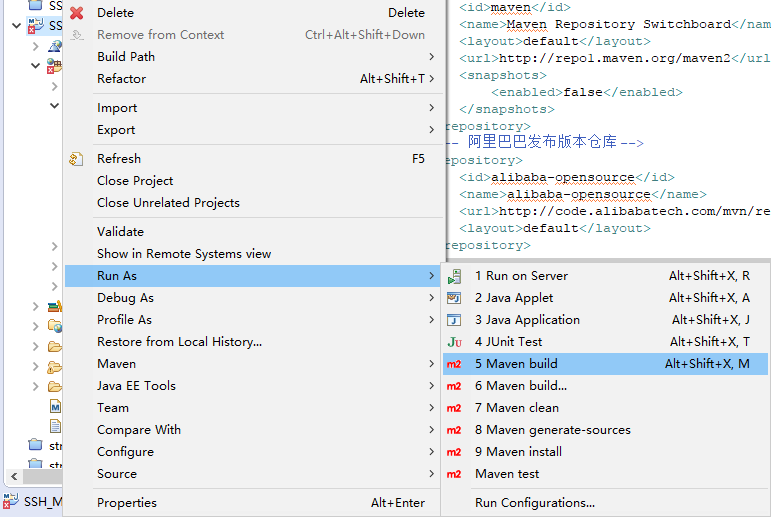
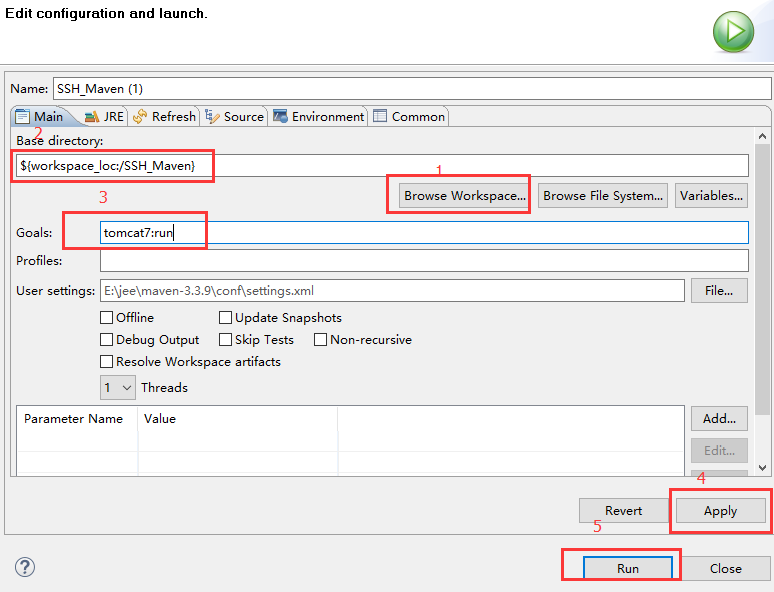
4.不出意外就可以运行了
SSH 整合 (Maven)的更多相关文章
- SSH整合Maven教程
http://www.cnblogs.com/xdp-gacl/p/4239501.html
- ssh整合之七注解结合xml形式
1.我们之前的纯xml的方式,我们的配置文件很多,我们可以使用注解结合xml的方式进行开发,这样的话,我们的配置文件,会少很多,同时,我们可以直接在类中看到配置,这样,我们就可以快速地搭建一个ssh整 ...
- ssh整合oracle数据源报错????
在SSH整合的时候,引入oracle的pom节点,但是报错,因为没有权限,要手动将Oracle.jar注册到本地仓库 保证你电脑有maven环境,测试 方式为 cmd---->mvn -vers ...
- 三大框架SSH整合
三大框架SSH整合 -------------------------------Spring整合Hibernate------------------------------- 一.为什么要整合Hi ...
- 【Java EE 学习 67 下】【OA项目练习】【SSH整合JBPM工作流】【JBPM项目实战】
一.SSH整合JBPM JBPM基础见http://www.cnblogs.com/kuangdaoyizhimei/p/4981551.html 现在将要实现SSH和JBPM的整合. 1.添加jar ...
- SSH整合(struts2.3.24+hibernate3.6.10+spring4.3.2+mysql5.5+myeclipse8.5+tomcat6+jdk1.6)
终于开始了ssh的整合,虽然现在比较推崇的是,ssm(springmvc+spring+mybatis)这种框架搭配确实比ssh有吸引力,因为一方面springmvc本身就是遵循spring标准,所以 ...
- SSH整合之全注解
SSH整合之全注解 使用注解配置,需要我们额外引入以下jar包
- 用ssh整合时,用sessionfactory的getCurrentSession()获取不到session
在用ssh整合时,一开始用的是getCurrentSession(),获取当前线程上的session,但是总是抛异常,不能获取. 后来用sessionfactory的openSession(),但是, ...
- SSH整合(1)异常
信息: No Spring WebApplicationInitializer types detected on classpath 十二月 01, 2016 10:06:12 下午 org.apa ...
- Spring(八)SSH整合简述
一.Spring与Struts2的整合 1.1.整合步骤 1.2.配置web.xml 1.3.配置spring配置文件applicationContext.xml 1.4.配置struts配置文件 1 ...
随机推荐
- linux系统编程之文件与IO(五):stat()系统调用获取文件信息
一.stat()获取文件元数据 stat系统调用原型: #include <sys/stat.h> int stat(const char *path, struct stat *buf) ...
- C# 委托和事件,简单示例说明问题
先看看示例效果 按照国际惯例,得先说说概念. 委托(C# 编程指南) 事件(C# 编程指南) 以上内容来自MSDN. 委托源码 [委托] 概念和代码都有了.剩下的就是应用了,要是只知道概念不会用,那还 ...
- CentOS ASP.NET Core Runtime Jexus跨平台布署
.net core 开源和跨平台,能布署到当前主流的Windows,Linux,macOS 系统上.本篇我们将在 Linux 系统上使用 ASP.NET Core Runtime 和 Jexus 布署 ...
- c# 协变与抗变
定义 协变:与原始类型转换方向相同的可变性称为协变. 抗变:与派生类型转换方向相同的可变性称为抗变. 补充: 参数是协变的,可以使用派生类对象传入需要基类参数的方法,反之不行 返回值是抗变的,不能使用 ...
- Python实现汉诺塔问题的可视化(以动画的形式展示移动过程)
学习Python已经有一段时间了,也学习了递归的方法,而能够实践该方法的当然就是汉诺塔问题了,但是这次我们不只是要完成对汉诺塔过程的计算,还要通过turtle库来体现汉诺塔中每一层移动的过程. 一.设 ...
- java 附件上传、下载前后端代码
前言:业务需要:附件上传,需要同时满足浏览器上传,和APP上传附件,并且浏览器端不可使用form表单提交,因为表单提交无法直接获取返回值,除非刷新页面才可显示上传的附件.所以此处使用ajaxfileu ...
- centos7 虚拟机中,网卡不启动的解决方式
使用NAT模式的虚拟centos, 只显示两个网卡,无法连接外网, 输入systemctl start network后报错信息" Restarting network (via syste ...
- Organising the Organisation(uva10766)(生成树计数)
Input Output Sample Input 5 5 2 3 1 3 4 4 5 1 4 5 3 4 1 1 1 4 3 0 2 Sample Output 3 8 3 题意: 有一张图上有\( ...
- python 中 使用sys模块 获取运行脚本时在命令行输入的参数
在python项目的开发的过程中, 经常需要运行各种python脚本, 有时候还需要根据不同的使用情况输入不同的参数, 如果每次都去编辑一下脚本那就太麻烦,太耗费时间了, 这时就可以使用Python自 ...
- 五,session数据写入memcached
1,session数据通常保存在服务器端的文件中,它的默认过期时间是1440s.我们可以将session数据保存到memcached中,设定memcached的过期时间大于session过期时间即可. ...