
Fully Update And Upgrade Offline Debian-based Systems
Let us say, you have a system (Windows or Linux) with high-speed Internet connection at work and a Debian or any Debian derived systems with no internet connection or very slow Internet connection(like dial-up) at home. You want to upgrade your offline home system. What would you do? Buy a high speed Internet connection? Not necessary! You still can update or upgrade your offline system with Internet. This is where Apt-Offline comes in help.
As the name says, apt-offline is an Offline APT Package Manager for APT based systems like Debian and Debian derived distributions such as Ubuntu, Linux Mint. Using apt-offline, we can fully update/upgrade our Debian box without the need of connecting it to the Internet. It is cross-platform tool written in the Python Programming Language and has both CLI and graphical interfaces.
Requirements
- An Internet connected system (Windows or Linux). We call it online system for the sake of easy understanding throughout this guide.
- An Offline system (Debian and Debian derived system). We call it offline system.
- USB drive or External Hard drive with sufficient space to carry all updated packages.
Installation
Apt-Offline is available in the default repositories of Debian and derivatives. If your Online system is running with Debian, Ubuntu, Linux Mint, and other DEB based systems, you can install Apt-Offline using command:
sudo apt-get install apt-offline
If your Online runs with any other distro than Debian, git clone Apt-Offline repository:
git clone https://github.com/rickysarraf/apt-offline.git
Go the directory and run it from there.
cd apt-offline/
sudo ./apt-offline
Steps to do in Offline system (Non-Internet connected system)
Go to your offline system and create a directory where you want to store the signature file:
mkdir ~/tmp
cd ~/tmp/
You can use any directory of your choice. Then, run the following command to generate the signature file:
sudo apt-offline set apt-offline.sig
Sample output would be:
Generating database of files that are needed for an update.

Generating database of file that are needed for operation upgrade
By default, apt-offline will generate database of files that are needed to be update and upgrade. You can use —update or --upgrade options to create database for either one of these.
Copy the entire tmp folder in an USB drive or external drive and go to your online system (Internet-enabled system).
Steps to do in Online system
Plug in your USB drive and go to the temp directory:
cd tmp/
Then, run the following command:
sudo apt-offline get apt-offline.sig --threads 5 --bundle apt-offline-bundle.zip
Here, “–threads 5” represents the number of APT repositories. You can increase the number if you want to download packages from more repositories. And, “–bundle apt-offline-bundle.zip” option represents all packages will be bundled in a single archive file called apt-offline-bundle.zip. This archive file will be saved in your current working directory.
The above command will download data based on the signature file generated earlier in the offline system.
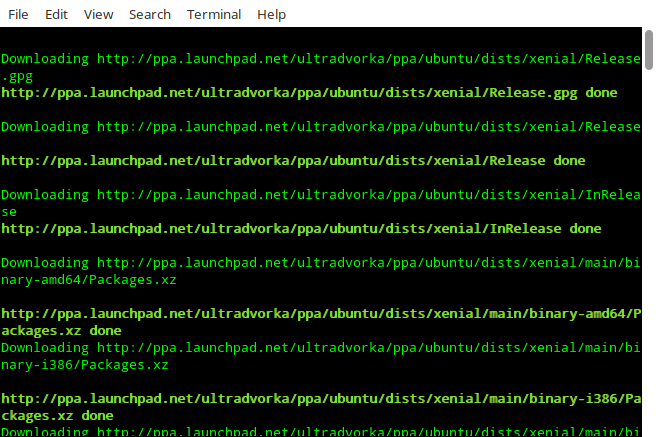
This will take several minutes depending upon the Internet connection speed. Please note that apt-offline is cross platform, so you can use it to download packages on any OS.
Once completed, copy the tmp folder to USB or External drive and return back to the offline system. Make sure your USB device has enough free space to keep all downloaded files, because all packages are available in the tmp folder now.
Steps to do in offline system
Plug in the device in your offline system and go to the tmp directory where you have downloaded all packages earlier.
cd tmp
Then, run the following command to install all download packages.
sudo apt-offline install apt-offline-bundle.zip
This will update the APT database, so APT will find all required packages in the APT cache.
Note: If both online and offline systems are in the same local network, you can transfer the tmp folder to the offline system using “scp” or any other file transfer applications. If both systems are in different places, copy the folder using USB devices.
And, that’s all for now folks. I hope this guide will useful for you. More good stuffs to come. Stay tuned!
Cheers!
Resource:
Fully Update And Upgrade Offline Debian-based Systems的更多相关文章
- ubuntu sudo update与upgrade的作用及区别
ubuntu sudo update与upgrade的作用及区别 入门linux的同志,刚开始最迫切想知道的,大概一个是中文输入法,另一个就是怎么安装软件.本文主要讲一下LINUX安装软件方面的特点. ...
- Ubuntu点滴--apt-get update和upgrade的作用
update update is used to resynchronize the package index files from their sources. The indexes of av ...
- Linux中的update和upgrade的区别
update是更新源里的软件列表 upgrade顾名思义是升级,升级你系统里的软件
- ubuntu 手动更新源 以及使用sudo update与upgrade的作用及区别
一.今天更新一下我的ubuntu系统,用了几个源发现不怎么好用 上网查了一下发现有说阿里云的源挺好用 然后我试了一下 下载速度还挺快,下面分享一下怎么手动添加源列表 1.最好先做一下备份 sudo c ...
- 树莓3B+_apt-get update && apt-get upgrade
在Windows下安装软件,我们只需要有EXE文件,然后双击,下一步直接OK就可以了.但在LINUX下,不是这样的.每个LINUX的发行版,都会维护一个自己的软件仓库,我们常用的几乎所有软件都在这里面 ...
- Linux中的update和upgrade的作用
update 是同步 /etc/apt/sources.list 和 /etc/apt/sources.list.d 中列出的源的索引,这样才能获取到最新的软件包.update是下载源里面的metad ...
- 【linux】记录一个yum update和upgrade的区别
yum update 更新软件包和系统软件.系统内核 yum upgrade只更新软件包,不更新系统软件和系统内核 查看版本号 [root@localhost ~]# uname -r 3.10.0- ...
- download plugin update site for offline installation
Reference Eclipse Launcher Running update manager from command line 好多次为window下的eclipse不能拿到linux下直 ...
- apt-get update 和 upgrade 的区别
http://blog.csdn.net/duyiwuer2009/article/details/26983267
随机推荐
- 简单工厂法( Factory Method)
工厂方法 (Factory Method) Define an interface for creating an object ,but let subclasses decide which cl ...
- Python之模块(二)
1.subprocess模块 2.loggin模块 很多程序都有记录日志的需求,并且日志中包含的信息即有正常的程序访问日志,还可能有错误.警告等信息输出,python的logging模块提供了标准的日 ...
- 关于json 转换BigDecimal精度丢失问题
今天在转换一个关于金额字段发现一个关于json转换的bug 目前尚未深入观察 问题: 如果金钱为bigdecimal json转换后不会丢失精度 但是通过@responsebody 返回到前端后发现 ...
- c++官方文档-模版类
#include <iostream> using namespace std; template<class T> class MyPair { private: T t[] ...
- cplex-Java-样例代码解析
import ilog.cplex.IloCplex; import ilog.concert.*; /** * * * * 最大化 x1 + 2x2 + 3x3</br> * 约束 &l ...
- WPF 颜色拾色器
效果图: 下载:Code 参考: http://www.codeproject.com/Articles/33001/WPF-A-Simple-Color-Picker-With-Previewhtt ...
- windows脚本测试
一. C:\Users\smc892h>systeminfo | findstr 物理内存物理内存总量: 12,167 MB可用的物理内存: 2,103 MB 二.截取字段 参考网站 ...
- CENTOS系统安装及初始化配置相关
一,配置网卡: 1,设置网卡ip地址:vi /etc/sysconfig/network-scripts/ifcfg-eth0 DEVICE=eth0TYPE=EthernetONBOOT=yes ...
- zabbix配合脚本监控Kafka
简介: Kafka是一种高吞吐量的分布式发布订阅消息系统,它可以处理消费者规模的网站中的所有动作流数据.Kafka如下特性,受到诸多公司的青睐. 1.高吞吐量:即使是非常普通的硬件Kafka也可以支持 ...
- jsp 调用其他jsp页面 跳转
response.sendRedirect("test2.jsp"); window.location.reload("test2.jsp"); locatio ...