
部署LNMP架构Blog博客平台 ---惟净
部署环境:VM虚拟机 操作系统:CentOS-6.8-x64 IP地址:192.168.31.91
Mysql数据库版本:5.6.34 Cmake软件包版本:3.5.2
Nginx软件包版本:1.10.2 PHP软件包版本:5.6.30 依赖软件包版本:libiconv-1.14.tar.gz
免费开源博客软件包版本:wordpress-4.7.2-zh_CN.tar.gz
作者:惟净(刘琪)
[root@master-01 ~]# setenforce 0
[root@master-01 ~]# /etc/init.d/iptables stop
[root@master-01 ~]# yum groupinstall "开发工具" -y
[root@master-01 ~]# yum install vim wget pcre pcre-devel openssl openssl-devel -y
[root@master-01 Nginx]# tar xvzf nginx-1.10.2.tar.gz
[root@master-01 Nginx]# cd nginx-1.10.2
[root@master-01 nginx-1.10.2]# useradd nginx -s /sbin/nologin -M
[root@master-01 nginx-1.10.2]# ./configure --user=nginx --group=nginx --prefix=/usr/local/nginx-1.10.2 --with-http_stub_status_module --with-http_ssl_module && make && make install
[root@master-01 nginx-1.10.2]# ln -s /usr/local/nginx-1.10.2/ /usr/local/nginx
[root@master-01 nginx-1.10.2]# cp /usr/local/nginx/conf/nginx.conf /usr/local/nginx/conf/nginx.conf.bck
[root@master-01 nginx-1.10.2]# /usr/local/nginx/sbin/nginx
[root@master-01 nginx-1.10.2]# netstat -tnlp | grep :80
tcp 0 0 0.0.0.0:80 0.0.0.0:* LISTEN 6338/nginx
[root@master-01 Mysql]# tar xvzf cmake-3.5.2.tar.gz
[root@master-01 Mysql]# cd cmake-3.5.2
[root@master-01 cmake-3.5.2]# yum install ncurses-devel -y
[root@master-01 cmake-3.5.2]# ./configure --prefix=/usr/local/cmake && make && make install
[root@master-01 Mysql]# tar xvzf mysql-5.6.34.tar.gz
[root@master-01 Mysql]# cd mysql-5.6.34
[root@master-01 Mysql]# cd mysql-5.6.34
[root@master-01 mysql-5.6.34]# /usr/local/cmake/bin/cmake \
> -DCMAKE_INSTALL_PREFIX=/usr/local/mysql \
> -DMYSQL_DATADIR=/usr/local/mysql/data \
> -DSYSCONFDIR=/etc \
> -DWITH_READLINE=1 \
> -DMYSQL_TCP_PORT=3306 \
> -DMYSQL_UNIX_ADDR=/tmp/mysql.sock \
> -DENABLED_LOCAL_INFILE=1 \
> -DEXTRA_CHARSETS=all \
> -DDEFAULT_CHARSET=utf8 \
> -DDEFAULT_COLLATION=utf8_general_ci
[root@master-01 mysql-5.6.34]# make && make install
[root@master-01 mysql-5.6.34]# rpm -qa | grep mysql
mysql-libs-5.1.73-7.el6.x86_64
[root@master-01 mysql-5.6.34]# yum remove mysql-libs-5.1.73-7.el6.x86_64 -y
[root@master-01 mysql-5.6.34]# useradd -M -u 27 -s /sbin/nologin mysql
[root@master-01 mysql-5.6.34]# groupmod -g 27 mysql
[root@master-01 mysql-5.6.34]# chown mysql.mysql -R /usr/local/mysql/
[root@master-01 mysql-5.6.34]# echo '#Mysql-5.6.34' >> /etc/profile
[root@master-01 mysql-5.6.34]# echo 'export PATH=$PATH:/usr/local/mysql/bin' >> /etc/profile
[root@master-01 mysql-5.6.34]# source /etc/profile
[root@master-01 mysql-5.6.34]# cp /usr/local/mysql/support-files/mysql.server /etc/init.d/mysqld
[root@master-01 mysql-5.6.34]# chmod +x /etc/init.d/mysqld
[root@master-01 mysql-5.6.34]# chkconfig --add mysqld
[root@master-01 mysql-5.6.34]# chkconfig --list mysqld
mysqld 0:关闭 1:关闭 2:启用 3:启用 4:启用 5:启用 6:关闭
[root@master-01 mysql-5.6.34]# chown mysql.mysql -R /usr/local/mysql/data/
[root@master-01 mysql]# cd /usr/local/mysql/
[root@master-01 mysql]# pwd
/usr/local/mysql
[root@master-01 mysql-5.6.34]# ./scripts/mysql_install_db --user=mysql
[root@master-01 mysql]# service mysqld start
Starting MySQL. SUCCESS!
[root@master-01 mysql]# /usr/local/mysql/bin/mysqladmin -u root password "123456"
Warning: Using a password on the command line interface can be insecure.
[root@master-01 mysql]# /usr/local/mysql/bin/mysql -u root -p123456
Warning: Using a password on the command line interface can be insecure.
Welcome to the MySQL monitor. Commands end with ; or \g.
Your MySQL connection id is 2
Server version: 5.6.34 Source distribution
Copyright (c) 2000, 2016, Oracle and/or its affiliates. All rights reserved.
Oracle is a registered trademark of Oracle Corporation and/or its
affiliates. Other names may be trademarks of their respective
owners.
Type 'help;' or '\h' for help. Type '\c' to clear the current input statement.
mysql> exit
Bye
[root@master-01 mysql]# netstat -tnalp | grep :80
tcp 0 0 0.0.0.0:80 0.0.0.0:* LISTEN 6338/nginx
[root@master-01 mysql]# netstat -tnalp | grep :3306
tcp 0 0 :::3306 :::* LISTEN 29405/mysqld
[root@master-01 mysql]# yum install zlib-devel libxml2-devel libjpeg-devel libjpeg-turbo-turbo-devel libiconv-devel freetype-devel libpng-devel gd-devel libcurl-devel libxslt-devel -y
[root@master-01 PHP]# tar xvzf libiconv-1.14.tar.gz
[root@master-01 libiconv-1.14]# ./configure --prefix=/usr/local/libiconv && make && make install
[root@master-01 libiconv-1.14]# wget -O /etc/yum.repos.d/epel.repo http://mirrors.aliyun.com/repo/epel-6.repo
[root@master-01 libiconv-1.14]# yum install libmcrypt-devel mhash mcrypt -y
[root@master-01 PHP]# tar xvzf php-5.6.30.tar.gz
[root@master-01 PHP]# cd php-5.6.30
[root@master-01 php-5.6.30]# pwd
/usr/local/src/PHP/php-5.6.30
[root@master-01 php-5.6.30]# ./configure \
> --prefix=/usr/local/php-5.6.30 \
> --with-mysql=/usr/local/mysql/ \
> --with-iconv-dir=/usr/local/libiconv \
> --with-freetype-dir \
> --with-jpeg-dir \
> --with-zlib \
> --with-png-dir \
> --with-libxml-dir=/usr \
> --enable-xml \
> --disable-rpath \
> --enable-bcmath \
> --enable-shmop \
> --enable-sysvsem \
> --enable-inline-optimization \
> --with-curl \
> --enable-mbregex \
> --enable-fpm \
> --enable-mbstring \
> --with-mcrypt \
> --with-gd \
> --enable-gd-native-ttf \
> --with-openssl \
> --with-mhash \
> --enable-pcntl \
> --enable-sockets \
> --with-xmlrpc \
> --enable-soap \
> --enable-short-tags \
> --enable-static \
> --with-xsl \
> --enable-opcache=no \
> --with-fpm-user=nginx \
> --with-fpm-group=nginx \
> --enable-ftp
[root@master-01 php-5.6.30]# ln -s /usr/local/mysql/lib/libmysqlclient.so.18 /usr/lib64/
[root@master-01 php-5.6.30]# touch ext/phar/phar.phar
[root@master-01 php-5.6.30]# make && make install
[root@master-01 php-5.6.30]# ln -s /usr/local/php-5.6.30/ /usr/local/php
[root@master-01 php-5.6.30]# cp php.ini-production /usr/local/php-5.6.30/lib/php.ini
[root@master-01 php-5.6.30]# cd /usr/local/php/etc/
[root@master-01 etc]# pwd
/usr/local/php/etc
[root@master-01 etc]# cp php-fpm.conf.default php-fpm.conf
[root@master-01 etc]# /usr/local/php/sbin/php-fpm
[root@master-01 etc]# ps aux | grep php-fpm
root 28621 0.0 0.2 223092 4548 ? Ss 20:01 0:00 php-fpm: master process (/usr/local/php-5.6.30/etc/php-fpm.conf)
nginx 28622 0.0 0.2 223092 4264 ? S 20:01 0:00 php-fpm: pool www
nginx 28623 0.0 0.2 223092 4264 ? S 20:01 0:00 php-fpm: pool www
root 28625 0.0 0.0 103324 892 pts/0 S+ 20:01 0:00 grep php-fpm
[root@master-01 etc]# netstat -tanlp | grep :9000
tcp 0 0 127.0.0.1:9000 0.0.0.0:* LISTEN 28621/php-fpm
[root@master-01 etc]# vim /usr/local/nginx/conf/nginx.conf
worker_processes 1;
error_log logs/error.log;
events {
worker_connections 1024;
}
http {
include mime.types;
default_type application/octet-stream;
log_format main '$remote_addr - $remote_user [$time_local] "$request"'
'$status $body_bytes_sent "http_referer"'
'"$http_user_agent" "$http_x_forwarded_for"';
sendfile on;
keepalive_timeout 65;
include extra/blog.conf;
}
[root@master-01 etc]# cd /usr/local/nginx/conf/
[root@master-01 conf]# mkdir extra
[root@master-01 conf]# pwd
/usr/local/nginx/conf
[root@master-01 conf]# cd extra/
[root@master-01 extra]# vim blog.conf
server {
listen 80;
server_name blog.liuqi.org;
location / {
root html/blog;
index index.html index.htm;
}
location ~ .*\.(php|php5)?$ {
root html/blog;
fastcgi_pass 127.0.0.1:9000;
fastcgi_index index.php;
include fastcgi.conf;
}
}
[root@master-01 extra]# /usr/local/nginx/sbin/nginx -t
nginx: the configuration file /usr/local/nginx-1.10.2/conf/nginx.conf syntax is ok
nginx: configuration file /usr/local/nginx-1.10.2/conf/nginx.conf test is successful
[root@master-01 html]# mkdir blog
[root@master-01 html]# cd blog/
[root@master-01 blog]# touch liuqi_info.php
[root@master-01 blog]# echo "<?php phpinfo();?>" > liuqi_info.php
[root@master-01 blog]# pwd
/usr/local/nginx/html/blog
[root@master-01 blog]# /usr/local/nginx/sbin/nginx -s reload
在客户Windows客户端上打开Hosts文件
C:\Windows\System32\drivers\etc\hosts
192.168.31.91 blog.liuqi.org ---> 把这一行写入文件的尾处!保存退出!
在浏览器上输入:http://blog.liuqi.org/liuqi_info.php
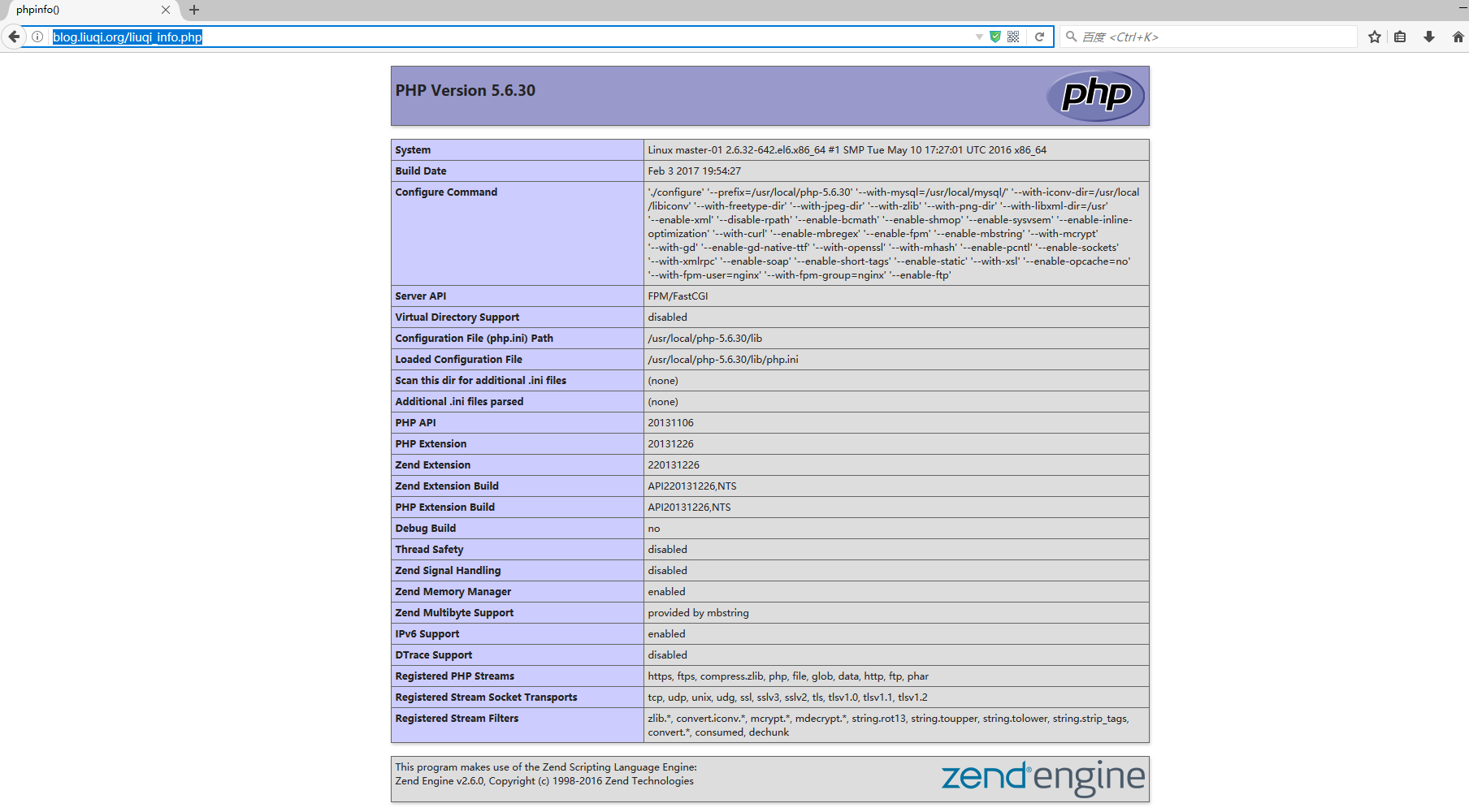
[root@master-01 blog]# netstat -tnalp | grep :80
tcp 0 0 0.0.0.0:80 0.0.0.0:* LISTEN 6338/nginx
[root@master-01 blog]# netstat -tnalp | grep :9000
tcp 0 0 127.0.0.1:9000 0.0.0.0:* LISTEN 28621/php-fpm
[root@master-01 blog]# netstat -tnalp | grep :3306
tcp 0 0 :::3306 :::* LISTEN 29405/mysqld
[root@master-01 blog]# /usr/local/mysql/bin/mysql -u root -p123456
mysql> create database wordpress;
Query OK, 1 row affected (0.00 sec)
mysql> show databases like 'wordpress';
+----------------------+
| Database (wordpress) |
+----------------------+
| wordpress |
+----------------------+
1 row in set (0.00 sec)
mysql> grant all on wordpress.* to wordpress@'localhost' identified by '123456';
Query OK, 0 rows affected (0.00 sec)
mysql> grant all on wordpress.* to wordpress@'192.168.1.%' identified by '123456';
Query OK, 0 rows affected (0.00 sec)
mysql> flush privileges;
Query OK, 0 rows affected (0.00 sec)
mysql> show grants for wordpress@'localhost';
+------------------------------------------------------------------------------------------------------------------+
| Grants for wordpress@localhost |
+------------------------------------------------------------------------------------------------------------------+
| GRANT USAGE ON *.* TO 'wordpress'@'localhost' IDENTIFIED BY PASSWORD '*6BB4837EB74329105EE4568DDA7DC67ED2CA2AD9' |
| GRANT ALL PRIVILEGES ON `wordpress`.* TO 'wordpress'@'localhost' |
+------------------------------------------------------------------------------------------------------------------+
2 rows in set (0.00 sec)
mysql> select user,host from mysql.user;
+-----------+-------------+
| user | host |
+-----------+-------------+
| root | 127.0.0.1 |
| wordpress | 192.168.1.% |
| root | ::1 |
| | localhost |
| root | localhost |
| wordpress | localhost |
| | master-01 |
| root | master-01 |
+-----------+-------------+
8 rows in set (0.00 sec)
mysql> quit
Bye
[root@master-01 blog]# cd /usr/local/nginx/conf/extra/
[root@master-01 extra]# pwd
/usr/local/nginx/conf/extra
[root@master-01 src]# cp wordpress-4.7.2-zh_CN.tar.gz /usr/local/nginx/html/blog/
[root@master-01 src]# cd /usr/local/nginx/html/blog/
[root@master-01 blog]# tar xvzf wordpress-4.7.2-zh_CN.tar.gz
[root@master-01 wordpress]# vim /usr/local/nginx/conf/extra/blog.conf
server {
listen 80;
server_name blog.liuqi.org;
location / {
root html/blog;
index index.php index.html index.htm;
}
location ~ .*\.(php|php5)?$ {
root html/blog;
fastcgi_pass 127.0.0.1:9000;
fastcgi_index index.php;
include fastcgi.conf;
}
}
[root@master-01 wordpress]# /usr/local/nginx/sbin/nginx -s reload
[root@master-01 blog]# service mysqld restart
Shutting down MySQL.. SUCCESS!
Starting MySQL. SUCCESS!
[root@master-01 blog]# rm -rf liuqi_info.php
[root@master-01 blog]# mv wordpress/* .
[root@master-01 blog]# /bin/mv wordpress-4.7.2-zh_CN.tar.gz /usr/local/src/
[root@master-01 blog]# chown -R nginx.nginx /usr/local/nginx/html/blog/
[root@master-01 blog]# /usr/local/nginx/sbin/nginx -s reload
在浏览器上输入:http://blog.liuqi.org


部署LNMP架构Blog博客平台 ---惟净的更多相关文章
- Mweb发布blog到各博客平台
Mweb发布blog到各博客平台 主流博客平台 博客平台 博客园 CSDN 51CTO 博客类型 MetaWeblog API MetaWeblog API MetaWeblog API 博客网址 h ...
- Github 搭建 Hexo 纯静态化个人博客平台
以前一直想搭建一个属于自己的博客平台,有余种种原因一直未能实现,最近闲来无事,参照网上的教程,搭建了属于自己的博客.自己的博客网站,样式自由,不需要受限于各大平台. 本篇为从零开始的基础篇,本篇所包含 ...
- Code First开发系列实战之使用EF搭建小型博客平台
返回<8天掌握EF的Code First开发>总目录 本篇目录 理解应用需求 数据库设计 创建实体数据模型 创建实体类 创建关系和导航属性 实现DbContext类 执行数据访问 理解仓储 ...
- 基于Metaweblog API 接口一键发布到国内外主流博客平台
之前的生活 之前一直使用evenote写博客和日志,其实还是挺方便的.但是我一直都希望能够同步到国内的博客和国外的blogspot等主流博客平台.而强大everote只提供了facebook.twit ...
- 基于Node.js的ghost开源博客平台
Ghost 是一套基于Node.js 构建的开源博客平台(Open source blogging platform),具有易用的书写界面和体验. 1.安装node windows 下安装npm:ht ...
- Centos 7使用docker部署LAMP搭建wordpress博客系统
0.简要概述 LAMP是目前比较流行的web框架,即Linux+Apache+Mysql+PHP的网站架构方案.docker是目前非常流行的虚拟化应用容器,可以为任何应用创建一个轻量级.可移植的容器. ...
- 白嫖码云Pages,两分钟的事,就能搭个百度能搜到的个人博客平台
为了攒点钱让女儿做个富二代(笑),我就没掏钱买服务器,白嫖 GitHub Pages 搭了一个博客平台.不过遗憾的是,GitHub Pages 只能被谷歌收录,无法被百度收录,这就白白损失了一大波流量 ...
- Dropplets – 极简的 Markdown 博客平台
Dropplets 是一个简单的博客平台,专注于提供正是你在博客解决方案中需要的.当涉及到基础的博客功能,你真正想要做的是写和发表,而这就是 Dropplets 的过人之处.Dropplets 是一个 ...
- Redis C客户端API - God's blog - 博客频道 - CSDN.NET
Redis C客户端API - God's blog - 博客频道 - CSDN.NET Redis安装步骤: 1.redis server安装 wget http://redis.googlecod ...
随机推荐
- Python正则表达式学习笔记
[] 字符类,只要匹配里面的任意字符,都算匹配 . 元字符,可以匹配除换行符之外的所有字符 大小写敏感,但是可以关闭 \d 可以匹配0-9中的任意数字 {3}大括号里面的数字,边上前面一个字符匹配的 ...
- CodeForces 652C Foe Pairs
只要计算每个位置最多能到哪个位置,累加即可,DP从后往前预处理一下每个位置到达的最远位置. 有坑点:输入的时候如果同一个点出发的,需要保存最小值. #include<cstdio> #in ...
- CDbConnection failed to open the DB connection: SQLSTATE[28000] [1045] Access denied for user 'root'@'localhost' (using password: YES)
连接mysql出错:CDbConnection failed to open the DB connection: SQLSTATE[28000] [1045] Access denied for u ...
- objective-c之各种数值
各种数值 NSArray和NSDictionary都只能存储对象,不能存储任何基本类型的数据,如int,float,struct.因此我们可以用对象来封装基本的数值. NSNumber Cocoa提供 ...
- 功率W与dBm的对照表及关系(转)
源:功率W与dBm的对照表及关系 功率W与dBm的对照表 dBm Watts dBm Watts 0 ...
- Unity3D ——强大的跨平台3D游戏开发工具(五)
第九章 图形用户界面类G.U.I 您在玩很多3D游戏的时候,不知是否注意到在游戏界面中,总有一些图形和文字信息是不随着3D视角的改变而改变的.这也是由于游戏本身的要求而决定的.比如说英雄的生命值,聊天 ...
- jmeter+ant+jenkins+mac 构建后自动发送邮件
1.安装Email Extension Plugin插件 2.进入系统管理-系统设置,按如下进行设置: ------------------------------------------------ ...
- 原生JavaScript之“淘宝轮播图”
轮播图是我们学习原生js的必经之路 它包含很多基本知识的运用,像this的使用,DOM的操作,还有setInterval的使用和清除,浮动与定位等等,很好的考察了我们的基础知识牢不牢固, 话不多说,直 ...
- JAVA控制台输入输出方法总结
java的控制台输入输出有很多方法,此文分别对其进行介绍. 1.控制台的输入 关于控制台的输入主要介绍三种方法,第一种方法使用BufferedReader获得控制台输入的数据,此方法是传统的输入方法, ...
- 从底层谈WebGIS 原理设计与实现(三):WebGIS前端地图显示之根据地理范围换算出瓦片行列号的原理(转载)
从底层谈WebGIS 原理设计与实现(三):WebGIS前端地图显示之根据地理范围换算出瓦片行列号的原理 1.前言 在上一节中我们知道了屏幕上一像素等于实际中多少单位长度(米或经纬度)的换算方法, ...