
spring boot框架eclipse快速搭建
1.maven安装配置好,使用eclipse创建maven项目(选择maven-archetype-quickstart)
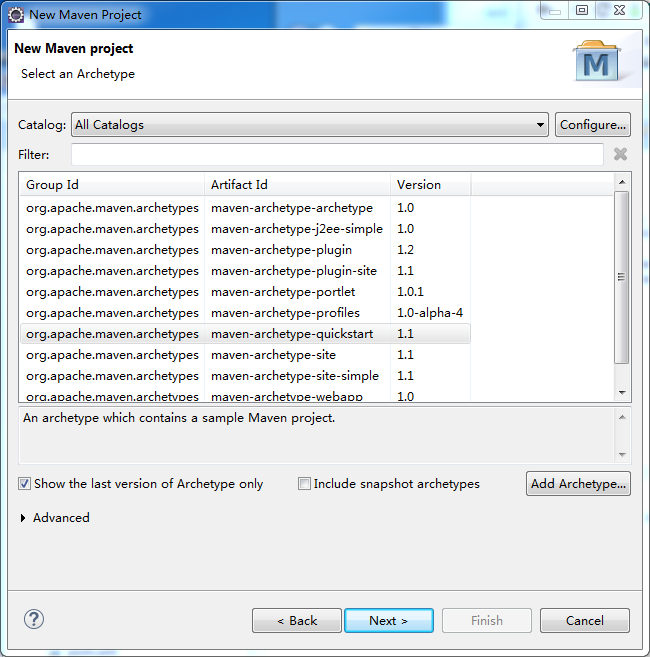
2.然后进入http://docs.spring.io/spring-boot/docs/1.5.1.RELEASE/reference/htmlsingle/(maven installation)配置pom.xml文件
<!-- Inherit defaults from Spring Boot -->

    <parent>

        <groupId>org.springframework.boot</groupId>

        <artifactId>spring-boot-starter-parent</artifactId>

        <version>1.5.1.RELEASE</version>

    </parent>

    <!-- Add typical dependencies for a web application -->

    <dependencies>

        <dependency>

            <groupId>org.springframework.boot</groupId>

            <artifactId>spring-boot-starter-web</artifactId>

        </dependency>

    </dependencies>

    <!-- Package as an executable jar -->

    <build>

        <plugins>

            <plugin>

                <groupId>org.springframework.boot</groupId>

                <artifactId>spring-boot-maven-plugin</artifactId>

            </plugin>

        </plugins>

    </build>
注释:eclipse创建maven项目时,自动加入了junit,我在创建时删除了junit模块依赖 与 test源码包
3.编写测试类
 package hello;

 import org.springframework.boot.*;

 import org.springframework.boot.autoconfigure.*;

 import org.springframework.stereotype.*;

 import org.springframework.web.bind.annotation.*;

 @Controller

 @EnableAutoConfiguration

 public class App{

     @RequestMapping("/")

     @ResponseBody

     String home() {

         return "Hello World!";

     }

     public static void main(String[] args) throws Exception {

         SpringApplication.run(App.class, args);

     }

 }
4.最后进入项目根目录pom.xml文件下,执行mvn clean install
耐心等待maven构建完,运行App main方法,服务启动,成功。
启动后默认访问端口及地址是:http://127.0.0.1:8080
打包:
mvn clean install
会在项目target目录下生成jar执行文件
发布:
java -jar *-SNAPSHOT.jar

spring boot框架eclipse快速搭建的更多相关文章
- spring boot / cloud (十七) 快速搭建注册中心和配置中心
spring boot / cloud (十七) 快速搭建注册中心和配置中心 本文将使用spring cloud的eureka和config server来搭建. 然后搭建的模式,有很多种,本文主要聊 ...
- Spring boot 集成 Dubbo 快速搭建
架构: 1.ZooKeeper:服务注册中心 2.api工程:提供对外暴露的服务API 3.provider:服务提供者 4.consumer:服务消费者 示例如下: (一)新建 Maven 项目 a ...
- Spring Boot 学习(一) 快速搭建SpringBoot 项目
快速搭建一个 Spring Boot 项目 部分参考于<深入实践Spring Boot>.<Spring实战 第四版>与程序猿DD的有关博客. 参考(嘟嘟独立博客):http: ...
- Spring Boot基础:Spring Boot简介与快速搭建(1)
1. Spring Boot简介 Spring Boot是由Pivotal团队提供的全新框架,其设计目的是用来简化Spring应用的创建.运行.调试.部署等. Spring Boot默认使用tomca ...
- 初识Spring Boot框架和快速入门
前面的铺垫文章已经连着写了六篇了,主要是介绍了spring和SpringMVC框架,小伙伴们在学习的过程中大概也发现了这两个框架需要我们手动配置的地方非常多,不过做JavaEE开发的小伙伴们肯定也听说 ...
- (Spring Boot框架)快速入门
Spring Boot 系列文章推荐 Spring Boot 入门 Spring Boot 属性配置和使用 Spring Boot 集成MyBatis Spring Boot 静态资源处理 今天介绍一 ...
- 在Spring Boot框架下使用WebSocket实现消息推送
Spring Boot的学习持续进行中.前面两篇博客我们介绍了如何使用Spring Boot容器搭建Web项目(使用Spring Boot开发Web项目)以及怎样为我们的Project添加HTTPS的 ...
- Mock平台2-Java Spring Boot框架基础知识
微信搜索[大奇测试开],关注这个坚持分享测试开发干货的家伙. 认识Spring Boot 在N年前的大学时代想要开发一个Web服务使用的还是SSH框架(struts+spring+hibernate) ...
- spring boot 框架设计步骤
spring boot 框架设计步骤: 1.poem.xml配置 2.application.yml配置 3.entiry实体 4.realm.Myrealm extends AuthorizingR ...
随机推荐
- (中等) POJ 2482 Stars in Your Window,静态二叉树。
Description Here comes the problem: Assume the sky is a flat plane. All the stars lie on it with a l ...
- html的URL参数传值问题
在URL中的参数传值时,例如:www.nihao.com?id=001 ,= 两边不能有空格,不然PHP在通过$_GET['id']获取时会出现传值为空.
- (中等) POJ 2528 Mayor's posters , 离散+线段树。
Description The citizens of Bytetown, AB, could not stand that the candidates in the mayoral electio ...
- 忘记Django登陆账号和密码的处理方法
Reference: http://nolinux.blog.51cto.com/4824967/1743392 公司部署了一套分布式网络监控系统,使用celery来做的分布式任务队列,针对celer ...
- C # 产生鼠标点击事件
新建一个WinFrom,找到MouseDown,回车,生成代码如下点击的效果如图 参考文章:http://blog.csdn.net/u012842807/article/details/454143 ...
- SVN:cannot map the project with svn provider解决办法
转自:http://www.blogjava.net/jzone/articles/337697.html 首先,叙述一下令人蛋疼的情况,纠结了我几个小时,更新Workspace原有的项目,显示更新成 ...
- HTML5学习笔记四:html5结构
一.大纲:大纲即文档中各内容区块的结构编排 1. 显示编排内容区块:使用section等元素创建文档结构,每个内容区块使用标题(h1~h6,hgroup); 2. 隐式编排内容区块:根据页面所书写的各 ...
- javac不是内部或外部命令
1.描述 在命令行输入javac,提示“不是内部或外部命令”. 2.解决过程 2.1.解决方案一 2.1.1.检查并添加环境变量 通常就是这个原因导致. 2.1.2.过程一 确实还是环境变量没有写对. ...
- Spring 之 配置(Java之负基础实战)
1.程序加入Spring <?xml version="1.0" encoding="utf-8"?> <web-app xmlns=&quo ...
- IE6中让png的icon图标也透明的完整代码段
一个引用了在IE6中让img图标也可引用png图片的js插件代码的html是这样写的,兼容IE6: <a class="btn btn-select" href=" ...