
php script 的生命周期
The Execution Life-cycle
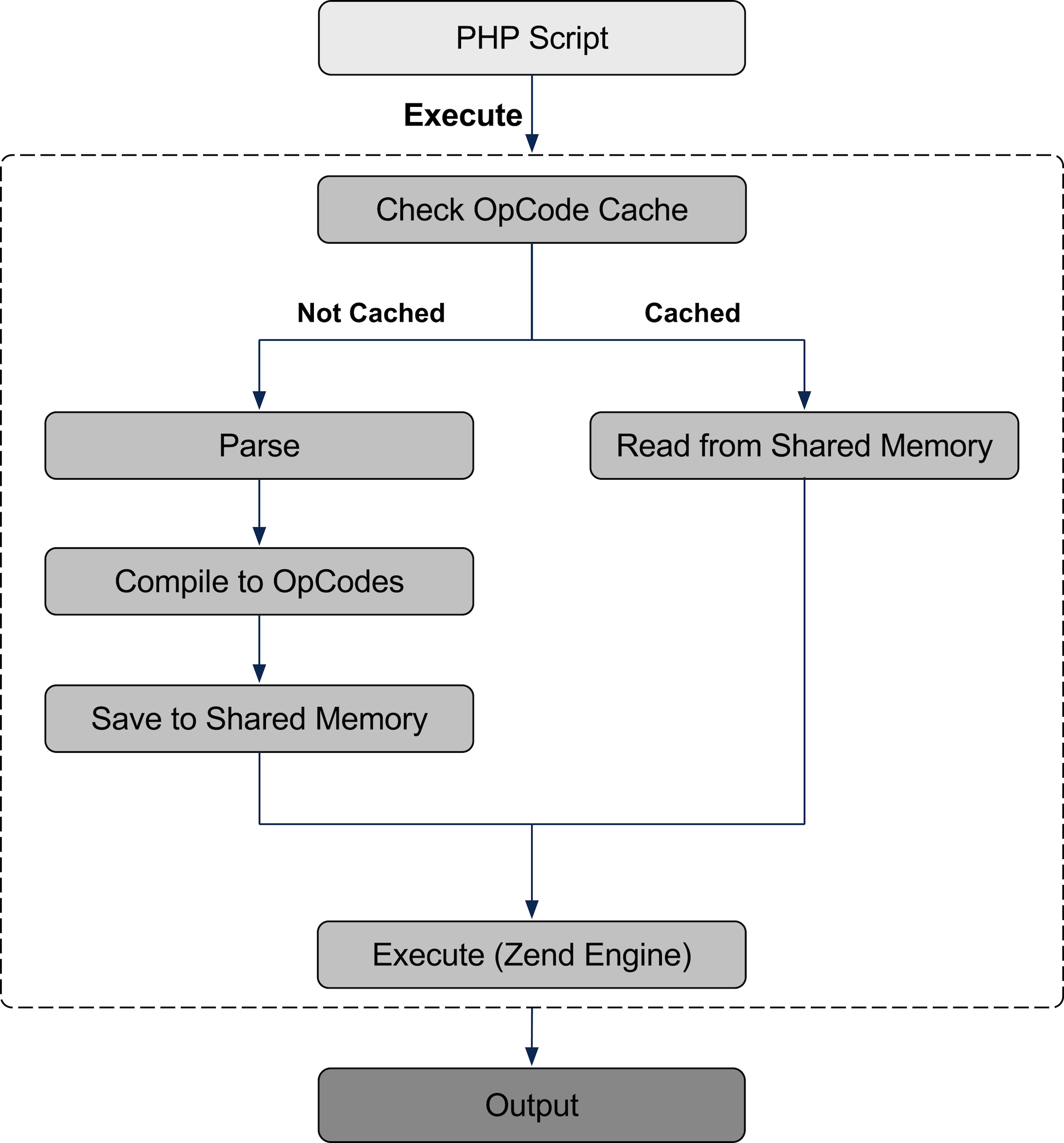
PHP is a scripting language, which most people take to mean that it is not compiled. While this is true in the traditional sense in that we are not calling a gcc or javac; instead we are compiling every time the script is requested. In fact, the PHP and Java compilation life cycles are pretty similar, because they both compile to an intermediary instruction set (opcodes, or bytecodes) which are then run in a virtual machine (Zend VM or JVM).

The parsing and compilation phases is slow. When we add an opcache, we short-circuit this process by storing the result of the parsing and compilation phases, leaving just the execution to run dynamically as always. In effect, we are closer to the Java life-cycle now; with the main differences being that we saved to shared memory instead of a file, and can automatically re-compile if changes occur to the script.
Tokens & OpCodes
Once PHP gets ahold of your code, it creates two representations of your code. The first is tokens; this is a way to break down your code into consumable chunks for the engine to compile into it’s second representation, opcodes. The opcodes are the actual instructions for the Zend VM to execute.
The Worst Hello World Ever
Taking a simple code example, a vastly over-engineered hello world example, lets look at both tokens, and opcodes.
<?php

class Greeting {

    public function sayHello($to)

    {

        echo "Hello $to";

    }

}

$greeter = new Greeting();

$greeter->sayHello("World");

?>
Tokenizing
The first part of the compilation process parses the code into tokens. These are passed to the compiler to create OpCodes.
|
Token Name |
Value |
|
|
<?php |
|
|
class |
|
|
|
|
|
Greeting |
|
|
|
|
{ |
|
|
|
|
|
|
public |
|
|
|
|
|
function |
|
|
|
|
|
sayHello |
|
( |
|
|
|
$to |
|
) |
|
|
|
|
|
{ |
|
|
|
|
|
|
echo |
|
|
|
|
" |
|
|
|
Hello |
|
|
$to |
|
" |
|
|
; |
|
|
|
|
|
} |
|
|
|
|
|
} |
|
|
|
|
|
|
$greeter |
|
|
|
|
= |
|
|
|
|
|
|
new |
|
|
|
|
|
Greeting |
|
( |
|
|
) |
|
|
; |
|
|
|
|
|
|
$greeter |
|
|
-> |
|
|
sayHello |
|
( |
|
|
|
"World" |
|
) |
|
|
; |
|
|
|
|
|
|
?> |
As you can see, most discrete piece of the code is given a name, starting with T_ and then a descriptive name. This is where the infamous T_PAAMAYIM_NEKUDOTAYIM error comes from: it represents the double colon.
Some tokens do not have a T_ name, this is because they are a single character — it would obviously wasteful to then assign them a much larger name — T_DOUBLE_QUOTE or T_SEMICOLON don’t make much sense.
It is also interesting to see the difference interpolation of variables makes; take the two strings, both double quotes, "Hello $to" and "World", the first, to account for the interpolated variables is split into 4 unique opcodes:
|
" |
|
|
|
Hello |
|
|
$to |
|
" |
and the non-interpolated string is simply one:
|
|
"World" |
With this view we can start to see how small choices we make start to affect performance in miniscule ways (and frankly, especiallyin this case, as with single Vs double quotes, it’s not worth caring about!)
You can see the script that was used to generate this list of tokens here.
OpCodes
Next, lets look at how this looks like once we have compiled to opcodes. This is what the OpCode caches store.
To get the opcodes, we run the script through VLD, the Vulcan Logic Dumper, a pecl extension for PHP. To install it simple run:
$ pecl install vld-beta
And make sure the following is added to your PHP config:
| extension=vld.so |
Once you’ve done this, you can dump the opcodes for any code using the following on the command line:
$ php -dvld.active=1 -dvld.execute=0 <file>
VLD dumps global code (main script), global functions, and then class functions. However we’re going to look at our class functions first so as follow the same flow as the code itself.
Understanding VLD Dumps
A VLD dump is typically multiple dumps, one for the main script, then one for each global function and class function. Each dump is identical in structure.
First is the header which lists (if applicable) the class, and the function; then it lists the filename. Next it lists the function name (again, and only if applicable).
| Class Greeting: | |
| Function sayhello: | |
| filename: ./Greeting.php | |
| function name: sayHello |
Next, it lists the total number of opcodes in the dump:
| number of ops: 8 |
And then it lists the compiled variables (see below for details):
| compiled vars: !0 = $to |
This is particularly important to take notice of.
Finally, it actually lists the opcodes, one per line, under the heading row:
| line # * op fetch ext return operands | |
| ------------------------------------------------------------------------ |
Each opcode has the following:
line: The line number in the source file#: The opcode number*: entry (left aligned) and exit points (right aligned), indicated by greater than symbols (>)op: The opcode namefetch: Details on global variable fetches (super globals, or the use of the global keyword)ext: Extra data associated with the opcode, for example the opcode to which it should JMPreturn: The location where return data from the operation is storedoperands: the operands used by the opcode (e.g. two variables to concat)
Note: Not all columns are applicable to all opcodes.
Variables
There are multiple types of variables within the Zend Engine. All variables use numeric identifiers.
- Variable prefixed with an exclamation point (!) are compiled variables (
CVs) — these are pointers to userland variables - Variables prefixed with a tilde (~) are temporary variables used for temporary storage (
TMP_VARs) of in-process operations - Variables prefixed with a dollar ($) are another type of temporary variables (
VARs) which are tied to userland variables like CVs and therefore require things like refcounting. - Variables prefixed with a colon (:) are temporary variables used for the storage of the result of lookups in the class hashtable
Dumping Hello World
| Class Greeting: | |
| Function sayhello: | |
| number of ops: 8 | |
| compiled vars: !0 = $to | |
| line # * op fetch ext return operands | |
| ---------------------------------------------------------------------------- | |
| 3 0 > EXT_NOP | |
| 1 RECV !0 | |
| 5 2 EXT_STMT | |
| 3 ADD_STRING ~0 'Hello+' | |
| 4 ADD_VAR ~0 ~0, !0 | |
| 5 ECHO ~0 | |
| 6 6 EXT_STMT | |
| 7 > RETURN null |
Reading this, we see that we’re in the function sayHello of the class Greeting, and that we have one compiled variable, $to, which is identified by !0.
Next, following the list of opcodes (ignoring the no-op), we can see that:
RECV: The function receives a value which is assigned to!0(which represents$to)ADD_STRING: Next we create a temporary variable identified by a~,~0and assign the static string,'Hello+', where the+represents a spaceADD_VAR: After this, we concat the contents our variable,!0to our temporary variable,~0ECHO: Then we echo that temporary variableRETURN: Finally we return nothing as the function ends
Next, lets look at the main script:
Here we see one compiled variable, $greeter, identified by !0. So lets walk through this, again we’ll ignore the no-op.
FETCH_CLASS: First we lookup the class,Greeter; we store this reference in:1NEW: Then we instantiate an instance of the class (:1) and assign it to aVAR,$2, andDO_FCALL_BY_NAME: call the constructorASSIGN: Next we assign the resulting object (inVAR $2) to ourCV(!0)INIT_METHOD_CALL: We start calling the sayHello method, andSEND_VAL: pass in'World'to the method, andDO_FCALL_BY_NAME: Actually execute the methodRETURN: The script ends successfully, with an implicit return of 1.
php script 的生命周期的更多相关文章
- react9 生命周期
<body><!-- React 真实 DOM 将会插入到这里 --><div id="example"></div> <!- ...
- Vue实例及生命周期
1,Vue实例生命周期. 有时候,我们需要在实例创建过程中进行一些初始化的工作,以帮助我们完成项目中更复杂更丰富的需求,开发,针对这样的需求,Vue提供给我们一系列的钩子函数 2,Vue生命周期的阶段 ...
- MonoBehaviour Lifecycle(生命周期/脚本执行顺序)
脚本执行顺序 前言 搭建一个示例来验证Unity脚本的执行顺序,大概测试以下部分: 物理方面(Physics) 渲染(Scene rendering) 输入事件(InputEvent) 流程图 Uni ...
- ReactJS入门(二)—— 组件的生命周期
如果你熟悉avalon,使用过 data-include-rendered 和 data-include-loaded 等回调方法,那么你会很好地理解React组件的各个生命周期. 说白了其实就是Re ...
- vue生命周期
1.Vue1.0生命周期 1.1钩子函数: created -> 实例已经创建 √ beforeCompile -> 编译之前 compiled -> 编译之后 read ...
- 05-Vue入门系列之Vue实例详解与生命周期
Vue的实例是Vue框架的入口,其实也就是前端的ViewModel,它包含了页面中的业务逻辑处理.数据模型等,当然它也有自己的一系列的生命周期的事件钩子,辅助我们进行对整个Vue实例生成.编译.挂着. ...
- Cordova - 使用Cordova开发iOS应用实战2(生命周期、使用Safari调试)
Cordova - 使用Cordova开发iOS应用实战2(生命周期.使用Safari调试) 前文我们创建了一个简单的Cordova项目,结构如下: 1,Cordova生命周期事件 (1)device ...
- 理解AngularJS生命周期:利用ng-repeat动态解析自定义directive
ng-repeat是AngularJS中一个非常重要和有意思的directive,常见的用法之一是将某种自定义directive和ng-repeat一起使用,循环地来渲染开发者所需要的组件.比如现在有 ...
- php会话(session)生命周期概念介绍及设置更改和回收
http://www.169it.com/article/8429580816135935852.html https://my.oschina.net/jiec/blog/227252 sessi ...
随机推荐
- IE11中的F12无效的问题
最近做的一个项目中,h5中的video标签IE11在有的机器上兼容,有的机器上不兼容,很是让人头疼.将IE卸载后重装又发现最新的IE11中F12开发者工具失效.面对F12失效的问题,具体解决办法如下: ...
- Augular JS里的各种ng
Augular JS里的各种ng- 正文: 1.ng-disabled="一种状态:该状态下不可用"例如: %button.btn.btn-2(ng-disabled=" ...
- zf-删除重复数据只保留一条(转)
http://blog.csdn.net/anya/article/details/6407280
- 我为什么坚持DBA一定要懂开发
我为什么坚持DBA一定要懂开发时间 2016-03-23 15:34:08 张碧池的幸福生活原文 http://pottievil.com/我为什么坚持dba一定要懂开发/主题 DBA 数据库最近手头 ...
- T-shirts Distribution
T-shirts Distribution time limit per test 1 second memory limit per test 256 megabytes input standar ...
- Swift & OC 混编 浅析
转载自:http://www.infoq.com/cn/articles/wangyi-cartoon-swift-mixed-practice?utm_campaign=rightbar_v2&am ...
- HDU1518:Square(DFS)
Square Time Limit : 10000/5000ms (Java/Other) Memory Limit : 65536/32768K (Java/Other) Total Submi ...
- IDL 遍历 XML文档示例
IDL解析XML文档同样也有2种方法:DOM和SAX方式:两种方法在IDL自带的帮助里面有详细介绍,可以去查看. IDL 源码PRO sample_recurse, oNode, indent COM ...
- USACO Section 1.3 Combination Lock 解题报告
题目 题目描述 农夫John的牛从农场逃脱出去了,所以他决定用一个密码锁来把农场的门锁起来,这个密码锁有三个表盘,每个表盘都是环形的,而且上面刻有1~N,现在John设了一个开锁密码,而且这个锁的设计 ...
- opencart配置税率
1.System->Localisation->Geo Zones新增税收区域 2.System->Localisation->Taxes->Tax Rates新增税率 ...