
ftp_get_file_and_directory


        class DirectoryItem

        {

            public Uri BaseUri;

            public string AbsolutePath

            { get { return string.Format("{0}/{1}", BaseUri, Name); } }

            public DateTime DateCreated;

            public bool IsDirectory;

            public string Name;

            public List<DirectoryItem> Items;

            public override string ToString() { return Name; }

        }

        internal enum enumFolderListFMT { UNIX, DOS_IIS };

        internal enum enumFTPPlatform { WindowsServer2008, ServU}

        /// <summary>

        /// 获取目录信息(包含文件夹,文件)

        /// </summary>

        /// <param name="address"></param>

        /// <param name="username"></param>

        /// <param name="password"></param>

        /// <returns></returns>

        static List<DirectoryItem> GetDirectoryInformation(string addr2, string username, string password)

        {

            var address = addr2.EndsWith("/") ? addr2.Substring(, addr2.Length - ) : addr2;//去除最后一个斜杠

            FtpWebRequest request = (FtpWebRequest)FtpWebRequest.Create(address);

            request.Method = WebRequestMethods.Ftp.ListDirectoryDetails;

            request.Credentials = new NetworkCredential(username, password);

            request.UsePassive = true;

            request.UseBinary = true;

            request.KeepAlive = false;

            string[] list = null;

            using (FtpWebResponse response = (FtpWebResponse)request.GetResponse())

            using (StreamReader reader = new StreamReader(response.GetResponseStream()))

            {

                list = reader.ReadToEnd().Split(new string[] { "\r\n" }, StringSplitOptions.RemoveEmptyEntries);

            }

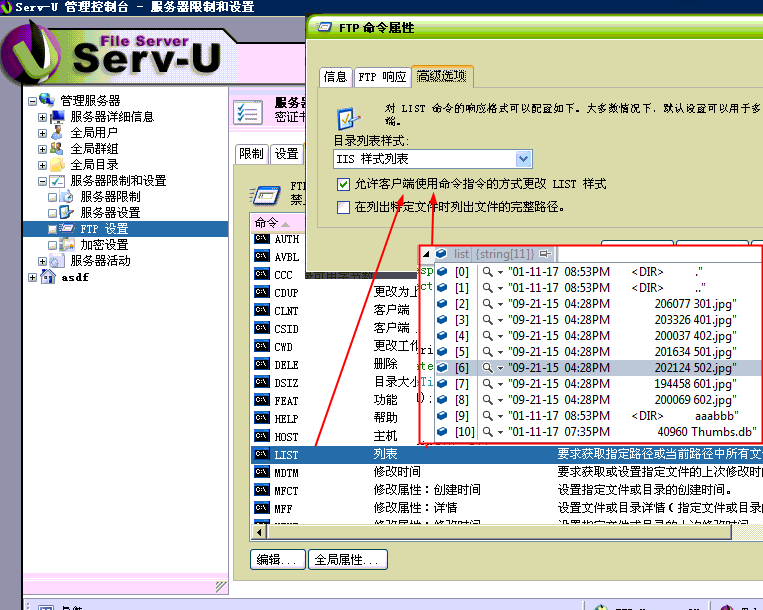
            //unix or dos_iis format?

            enumFolderListFMT folderFormat = enumFolderListFMT.UNIX;

            int dir_pos = ;

            bool found = false;

            foreach (var item in list)

            {

                if (item.ToLower().Contains("<dir>"))

                {

                    folderFormat = enumFolderListFMT.DOS_IIS;

                    dir_pos = item.ToLower().IndexOf("<dir>");

                    found = true;

                    break;

                }

            }

            if (!found && list.Length >  && list[].ToLower()[] != 'd' && list[].ToLower()[] != '-')

            {

                folderFormat = enumFolderListFMT.DOS_IIS;

            }

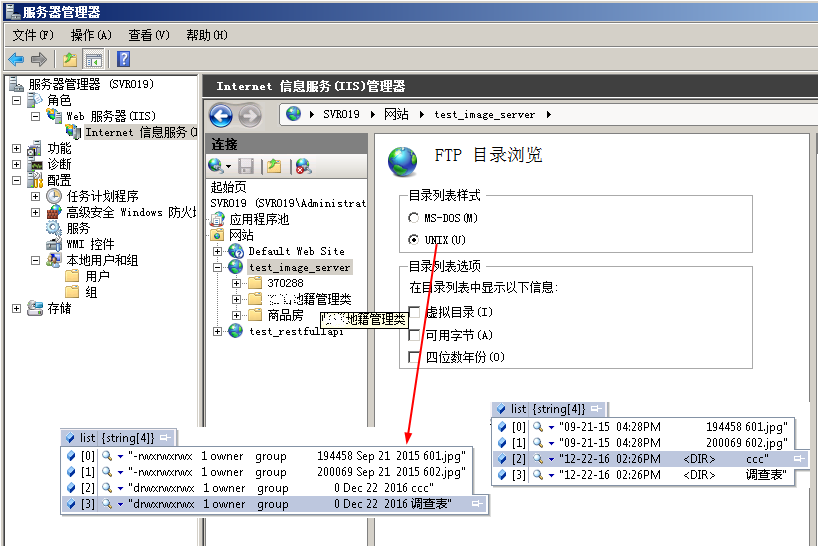
            enumFTPPlatform ftpPlatform = enumFTPPlatform.WindowsServer2008;

            if (folderFormat == enumFolderListFMT.UNIX)

            {

                if (list.Length >  && list[].Substring(, ).ToLower().Count(c => c == '-') < )

                    ftpPlatform = enumFTPPlatform.WindowsServer2008;

                else

                    ftpPlatform = enumFTPPlatform.ServU;

            }

            List<DirectoryItem> returnValue = new List<DirectoryItem>();

            if (folderFormat == enumFolderListFMT.DOS_IIS)

            {

                foreach (var item in list)

                {

                    if (item.ToLower().Contains("<dir>"))

                    {

                        var dir = item.Substring(dir_pos + ).Trim();

                        if (dir == "." || dir == "..") continue;

                        var di = new DirectoryItem();

                        di.BaseUri = new Uri(address);

                        //di.DateCreated = dateTime;

                        di.IsDirectory = true;

                        di.Name = dir;

                        //Debug.WriteLine(di.AbsolutePath);

                        di.Items = GetDirectoryInformation(di.AbsolutePath, username, password);

                        returnValue.Add(di);

                    }

                    else

                    {

                        string filename = "";

                        if(found)

                            filename = item.Substring(dir_pos + ).Trim();

                        else

                            filename = item.Substring().Trim();

                        var di = new DirectoryItem();

                        di.BaseUri = new Uri(address);

                        di.IsDirectory = false;

                        di.Name = filename;

                        di.Items = null;

                        returnValue.Add(di);

                    }

                }

            }

            else if (folderFormat == enumFolderListFMT.UNIX)

            {

                var pos = ftpPlatform == enumFTPPlatform.WindowsServer2008 ?  : ;

                foreach (var item in list)

                {

                    if (item.Substring(, ).ToLower() == "d")

                    {

                        var dir = item.Substring(pos).Trim();

                        if (dir == "." || dir == "..") continue;

                        var di = new DirectoryItem();

                        di.BaseUri = new Uri(address);

                        di.IsDirectory = true;

                        di.Name = dir;

                        di.Items = GetDirectoryInformation(di.AbsolutePath, username, password);

                        returnValue.Add(di);

                    }

                    else if (item.Substring(, ).ToLower() == "-")

                    {

                        var filename = item.Substring(pos).Trim();

                        var di = new DirectoryItem();

                        di.BaseUri = new Uri(address);

                        di.IsDirectory = false;

                        di.Name = filename;

                        di.Items = null;

                        returnValue.Add(di);

                    }

                }

            }

            return returnValue;

        }

        /// <summary>

        /// 下载文件

        /// </summary>

        /// <param name="filePath">下载到哪里</param>

        /// <param name="outputFilename">下载后的文件名</param>

        /// <param name="fileName">服务器上的文件名</param>

        /// <param name="ftpServerIP">服务器全路径,注意最后的斜线不可少。如ftp://172.18.1.152:8009/aaa/</param>

        /// <param name="ftpUserID">访问的用户名</param>

        /// <param name="ftpPassword">访问的密码</param>

        /// <returns></returns>

        public int DownloadFile(string filePath, string outputFilename, string fileName, string ftpServerIP, string ftpUserID, string ftpPassword)

        {

            FtpWebRequest reqFTP;

            try

            {

                //filePath = < <The full path where the file is to be created.>>,

                //fileName = < <Name of the file to be created(Need not be the name of the file on FTP server).>>

                FileStream outputStream = new FileStream(filePath + "\\" + outputFilename, FileMode.Create);

                reqFTP = (FtpWebRequest)FtpWebRequest.Create(new Uri(ftpServerIP + fileName));

                reqFTP.Method = WebRequestMethods.Ftp.DownloadFile;

                reqFTP.UseBinary = true;

                reqFTP.KeepAlive = false;

                reqFTP.Credentials = new NetworkCredential(ftpUserID, ftpPassword);

                FtpWebResponse response = (FtpWebResponse)reqFTP.GetResponse();

                Stream ftpStream = response.GetResponseStream();

                long cl = response.ContentLength;

                int bufferSize = ;

                int readCount;

                byte[] buffer = new byte[bufferSize];

                readCount = ftpStream.Read(buffer, , bufferSize);

                while (readCount > )

                {

                    outputStream.Write(buffer, , readCount);

                    readCount = ftpStream.Read(buffer, , bufferSize);

                }

                ftpStream.Close();

                outputStream.Close();

                response.Close();

                return ;

            }

            catch (Exception ex)

            {

                // Logging.WriteError(ex.Message + ex.StackTrace);

                System.Windows.Forms.MessageBox.Show(ex.Message);

                return -;

            }

        }
get_directory_file_download
ftp_get_file_and_directory的更多相关文章
随机推荐
- 每个程序员都应该学习使用Python或Ruby
每个程序员都应该学习使用Python或Ruby 如果你是个学生,你应该会C,C++和Java.还会一些VB,或C#/.NET.多少你还可能开发过一些Web网页,你知道一些HTML,CSS和JavaSc ...
- getWritableDatabase()与getReadableDatabase()的区别:
getWritableDatabase取得的实例不是仅仅具有写的功能,而是同时具有读和写的功能同样的 getReadableDatabase取得的实例也是具对数据库进行读和写的功能. 两者的区别在于 ...
- 【转】获取/设置IFRAME内对象元素的几种JS方法
1.IE专用(通过frames索引形象定位): document.frames[i].document.getElementById('元素的ID'); 2.IE专用(通过IFRAME名称形象定位): ...
- Entity Framework 学习初级篇7--基本操作:增加、更新、删除、事务
本节,直接写通过代码来学习.这些基本操作都比较简单,与这些基本操作相关的内容在之前的1至6节基本介绍完毕. l 增加: 方法1:使用AddToXXX(xxx)方法:实例代码如下: ...
- ssh-copy-id
建立无密码登录是经现root成功普通用户失败, chmod 0600 authorized_keys setenforce 0 ssh-copy-id server2 ssh-add ~/.ss ...
- 关于日期条件查询的sql 代码
daysqhql = "select sum(c.casenum) from domain.Case c where" + " convert(varchar(10),c ...
- PAT (Advanced Level) 1091. Acute Stroke (30)
BFS求连通块.递归会爆栈. #include<cstdio> #include<cstring> #include<cmath> #include<algo ...
- 一个门外汉的理解 ~ Faster R-CNN
首先放R-CNN的原理图 显然R-CNN的整过过程大致上划分为四步: 1.输入图片 2.生成候选窗口 3.对局部窗口进行特征提取(CNN) 4.分类(Classify regions) 而R-CNN的 ...
- 一些简单的例子让你在Java中能更好的学习并理解循环结构(1)!
一.java中流程控制方式采用三种基本流程结构:顺序结构,选择(分支)结构,循环结构. 1.[if-else 结构] if(1>2){ system.out.println("if条件 ...
- Cordova插件开发
我在网上找了很多关于Cordova插件开发的例子,都不是我想要的,我只想要,怎么调用这个生成出来的js,最终得到了最为直接又简单的方法,希望给能帮助到大家! document.addEventList ...