代码分析在大多数项目中通常是作为最后一个步骤(如果做了的话)完成的。其通常难以配置及与现有代码整合。

本文旨在勾勒出使用 Gradle 整合 PMD 与 FindBugs 的步骤,并将其与一个现有的 Sonar 构建工具进行整合。

PMD、CheckStyle 和 FindBugs

首先要做的就是在我们的 build.gradle 文件中添加插件:

1
2
3
apply plugin: 'checkstyle'
apply plugin: 'pmd'
apply plugin: 'findbugs'

这些插件能在我们的代码中启用 PMD、CheckStyle 和 FindBugs。

ostatsu
翻译于 1个月前

1人顶


顶 翻译的不错哦!

默认情况下,这些插件将对测试程序和主程序都进行分析。对于我们,需要避免在测试程序上运行FindBugs和PMD,我们使用如下命令:

1
2
3
4
5
6
findbugs{
    findbugsTest.enabled=false
}
pmd {
    pmdTest.enabled=false
}

下面,我们从Gradle中执行:

1
./gradlew clean findBugsMain pmdMain

这将对工程进行清理,然后对源代码执行FindBugs和PMD。

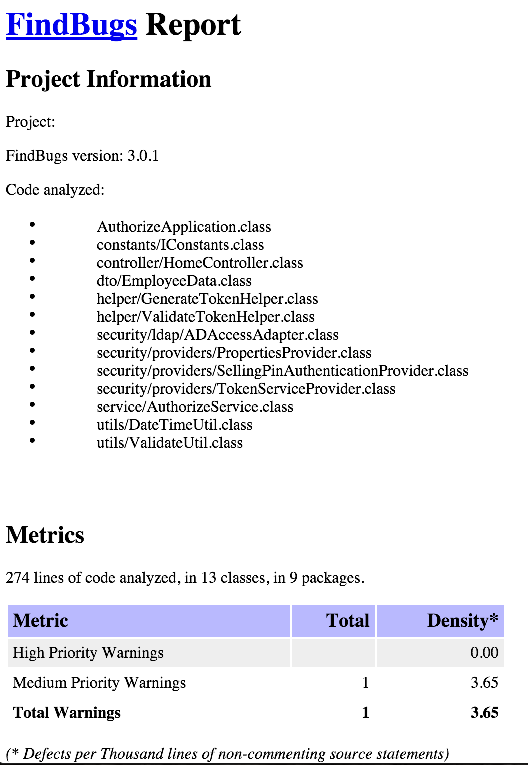
输出结果如下:

1
2
3
4
5
6
7
8
9
10
11
12
13
14
15
16
17
18
19
20
:clean
:compileJava
Note: Some input files use unchecked or unsafe operations.
Note: Recompile with -Xlint:unchecked for details.
:processResources
:classes
:findbugsMain FAILED
 
FAILURE: Build failed with an exception.
 
* What went wrong:
Execution failed for task ':findbugsMain'.
> FindBugs rule violations were found. See the report at: file:///myprojects/build/reports/findbugs/main.xml
 
* Try:
Run with --stacktrace option to get the stack trace. Run with --info or --debug option to get more log output.
 
BUILD FAILED
 
Total time: 24.597 secs

由于违背FindBugs规则,还没运行PMD构建已经失败。FindBugs和PMD的输出格式为XML。

结果报告保存在<proj_home>/build/reports文件夹。

社会主义好
翻译于 1周前

1人顶


顶 翻译的不错哦!

为了生成可读的HTML文档并忽略错误继续构建,我们在build.gradle文件中加入:

1
2
3
4
5
6
7
8
9
10
11
12
13
14
15
16
17
18
19
20
21
22
findbugs{
    ignoreFailures=true
    findbugsTest.enabled=false
 
}
 
tasks.withType(FindBugs) {
    reports {
        xml.enabled = false
        html.enabled = true
    }
}
tasks.withType(Pmd){
    reports{
        xml.enabled=true
        html.enabled=true
    }
}
pmd {
   ignoreFailures = true
    pmdTest.enabled=false
}

task.withType用于对每种任务进行配置,您可以对PMD启用HTML和XML报告,对FindBugs启用HTML报告。

注意:在输出报告时,FindBugs仅支持一种可用的输出格式。

1
2
3
4
5
6
7
8
9
10
11
12
13
14
15
16
17
./gradlew clean findBugsMain pmdMain
:clean
:compileJava
Note: Some input files use unchecked or unsafe operations.
Note: Recompile with -Xlint:unchecked for details.
:processResources
:classes
:findbugsMain
FindBugs rule violations were found. See the report at: file:///myprojects/build/reports/findbugs/main.html
:pmdMain
Removed misconfigured rule: LoosePackageCoupling  cause: No packages or classes specified
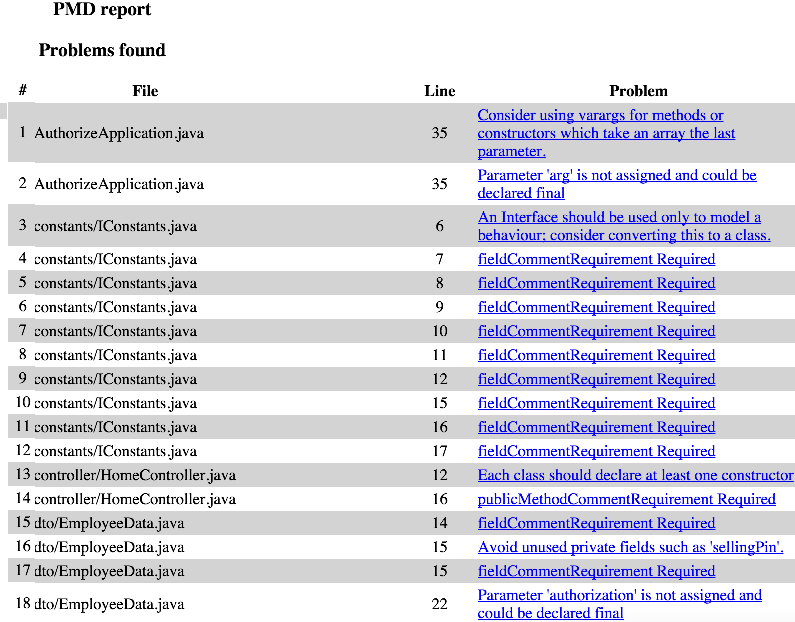
174 PMD rule violations were found. See the report at: file:///myprojects/build/reports/pmd/main.html
 
BUILD SUCCESSFUL
 
Total time: 6.013 secs

对于PMD,您可以使用ruleSet选项设置规则集。下面是一些常用的规则集。

1
2
3
4
5
6
7
8
9
10
11
12
13
14
15
16
17
18
19
20
21
22
23
pmd {
   ignoreFailures = true
    pmdTest.enabled=false
    ruleSets = [
            'java-basic',
            'java-braces',
            'java-clone',
            'java-codesize',
            'java-comments',
            'java-controversial',
            'java-coupling',
            'java-design',
            'java-empty',
            'java-finalizers',
            'java-imports',
            'java-optimizations',
            'java-strictexception',
            'java-strings',
            'java-typeresolution',
            'java-unnecessary',
            'java-unusedcode'
    ]
}

一个输出示例如下:

社会主义好
翻译于 1周前

0人顶


顶 翻译的不错哦!

与Sonar整合

PMD,Checkstyle和Sonar都是很有用的工具。但是,从一个组织的角度,我们需要追踪项目代码质量的变化和一段时间内的技术债务。我们需要能够对照其它类似的团队。

为了能够做到这些,我们使用Sonar。本文假设您已经安装好了Sonar。

对于这种情况,Altassian提供了相应的Sonar插件。为了使用它,我们需要添加必要的插件。

1
2
3
4
5
6
7
8
9
10
11
buildscript {
    repositories {
        mavenCentral()
        maven { url "http://mvnrepo.nordstrom.net/nexus/content/groups/public" }
        maven { url "http://repo.maven.apache.org/maven2" }
    }
    dependencies {
        classpath "org.sonarsource.scanner.gradle:sonarqube-gradle-plugin:1.2"
    }
 
}

构建脚本安装完毕,我们队sonarqube进行配置:

1
2
3
4
5
6
7
8
9
10
11
12
13
14
15
16
17
18
19
20
apply plugin: "org.sonarqube"
 
sonarqube{
    check
    properties {
        // Sonar Specific properties
        property 'sonar.projectName', 'Project Services' // This is the display project name
        property 'sonar.host.url','http://sonar:8080/' // This is the Sonar Server
        property 'sonar.projectKey', 'com.wordpress.mrvivekr:project' // The Key using which the project details are tracked
 
       // JDBC Properties
        property 'sonar.jdbc.url','jdbc:jtds:sqlserver://ABCD:1433/SonarDB;domain=MYCOMP;SelectMethod=Cursor'
 
        property 'sonar.jdbc.username','userName'
        property 'sonar.jdbc.password','Secr#%'
 
      //Which Sonar Profile to use - this is optional
        property 'sonar.profile','JavaProfile'
    }
}

注意:sonar.profile是预配置sonar配置(和规则),应由您的公司预先配置完成。但这是可选而非必须。我的JDBC连接使用SQLServer连接。

1
./gradlew sonarqube
1
2
3
4
5
6
7
8
9
10
11
12
13
14
15
16
17
18
19
20
21
22
23
24
25
26
27
28
29
30
31
32
33
34
35
36
37
38
39
40
41
42
43
44
45
46
47
48
49
50
51
52
53
54
:compileJava UP-TO-DATE
:processResources UP-TO-DATE
:classes UP-TO-DATE
:compileTestJava
:processTestResources
:testClasses
:test
....... ommitted .....
11:27:36.713 INFO  - Java Main Files AST scan done: 812 ms
11:27:36.714 INFO  - 13/13 source files have been analyzed
11:27:36.715 INFO  - Java bytecode scan...
11:27:36.762 INFO  - Java bytecode scan done: 47 ms
11:27:36.762 INFO  - Java Test Files AST scan...
11:27:36.762 INFO  - 5 source files to be analyzed
11:27:36.885 INFO  - Java Test Files AST scan done: 123 ms
11:27:36.885 INFO  - 5/5 source files have been analyzed
11:27:36.888 INFO  - Package design analysis...
11:27:39.868 INFO  - Package design analysis done: 2980 ms
11:27:39.884 INFO  - Sensor JavaSquidSensor (done) | time=4307ms
11:27:39.884 INFO  - Sensor Lines Sensor
11:27:39.888 INFO  - Sensor Lines Sensor (done) | time=4ms
11:27:39.888 INFO  - Sensor QProfileSensor
11:27:39.891 INFO  - Sensor QProfileSensor (done) | time=3ms
11:27:39.891 INFO  - Sensor InitialOpenIssuesSensor
11:27:45.592 INFO  - Sensor InitialOpenIssuesSensor (done) | time=5701ms
11:27:45.592 INFO  - Sensor ProjectLinksSensor
11:27:45.730 INFO  - Sensor ProjectLinksSensor (done) | time=138ms
11:27:45.730 INFO  - Sensor VersionEventsSensor
11:27:47.690 INFO  - Sensor VersionEventsSensor (done) | time=1960ms
11:27:47.690 INFO  - Sensor org.sonar.plugins.findbugs.FindbugsSensor@7894f007
11:27:47.694 INFO  - Execute Findbugs 3.0.1...
11:27:48.557 INFO  - Found findbugs plugin: /myprojects/build/sonar/findbugs/fb-contrib.jar
11:27:48.596 INFO  - Found findbugs plugin: /myprojects/build/sonar/findbugs/findsecbugs-plugin.jar
11:27:48.612 INFO  - Findbugs output report: /myprojects/build/sonar/findbugs-result.xml
The following classes needed for analysis were missing:
  javax.crypto.spec.SecretKeySpec
11:27:50.846 INFO  - Execute Findbugs 3.0.1 done: 3153 ms
11:29:31.499 INFO  - Sensor org.sonar.plugins.findbugs.FindbugsSensor@7894f007 (done) | time=103809ms
11:29:31.499 INFO  - Sensor SurefireSensor
11:29:31.500 INFO  - parsing /myprojects/build/test-results
11:29:31.558 INFO  - Sensor SurefireSensor (done) | time=59ms
11:29:31.558 INFO  - Sensor JaCoCoOverallSensor
11:29:31.565 WARN  - You are not using the latest JaCoCo binary format version, please consider upgrading to latest JaCoCo version.
11:29:31.565 INFO  - Analysing /myprojects/build/jacoco/test.exec
11:29:31.601 WARN  - You are not using the latest JaCoCo binary format version, please consider upgrading to latest JaCoCo version.
......... Ommitted .............
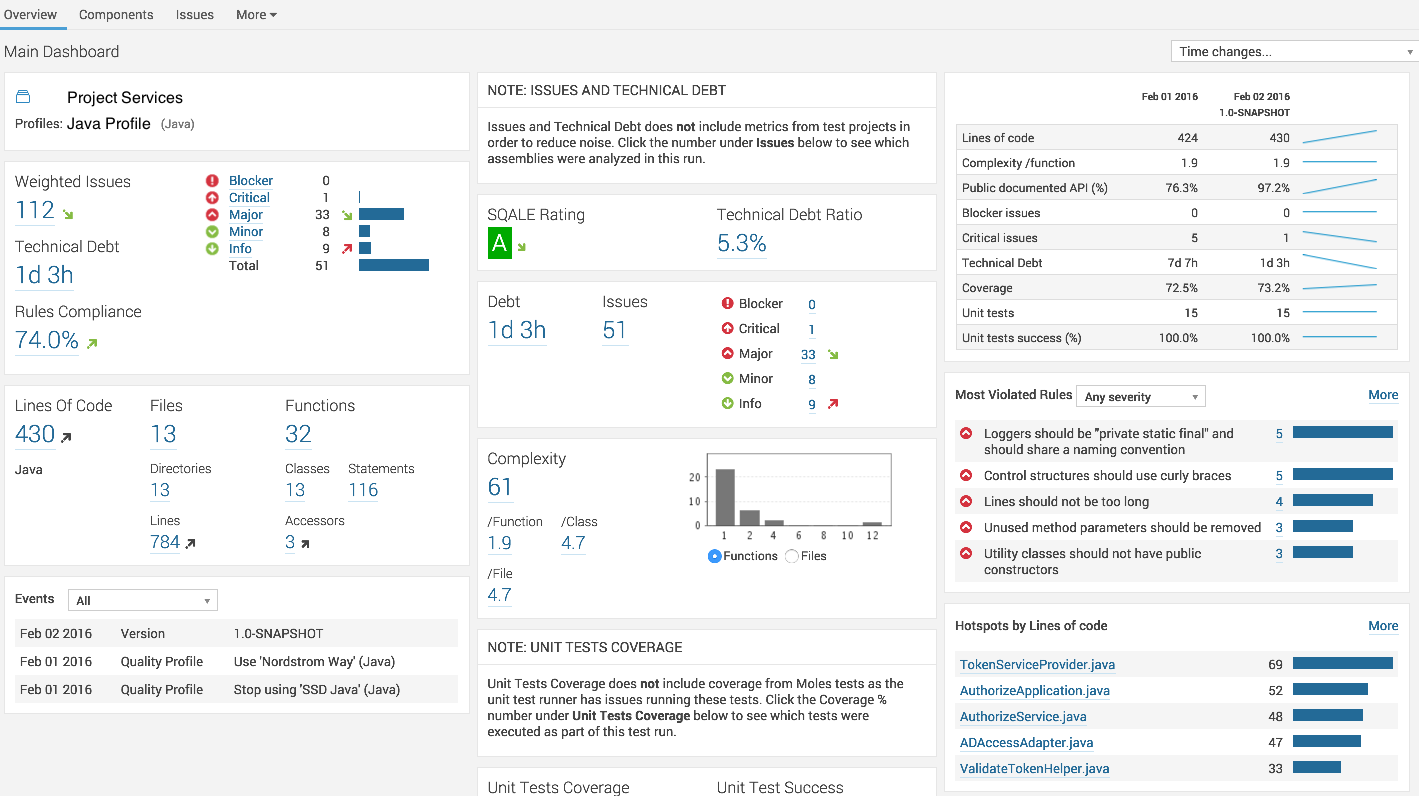
11:30:38.654 INFO  - ANALYSIS SUCCESSFUL, you can browse http://sonar:8080/dashboard/index/com.wordpress.mrvivekr:project
11:30:38.654 INFO  - Note that you will be able to access the updated dashboard once the server has processed the submitted analysis report.
11:30:38.655 INFO  - Executing post-job class org.sonar.plugins.buildbreaker.AlertBreaker
11:30:38.657 INFO  - Executing post-job class org.sonar.plugins.buildbreaker.ForbiddenConfigurationBreaker
 
BUILD SUCCESSFUL
 
Total time: 5 mins 16.499 secs

您应该看到类似的输出:

享受代码分析吧!

http://www.oschina.net/translate/code-analysis-with-gradle

https://dzone.com/articles/code-analysis-with-gradle

使用 Gradle 插件进行代码分析(转)的更多相关文章

  1. Eclipse插件(导出UML图,打开文件资源管理器插件,静态代码分析工具PMD,在eclipse上安装插件)

    目录 能够导出UML图的Eclipse插件 打开文件资源管理器插件 Java静态代码分析工具PMD 如何在eclipse上安装插件 JProfiler性能分析工具 从更新站点安装EclEmma 能够导 ...

  2. jQuery File Upload 插件 php代码分析

    jquery file upload php代码分析首先进入构造方法 __construct() 再进入 initialize()因为我是post方式传的数据  在进入initialize()中的po ...

  3. CNI bridge 插件实现代码分析

    对于每个CNI 插件在执行函数cmdAdd之前的操作是完全一样的,即从环境变量和标准输入内读取配置.这在http://www.cnblogs.com/YaoDD/p/6410725.html这篇博文里 ...

  4. Docker Libnetwork Bridge插件实现代码分析----创建网络部分

    // drivers/bridge/bridge.go // Create a new network using bridge plugin 1.func (d *driver) CreateNet ...

  5. Docker Libnetwork Bridge插件实现代码分析----初始化部分

    Bridge driver数据结构如下所示: type driver struct { config *configuration network *bridgeNetwork natChain *i ...

  6. Android 热修复Nuwa的原理及Gradle插件源码解析

    现在,热修复的具体实现方案开源的也有很多,原理也大同小异,本篇文章以Nuwa为例,深入剖析.  Nuwa的github地址 https://github.com/jasonross/Nuwa 以及用于 ...

  7. Gradle的构建过程都不会?带你全面了解Android如何自定义Gradle 插件

    目前 Android 工程的默认构建工具为 Gradle,我们在构建 APK 的时候往往会执行 ./gradlew assembleDebug 这样的命令.. 那么这个命令到底代表着什么含义呢?命令的 ...

  8. 完整全面的Java资源库(包括构建、操作、代码分析、编译器、数据库、社区等等)

    构建 这里搜集了用来构建应用程序的工具. Apache Maven:Maven使用声明进行构建并进行依赖管理,偏向于使用约定而不是配置进行构建.Maven优于Apache Ant.后者采用了一种过程化 ...

  9. Android官方技术文档翻译——Gradle 插件用户指南(5)

    昨晚把第五章未译完的几句话攻克了.只是第六章没怎么译,明后天又是周末,假设周一前第六章翻译完的话,周一再发第六章. 本文译自Android官方技术文档<Gradle Plugin User Gu ...

随机推荐

  1. A Game of Thrones(17) - Bran

    It seemed as though he had been falling for years. Fly, a voice whispered in the darkness, but Bran ...

  2. Nginx分时段限制下载速度解决方案(原创)_于堡舰_新浪博客

    Nginx分时段限制下载速度解决方案(原创)_于堡舰_新浪博客 Nginx分时段限制下载速度解决方案(原创)    (2011-03-02 16:40:49)    转载▼    标签:    ngi ...

  3. POJ 1122 FDNY to the Rescue!

    给出某些交叉点的距离,-1 表示无法到达. 然后给出火灾发生点  和 附近的消防局位置. 排列消防局 的 时间 与路径. 反向建图,以火灾出发点为起点做一次SPFA. #include<cstd ...

  4. HTML5之画布的拖拽/拖放

    <!DOCTYPE HTML> <html> <head> <script type="text/javascript"> func ...

  5. ftk学习记(waitbox篇)

    [声明:版权全部.欢迎转载,请勿用于商业用途.  联系信箱:feixiaoxing @163.com] 前面说到了脚本.那么就看看ftk中demo与script搭配的效果是什么样的? 上面的效果图就相 ...

  6. UVA 10140 - Prime Distance(数论)

    10140 - Prime Distance 题目链接 题意:求[l,r]区间内近期和最远的素数对. 思路:素数打表,打到sqrt(Max)就可以,然后利用大的表去筛素数.因为[l, r]最多100W ...

  7. xcode中找不到XXX.dylib

    xcode中找不到 XXX.dylib 了,比如libz.tbd 如果要用到 libz.dylib,可以用下面的办法,来自 Stack Overflow. Go to Build Phases > ...

  8. LNK1207: incompatible PDB format in********

    LNK1207: incompatible PDB format in******** VC中错误:LINK : fatal error LNK1207: incompatible PDB forma ...

  9. sql语句中 limi的用法

    SELECT * FROM table LIMIT [offset,] rows | rows OFFSET offset 使用查询语句时需要返回前几条或者中间的某几行数据时可以用到limit 例如 ...

  10. poj1804(归并排序求逆序数)

    逆序数.也就是说,对于n个不同的元素,先规定各元素之间有一个标准次序(比如n个 不同的自然数,可规定从小到大为标准次序),于是在这n个元素的任一排列中,当某两个元素的先后次序与标准次序不同一时候,就说 ...