
Jquery弹出窗口
今天讲了Jquery的弹出窗口的组成和用法:
先把引用文件的代码写好:
// 每个弹窗的标识

var x =0;

var idzt = new Array();

var Window = function(config){

    //ID不重复

    idzt[x] = "zhuti"+x;  //弹窗ID

    //初始化,接收参数

    this.config = {

        width : config.width || 300, //宽度

        height : config.height || 200, //高度

        buttons : config.buttons || '', //默认无按钮

        title : config.title || '标题', //标题

        content : config.content || '内容', //内容

        isMask : config.isMask == false?false:config.isMask || true, //是否遮罩

        isDrag : config.isDrag == false?false:config.isDrag || true, //是否移动

        };

    //加载弹出窗口

    var w = ($(window).width()-this.config.width)/2;

    var h = ($(window).height()-this.config.height)/2;

    var nr = "<div class='zhuti' id='"+idzt[x]+"' bs='"+x+"' style='width:"+this.config.width+"px; height:"+this.config.height+"px; background-color:white; left:"+w+"px; top:"+h+"px;'></div>";

    $("body").append(nr);

    //加载弹窗标题

    var content ="<div id='title"+x+"' class='title' bs='"+x+"'>"+this.config.title+"<div id='close"+x+"' class='close' bs='"+x+"'>×</div></div>";

    //加载弹窗内容

    var nrh = this.config.height - 75;

    content = content+"<div id='content"+x+"' bs='"+x+"' class='content' style='width:100%; height:"+nrh+"px;'>"+this.config.content+"</div>";

    //加载按钮

    content = content+"<div id='btnx"+x+"' bs='"+x+"' class='btnx'>"+this.config.buttons+"</div>";

    //将标题、内容及按钮添加进窗口

    $('#'+idzt[x]).html(content);

    //创建遮罩层

    if(this.config.isMask)

    {

        var zz = "<div id='zz'></div>";

        $("body").append(zz);

        $("#zz").css('display','block');

    }

    //最大最小限制,以免移动到页面外

    var maxX = $(window).width()-this.config.width;

    var maxY = $(window).height()-this.config.height;

    var minX = 0,

        minY = 0;

    //窗口移动

    if(this.config.isDrag)

    {

        //鼠标移动弹出窗

        $(".title").bind("mousedown",function(e){

                var n = $(this).attr("bs"); //取标识

                //使选中的到最上层

                $(".zhuti").css("z-index",3);

                $('#'+idzt[n]).css("z-index",4);

                //取初始坐标

                var endX = 0, //移动后X坐标

                    endY = 0, //移动后Y坐标

                    startX = parseInt($('#'+idzt[n]).css("left")), //弹出层的初始X坐标

                    startY = parseInt($('#'+idzt[n]).css("top")), //弹出层的初始Y坐标

                    downX = e.clientX, //鼠标按下时,鼠标的X坐标

                    downY = e.clientY; //鼠标按下时,鼠标的Y坐标

                //绑定鼠标移动事件

                $("body").bind("mousemove",function(es){

                    endX = es.clientX - downX + startX; //X坐标移动

                    endY = es.clientY - downY + startY; //Y坐标移动

                    //最大最小限制

                    if(endX > maxX)

                    {

                        endX = maxX;

                    } else if(endX < 0)

                    {

                        endX = 0;

                    }

                    if(endY > maxY)

                    {

                        endY = maxY;

                    } else if(endY < 0)

                    {

                        endY = 0;

                    }

                    $('#'+idzt[n]).css("top",endY+"px");

                    $('#'+idzt[n]).css("left",endX+"px");

                    window.getSelection ? window.getSelection().removeAllRanges():document.selection.empty(); //取消选中文本

                    });

            });

        //鼠标按键抬起,释放移动事件

        $("body").bind("mouseup",function(){

                $("body").unbind("mousemove");

            });

    }

    //关闭窗口

    $(".close").click(function(){

            var m = this.getAttribute("bs"); //找标识

            $('#'+idzt[m]).remove(); //移除弹窗

            $('#zz').remove(); //移除遮罩

        })

        x++;  //标识增加

}
这个JS文件把弹出窗口的内容,样式,位置,按钮,以及遮罩层都做了处理,在引用前好好看看里面的代码,最好都能弄懂,里面也做了详细的注释,希望可以帮的你。
下面是CSS样式表:
.zhuti

{

    position:absolute;

    z-index:;

    font-size:14px;

    border-radius:5px;

    box-shadow:0 0 5px white;

    overflow:hidden;

    color:#333;

}

.title

{

    background-color:#3498db;

    vertical-align:middle;

    height:35px;

    width:100%;

    line-height:35px;

    text-indent:1em;

}

.close{

    float:right;

    width:35px;

    height:35px;

    font-weight:bold;

    line-height:35px;

    vertical-align:middle;

    color:white;

    font-size:18px;

    }

.close:hover

{

    cursor:pointer;

}

.content

{

    text-indent:1em;

    padding-top:10px;

}

.btnx

{

    height:30px;

    width:100%;

    text-indent:1em;

}

.btn

{

    height:28px;

    width:80px;

    float:left;

    margin-left:20px;

    color:#333;

}

#zz

{

    width:100%;

    height:100%;

    opacity:0.15;

    display:none;

    background-color:#ccc;

    z-index:;

    position:absolute;

    top:0px;

    left:0px;

}
这个样式表把每个标签和所需要的样式都写好了,这样就能节省主要页面的代码量,并且让主页面看起来非常的整齐,如果要改,只需要在CSS样式表中修改即可,注意:不管要引用什么文件,必须把Jquery文件放在最前面!!!
下面是主页面代码:
<!DOCTYPE html PUBLIC "-//W3C//DTD XHTML 1.0 Transitional//EN" "http://www.w3.org/TR/xhtml1/DTD/xhtml1-transitional.dtd">

<html xmlns="http://www.w3.org/1999/xhtml">

<head>

<meta http-equiv="Content-Type" content="text/html; charset=utf-8" />

<title>无标题文档</title>

<script type="text/javascript" src="jquery-1.11.2.min.js">

</script>

<script type="text/javascript" src="tanchuang.js">

</script>

<link href="tanchuang.css" rel="stylesheet" type="text/css" />

<style type="text/css">

*{

    margin: 0px auto;

}

</style>

</head>

<body style="background-color:#999">

<div style="width:200px; margin-top:10px">

<input type="button" value="弹出窗口" id="btntc" style="width:100px; height:30px; font-size:18px;" />

</div>

</body>

<script type="text/javascript">

$(document).ready(function(e) {

    $('#btntc').click(function(){

            var html = "<div style='color:red'>这是测试的弹窗</div>";

            var button ="<input type='button' value='确定' /><input type='button' value='取消' />";

            var win = new Window({

                width : 400, //宽度

                height : 300, //高度

                title : '测试弹窗', //标题

                content : html, //内容

                isMask : false, //是否遮罩

                buttons : button, //按钮

                isDrag:true, //是否移动

                });

        })

});

</script>

</html>
同样的,主页面里面也加了详细的注释,这样便于日后的理解,希望可以帮的自己和大家。让我们看看效果吧:

点击弹出窗口之后的效果:
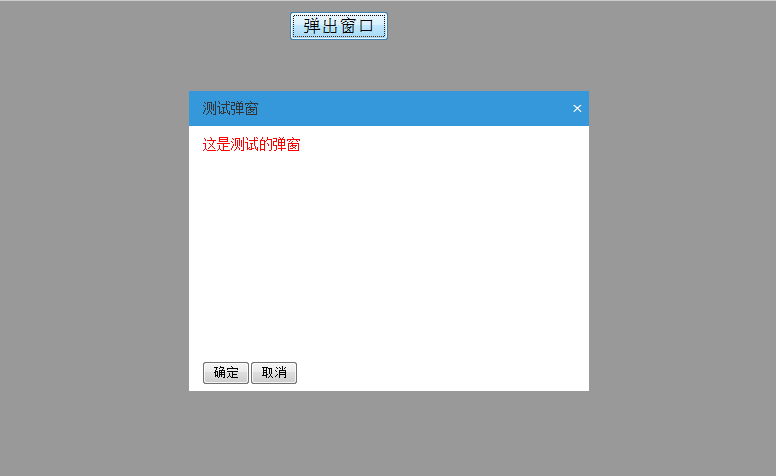

我们可以看到每个弹出窗口都可以移动,并且可以弹出无数个窗口,如果把遮罩层改成true,那样就不能再出现第二个弹出窗口了。
一定要记住遮罩层的实用,这样可以避免很多BUG如果要引用弹出窗口一定要测试好了再使用,以防出现问题,切记!!!
Jquery弹出窗口的更多相关文章
- jQuery弹出窗口完整代码
jQuery弹出窗口完整代码 效果体验:http://keleyi.com/keleyi/phtml/jqtexiao/1.htm 1 <!DOCTYPE html PUBLIC "- ...
- jQuery弹出窗口浏览图片
效果预览:http://keleyi.com/keleyi/phtml/jqtexiao/3.htm HTML文件代码: <!DOCTYPE HTML> <html> < ...
- jQuery 弹出窗口的形式一直是具体案件的中心
在网上查 多 不是不符合无效;因此,一些自己总结,解决这个问题 原则: 常见问题: 弹出层居中了,背景也是半透明的 可是发现一拉动滚动栏立即就露馅了发现背景仅仅设置了屏幕所在段,其它部分都是原来 ...
- JQuery弹出窗口小插件ColorBox
本文来自: Small_陌 http://www.cnblogs.com/wggmqj/archive/2011/11/04/2236263.html 今天在博客园看到一篇<ASP.NET MV ...
- FancyBox——jQuery弹出窗口插件
最近工作项目中有用到这款插件,就查找了一下相关资料和用法,下面是一些基本的简单用法,比较容易掌握,有需要的小伙伴可以参考.:) FancyBox是一款基于jquery开发的类Lightbox插件.支持 ...
- jquery弹出窗口选择回写值
$(document).ready(function(){ $('.sel').dblclick(function(){ var nowid=$(this).attr('id'); window.op ...
- jquery-通过js编写弹出窗口
本文转载 本文主要是通过js动态控制div的高度,css控制浮动 <!DOCTYPE html PUBLIC "-//W3C//DTD XHTML 1.0 Transitional// ...
- jQuery弹出层始终垂直居中相对于屏幕或当前窗口
把弹出层的位置设为fixed,设置top:50%,然后获取当前元素的整体的高度height,用获取的高度height/2,设置margin-top:-height/2.即可把当前的弹出层始终垂直居中于 ...
- Js(Jquery)实现的弹出窗口
想实现一个弹出层,过一段时间自动消失的功能. 之前的项目中是:在页面中预先先一个<div>区域,默认隐藏或者因为没有内容不显示.当需要显示信息时,将该<div>填充上内容,并用 ...
随机推荐
- 【翻译】使用Visual Studio在Azure上部署Asp.Net Core Web应用
配置运行环境 Install the latest Azure SDK for Visual Studio. The SDK installs Visual Studio if you don't a ...
- WPF 实现验证码功能
产生验证码的类:ValidCode.cs public class ValidCode { #region Private Fields /// <summary> /// PI /// ...
- lufylegend库 鼠标事件 循环事件 键盘事件
lufylegend库 鼠标事件 循环事件 键盘事件 <!DOCTYPE html> <html lang="en"> <head> <m ...
- 简单加解密算法 - vb.net
Public Class Form1 Dim charAarray() As Char '加密 Private Sub Btn_En_Click(sender As System.O ...
- hessian原理解析一(客户端分析)
hessian 是一款开源的二进制远程通讯协议,使用简单方法提供了RMI功能,主要用于面向对象的消息通信. 优点:跨平台.多语言支持.使用简单 缺点:传递复杂对象性能会下降,不适合安全性高的应用 一 ...
- SQLSERVER 中实现类似Mysql的 INSERT ON DUPLICATE KEY UPDATE
通过SQLServer创建索引时,有一个IGNORE_DUP_KEY的选项,可以类似实现. IGNORE_DUP_KEY = { ON | OFF } 指定对唯一聚集索引或唯一非聚集索引执行多行插入操 ...
- Quartz_理解1
一.引言 quratz是目前最为成熟,使用最广泛的java任务调度框架,功能强大配置灵活.在企业应用中占重要地位.quratz在集群环境中的使用方式是每个企业级系统都要考虑的问题.早在2006年,在I ...
- cordova调用本地SQLite数据库的方法
第一篇技术博客,写下来和大家分享今天所学,其次自己也巩固一下. 整个下午的时间用来钻研如何用cordova调用移动端本地SQLite数据库.首先我并不是用eclipse来编程的,而是用cordova建 ...
- executssql 函数的每一句代码的意思
Public Function Executesql(ByVal sql As String, Msgstring As String) As ADODB.Recordset Dim cnn As A ...
- Sublime Text 中文乱码解决方案
1.到这里下载安装PackageControl https://packagecontrol.io/installation#Manual 完成重启Sublime Text: 2.按Ctrl+Shif ...