
html bottom html submit按钮表单控件与CSS美化
一、html submit与bottom按钮基本语法结构
1、html submit按钮
在input标签里设置type="submit"即可设置此表单控件为按钮。
submit按钮代码:
<input name="" type="submit" value="提交" />
2、html bottom按钮
在input标签里设置type="bottom"也是即可设置此表单控件为按钮。
bottom按钮代码:
<input name="" type="button" value="提交" />
二、html submit与bottom按钮区别
type=button 就单纯是按钮功能
type=submit 是发送表单
但是对于从事WEB UI的人应该要注意到,使用submit来提高页面易用性:
使用submit后,页面支持键盘enter键操作,而很多WEB软件设计师,可能没有注意到submit统一.
用button后往往页面不支持enter键了。所以需要支持enter键,必须要设置个submit,默认enter键对页面第一个submit进行操作。
<input type="submit" name="b1" value="提交" onClick="bt_submit_onclick()">
执行完onClick,转到action。可以自动提交不需要onClick。所以说onclick这里可以不要。
<input type="button" name="b1" value="提交" onClick="bt_submit_onclick()">
执行完onClick,跳转文件在 js文件里控制。提交需要onClick。
比如:
1,onclick="form1.action='a.jsp';form1.submit();" 这样就实现了submit的功能了。
2,button代码
<form name="form1" method="post" action="http://www.divcss5.com">

<input type="button" name="Button" value="按钮" onClick="submit()">

</form>
3,按钮HTML 代码
<input type="button" name="Button" value="Button" onClick="javascript:windows.location.href="你的url"">
三、html submit与bottom按钮美化css div布局
首先我们准备好按钮美化的按钮图片,并对input submit或bottom按钮控件内添加class样式即可,设置其按钮背景为美化图片,设置好边框为零,宽度和高度。
1、对html bottom按钮美化
1)、图片素材
可将图片另存为使用

2)、对应完整HTML源代码:
<!DOCTYPE html>

<html>

<head>

<title>button按钮美化 在线演示-www.divcss5.com</title>

<!-- www.divcss5.com -->

<style>

html{width:100%;height:100%;}

body{background:#fff;font-size:18px;font-family:"Arial", "Tahoma", "微软雅黑", "雅黑";

line-height:18px;padding:0px;margin:0px;text-align:center}

div{padding:18px}

img{border:0px;vertical-align:middle;padding:0;margin:0}

input, button{font-family:"Arial", "Tahoma", "微软雅黑", "雅黑";border:0;

vertical-align:middle;margin:8px;line-height:18px;font-size:18px}

.btn{width:140px;height:36px;line-height:18px;font-size:18px;

background:url("bg26.jpg") no-repeat left top;color:#FFF;padding-bottom:4px}

</style>

</head>

<body>

<p>

<form id="form1" name="form1" method="" action="http://www.divcss5.com/" target="_blank">

<div>

<input type="button" class="btn" value="按钮" onmouseover="this.style.backgroundPosition='left -36px'"

 onmouseout="this.style.backgroundPosition='left top'" />

</div>

</form>

</p>

</body>

</html>
2、对html submit按钮美化
1)、图片素材
可将图片另存为使用
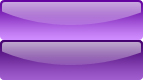
2)、对应完整HTML源代码:
<!DOCTYPE html>

<html>

<head>

<title>submit按钮美化 在线演示-www.divcss5.com</title>

<!-- www.divcss5.com -->

<style>

html { width:100%; height:100%; }

body { background:#fff; font-size:18px; font-family:"Arial", "Tahoma", "微软雅黑", "雅黑";

 line-height:18px; padding:0; margin:0; text-align:center; }

div { padding:18px }

img { border:0px; vertical-align:middle; padding:0px; margin:0px; }

input, button { font-family:"Arial", "Tahoma", "微软雅黑", "雅黑"; border:0;

 vertical-align:middle; margin:8px; line-height:18px; font-size:18px }

.btns { width:143px; height:40px; background:url("bg11.jpg") no-repeat left top; color:#FFF; }

</style>

</head>

<body>

<p>

<form id="form1" name="form1" method="" action="http://www.divcss5.com/" target="_blank">

<div>

<input type="submit" class="btns" onmouseover="this.style.backgroundPosition='left -40px'"

 onmouseout="this.style.backgroundPosition='left top'" value="提交" />

</div>

</form>

</p>

</body>

</html>
html bottom html submit按钮表单控件与CSS美化的更多相关文章
- 仿苹果电脑任务栏菜单&&拼图小游戏&&模拟表单控件
<!DOCTYPE html PUBLIC "-//W3C//DTD XHTML 1.0 Transitional//EN" "http://www.w3.org/ ...
- 了解HTML表单之13个表单控件
目录 传统控件 button select option optgroup textarea fieldset legend label 新增控件 datalist keygen output pro ...
- wicket基础应用(2)--wicket表单控件的使用
该文可以转载,但转载必须注明作者,出处: 作者:lhx1026 出处:http://lhx1026.iteye.com/ 这一章介绍wicket表单控件的简单应用 1.Label控件 这个应该说是最常 ...
- 我教女朋友学编程Html系列(6)—Html常用表单控件
做过网页的人都知道,html表单控件十分重要.基本上我们注册会员.登录用户,都需要填写用户名.密码,那些框框都是表单控件. 本来今天就想写一些常用的html表单控件,于是开始搜资料,找到了一个网页,作 ...
- Angular19 自定义表单控件
1 需求 当开发者需要一个特定的表单控件时就需要自己开发一个和默认提供的表单控件用法相似的控件来作为表单控件:自定义的表单控件必须考虑模型和视图之间的数据怎么进行交互 2 官方文档 -> 点击前 ...
- 第九课 表单及表单控件 html5学习4
表单有由表单域.提示文本.表单3部分构成 一.表单控件 input 控件 1.<input />单标签2.input属性: 可以通过type属性变换形状 value默认值 name名称 c ...
- 前端 HTML body标签相关内容 常用标签 表单标签 form 表单控件分类
表单控件分类 input标签: input标签 type属性的text,password,button按钮,submit按钮 input标签placeholder属性 标签上显示内容 input标签 ...
- 表单控件 css的三中引入方式css选择器
1. 表单控件: 单选框 如果两个单选的name值一样,会产生互斥效果 <p> <!--单选框--> 男<input type="radio" nam ...
- 认识HTML中表格、列表标签以及表单控件
前端之HTML,CSS(二) HTML标签 列表标签 无序列表:闭标签,由<ul><li></li>...</ul>组合而成,效果成纵向列表.格式:&l ...
随机推荐
- Ubuntu Linux系统下的SVN客户端工具PySVN
在Windows下面一直在用TortoiseSVN做为SVN客户端工具,但它居然没提供Linux版本,无视Linux用户的存在.它视我如空 气,偶视它如废土.开始探索尝试其他跨平台的SVN客户端,最后 ...
- psy & vr
技术指标及应用法则:PSY和VR 一.PSY(Psychologial Line) 1. PSY的参数 2. PSY的应用法则 二.VR(Volume Ratio) 1. VR的参数 2. VR的 ...
- iOSFMDB和CoreData
转发:http://wenku.baidu.com/link?url=LSPSZSPxN4pVwWNwqEXSoY0-jlnXq-_14C7qV1FV9_gFIMPjdKlXrG4Nrh_08EZS1 ...
- hibernate里的generator中class =value介绍
在*.hbm.xml必须声明的<generator>子元素是一个Java类的名字,用来为该持久化类的实例生成唯一的标识.<generator class="sequence ...
- String Matching Content Length
hihocoder #1059 :String Matching Content Length 时间限制:10000ms 单点时限:1000ms 内存限制:256MB 描述 We define the ...
- android脚步---UI界面修改,增加按钮和监听
我的UU界面,其布局如下: 需要修改的部分: 意见反馈居中,还有增加backbutton 首先在mainactivity中找到我的UU的定义:dialogue public void showAbou ...
- Source
转载自:http://blog.csdn.net/u014084081/article/details/44617707 Guide iOS Developer Library 教程 Ray Wend ...
- bLock 回调 就是这么简单!
转载自:http://blog.csdn.net/mobanchengshuang/article/details/11751671 我们在开发中常常会用到函数回调,你可以用通知来替代回调,但是大多数 ...
- Super Jumping! Jumping! Jumping! 基础DP
Super Jumping! Jumping! Jumping! Time Limit: 2000/1000 MS (Java/Others) Memory Limit: 65536/32768 ...
- dlopen函数详解
Linux提供了一套API来动态装载库.下面列出了这些API: - dlopen,打开一个库,并为使用该库做些准备.- dlsym,在打开的库中查找符号的值.- dlclose,关闭库.- dlerr ...