
What is a Database Trigger?
Link:
http://www.essentialsql.com/what-is-a-database-trigger/
Copy...
What is a Database Trigger?
A database trigger is special stored procedure that is run when specific actions occur within a database. Most triggers are defined to run when changes are made to a table’s data. Triggers can be defined to run instead of or after DML (Data Manipulation Language) actions such as INSERT, UPDATE, and DELETE.
Triggers help the database designer ensure certain actions, such as maintaining an audit file, are completed regardless of which program or user makes changes to the data.
The programs are called triggers since an event, such as adding a record to a table, fires their execution.
Triggers and their implementations are specific to database vendors. In this article we’ll focus on Microsoft SQL server; however, the concepts are the same or similar in Oracle and MySQL.
Note: All the examples for this lesson are based on Microsoft SQL Server Management Studio and the AdventureWorks2012 database. You can get started using these free tools using my Guide Getting Started Using SQL Server.
Events
The triggers can occur AFTER or INSTEAD OF a DML action. Triggers are associated with the database DML actions INSERT, UPDATE, and DELETE. Triggers are defined to run when these actions are executed on a specific table.
AFTER triggers
Once the DML actions, such as an INSERT completes, the AFTER trigger executes. Here are some key characteristics of AFTER triggers:
- After triggers are run after a DML action, such as an INSERT statement and any ensuing referential cascade actions and constraint checks have run.
- You can’t cancel the database action using an AFTER trigger. This is because the action has already completed.
- One or more AFTER triggers per action can be defined on a table, but to keep things simple I recommend only defining one.
- You can’t define AFTER triggers on views.
INSTEAD OF triggers
INSTEAD OF triggers, as their name implies, run in place of the DML action which caused them to fire. Items to consider when using INSTEAD OF triggers include:
- An INSTEAD OF trigger overrides the triggering action. If an INSTEAD OF trigger is defined to execute on an INSERT statement, then once the INSERT statement attempt to run, control is immediately passed to the INSTEAD OF trigger.
- At most, one INSTEAD OF trigger can be defined per action for a table. This makes sense, as if you had to “INSTEAD OF” triggers for an insert, which one should run?
Special Database Objects
Triggers use two special database objects, INSERTED and DELETED, to access rows affected by the database actions. Within the scope of a trigger the INSERTED and DELETE objects have the same columns as the trigger’s table.
The INSERTED table contains all the new values; whereas, the DELETED table contains old values. Here is how the tables are used:
- INSERT – Use the INSERTED table to determine which rows were added to the table.
- DELETE – Use the DELETED table to see which rows were removed from the table.
- UPDATE – Use the INSERTED table to inspect the new or updated values and the DELETED table to see the values prior to update.
Definition
A trigger is defined for a specific table and one or more events. In most database management systems you can only define one trigger per table.
Below is an example trigger from the AdventureWorks2012 database.
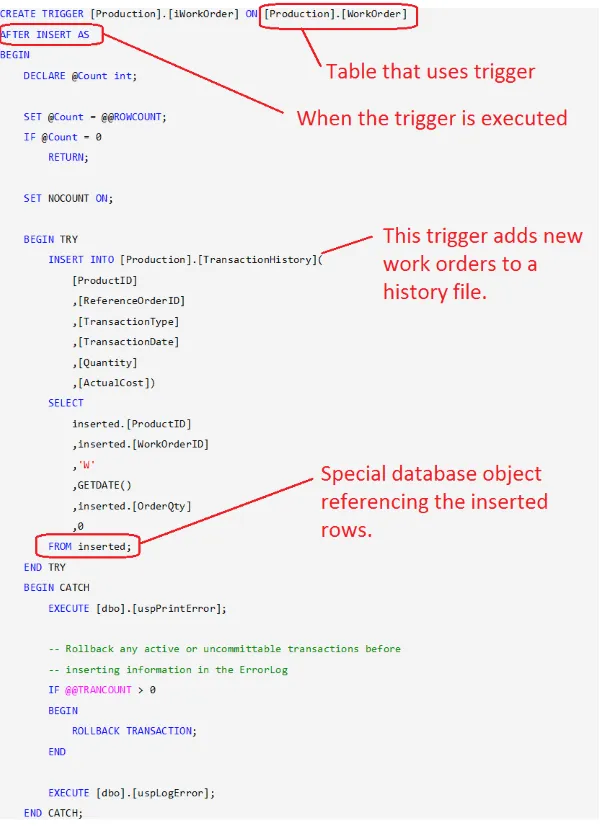
You’ll notice the syntax for a trigger is very similar to that of a stored procedure. In fact, the trigger uses the same language to implement its logic as do stored procedures. In MS SQL, this is T-SQL; whereas in Oracle it is PL/SQL.
Here are some important parts to a trigger:
- The CREATE Statement – It defines which table is associated with the trigger. In addition this statement is used to specify when the trigger executes (e.g. after insert).
- The actual program. In the example, this program runs whenever one or more rows are inserted into the WorkOrder table.
- Special database objects – Triggers use specially defined databases objects such as INSERTED, or DELETED to access records affected by the database action.
- In this example the trigger is using the INSERTED object to gain access to the newly created rows. The INSERT statement is used to table those rows and add them to a history table.
Uses for Triggers
Here are some common uses for triggers:
Complex Auditing
You can use triggers to track changes made to tables. In our example above, changes made to the WorkOrder table are recorded a TransactionHistory table.
Typically when creating audit trails, you’ll use AFTER triggers.
You may think this is redundant, as many changes are logged in the databases journals, but the logs are meant for database recovery and aren’t easily accessible by user programs. The TransactionHistory table is easily referenced and can be incorporated into end user reports.
Enforce Business Rules
Triggers can be used to inspect all data before a DML action is performed. You can use INSTEAD OF triggers to “intercept” the pending DML operation, apply any business rules, and ultimately complete the transaction.
An example business rule may be that a customer status is defined as:
- Gold – Purchases over $1,000,000 in the past 12 months.
- Silver – Purchase of $500,000 to $1,000,000 in the past 12 months.
- Bronze – All other purchase levels.
An INSTEAD OF trigger could be defined to check the customer status each time a customer record is added or modified. The status check would involve creating a sum of all the customers’ purchases and ensuring the new status corresponds with the sum of the last 12 months of purchases.
Derive Column Values
Triggers can be used to calculate column values. For instance, for each customer you may wish to maintain a TotalSales column on the customer record. Of course, for this to remain accurate, it would have to be update every time a sales was made.
This could be done using an AFTER trigger on INSERT, UPDATE, and DELETE statements for the Sales table.
Triggers Are Tricky!
In general, my advice is to avoid using triggers unless absolutely necessary.
You should avoid using triggers in place of built in features. For instance, rather than rely on triggers to enforce referential integrity, you’re better off using relationships.
Here are some reasons why I shy away from them:
- They can be hard to troubleshoot.
- Triggers can cause other triggers to fire. Two Tables, A and B, both have an AFTER UPDATE trigger. If the AFTER UPDATE trigger on Table A updates Table B, then updating Table A causes it’s trigger and then B’s trigger to Fire.
- You have to be sure you don’t create a trigger storm! Can you imagine if Table B, for some reason, updated Table A? Now you have a circular reference… Boom!
- I try to move as much logic into Stored Procedures and have applications make changes to the database through them rather than straight up SQL statements.
What is a Database Trigger?的更多相关文章
- Oracle12c中多宿主环境(CDB&PDB)的数据库触发器(Database Trigger)
Oracle12c中可插拔数据库(PDBs)上的多宿主数据库触发器 随着多宿主选项的引入,数据库事件触发器可以在CDB和PDB范围内创建. 1. 触发器范围 为了在CDB中创建数据库事件触发器,需 ...
- [结]Oracle trigger(触发器)摘录
1.触发器: 是许多关系数据库系统都提供的一项技术.在ORACLE系统里,触发器类似过程和函数,都有声明,执行和异常处理过程的PL/SQL块. 触发器在数据库里以独立的对象存储,它与存储过程和函数不同 ...
- ORACLE DB TRIGGER详解
本篇主要内容如下: 8.1 触发器类型 8.1.1 DML触发器 8.1.2 替代触发器 8.1.3 系统触发器 8.2 创建触发器 8.2.1 触发器触发次序 8.2.2 创建DML触发器 8.2. ...
- 使用Server Trigger保护重要的数据库对象
一 .Server Trigger的简单介绍 在SQL Server数据库中,Server Trigger 是一种特殊类型的存储过程,它可以对特定表.视图或存储中的必然事件自动响应,不由用户调用.创建 ...
- 【Oracle】详解ORACLE中的trigger(触发器)
本篇主要内容如下: 8.1 触发器类型 8.1.1 DML触发器 8.1.2 替代触发器 8.1.3 系统触发器 8.2 创建触发器 8.2.1 触发器触发次序 8.2.2 创建DML触发器 8.2. ...
- 16Oracle Database 系统权限和对象权限
Oracle Database 系统权限和对象权限 Oracle中的系统权限和对象权限 DCL 数据控制语言 -- 查看对象的权限 grant / revoke 查看登录用户 Show user 查看 ...
- 从AdventureWorks学习数据库建模——实体分析
最近打算写写数据库建模的文章,所以打算分析微软官方提供的SQL Server示例数据库AdventureWorks,看看这个数据库中有哪些值得学习的地方. 首先我们需要下载安装一个SQL Server ...
- Oracle触发器原理、创建、修改、删除
本篇主要内容如下: 8.1 触发器类型 8.1.1 DML触发器 8.1.2 替代触发器 8.1.3 系统触发器 8.2 创建触发器 8.2.1 触发器触发次序 8.2.2 创建DML触发器 8.2. ...
- linux 安装 ArcSDE10.1
实验仍未成功,步骤仅供参考. 1:首先检查一下在Linux操作系统下Oracle数据库是否能启动,是否能连通等 [oracle@localhost ~]$ sqlplus SQL*Plus: Rele ...
随机推荐
- C# 访问数据库
1. 首先引用和生命system.data.sqlClient 2. 使用sqlconnect类链接,sqlcommand类执行SQL命令,最后结果返回给sqlDataReader类或者是其他类 3. ...
- 第四章 电商云化,4.2 集团AliDocker化双11总结(作者: 林轩、白慕、潇谦)
4.2 集团AliDocker化双11总结 前言 在基础设施方面,今年双11最大的变化是支撑双11的所有交易核心应用都跑在了Docker容器中.几十万Docker容器撑起了双11交易17.5万笔每秒的 ...
- TCP中的RST复位信号
TCP中的RST复位信号 在TCP协议中RST表示复位,用来关闭异常的连接,在TCP的设计中它是不可或缺的. 发送RST包关闭连接时,不必等缓冲区的包都发出去,直接就丢弃缓存区的包发送RST包.而接收 ...
- Linux字符集的查看及修改
一·查看字符集 字符集在系统中体现形式是一个环境变量,以CentOS6.5为例,其查看当前终端使用字符集的方式可以有以下几种方式: 第一种: [root@Testa-www tmp]# echo $L ...
- sicp-py
第一章 在第一章中,我们专注于计算过程,以及程序设计中函数的作用.我们看到了如何使用原始数据(数值)和原始操作(算术运算),如何通过组合和控制来形成复合函数,以及如何通过给予过程名称来创建函数抽象.我 ...
- Java正则认识
一.为什么要有正则? 方便的对数据进行匹配 执行复杂的字符串验证.拆分.替换功能 举例:判断一个字符串是否由数字组成.(有以下两种方法对比) 不使用正则 String str = "1234 ...
- js高级群的一些整理6月
https://github.com/the5fire/backbonejs-learning-note/blob/master/chapters/01-hello-backbonejs.rst Ba ...
- PHP流式上传和表单上传(美图秀秀)
最近需要开发一个头像上传的功能,找了很多都需要授权的,后来找到了美图秀秀,功能非常好用. <?php /** * Note:for octet-stream upload * 这个是流式上传PH ...
- Shell入门教程:流程控制(5)for 循环
for循环的运作方式,是将 串行 的元素的元素一一取出,依序放入制定的变量中,然后重复执行含括的命令区域(在 do 与 done 之间),直到所有元素取尽为止. 其中,串行是一些字符串的组合,彼此用 ...
- 如何使用JS来检测游览器是什么类型,或android是什么版本号- 转载
var brower = { versions:function(){ var u = window.navigator.userAgent; var num ; if(u.indexOf('Trid ...