
swiper插件在ie浏览器无反应,解决办法
在写pc端页面时,用swiper插件发现在ie中用不了,百度下说是swiper从3以后向手机端发展,所以在pc端无响应。后来了解到,swiper3是专门针对移动端写的。如果想兼容IE8的话,应该引入swiper2.
也就是:idangerous.swiper.js
官网演示地址:http://2.swiper.com.cn/demo/
swiper2下载地址
链接:https://pan.baidu.com/s/1rWhJ1sCbcJVf4wfBRq_MYg 密码:qcuw
参考源码:
css:
<link rel="stylesheet" type="text/css" href="../css/idangerous.swiper.css" />
js
<script src="../js/idangerous.swiper.js" type="text/javascript" charset="utf-8"></script>
html
  <div class="container-middle-solution">

    <div class="swiper-container">

                        <div class="swiper-wrapper">

                            <div class="swiper-slide">

                                <div class="container-middle-solution-pc">

                                    <div>

                                        <a class="title">网络解决方案</a>

                                    </div>

                                    <div>我们做响应网站,网页开发,区块链开发,UI/UX设计,CRM解决方案,托管服务器解决方案。</div>

                                    <div>

                                        <img src="../img/index-pc.png">

                                    </div>

                                </div>

                            </div>

                            <div class="swiper-slide">

                                <div class="container-middle-solution-pc">

                                    <div>移动解决方案</div>

                                    <div>我们做iOS应用开发,Android应用开发,混合APP开发以及移动应用市场咨询。</div>

                                    <div>

                                        <img src="../img/index-pc.png">

                                    </div>

                                </div>

                            </div>

                            <div class="swiper-slide">

                                <div class="container-middle-solution-pc">

                                    <div>网络解决方案</div>

                                    <div>我们做响应网站,网页开发,区块链开发,UI/UX设计,CRM解决方案,托管服务器解决方案。</div>

                                    <div>

                                        <img src="../img/index-pc.png">

                                    </div>

                                </div>

                            </div>

                            <div class="swiper-slide">

                                <div class="container-middle-solution-pc">

                                    <div>网络解决方案</div>

                                    <div>我们做响应网站,网页开发,区块链开发,UI/UX设计,CRM解决方案,托管服务器解决方案。</div>

                                    <div>

                                        <img src="../img/index-pc.png">

                                    </div>

                                </div>

                            </div>

                            <div class="swiper-slide">

                                <div class="container-middle-solution-pc">

                                    <div>网络解决方案</div>

                                    <div>我们做响应网站,网页开发,区块链开发,UI/UX设计,CRM解决方案,托管服务器解决方案。</div>

                                    <div>

                                        <img src="../img/index-pc.png">

                                    </div>

                                </div>

                            </div>

                            <div class="swiper-slide">

                                <div class="container-middle-solution-pc">

                                    <div>网络解决方案</div>

                                    <div>我们做响应网站,网页开发,区块链开发,UI/UX设计,CRM解决方案,托管服务器解决方案。</div>

                                    <div>

                                        <img src="../img/index-pc.png">

                                    </div>

                                </div>

                            </div>

                            <div class="swiper-slide">

                                <div class="container-middle-solution-pc">

                                    <div>网络解决方案</div>

                                    <div>我们做响应网站,网页开发,区块链开发,UI/UX设计,CRM解决方案,托管服务器解决方案。</div>

                                    <div>

                                        <img src="../img/index-pc.png">

                                    </div>

                                </div>

                            </div>

                        </div>

                        <!-- Add Arrows -->

                        <!--<div class="icon-left">-->

                        <!--<div class="swiper-button-next"></div>

                        <div class="swiper-button-prev"></div>-->

                    <a class="arrow-left" href="#"></a>

                    <a class="arrow-right" href="#"></a>

                    </div>

                </div>
<script type="text/javascript">
var swiper = new Swiper('.swiper-container', {
// slidesPerView: "auto",
slidesPerView: 2,
spaceBetween: 0,
// mode: 'vertical', //2版本垂直滑动
// direction: 'vertical', //3版本垂直滑动
// pagination: {
// el: '.swiper-pagination',
// clickable: true,
// },
navigation: {
nextEl: '.swiper-button-next',
prevEl: '.swiper-button-prev',
},
});
$('.arrow-left').on('click', function(e) {
e.preventDefault();
swiper.swipePrev();
})
$('.arrow-right').on('click', function(e) {
e.preventDefault();
swiper.swipeNext();
})
</script>
css样式问题
.swiper-container {

                width: 100%;

                padding-bottom: 100px;

            }

            /*.swiper-slide {

                background-position: center;

                background-size: cover;

                display: -webkit-box;

                display: -ms-flexbox;

                display: -webkit-flex;

                display: flex;

                -webkit-box-pack: center;

                -ms-flex-pack: center;

                -webkit-justify-content: center;

                justify-content: center;

                -webkit-box-align: center;

                -ms-flex-align: center;

                -webkit-align-items: center;

                align-items: center;

            }*/

            .swiper-button-prev,

            .swiper-container-rtl .swiper-button-next {

                background: url(../img/index-left.png) center center no-repeat;

                background-size: 100%;

                100%;

                left: 52px;

                right: auto;

                top: 220px;

                width: 54px;

                height: 54px;

            }

            /*.arrow-left {

                background: url(../img/index-left.png) center center no-repeat;

                background-size: 100%;

                100%;

                left: 52px;

                right: auto;

                top: 220px;

                width: 54px;

                height: 54px;

            }*/

            .arrow-left {

                background: url(../img/index-left.png) no-repeat left top;

                position: absolute;

                left: 36px;

                top: 180px;

                margin-top: -15px;

                width: 54px;

                height: 54px;

                background-size: 100% 100%;

            }

            .arrow-right {

                background: url(../img/index-right.png) no-repeat left bottom;

                position: absolute;

                /* right: 10px; */

                left: 110px;

                top: 180px;

                margin-top: -15px;

                width: 54px;

                height: 54px;

                background-size: 100% 100%;

            }
效果
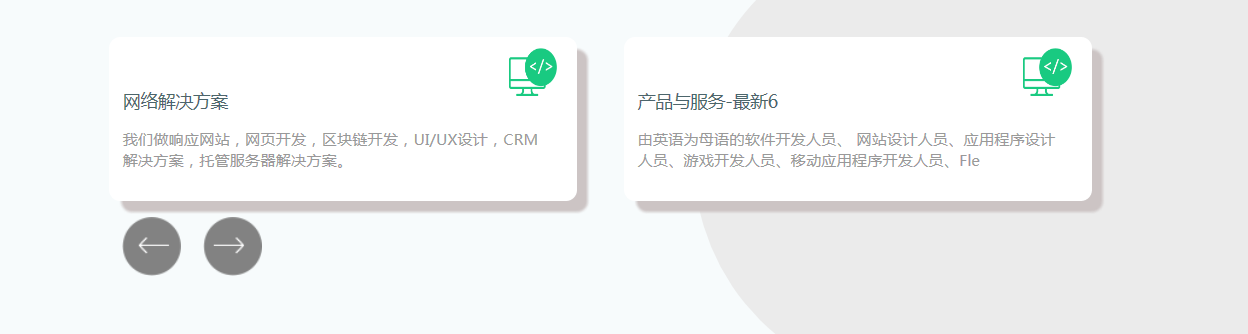
注意:在引用css2.0是有些样式之前写的4.0的,所以样式要改,要不然起冲突
写每个轮播之间的间距,要实现除了第一个之外,其他加上margin-left。那么在<div class="swiper-slide swiper-slides"> 里面,我这加的是swiper-slides
.swiper-slides:not(:first-child){
margin-left: 10px !important;
}
swiper插件在ie浏览器无反应,解决办法的更多相关文章
- swiper插件 纵向内容超出一屏解决办法
1.css .swiper-slide { overflow: auto; } 2.js var swiper = new Swiper('.swiper-container', { directio ...
- 关于小米4电信4g刷入第三方ROM无信号解决办法
from: http://www.yuwantb.com/xiaomi4-lineage-os.html 关于小米4电信4g刷入第三方ROM无信号解决办法 下载这个电信4g补丁包. 链接:http ...
- [vuejs] 终端npm run dev 不能自动打开浏览器运行项目解决办法
终端执行: npm run dev 出现: I Your application is running here: http://localhost:8080 但并没有打开浏览器运行项目 解决办法: ...
- 关于调用notifyDataSetChanged刷新PullToRefreshListView列表无反应解决办法
文章转载自:关于调用notifyDataSetChanged刷新PullToRefreshListView列表无反应解决办法 | TeachCourse
- 分享一个控制JS 浏览器缓存的解决办法。
JS 缓存的问题一直都是我们又爱又恨的东西.也是我们比较头痛的问题, 一方面为了提高网站响应速度,减少服务器的负担,和节省带宽,将需要将静态资源缓存在客户端, 但是另一方面,当js 文件有改动的时候 ...
- selenium webdriver启动IE浏览器失败的解决办法
通过selenium webdriver启动IE浏览器失败,报错:selenium.common.exceptions.WebDriverException: Message: Unexpected ...
- postman插件部分Header设置无效的解决办法
在使用chrome的postman插件模拟http请求的时候,碰到了设置的部分Headers无效的问题,比如说Referer设置后就无效,经过查询发现了问题原因,原因的具体说明参考postman官网的 ...
- MySQL删除数据库时无响应解决办法
删除远程主机上MySQL中的一个数据库时,远程主机一直在响应,无法正常删除. 这个问题的解决办法如下:在远程主机上登录MySQL,执行show full processlist;观察state和inf ...
- jQuery,Table表头固定插件chromatable存在的问题及解决办法
在最近的项目中需要将表格的表头固定,搜寻了大量的资料,发现chromatable插件还是比较方便的.但是当我在一个页面中多次使用 chromatable固定对个表格的表头时问题就出现了,首先说明系统的 ...
随机推荐
- ps:消除锯齿和羽化
我们使用椭圆选框工具,分别关闭和打开消除锯齿(也称抗锯齿),创建两个差不多大的正圆形选区,然后填充黑色看看.怎样快速填充黑色还记得吗?先[X]然后[ALT DELETE].填充之后取消选择[CTRL ...
- Windows电脑无法识别USB设备怎么办?
您可能已经注意到,如果您使用USB设备并将其插入计算机,Windows会识别并配置它.然后,如果你拔掉它并将其重新插入另一个USB端口,Windows就会出现一连串的健忘症,并认为这是一个完全不同的设 ...
- java8-Stream集合操作快速上手
java8-Stream集合操作快速上手 目录 Stream简介 为什么要使用Stream 实例数据源 Filter Map FlatMap Reduce Collect Optional 并发 ...
- @ControllerAdvice全局数据绑定
@ModelAttribute 注解标记该方法的返回数据是一个全局数据,默认情况下,这个全局数据的 key 就是返回的变量名,value 就是方法返回值,当然开发者可以通过 @ModelAtt ...
- ubuntu 18.04下Chromium设置为系统代理
前言 在ubuntu 18.04下挂上ss后firefox能直接上google了但是chromium上不去 会出现下面两种情况 # This site can't be reached xxxxxx ...
- 20180715-Java 数组
double[] myList //首选方法 double myList[] //效果相同,但不是首选方法 该实例完整地展示了如何创建.初始化和操纵数组: public class TestArray ...
- PHP实现多服务器SESSION共享
为什么要session共享? 现在稍微大一点的网站基本上都有好几个子域名,比如www.feiniu.com, search.feiniu.com, member.feiniu.com,这些网站如果需要 ...
- HDU 5179 beautiful number (数位dp / 暴力打表 / dfs)
beautiful number Time Limit: 2000/1000 MS (Java/Others) Memory Limit: 32768/32768 K (Java/Others) ...
- Only variables should be passed by reference
报错位置代码: $status->type = array_pop(explode('\\',$status->type)) (此处$status->type值原本是 APP\ ...
- 【CDN+】 CDN项目的两大核心--缓存与回源
前言 项目中碰到CDN专用名词: 回源, 然后不知道什么意思,反过来查询了一下CDN相关的一些基本术语,特做记录 CDN基础概念 CDN (Content Delivery Network,即内容分发 ...