
二、IDS4配置服务
它是根据定义配置服务Config.cs文件来生成客户端和API使用该服务所需的配置数据。
一、IDS4签名服务
1、为项目添加NuGet包。
2、IDS4服务制定的配置Config.cs。
using IdentityServer4.Models;

using System;

using System.Collections.Generic;

using System.Linq;

using System.Threading.Tasks;

namespace ids4

{

    //一、IDS4服务制定

    public class Config

    {

        //1、定义API资源

        public static IEnumerable<ApiResource> GetApis() //ApiResource是属于using IdentityServer4.Models;内的。

        {

            return new List<ApiResource>

            {

                new ApiResource("api1", "My API")

            };

        }

        //2、定义客户端

        public static IEnumerable<Client> GetClients()

        {

            return new List<Client>

            {

                new Client

                {

                    ClientId = "client",

                    // no interactive user, use the clientid/secret for authentication

                    AllowedGrantTypes = GrantTypes.ClientCredentials,

                    // secret for authentication

                    ClientSecrets =

                    {

                       new Secret("secret".Sha256())

                    },

                    // scopes that client has access to

                    AllowedScopes = { "api1" }

                }

            };

        }

    }

}
3、Startup.cs内添加IDS4服务。
using IdentityServer4.Models;

using Microsoft.AspNetCore.Builder;

using Microsoft.AspNetCore.Hosting;

using Microsoft.AspNetCore.Http;

using Microsoft.AspNetCore.Mvc;

using Microsoft.Extensions.Configuration;

using Microsoft.Extensions.DependencyInjection;

namespace ids4

{

    //二、添加IDS4服务

    public class Startup

    {

        public Startup(IConfiguration configuration)

        {

            Configuration = configuration;

        }

        public IConfiguration Configuration { get; }

        // This method gets called by the runtime. Use this method to add services to the container.

        public void ConfigureServices(IServiceCollection services)

        {

            services.Configure<CookiePolicyOptions>(options =>

            {

                // This lambda determines whether user consent for non-essential cookies is needed for a given request.

                options.CheckConsentNeeded = context => true;

                options.MinimumSameSitePolicy = SameSiteMode.None;

            });

            services.AddMvc().SetCompatibilityVersion(CompatibilityVersion.Version_2_1);

            //1、注入服务添&加在最底部

            var builder = services.AddIdentityServer()

            //.AddInMemoryIdentityResources(Config.GetIdentityResources())  //注入GetIdentityResources资源。

            .AddInMemoryApiResources(Config.GetApis()) //注入ApiResources资源对应定义的API资源。

            .AddInMemoryClients(Config.GetClients());  //注入定义的客户端

        }

        // This method gets called by the runtime. Use this method to configure the HTTP request pipeline.

        public void Configure(IApplicationBuilder app, IHostingEnvironment env)

        {

            app.UseIdentityServer();//2、添加服务&添加在顶部

            if (env.IsDevelopment())

            {

                app.UseDeveloperExceptionPage();

            }

            else

            {

                app.UseExceptionHandler("/Home/Error");

                app.UseHsts();

            }

            app.UseHttpsRedirection();

            app.UseStaticFiles();

            app.UseCookiePolicy();

            app.UseMvc(routes =>

            {

                routes.MapRoute(

                    name: "default",

                    template: "{controller=Home}/{action=Index}/{id?}");

            });

        }

    }

}
4、运行服务器并浏览浏览器 http://localhost:5000/.well-known/openid-configuration 您应该会看到所谓的发现文档。客户端和API将使用它来下载必要的配置数据。
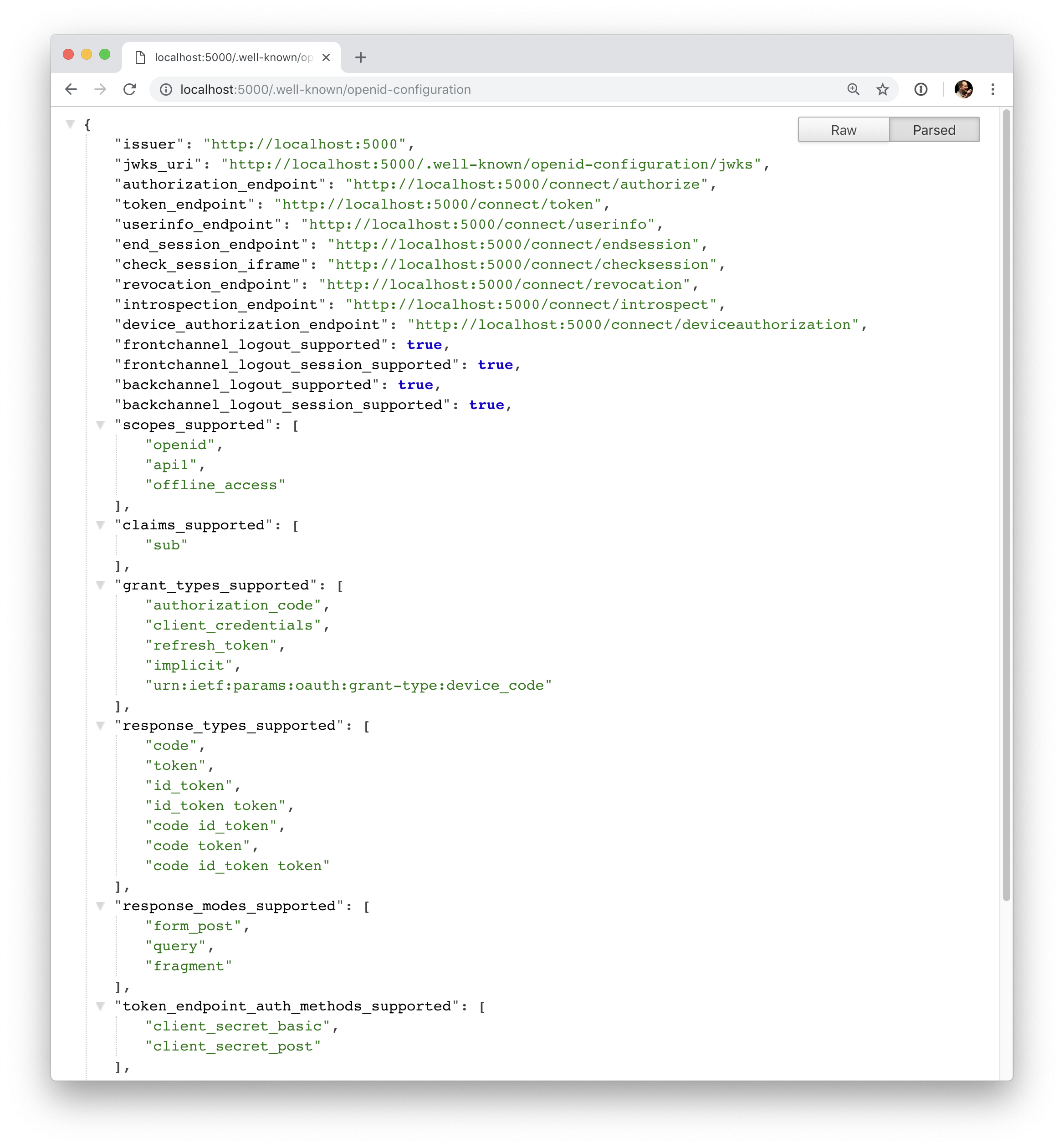
{

    "issuer": "http://localhost:5000",

    "authorization_endpoint": "http://localhost:5000/connect/authorize",

    "token_endpoint": "http://localhost:5000/connect/token",

    "userinfo_endpoint": "http://localhost:5000/connect/userinfo",

    "end_session_endpoint": "http://localhost:5000/connect/endsession",

    "check_session_iframe": "http://localhost:5000/connect/checksession",

    "revocation_endpoint": "http://localhost:5000/connect/revocation",

    "introspection_endpoint": "http://localhost:5000/connect/introspect",

    "device_authorization_endpoint": "http://localhost:5000/connect/deviceauthorization",

    "frontchannel_logout_supported": true,

    "frontchannel_logout_session_supported": true,

    "backchannel_logout_supported": true,

    "backchannel_logout_session_supported": true,

    "scopes_supported": ["api1", "offline_access"],

    "claims_supported": [],

    "grant_types_supported": ["authorization_code", "client_credentials", "refresh_token", "implicit", "urn:ietf:params:oauth:grant-type:device_code"],

    "response_types_supported": ["code", "token", "id_token", "id_token token", "code id_token", "code token", "code id_token token"],

    "response_modes_supported": ["form_post", "query", "fragment"],

    "token_endpoint_auth_methods_supported": ["client_secret_basic", "client_secret_post"],

    "subject_types_supported": ["public"],

    "id_token_signing_alg_values_supported": ["RS256"],

    "code_challenge_methods_supported": ["plain", "S256"]

}
二、IDS4配置服务的更多相关文章
- 【WCF全析(二)】--服务配置部署详解
上篇文章主要讨论了WCF的基本内容,其中包括WCF的术语.创建方法及WCF在开发过程中使用的意义,它不仅能够提供程序之间的通信,而且还能提供程序和数据间的通信,WCF提供了多样化的程序 ...
- 5、SAMBA服务二:配置实例
①:SAMBA服务一:参数详解 ②:SAMBA服务二:配置实例 5.2.3.Samba共享目录配置实例 1.允许匿名用户读取/it共享目录,修改/etc/samba/smb.conf,在最后添加以下内 ...
- 《深入理解Spring Cloud与微服务构建》学习笔记(二十)~配置中心Spring Cloud Config
本例重新创建项目,构建一个空的mavan工程. 一.Config Server 从本地读取配置文件 新建一个moudle config_server ,pom添加依赖 <dependency ...
- AgileEAS.NET SOA 中间件平台5.2版本下载、配置学习(二):配置WinClient分布式运行环境
一.前言 AgileEAS.NET SOA 中间件平台是一款基于基于敏捷并行开发思想和Microsoft .Net构件(组件)开发技术而构建的一个快速开发应用平台.用于帮助中小型软件企业建立一条适合市 ...
- 第四十二章 微服务CICD(4)- jenkins + gitlab + webhooks + publish-over-ssh(2)
上一节完成了"当git客户端push代码到gitlab后,jenkins会立即去gitlab拉取代码并构建". 目的:本节完成jenkins自动构建之后,自动的将jar包部署到应用 ...
- 【WCF--初入江湖】03 配置服务
03 配置服务 数据库 生成数据库脚本: CREATE DATABASE [EmployeeDb]; CREATE TABLE [dbo].[T_Employee]( [Id] [,) NOT NUL ...
- mysql 5.6.20的安装、配置服务、设置编码格式
一.安装 安装环境 系统:Window 32 版本:Mysql 5.6.20 1. 首先从官网上http://dev.mysql.com/downloads/mysql/ ...
- WCF技术剖析之二十三:服务实例(Service Instance)生命周期如何控制[下篇]
原文:WCF技术剖析之二十三:服务实例(Service Instance)生命周期如何控制[下篇] 在[第2篇]中,我们深入剖析了单调(PerCall)模式下WCF对服务实例生命周期的控制,现在我们来 ...
- NFS 配置服务
NFS 配置服务 北京市海淀区 张俊浩 一.NFS.即网络文件系统(Network File System,NFS).一种使用于分散式文件系统的协议,由升阳公司开发.于1984年向外发布.功能是通过 ...
随机推荐
- CF1090J Two Prefixes
神仙题++ 还是在某校梁大讲的题qaq 我们考虑容斥 也就是本质不同字串=全部-重复的 我们只需要求重复的即可 考虑相同的s=ab 我们用长度最长的a作为代表串 如果存在一个a'b'且|a'|> ...
- django 修改字段后,同步数据库,失败:django.db.utils.InternalError: (1054, "Unknown column 'api_config.project_id_id' in 'field list'")
问题原因是,修改字段后,同步失败了,然后执行查询的时候,就会提示这个错误,这个字段没有 最暴力的方法可以直接在数据库中修改字段,但是修改后,models没同步,可能会存在问题,因此开始我的百度之旅(这 ...
- Flink 实战:如何解决生产环境中的技术难题?
大数据作为未来技术的基石已成为国家基础性战略资源,挖掘数据无穷潜力,将算力推至极致是整个社会面临的挑战与难题. Apache Flink 作为业界公认为最好的流计算引擎,不仅仅局限于做流处理,而是一套 ...
- luogu P1449 后缀表达式 x
题目描述 所谓后缀表达式是指这样的一个表达式:式中不再引用括号,运算符号放在两个运算对象之后,所有计算按运算符号出现的顺序,严格地由左而右新进行(不用考虑运算符的优先级). 如:3*(5–2)+7对应 ...
- Python_007(深浅拷贝)
一.基础数据类型的补充 1.其他类型之间的相互转换 例如:str = int(str) str => int; int = list(int) int => list; tuple = ...
- javascript-object对象属性操作之Object.defineProperty
一.基本用法简介 声明一个简单的对象,如下 var obj = { name: 'ldld' } 我们可以用Object.defineProperty来声明这个对象 var obj = {} Obje ...
- Jquery append() 添加多次同个元素时,只有一次作用,如何解决?
这是一个简单的table <table id="mytable"> <!-- 这里将要动态加载tr数据 --> </table> 这是一个模版t ...
- Jenkins使用三:管理slave节点(配置SSH公钥和私钥)
添加slave 给节点起个名字 1.远程工作目录:/test/workspace--这个地址是测试机的 jenkins 的 workspace 工作目录,自己随便写个本机的路径2.用法--尽可能的使用 ...
- Python模块学习之xlrd、xlutils、openpyxl 读写/追加Excel文件
Python操作Excel的四个工具包 xlrd: 对Excel进行读相关操作,注意只能操作 .xls xlwt: 对Excel进行写相关操作,注意只能操作 .xls,且只能创建一个全新的Excel然 ...
- maven 依赖调解
项目A有两条依赖关系 A->B->C->X(1.0),A->D->X(2.0) ,X是A的传递性依赖,但是两条路径上有两个版本的依赖,会选择哪个呢? maven 依赖调 ...